
1. Introduction
Thank you for purchasing the SOFTSEA Twin Gaming Loft Bed with Desk & LED Light. This manual provides essential information for the safe assembly, operation, and maintenance of your new loft bed. Please read all instructions carefully before beginning assembly and retain this manual for future reference.
2. Safety Information
Your safety is paramount. Please adhere to the following guidelines:
- This product has a maximum weight capacity of 300 pounds. Do not exceed this limit.
- A mattress thickness of 6 inches is required for safe use of the loft bed.
- It is strongly recommended that two people assemble the bed together for safety and ease.
- Always use the provided guardrails on the upper bunk. Ensure they are properly installed and secured.
- Use the integrated ladder for access to the upper bunk. Do not use chairs or other furniture.
- Do not allow jumping or rough play on the bed.
- Periodically check all bolts and connections to ensure they remain tight and secure.
- Keep small parts away from children during assembly to prevent choking hazards.
3. Package Contents
Before assembly, verify that all components listed below are present and undamaged. The bed parts may arrive in multiple packages.
- Loft Bed Frame Components (Pine Wood and MDF)
- Integrated Desk with Shelves
- Storage Drawers
- LED Light Strip
- Charging Station (2 Standard Plug Outlets & 2 USB Ports)
- Bed Slats (14 PCS)
- Assembly Hardware (bolts, screws, connectors)
- Assembly Tools (All necessary tools are included)
4. Assembly Instructions
Full assembly is required for this loft bed. Please follow these general guidelines:
- Preparation: Clear a spacious area for assembly. Unpack all components and lay them out. Identify each part by comparing it with the provided parts list and diagrams (if available).
- Team Assembly: As recommended, two people should work together to ensure stability and safety during the assembly process.
- Hardware: All necessary tools and hardware are included. Ensure you use the correct hardware for each step as indicated in the assembly diagrams.
- Step-by-Step: Follow the step-by-step instructions provided in the separate assembly guide (not included in this document) carefully. Do not skip steps.
- Tightening: Hand-tighten all bolts initially. Once the entire structure is assembled, go back and securely tighten all connections with the provided tools. Do not overtighten.
- Stability Check: After assembly, gently shake the bed to ensure it is stable and all connections are secure. If any wobbling occurs, re-check all connections and tighten as necessary.

Figure 1: Front view of the assembled SOFTSEA Twin Gaming Loft Bed. This image shows the integrated desk, storage shelves, and the ladder leading to the bed platform.
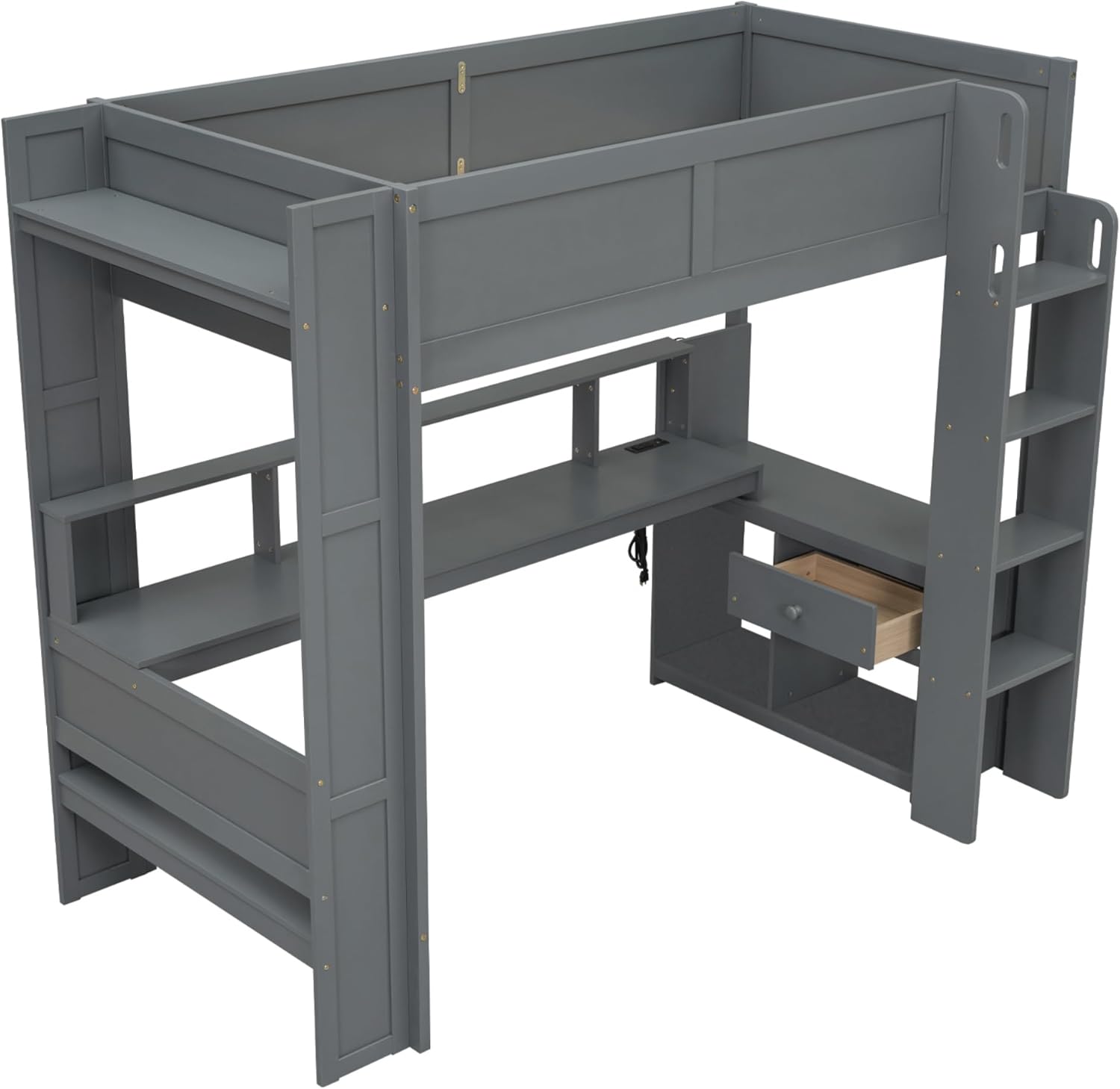
Figure 2: Angled view of the loft bed's desk area. The charging station with outlets and USB ports is visible, along with an open storage drawer.
5. Operating Instructions
5.1. LED Light Strip
The integrated LED light strip provides ambient lighting for your desk area.
- Power Connection: Ensure the LED light strip's power cable is securely plugged into a functional wall outlet or the integrated charging station.
- Operation: Use the inline switch on the LED light strip cable to turn the light on or off.
5.2. Charging Station
The desk includes a charging station with two standard plug outlets and two USB ports for convenient power access.
- Power Connection: Ensure the charging station's power cable is securely plugged into a functional wall outlet.
- Using Outlets: Plug your electronic devices directly into the standard plug outlets.
- Using USB Ports: Connect your USB-compatible devices (e.g., smartphones, tablets) to the USB ports for charging.
- Safety: Do not overload the charging station. Avoid plugging in high-power appliances.
6. Maintenance
Proper maintenance will extend the life of your loft bed.
- Cleaning: Wipe surfaces with a soft, dry cloth. For stubborn marks, a slightly damp cloth with mild soap can be used, followed by immediate drying. Avoid abrasive cleaners or harsh chemicals.
- Hardware Check: Periodically (e.g., every 3-6 months) inspect all bolts, screws, and connections. Tighten any loose hardware to maintain structural integrity and prevent wobbling.
- Environmental Conditions: Avoid exposing the bed to extreme temperature changes or high humidity, which can affect wood and MDF materials.
7. Troubleshooting
If you encounter any issues, refer to the following troubleshooting guide:
- Bed is Wobbly:
- Ensure all assembly bolts are fully tightened.
- Verify that all parts are correctly oriented according to the assembly diagrams.
- Check if the bed is on an even surface.
- LED Light Not Working:
- Check if the power cable is securely plugged into a functional wall outlet or the charging station.
- Ensure the inline switch on the LED cable is in the 'ON' position.
- Test the outlet with another device to confirm it has power.
- Charging Station Not Providing Power:
- Confirm the charging station's power cable is securely plugged into a functional wall outlet.
- Test the outlets and USB ports with different devices to isolate the issue.
- Avoid overloading the station with too many high-power devices.
- Missing or Damaged Parts:
- Carefully re-check all packaging. If parts are genuinely missing or damaged, contact SOFTSEA customer support.
8. Specifications
| Model Number | x0373 |
| Overall Dimensions (L x W x H) | 83.1'' x 48'' x 70.9'' |
| Bed Inner Space (L x W) | 76'' x 39'' |
| Recommended Mattress Thickness | 6 inches |
| Bed Weight Capacity | 300 LBS |
| Material | Pine Wood + MDF |
| Color | Dark Grey |
| Number of Bed Slats | 14 PCS |
| Special Features | Integrated Desk, LED Light, Charging Station (2 Standard Plug Outlets & 2 USB Ports), Multi-Storage Shelves, Drawers |

Figure 3: Detailed dimension diagram of the SOFTSEA Twin Gaming Loft Bed. All measurements are in inches.
9. Warranty Information
This SOFTSEA product is covered by a One Year Warranty against manufacturing defects from the date of purchase. This warranty covers defects in materials and workmanship under normal use. It does not cover damage resulting from improper assembly, misuse, abuse, accidents, or normal wear and tear.
10. Customer Support
If you have any questions, require assistance with assembly, or need to report missing/damaged parts, please contact SOFTSEA customer support. Refer to your purchase documentation for specific contact details or visit the official SOFTSEA website.