
1. Introduction
This manual provides comprehensive instructions for the assembly, operation, and maintenance of your Sensyne 88-inch Phone Tripod and Selfie Stick. Designed for versatility, this device supports various photography and videography needs, including overhead shots, live streaming, and group photos. Please read this manual thoroughly before use to ensure proper functionality and safety.
2. Package Contents
Verify that all items listed below are included in your package:
- Tripod Base with Extendable Pole
- Flexible Gooseneck Attachment
- Phone Holder (up to 5.7 inches wide)
- Wireless Remote Control
- GoPro Adapter
- Portable Storage Bag

Image 2.1: All components included in the Sensyne 88-inch Phone Tripod package.
3. Product Overview
The Sensyne 88-inch Phone Tripod is a versatile tool for capturing photos and videos. It features a stable tripod base, an extendable central pole, a flexible gooseneck for unique angles, and a universal phone holder. A wireless remote control is included for convenient operation.

Image 3.1: The Sensyne 88-inch Phone Tripod in both standard and gooseneck configurations.
4. Setup Instructions
4.1 Unfolding the Tripod
- Place the tripod on a flat, stable surface.
- Gently spread the three legs outwards until they are fully extended and locked into position, forming a stable base.
4.2 Adjusting Height
- Loosen the locking clips on the central pole sections.
- Extend the pole to your desired height. The tripod can extend up to 88 inches.
- Securely fasten all locking clips to ensure stability.
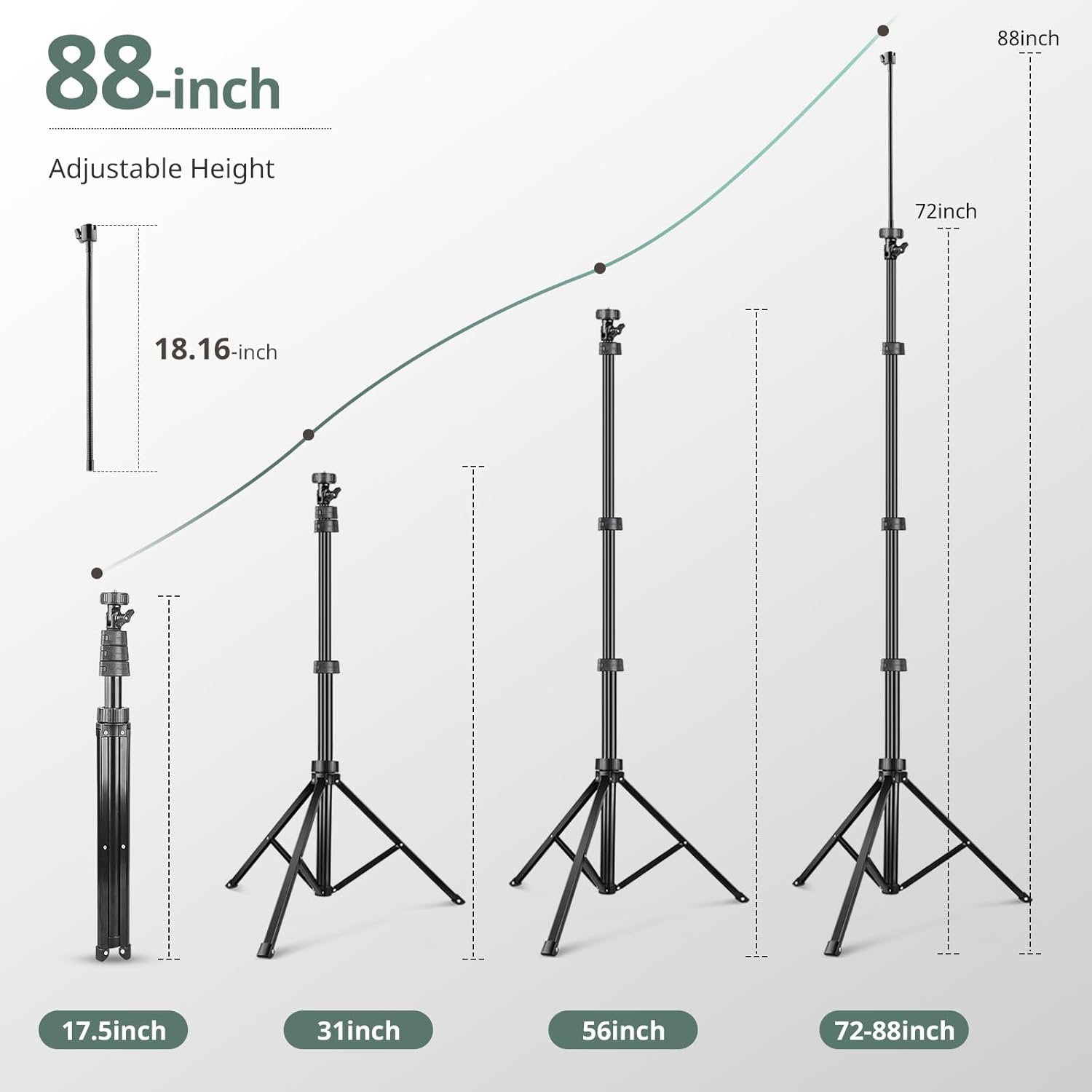
Image 4.1: Diagram illustrating the adjustable height of the tripod from 17.5 inches to 88 inches.
4.3 Attaching the Phone Holder or Camera
- Locate the 1/4-inch screw mount at the top of the tripod pole.
- Screw the phone holder onto the 1/4-inch mount until it is secure. For cameras or action cameras (with adapter), attach them directly to this mount.
- Open the phone holder clamps and carefully insert your smartphone. Ensure it is held firmly.
4.4 Attaching the Flexible Gooseneck
- The gooseneck attaches to a separate 1/4-inch screw mount, often located on the side or an auxiliary port of the tripod.
- Screw the gooseneck onto the designated mount.
- Attach a second phone holder to the end of the gooseneck for dual phone setups or unique angles.
4.5 Pairing the Wireless Remote Control
- Ensure the remote control has a working battery (1 Lithium Metal battery included).
- Turn on the remote control (if it has a power switch).
- On your smartphone, go to Settings > Bluetooth.
- Enable Bluetooth and search for available devices.
- Select "AB Shutter3" or a similar name from the list to pair.
- Once paired, the remote can be used to trigger your phone's camera shutter from up to 30 feet (10 meters) away.

Image 4.2: Instructions for pairing the wireless remote shutter via Bluetooth.
5. Operating Instructions
5.1 Using the Flexible Gooseneck
The 14.95-inch flexible gooseneck allows for precise positioning of your device. Gently bend and twist the gooseneck to achieve desired angles for overhead shots, macro photography, or unique perspectives. Ensure the gooseneck is securely attached and the device is balanced before use.
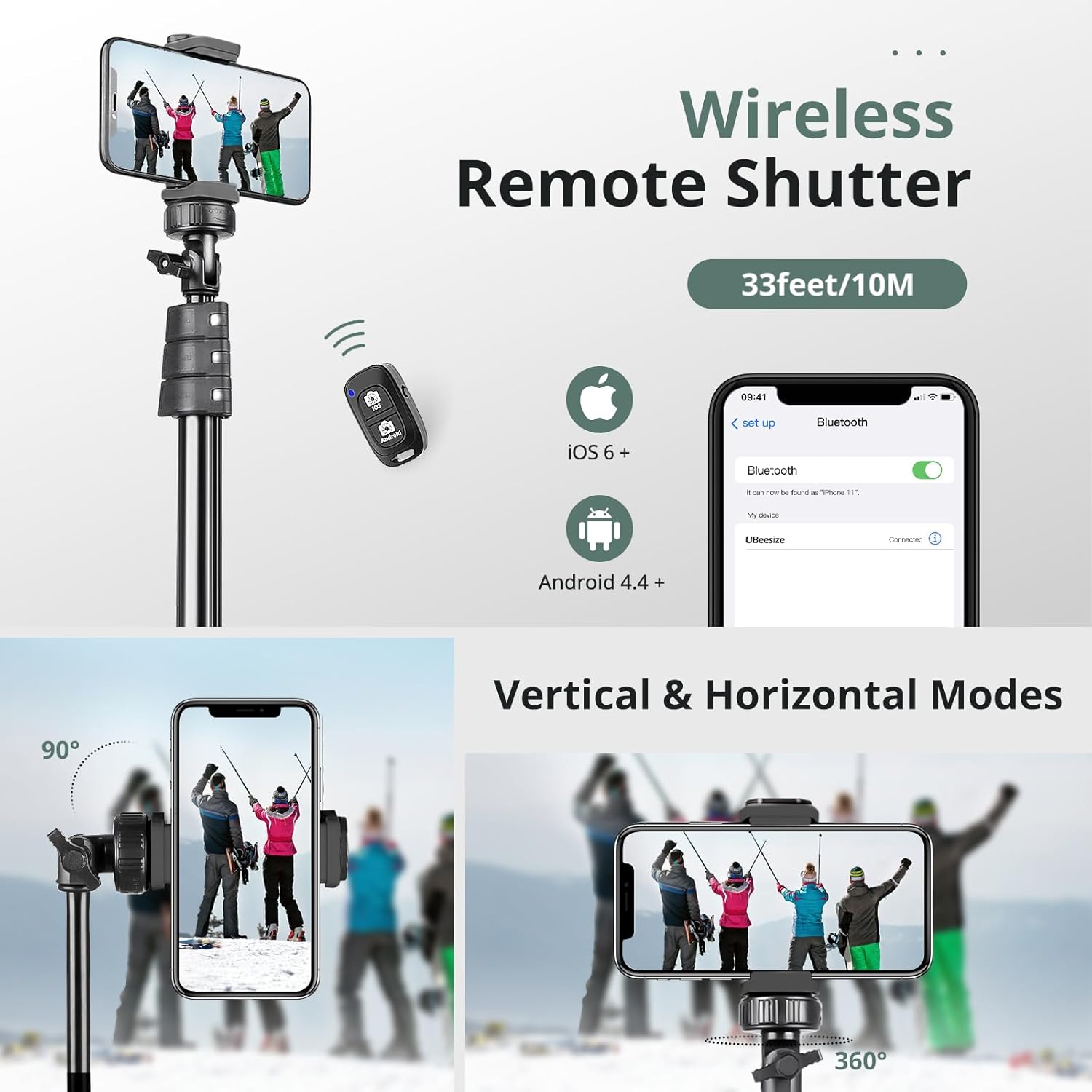
Image 5.1: Demonstrates the flexibility of the gooseneck for various camera angles.
5.2 Switching Between Vertical and Horizontal Modes
The phone holder features a rotating ball head that allows for quick transitions between vertical (portrait) and horizontal (landscape) orientations. Loosen the knob on the ball head, adjust your device to the desired orientation (90° vertical or 360° panoramic), and then tighten the knob to secure it.
5.3 Using the Wireless Remote Shutter
After pairing the remote control (refer to Section 4.5), open your phone's camera application. Press the appropriate button on the remote (iOS or Android) to remotely trigger the camera shutter for photos or start/stop video recording.

Image 5.2: Examples of tripod usage, including macro photography, video recording, selfie stick mode, and outdoor essential.
6. Compatibility
The Sensyne 88-inch Phone Tripod is designed for broad compatibility:
- Smartphones: Compatible with iPhones (15, 14, 13, 12 Series, SE, 11, X, XS Max, XR, 8 Plus, 8, 7, 7 Plus, 6S, 6), Samsung Galaxy (S22, S21 Series, Z Flip, Note), Google Pixel Series, One Plus Series, and other Android phones up to 5.7 inches wide.
- Cameras: Features a universal 1/4-inch screw mount for digital cameras, action cameras (with adapter), webcams, and camcorders.

Image 6.1: Illustrates compatibility with various devices including cameras, cell phones, and GoPro.
7. Maintenance
To ensure the longevity and optimal performance of your Sensyne tripod, follow these maintenance guidelines:
- Cleaning: Wipe the tripod with a soft, dry cloth after each use. For stubborn dirt, use a slightly damp cloth and mild soap, then dry thoroughly. Avoid harsh chemicals or abrasive materials.
- Storage: Store the tripod in its portable bag in a cool, dry place away from direct sunlight and extreme temperatures. Ensure all clips are fastened and the legs are folded for compact storage.
- Inspection: Periodically check all screws, clips, and joints for tightness. Tighten any loose components to maintain stability.
8. Troubleshooting
If you encounter issues with your Sensyne tripod, refer to the following common problems and solutions:
- Remote Control Not Pairing:
- Ensure the remote has a fresh battery.
- Verify Bluetooth is enabled on your phone and the remote is discoverable.
- Try unpairing and re-pairing the remote in your phone's Bluetooth settings.
- Tripod Instability:
- Ensure all leg sections are fully extended and their locking clips are securely fastened.
- Confirm the tripod is placed on a flat, level surface.
- Avoid extending the tripod to its maximum height in windy conditions or with heavy devices.
- Phone Not Holding Securely:
- Ensure your phone's width is within the holder's specified range (up to 5.7 inches).
- Make sure the phone is centered and the clamps are fully engaged.
9. Specifications
| Feature | Specification |
|---|---|
| Brand | SENSYNE |
| Model Number | AB Shutter3 |
| Material | Aluminum |
| Maximum Height | 88 Inches |
| Item Weight | 1.87 pounds (0.85 Kilograms) |
| Weight Limit | 6.6 Pounds |
| Gooseneck Length | 14.95 Inches |
| Phone Holder Width | Up to 5.7 Inches |
| Remote Control Range | 30 feet (10 meters) |
| Battery (Remote) | 1 Lithium Metal battery (included) |
| Tripod Head Type | Ball Heads |
10. Warranty and Support
Sensyne offers a 12-month replacement service for this product. If you encounter any concerns or require assistance, please contact our dedicated support team. We are committed to standing behind our product and ensuring your satisfaction.
For support, please refer to the contact information provided with your purchase or visit the official Sensyne website.