
1. Introduction
The YOURRYONG HLK-V20 is an intelligent speech recognition control module designed to enable voice-activated control for various electronic devices. This module integrates speech recognition capabilities with a high-power switch relay, making it suitable for applications such as voice-controlled LED lighting or other automated systems. This manual provides essential information for the proper setup, operation, and maintenance of your HLK-V20 module.
2. Product Overview
The HLK-V20 module combines a speech recognition chip, a relay for switching high-power loads, and interfaces for a speaker and microphone. Its compact design allows for integration into various projects requiring voice control functionality.

Figure 2.1: Top view of the HLK-V20 module, illustrating the main components including the speech recognition chip, the blue relay, and the connected speaker. This perspective highlights the primary functional elements.
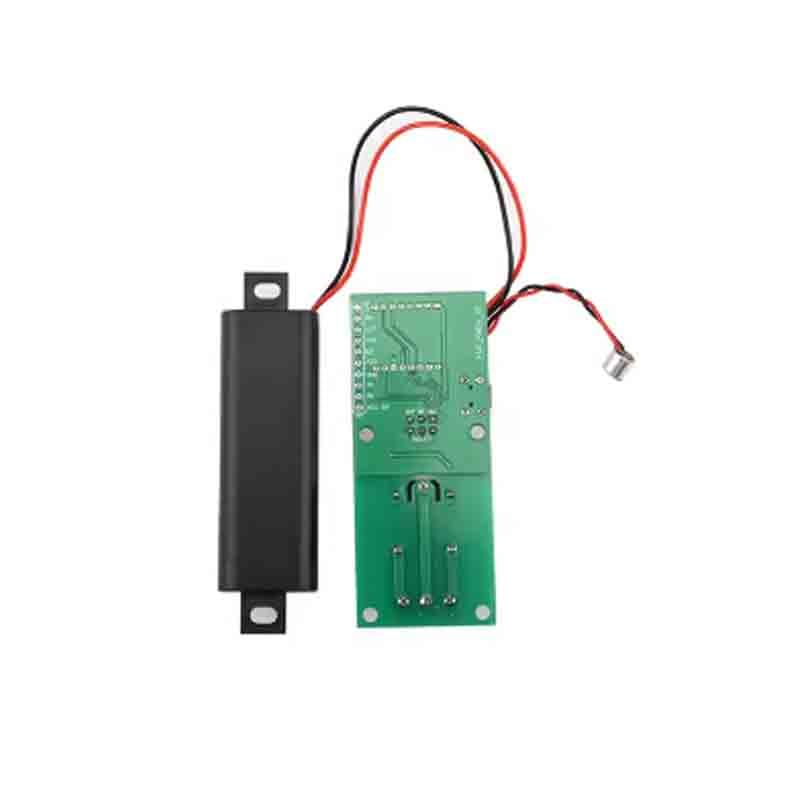
Figure 2.2: Bottom view of the HLK-V20 module, revealing the printed circuit board (PCB) traces and the designated connection point for the microphone. This view is useful for understanding the module's internal layout.

Figure 2.3: Angled perspective of the HLK-V20 module, providing a comprehensive view of the speaker, relay, and the various connection terminals. This image helps in identifying connection points for integration.
3. Setup
Follow these steps to set up your HLK-V20 module:
- Power Connection: Connect an appropriate DC power supply to the module's power input terminals. Ensure the voltage and current ratings of your power supply match the module's requirements (refer to specifications). Observe correct polarity.
- Speaker Connection: Connect the provided speaker to the designated speaker output terminals on the module. Ensure a secure connection.
- Microphone Connection: Connect the microphone to its dedicated input port. A secure connection is crucial for accurate voice recognition.
- Load Connection (Relay): Connect the device you wish to control (e.g., LED light, high-power switch) to the relay terminals. The relay typically has Common (COM), Normally Open (NO), and Normally Closed (NC) contacts. Connect your load according to your application's requirements. Ensure the load's voltage and current do not exceed the relay's maximum ratings.
- Initial Power-Up: Once all connections are secure, apply power to the module. Observe any indicator LEDs for signs of proper initialization.
4. Operating Instructions
The HLK-V20 module operates by recognizing pre-programmed voice commands to control its integrated relay.
- Voice Command Recognition: The module is pre-configured with a set of specific voice commands. These commands trigger the relay to switch the connected device on or off. Refer to the module's specific firmware documentation for the exact list of commands.
- Issuing Commands: Speak clearly and distinctly towards the microphone. Ensure there is minimal background noise for optimal recognition accuracy.
- Relay Activation: Upon successful recognition of a valid voice command, the module will activate or deactivate the integrated relay, thereby controlling the connected electrical device.
- LED Control Example: If an LED light is connected to the relay, a command such as "Turn on light" (example command) would switch the LED on, and "Turn off light" would switch it off.
5. Maintenance
Proper maintenance ensures the longevity and reliable operation of your HLK-V20 module.
- Cleaning: Keep the module free from dust, dirt, and moisture. Use a soft, dry cloth for cleaning. Avoid using liquid cleaners or solvents.
- Environmental Conditions: Operate the module in a dry, well-ventilated environment. Avoid exposure to extreme temperatures, high humidity, and strong electromagnetic interference, which can affect performance.
- Connection Checks: Periodically inspect all wire connections to ensure they remain secure and free from corrosion. Loose connections can lead to intermittent operation or damage.
6. Troubleshooting
If you encounter issues with your HLK-V20 module, refer to the following troubleshooting guide:
- Module Not Powering On:
- Verify that the power supply is correctly connected and providing the specified voltage.
- Check for any loose wires or damaged connections at the power input.
- Not Responding to Voice Commands:
- Ensure the microphone is securely connected and not obstructed.
- Speak clearly and at an appropriate distance from the microphone.
- Minimize background noise in the operating environment.
- Confirm that you are using the correct pre-programmed voice commands.
- Connected Device Not Activating/Deactivating:
- Check the wiring between the relay terminals and the connected device.
- Ensure the connected device is functional independently of the module.
- Verify that the module is successfully recognizing voice commands (e.g., by observing any indicator LEDs).
- Confirm the load's power requirements do not exceed the relay's maximum ratings.
7. Specifications
| Feature | Specification |
|---|---|
| Brand | YOURRYONG |
| Model | HLK-V20 |
| Part Number | 764921328581 |
| UPC | 764921328581 |
| Operation Mode | Automatic |
| Date First Available | March 14, 2024 |
8. Warranty and Support
For warranty information or technical support regarding your YOURRYONG HLK-V20 module, please refer to the purchase documentation or contact the retailer/manufacturer directly. Keep your proof of purchase for any warranty claims.