
Introduction
The Coast XP14R is a high-powered, rechargeable LED flashlight designed for versatile performance. Featuring COAST PURE BEAM® technology, it allows seamless transition between Ultra View Flood Beam and BULLS-EYE™ Spot Beam. With five distinct light modes and a durable aluminum construction, the XP14R is suitable for various applications, from outdoor adventures to professional use. This manual provides essential information for the proper use and care of your flashlight.

Image: The Coast XP14R flashlight, showcasing its robust design and powerful beam.
Setup
Battery Installation and Initial Charge
The XP14R flashlight uses ZITHION-X™ rechargeable batteries. The battery is typically pre-installed. Before first use, fully charge the flashlight.
- Locate the USB-C charging port on the flashlight.
- Connect the included USB-C cable to the flashlight and a compatible USB power source (e.g., wall adapter, computer USB port).
- The color-coded battery life indicator, located within the power switch, will illuminate to show charging status.
- A green light indicates a full charge.

Image: The XP14R flashlight with its included ZITHION-X battery and USB-C charging cable.

Image: Diagram illustrating the rechargeable battery and USB-C charging port with indicator lights.
Battery Life Indicator
The power switch features an integrated battery life indicator:
- Green: Battery charged.
- Red: Battery low.
- Flashing Red: Battery depleted.

Image: Close-up of the flashlight's power switch showing the battery life indicator in different states (charged, low, depleted).
Operating Instructions
Power On/Off and Mode Selection
The XP14R features a Quick-Cycle™ Power Switch for easy operation.
- Press the power switch once to turn the flashlight on.
- Press the power switch repeatedly to cycle through the five light modes: Medium, High, Low, MoonGlow™, and Turbo.
- To turn off the flashlight, press the power switch after cycling through all modes, or hold the switch down for approximately 2 seconds.
Caution: Repeated back-to-back use of Turbo mode may cause overheating and potential damage to the flashlight. Allow the flashlight to cool between extended Turbo mode uses.
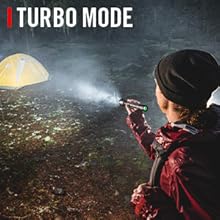
Image: Close-up of the flashlight's Quick-Cycle Power Switch, used to switch between light modes.

Image: Diagram illustrating the five light modes: Medium, High, Low, MoonGlow, and Turbo, with their respective lumen outputs.
Slide Focus® and Pure Beam® Focusing Optic
The XP14R features SLIDE FOCUS™ technology, allowing you to adjust the beam from a wide flood to a focused spot with one hand.
- To adjust the beam, slide the flashlight head forward or backward.
- Sliding the head forward creates a focused BULLS-EYE™ Spot Beam.
- Sliding the head backward creates a broad Ultra View Flood Beam.

Image: Illustration of the PURE BEAM focusing system, showing the transition between flood and spot beams.

Image: Diagram showing the Slide Focus mechanism on the flashlight head, indicating movement for beam adjustment.
Beam Lock® Feature
The BEAM LOCK® feature allows you to secure your desired beam position.
- Once you have set your preferred beam (flood, spot, or in-between), twist the bezel of the flashlight head until it stops.
- This action locks the focus position, preventing accidental changes.
- To unlock, twist the bezel in the opposite direction.

Image: Diagram illustrating the Beam Lock feature, showing how to twist the bezel to lock or unlock the beam focus.
Power Bank Functionality
The XP14R can also serve as a power bank to charge other devices.
- Locate the USB-A power-out port on the flashlight.
- Connect your device's charging cable to this port.
- The flashlight will begin charging your device.
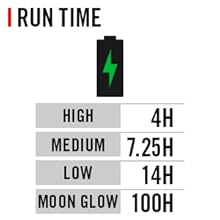
Image: The XP14R flashlight charging a smartphone via its USB-A power-out port, demonstrating its power bank capability.
Maintenance
Cleaning and Care
- Wipe the flashlight body with a soft, damp cloth to remove dirt and debris.
- Avoid using harsh chemicals or abrasive cleaners, as these can damage the finish.
- Keep the lens clean for optimal light output. Use a lens cleaning cloth if necessary.
Water and Dust Resistance
The XP14R is rated IP54 for dust and water resistance. This means it is protected against dust ingress sufficient to prevent the product from operating normally and against splashing water from any direction.
- Do not submerge the flashlight in water.
- Ensure the charging port cover is securely closed when not in use to maintain water resistance.

Image: Illustration highlighting the flashlight's IP54 storm and dust-proof rating, showing it in a rainy environment.
Battery Storage
- For long-term storage, charge the battery to approximately 50% and store the flashlight in a cool, dry place.
- Recharge the battery every 3-6 months to maintain its health.
Troubleshooting
| Problem | Possible Cause | Solution |
|---|---|---|
| Flashlight does not turn on. | Battery is depleted or not properly installed. | Charge the battery. Ensure the battery is correctly inserted and the tail cap is fully tightened. |
| Light is dim or flickers. | Low battery or dirty contacts. | Recharge the battery. Clean battery contacts with a clean cloth. |
| Beam focus is not smooth. | Dirt or debris in the slide mechanism. | Gently clean the sliding parts of the flashlight head. Avoid lubricants. |
| Flashlight overheats in Turbo mode. | Extended use in Turbo mode. | This is normal. Reduce to a lower light mode or turn off the flashlight to allow it to cool down. |
| Device not charging via power bank. | Flashlight battery low or incorrect cable. | Ensure the flashlight has sufficient charge. Verify the charging cable is functional and correctly connected. |
Specifications
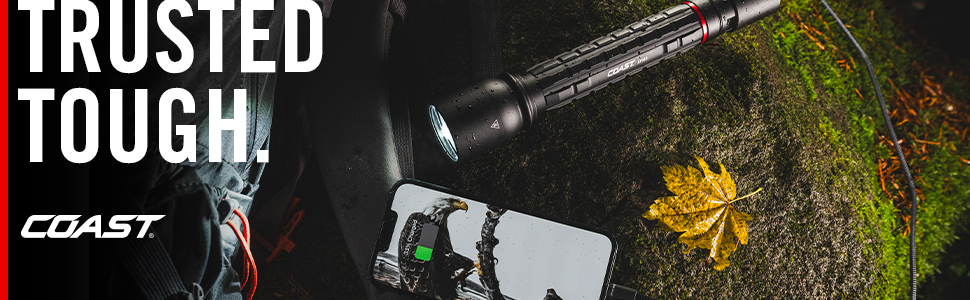
Image: Banner displaying key specifications of the XP14R flashlight, including lumens, beam distance, and run time.
| Feature | Detail |
|---|---|
| Model Number | 31033 (XP14R) |
| Light Output (Max) | 4500 lumens (Turbo) |
| Beam Distance (Max) | 420 meters (Turbo) |
| Runtime (Max) | 100 hours (MoonGlow) |
| Light Modes | Medium, High, Low, Turbo, MoonGlow™ |
| Focusing Optic | PURE BEAM® with SLIDE FOCUS™ |
| Battery Type | ZITHION-X™ Lithium-Ion (Rechargeable) |
| Charging | USB-C |
| Power Bank | USB-A Power-Out Port |
| Material | Aluminum |
| Water Resistance | IP54 (Dust and Water Resistant) |
| Dimensions (L x W x H) | 1.9"L x 1.9"W x 9.1"H |
| Weight | 16 ounces |
Warranty and Support
Lifetime Warranty
The Coast XP14R flashlight is backed by COAST’s commitment to quality and a Lifetime Warranty program. This warranty covers defects in materials and workmanship for the lifetime of the original owner. Please retain your proof of purchase.
What is Covered
- Manufacturing defects in materials and workmanship.
What is Not Covered
- Normal wear and tear.
- Damage resulting from misuse, neglect, or unauthorized modification.
- Batteries (including the ZITHION-X™ rechargeable battery) are typically not covered under the lifetime warranty, but may have a separate limited warranty. Refer to specific battery documentation for details.
Customer Support
For warranty claims, technical assistance, or further inquiries, please visit the official Coast website or contact their customer service department. Contact information can typically be found on the product packaging or the manufacturer's website.
