
Introduction
Thank you for choosing the CUORY Ergonomic Gaming Chair. This manual provides essential information for the safe assembly, proper operation, and effective maintenance of your new chair. Please read these instructions thoroughly before assembly and use to ensure optimal performance and longevity of the product.
Safety Information
- Weight Limit: Ensure the chair is stable and do not exceed the maximum weight capacity. The specific weight limit is not provided, but general ergonomic chair limits are typically around 250-300 lbs (113-136 kg).
- Assembly: Follow all assembly instructions carefully. Do not use power tools for assembly unless explicitly stated, as this may damage components.
- Stability: Always ensure all bolts and screws are securely tightened before using the chair. Periodically check and re-tighten fasteners.
- Movement: Avoid standing on the chair or using it as a step stool. Do not lean excessively to one side while seated, especially when reclining, to prevent tipping.
- Children: Keep small children and pets away from the assembly area. Small parts can be a choking hazard.
- Environment: Use the chair on a flat, stable surface. Avoid exposure to direct sunlight or extreme temperatures to prevent material degradation.
Package Contents
Before beginning assembly, verify that all components are present and undamaged. If any parts are missing or damaged, please contact customer support.
- Backrest
- Seat Cushion with Armrests and Footrest mechanism
- Star Base
- Casters (5 pieces)
- Gas Lift Cylinder
- Gas Lift Cover
- Mechanism Plate
- Lumbar Support Pillow (with massage function)
- Headrest Pillow
- Hardware Pack (screws, washers, Allen wrench)
- Instruction Manual

Image: All components of the CUORY Gaming Chair laid out for assembly. This includes the backrest, seat, base, wheels, and various hardware pieces.
Setup and Assembly
Assembly is required for this chair. Please follow the included instructions carefully. A general overview of the assembly process is provided below:
- Attach Casters to Base: Insert the five casters into the holes at the end of each leg of the star base. Push firmly until they click into place.
- Install Gas Lift: Place the gas lift cylinder into the center hole of the star base. Cover it with the gas lift cover.
- Attach Mechanism Plate to Seat: Align the mechanism plate with the pre-drilled holes on the underside of the seat cushion. Secure it with the provided screws and Allen wrench. Ensure the front of the mechanism faces the front of the seat.
- Connect Seat to Gas Lift: Carefully place the assembled seat onto the gas lift cylinder, ensuring the tapered end of the gas lift fits securely into the mechanism plate.
- Attach Backrest to Seat: Align the backrest with the mounting brackets on the seat cushion. Secure it using the provided screws.
- Install Pillows: Attach the headrest pillow and lumbar support pillow to the backrest using their integrated straps. The lumbar pillow may have a USB cable for its massage function.
- Final Check: Ensure all screws are tightened and the chair is stable before use.
Operating Instructions
Your CUORY Gaming Chair offers several adjustable features for personalized comfort:
- Height Adjustment: To adjust the chair's height, pull the lever located on the right side of the seat upwards. While seated, lift your weight to raise the chair; to lower it, remain seated and pull the lever. Release the lever at the desired height.
- Reclining Function: The chair features a reclining backrest with two positions. Pull the lever on the left side of the seat upwards to unlock the recline. Lean back to your desired angle and release the lever to lock it in place. To return to an upright position, lean forward slightly and pull the lever again.
- Reclining Tension Adjustment: A knob located underneath the seat allows you to adjust the tension required to recline the chair. Turn clockwise to increase tension (making it harder to recline) or counter-clockwise to decrease tension (making it easier to recline).
- Retractable Footrest: To use the footrest, pull it out from underneath the seat. Extend it to your desired length. To retract, push it back under the seat until it is fully hidden.
- Lumbar Massage Function: The lumbar support pillow includes a massage function. Connect the USB cable from the pillow to a compatible USB power source (e.g., computer, power bank, USB wall adapter). The massage function will activate.
- 360-Degree Swivel: The chair base allows for full 360-degree rotation.
- Flip-Up Armrests: The armrests can be flipped up to allow for closer access to a desk or for easier storage.

Image: Side view of the chair demonstrating the reclining mechanism and the levers for height and recline adjustment.
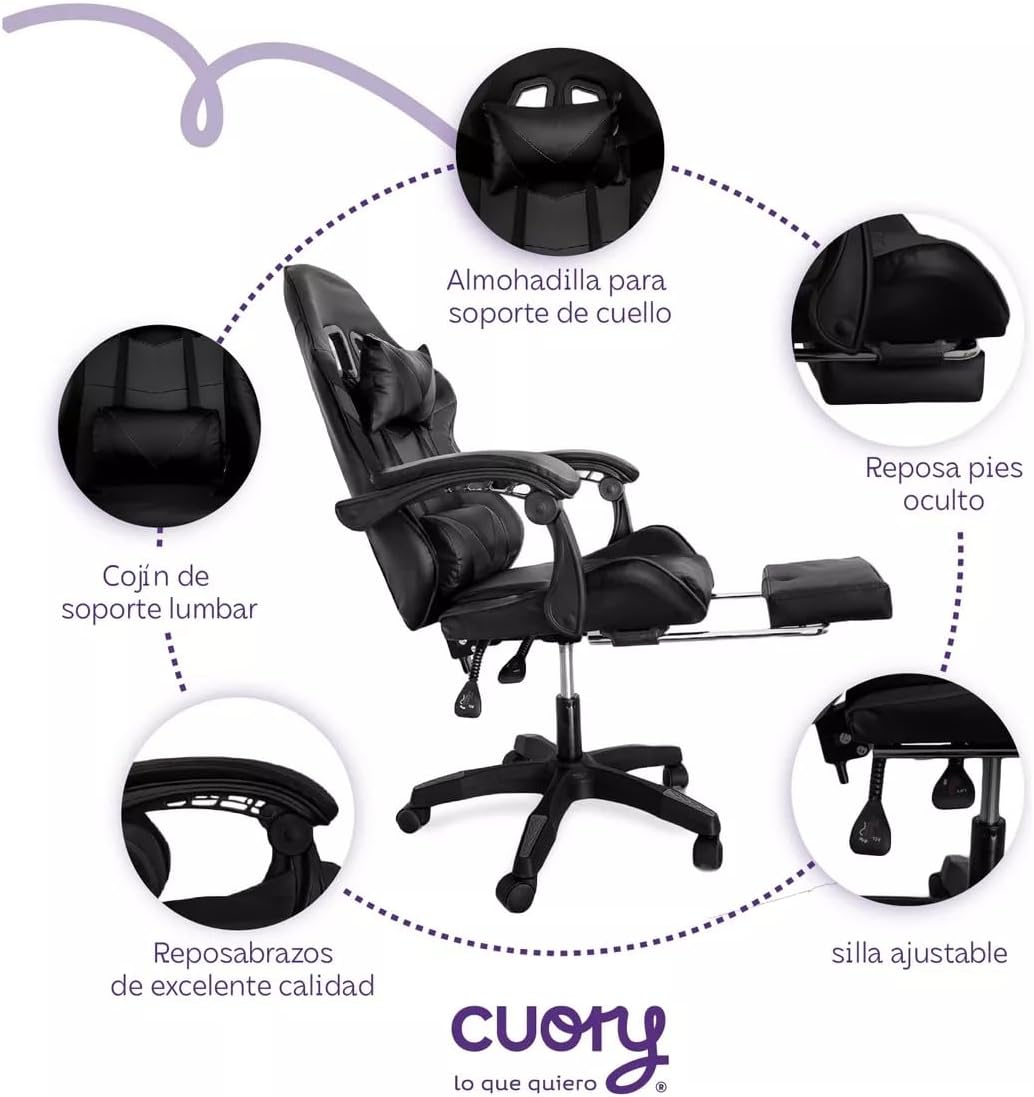
Image: Detailed view highlighting the neck support pillow, hidden footrest, lumbar support cushion, quality armrests, and adjustable chair controls.
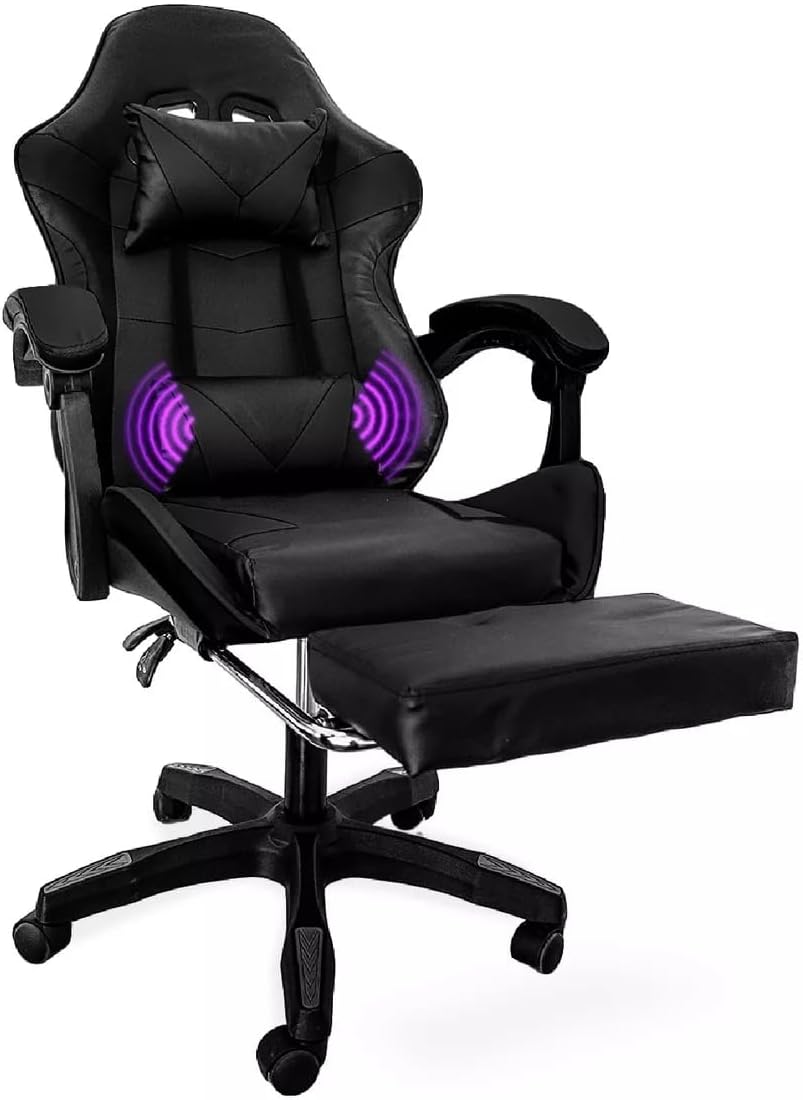
Image: The gaming chair with its footrest fully extended and visual representation of the lumbar massage function active.
Maintenance
- Cleaning: Wipe the chair surfaces with a soft, damp cloth. For synthetic leather, use a mild soap solution if necessary, then wipe with a clean, damp cloth and dry thoroughly. Avoid harsh chemicals or abrasive cleaners.
- Fasteners: Periodically check all screws and bolts to ensure they are tight. Re-tighten as needed to maintain stability and safety.
- Casters: Clean any hair or debris from the casters regularly to ensure smooth movement.
- Gas Lift: Do not attempt to disassemble or repair the gas lift cylinder. If it malfunctions, contact customer support for replacement.
Troubleshooting
| Problem | Possible Cause | Solution |
|---|---|---|
| Chair wobbles or feels unstable. | Loose screws or uneven floor. | Check and tighten all assembly screws. Ensure the chair is on a flat surface. |
| Chair does not adjust height. | Gas lift malfunction or lever not engaged. | Ensure the height adjustment lever is fully pulled. If the issue persists, the gas lift may need replacement. Contact support. |
| Backrest does not recline or lock. | Recline mechanism locked or damaged. | Ensure the recline lever is pulled to unlock. Check if the tension knob is too tight. If damaged, contact support. |
| Casters do not roll smoothly. | Debris caught in casters. | Remove any hair, dust, or debris from the caster wheels. |
| Lumbar massage function not working. | USB power issue or cable disconnected. | Ensure the USB cable is securely connected to a working power source. Try a different USB port or adapter. Note: The USB cable for the massage function may be short, requiring an extension or nearby power source. |
Specifications
| Feature | Detail |
|---|---|
| Brand | CUORY |
| Model Name | Silla Gamer (Gaming Chair) |
| Model Number | CUO2-MN-VAR |
| Color | Black |
| Material | Synthetic Leather (Seat, Backrest), Metal (Frame) |
| Product Dimensions (D x W x H) | 48 cm x 48 cm x 100 cm (18.9 x 18.9 x 39.4 inches) |
| Item Weight | 15 Kilograms (33 lbs) |
| Seat Depth | 35 cm (13.8 inches) |
| Chair Back Width | 34 cm (13.4 inches) |
| Features | Retractable Footrest, Height Adjustment, Reclining Backrest (2 positions), 360-Degree Swivel, Flip-up Armrests, Lumbar Support Pillow with Massage, Headrest Pillow |
| Recommended Uses | Gaming, Office |
| Assembly Required | Yes (Instructions included) |
| Care Instructions | Wipe with a cloth |

Image: Diagram illustrating the key dimensions of the CUORY Gaming Chair, including height, width, and depth measurements for various components.
Warranty and Support
CUORY products are designed for quality and durability. While specific warranty details are not provided in this manual, please refer to your purchase documentation or the seller's policy for warranty information.
For technical support, missing parts, or warranty claims, please contact CUORY customer service through the retailer where you purchased the product or visit the official CUORY store page:
Extended protection plans may be available for purchase separately. Please check with your retailer for details.
Official Product Videos
No official product videos from the seller were found to embed in this manual. Please check the product page on the retailer's website for any available video content.