
Introduction
Thank you for purchasing the WIITHINK WCD-9949 Portable CD Player Boombox. This device offers versatile audio playback options including CD, FM radio, Bluetooth, USB, and AUX input. Designed for ease of use and portability, it provides a rich audio experience for various settings. Please read this manual carefully to ensure proper operation and maintenance of your new boombox.
Safety Information
- Do not expose the unit to rain or moisture to prevent fire or shock hazards.
- Do not block ventilation openings. Ensure adequate space around the unit for proper airflow.
- Use only attachments/accessories specified by the manufacturer.
- Unplug the unit during lightning storms or when unused for long periods.
- Do not open the unit casing. Refer all servicing to qualified service personnel.
- Dispose of batteries properly. Do not expose batteries to excessive heat.
Package Contents
Verify that all items are present in the package:
- 1 x WIITHINK WTB791 Portable CD Radio Boombox (Batteries Not Included)
- 1 x Remote Control (Batteries Not Included)
- 1 x Power Cable
- 1 x AUX Line
- 1 x User Manual
- 1 x Packing Box
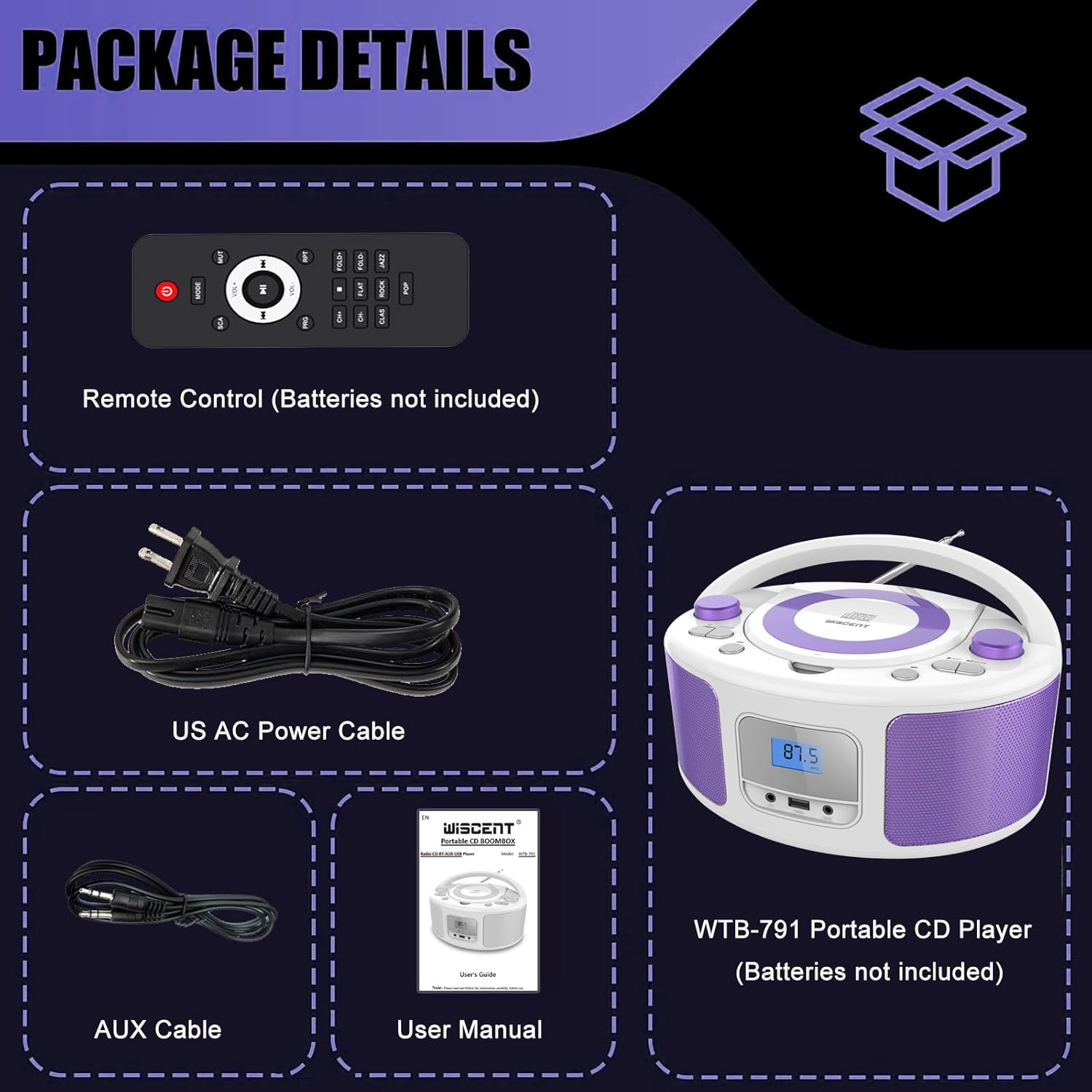
Image: Contents of the WIITHINK WCD-9949 Boombox package, showing the boombox, remote control, power cable, AUX cable, and user manual.
Product Overview
Familiarize yourself with the main components of your boombox.

Image: Front view of the WIITHINK WCD-9949 Boombox, highlighting key features such as CD player, Bluetooth, USB port, AUX input, headphone jack, LCD display, FM radio, and power options.
- Top-Loading CD Player: For playing CDs, CD-R/RW, MP3 CDs, and audiobook CDs.
- FM Radio Tuner: For listening to FM radio stations.
- Bluetooth: For wireless audio streaming from compatible devices.
- USB Input: For playing MP3/WMA music files from USB flash drives (FAT32 format, up to 128GB).
- AUX Input (3.5mm): For connecting external audio devices.
- Headphone Jack (3.5mm): For private listening.
- LCD Display: Shows current mode, track number, and radio frequency.
- Control Buttons: Power, Mode, Play/Pause, Skip/Search, Repeat, Scan, EQ/Function.
- Volume Knobs: Adjust audio output level.
- Tuning Knob: Adjusts FM radio frequency.
- Telescopic Antenna: For improved FM radio reception.
- Carrying Handle: For easy portability.
Setup
Powering the Boombox
Your boombox can be powered by AC power or batteries.
AC Power (Wall Outlet)
- Ensure the boombox is turned off.
- Insert one end of the provided AC power cable into the AC IN jack on the back of the boombox.
- Plug the other end of the AC power cable into a standard wall outlet.

Image: Rear view of the boombox, indicating the AC IN jack for power connection and the battery compartment.
Battery Power (Portable Use)
- Ensure the boombox is turned off and disconnected from AC power.
- Locate the battery compartment on the bottom of the unit.
- Open the battery compartment cover.
- Insert 4 x UM2-C 1.5V batteries (not included), ensuring correct polarity (+/-).
- Close the battery compartment cover securely.
Note: Remove batteries if the unit will not be used for an extended period to prevent leakage and damage.
Operating Instructions
General Operation
- Power On/Off: Press the POWER button to turn the unit on or off.
- Select Mode: Press the MODE button repeatedly to cycle through available modes: CD, FM, Bluetooth (BT), USB, AUX. The selected mode will be displayed on the LCD screen.
- Adjust Volume: Rotate the VOLUME knob clockwise to increase volume and counter-clockwise to decrease volume.
- EQ Modes: Press the EQ/FUN button to select different equalizer presets: ROCK / POP / FLAT / CLASS / JAZZ.

Image: Overview of the boombox's multiple playback modes and features.
CD Playback
- Press the MODE button to select CD mode. "CD" will appear on the display.
- Open the CD compartment cover by gently lifting it.
- Place a CD (CD, CD-R/RW, MP3 CD, audiobook CD) onto the spindle with the label side facing up.
- Close the CD compartment cover. The CD will begin playing automatically.
- Play/Pause: Press the PLAY/PAUSE button to pause or resume playback.
- Skip Tracks: Press the SKIP FORWARD or SKIP BACKWARD buttons to skip to the next or previous track.
- Repeat: Press the RPT button to repeat the current track (Repeat 1) or all tracks (Repeat All).
- Program Play: Refer to the detailed user manual for programming specific track orders.

Image: Close-up of the top-loading CD player with a disc inside, ready for playback.
FM Radio Operation
- Press the MODE button to select FM radio mode. The FM frequency will appear on the display.
- Extend the telescopic antenna for optimal reception.
- Auto Scan: Press and hold the SCAN button to automatically scan and save available FM stations (up to 30 presets).
- Manual Tuning: Rotate the TUNING knob to manually adjust the frequency.
- Select Preset: Use the PRESET +/- buttons on the remote control to navigate through saved stations.

Image: Visual representation of the FM radio feature, showing the frequency range and preset capabilities.
Bluetooth Pairing
- Press the MODE button to select Bluetooth mode. "BT" will flash on the display, indicating it's ready for pairing.
- On your Bluetooth-enabled device (smartphone, tablet, etc.), enable Bluetooth and search for available devices.
- Select "WTB-791" from the list of devices.
- Once paired, "BT" will stop flashing and remain solid. You can now stream audio wirelessly.
- Control playback (Play/Pause, Skip) using the boombox buttons or your connected device.

Image: The boombox displaying "BT" for Bluetooth mode, connected to a smartphone for wireless music streaming.
USB Playback
- Insert a USB flash drive (FAT32 format, up to 128GB) containing MP3/WMA audio files into the USB port on the front of the boombox.
- Press the MODE button to select USB mode. "USB" will appear on the display.
- Playback will start automatically. Use the Play/Pause and Skip buttons to control playback.
AUX Input
- Connect an external audio device (e.g., MP3 player, laptop) to the AUX IN jack on the front of the boombox using the provided 3.5mm AUX cable.
- Press the MODE button to select AUX mode. "AUX" will appear on the display.
- Control playback from your external device. Adjust volume using the boombox's volume knob.

Image: The boombox connected to multiple external devices via AUX input, demonstrating its versatility.
Headphone Use
For private listening, plug 3.5mm headphones (not included) into the HEADPHONE jack on the front of the boombox. The speakers will automatically mute.
Remote Control
The included remote control allows you to operate the boombox from a distance. Ensure batteries are inserted correctly (2 x AAA, not included). Functions include Power, Mode selection, Volume, Mute, Play/Pause, Skip/Search, Repeat, Scan, and EQ modes.

Image: The boombox and its remote control, highlighting the convenience of remote operation.
Maintenance
- Clean the unit with a soft, dry cloth. Do not use abrasive cleaners or solvents.
- Keep the CD compartment clean and free of dust. Use a CD lens cleaner if necessary.
- Store the unit in a cool, dry place away from direct sunlight and extreme temperatures.
Troubleshooting
| Problem | Solution |
|---|---|
| No power | Check if the AC power cable is securely connected. If using batteries, ensure they are inserted correctly and not depleted. |
| CD not playing | Ensure the CD is clean and free of scratches. Verify the CD is inserted correctly with the label side up. Close the CD compartment completely. Ensure CD mode is selected. |
| Poor FM radio reception | Extend and adjust the telescopic antenna. Try repositioning the unit. |
| Bluetooth not pairing | Ensure the boombox is in Bluetooth mode and "BT" is flashing. Make sure your device's Bluetooth is enabled and within range. Forget previous pairings on your device and try again. |
| USB playback issues | Ensure the USB drive is formatted to FAT32 and contains compatible MP3/WMA files. The maximum capacity supported is 128GB. |
Specifications
| Feature | Detail |
|---|---|
| Model Number | WCD-9949 |
| Product Dimensions (L x W x H) | 7 x 10 x 5 inches |
| Item Weight | 3.91 pounds |
| Connectivity Technology | Auxiliary, Bluetooth, USB |
| Speaker Type | Built-In |
| Power Output | 2x2W RMS |
| FM Radio Frequency | 87.5-108Mhz |
| Power Source | AC 100-240V~ / 4 x C batteries (not included) |
| USB Capacity | Up to 128GB (FAT32 format only) |
Warranty & Support
WIITHINK is committed to customer satisfaction. Your product comes with:
- 18-Month Replacement: For missing parts or defective products.
- Lifetime Technical Support: Assistance with any product inquiries.
- Amazon Buyer-Seller Messaging: Available 7/24 for support.
For any inquiries, please go to Your Orders, find your order in the list, and click on "WIITHINK" to contact us.

Image: Details on WIITHINK's customer support, including replacement policy and technical assistance.
Official Product Videos
WIITHINK Direct - CD Radio Portable CD Player Boombox with Bluetooth
Video: An official product video from WIITHINK Direct showcasing the features and functionality of the CD Radio Portable CD Player Boombox with Bluetooth.

