
Jocca Jocca Standventilator
Jocca Pedestal Fan with Nebulizer
User Manual
Model: Jocca Standventilator (B0CXY1SQN2)
Introduction
Thank you for choosing the Jocca Pedestal Fan with Nebulizer. This manual provides important information for the safe and efficient operation, maintenance, and troubleshooting of your new fan. Please read it thoroughly before use and keep it for future reference.

Image: Front view of the Jocca Pedestal Fan with Nebulizer, showcasing its black and blue design with the fan head and water tank.
Important Safety Instructions
Always follow basic safety precautions when using electrical appliances to reduce the risk of fire, electric shock, and injury to persons.
- Read all instructions before using this fan.
- Ensure the power supply matches the voltage specified on the fan's rating label.
- Do not immerse the fan, plug, or cord in water or other liquids.
- Unplug from outlet when not in use, when moving the fan from one location to another, and before cleaning.
- Do not operate any fan with a damaged cord or plug, or after the fan malfunctions or has been dropped or damaged in any manner.
- Keep the fan out of reach of children and pets.
- Do not insert fingers or any other objects into the fan grille when it is operating.
- Use the fan only for its intended household use as described in this manual.
- Do not use outdoors.
- Ensure the water tank is securely placed and filled correctly to prevent leaks, especially when using the nebulizer function.
Product Components
Familiarize yourself with the main parts of your Jocca Pedestal Fan with Nebulizer:
- Front Grille
- Fan Blades (3 blades)
- Rear Grille
- Motor Housing
- Control Panel
- Adjustable Stand Pole
- Water Tank (3.2L capacity)
- Water Tank Base / Nebulizer Unit
- Base
- Nebulizer Hose

Image: Close-up view of the fan's control panel, showing buttons for speed, mist, and timer, along with the oscillation knob.
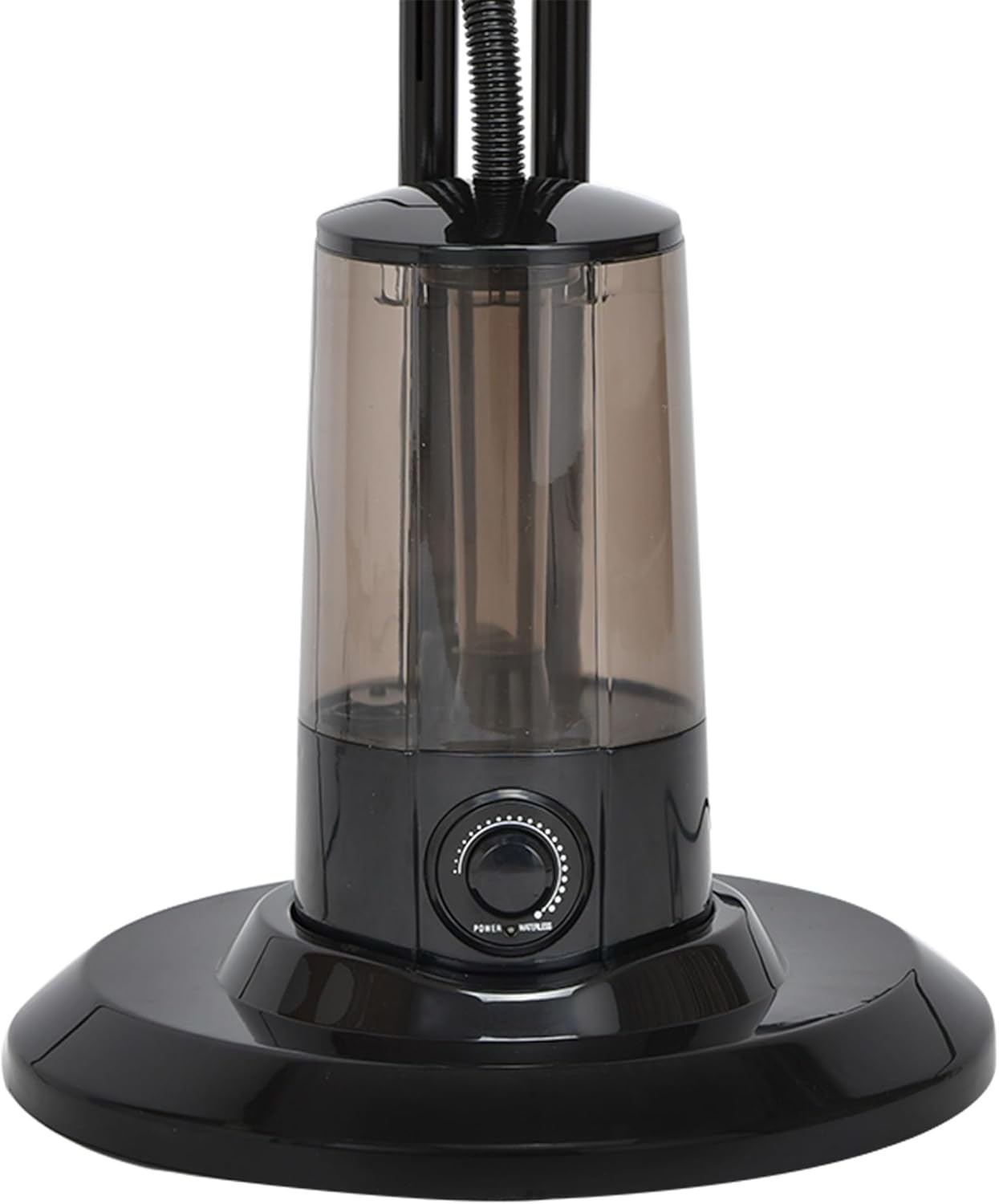
Image: Detailed view of the fan's water tank and base, highlighting the mist control dial.
Setup and Assembly
Follow these steps to assemble your fan:
- Base Assembly: Attach the main stand pole to the base, ensuring it is stable and secure.
- Motor Unit Attachment: Secure the motor housing unit to the top of the stand pole.
- Grille and Blade Installation:
- Remove the retaining nut from the motor shaft.
- Place the rear grille onto the motor housing, aligning the notches.
- Install the fan blades onto the motor shaft, ensuring they are correctly oriented.
- Secure the blades with the retaining nut, tightening it firmly.
- Attach the front grille, ensuring all clips are securely fastened.
- Water Tank Setup:
- Remove the water tank from its base.
- Fill the 3.2L tank with clean, cool water. Do not overfill.
- Place the filled water tank back onto its base, ensuring it sits correctly.
- Nebulizer Hose Connection: Connect the nebulizer hose from the water tank unit to the mist outlet on the fan head. Ensure a snug fit to prevent leaks.
- Placement: Position the fan on a flat, stable surface. Ensure it is not near curtains or other objects that could obstruct airflow or be affected by mist.
Note: Some users have reported difficulties with assembly, particularly with securing parts like the retaining nut and ensuring the water tank components are stable. Please ensure all parts are firmly connected as per instructions to avoid instability or malfunction.

Image: The fan shown with its approximate dimensions (height 127cm, base width 46cm), useful for planning placement.
Operating Instructions
Your Jocca Pedestal Fan offers multiple functions for optimal comfort.
Control Panel Functions:
- Power Button: Press to turn the fan ON or OFF.
- Speed Control (Buttons 1, 2, 3): Select desired fan speed.
- 1: Low speed
- 2: Medium speed
- 3: High speed
- Oscillation Control (Knob): Turn the knob on the control panel to activate or deactivate the 60° oscillation feature, which distributes air uniformly.
- Mist Function (MIST Button & Dial):
- Press the MIST button on the control panel to activate the nebulizer.
- Adjust the mist intensity using the dial located on the water tank base.

Image: The fan operating with visible mist being emitted from the fan head, demonstrating the nebulizer function.
- Timer Function (Buttons 10, 20, 30, 40, 50, 60): Set the fan to operate for a specific duration (up to 60 minutes). The fan will automatically turn off after the set time.
- Reclinable Head: Manually adjust the angle of the fan head to direct airflow precisely where needed.
Maintenance and Cleaning
Regular cleaning ensures optimal performance and extends the life of your fan.
- Always unplug the fan before cleaning.
- Exterior Cleaning: Use a soft, damp cloth to wipe down the exterior surfaces. Do not use abrasive cleaners or solvents.
- Grille and Blades: Periodically remove the front grille (if detachable) and gently wipe the fan blades with a soft, dry or slightly damp cloth to remove dust buildup. Ensure blades are completely dry before reassembling.
- Water Tank:
- Empty and rinse the water tank regularly, especially if not used for extended periods.
- Clean the inside of the tank to prevent mineral buildup or mold growth. Use a mild detergent if necessary, and rinse thoroughly.
- Ensure the nebulizer unit within the tank base is free from debris.
- Storage: When not in use for a long time, clean the fan thoroughly, empty the water tank, and store it in a cool, dry place, preferably in its original packaging.
Troubleshooting
If you encounter issues with your fan, refer to the following common problems and solutions:
| Problem | Possible Cause | Solution |
|---|---|---|
| Fan does not turn on. | No power supply; Power button not pressed; Loose connection. | Check if the fan is plugged into a working outlet. Press the power button. Ensure all assembly connections are secure. |
| Fan blades do not spin, but nebulizer works. | Motor issue; Obstruction. | Unplug the fan. Check for any obstructions around the blades. If no obstruction, contact customer support. |
| Mist function is not working or stops working. | Water tank empty; Mist button not pressed; Nebulizer unit clogged; Hose disconnected. | Ensure water tank is filled. Press the MIST button. Check if the nebulizer hose is securely connected. Clean the nebulizer unit and tank for mineral buildup. |
| Fan is unstable or wobbly. | Improper assembly; Uneven surface. | Ensure all assembly screws and connections (especially the base and stand pole) are tightened securely. Place the fan on a flat, stable surface. |
| Unusual noise during operation. | Loose parts; Obstruction; Motor issue. | Unplug the fan. Check for any loose parts or obstructions. If the noise persists, contact customer support. |
If the problem persists after trying these solutions, please contact Jocca customer support.
Specifications
| Feature | Detail |
|---|---|
| Brand | Jocca |
| Model Number | Jocca Standventilator |
| Color | Black and Blue |
| Product Dimensions | 61 x 26 x 46 cm; 4 kg (approx. 127cm height) |
| Power | 75 Watts |
| Voltage | 220 Volts (AC) |
| Automatic Shut-off | No |
| Special Features | Timer, Adjustable Mist, 60° Oscillation, Reclinable Head |
| Water Tank Capacity | 3.2 Liters |
| Number of Blades | 3 |
| Power Source | Corded Electric |
Warranty and Support
Jocca is committed to offering the latest innovations and best quality products. For any warranty claims, technical support, or inquiries regarding your Jocca Pedestal Fan with Nebulizer, please contact the retailer where you purchased the product or visit the official Jocca website for customer service information.
Please retain your proof of purchase for warranty purposes.
You can find more information about Jocca products and support at the Jocca Brand Store on Amazon.
Ask a question about this manual
Ask about setup, troubleshooting, compatibility, parts, safety, or missing instructions. Manuals+ will review the question and use this page’s manual context to help answer it.