
1. Introduction
Thank you for choosing the FUDONI V7A and GC666 Projector. This manual provides essential information for setting up, operating, and maintaining your projector. Please read it thoroughly before use to ensure optimal performance and safety. Keep this manual for future reference.

Image 1.1: FUDONI V7A and GC666 Projector, showcasing its compact design and connectivity features.
2. Safety Information
To prevent fire, electric shock, or injury, please observe the following safety precautions:
- Do not block the ventilation openings. Ensure adequate space around the projector for proper airflow.
- Do not expose the projector to rain or moisture. Avoid placing objects filled with liquids, such as vases, on the projector.
- Use only the power adapter supplied with the projector.
- Do not attempt to open or modify the projector. Refer all servicing to qualified personnel.
- Avoid direct eye exposure to the projector lens when the lamp is on.
- Place the projector on a stable, level surface to prevent it from falling.
3. Package Contents
Please check that all items are present in your package:
- FUDONI V7A and GC666 Projector Unit
- Remote Control
- Power Cable
- HDMI Cable
- User Manual
4. Product Overview
Familiarize yourself with the various parts and connections of your projector.
4.1 Front and Top View

Image 4.1: Front view of the projector, highlighting the projection lens and focus adjustment ring.
The front features the projection lens. The top panel typically includes control buttons for power, menu navigation, and input selection, along with focus and keystone correction dials.
4.2 Rear and Side View (Ports)
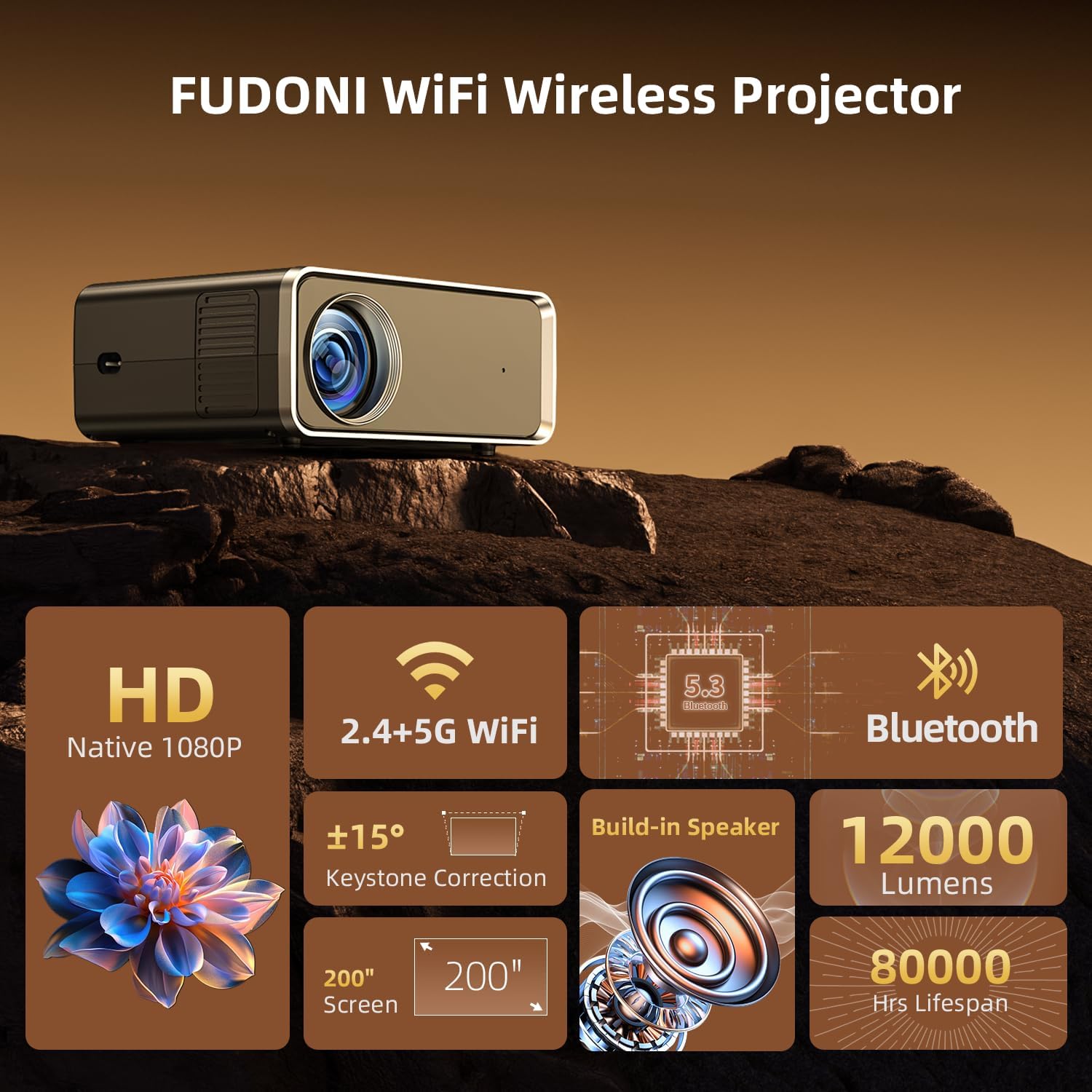
Image 4.2: Rear panel of the projector, displaying the HDMI, USB, AV, and power input ports.
The rear and side panels house various connectivity options:
- HDMI Port: Connect to laptops, gaming consoles, Blu-ray players, etc.
- USB Ports: For connecting USB drives to play media files.
- AV Port: For connecting older devices with composite video/audio output.
- Audio Out (3.5mm): For connecting external speakers or headphones.
- Power Input: Connect the power cable here.
5. Setup
Follow these steps to set up your projector:
- Placement: Place the projector on a stable surface or mount it. Ensure it is positioned at an appropriate distance from the screen or wall for your desired image size.
- Power Connection: Connect the power cable to the projector's power input and then to a power outlet.
- Power On: Press the power button on the projector or remote control to turn it on.
- Focus Adjustment: Rotate the focus ring on the lens until the projected image is clear and sharp.
- Keystone Correction: If the image appears trapezoidal, adjust the keystone correction dial (usually on the top or side) until the image is rectangular. The FUDONI V7A and GC666 supports up to ±15° keystone correction.

Image 5.1: Guide for optimal projection distance and corresponding screen sizes (e.g., 35-200 inches at 4-20 feet).
6. Operating Instructions
6.1 Input Source Selection
Use the 'Source' button on the remote or projector to select the desired input (HDMI, USB, AV, Screen Mirroring).

Image 6.1: The projector's compatibility with multiple devices including USB drives, TV sticks, gaming consoles, laptops, and mobile phones via various input methods.
6.2 WiFi Wireless Connection (Screen Mirroring)
The projector supports 2.4G and 5G dual-band WiFi for screen mirroring from compatible devices.
- Select 'Screen Mirroring' as the input source.
- Connect the projector to your home WiFi network via the settings menu.
- On your iOS, Android, MacBook, or Windows device, enable screen mirroring/casting and select the projector from the list of available devices.
Note:
- Due to copyright protections, streaming services like Netflix, Amazon Prime Video, and Hulu do not support direct screen mirroring. Use an HDMI connection with a streaming stick or box for these services.
- The projector can also connect wirelessly to cellular networks without a traditional WiFi router for outdoor use.

Image 6.2: Demonstrates the 5G/2.4G WiFi connection for fast and stable screen mirroring from various devices.
6.3 Bluetooth 5.3 Function
Connect external Bluetooth audio devices for an enhanced sound experience.
- Ensure your Bluetooth speaker or headphones are in pairing mode.
- On the projector, navigate to the Bluetooth settings menu.
- Select your device from the list to pair.

Image 6.3: The projector's Bluetooth function allows connection to external audio devices like soundbars, headphones, and portable speakers.
6.4 Zoom Function
Adjust the image size without moving the projector. Access the zoom function through the projector's menu or remote control to shrink the image size from 100% down to 50%.
7. Maintenance
Proper maintenance ensures the longevity and performance of your projector.
- Cleaning the Lens: Use a soft, lint-free cloth specifically designed for optical lenses. Do not use abrasive cleaners or excessive force.
- Cleaning the Casing: Wipe the projector's exterior with a soft, dry cloth. For stubborn marks, a slightly damp cloth can be used, followed by a dry one.
- Ventilation: Regularly check that the ventilation openings are clear of dust and debris to prevent overheating.
- Storage: When not in use for extended periods, store the projector in a cool, dry place, protected from dust and extreme temperatures.
8. Troubleshooting
If you encounter issues, refer to the following common problems and solutions:
| Problem | Possible Cause | Solution |
|---|---|---|
| No Power | Power cable loose; Power outlet faulty | Check power cable connection; Try a different outlet |
| No Image | Incorrect input source; Cable not connected | Select correct input source; Ensure HDMI/USB/AV cable is securely connected |
| Image is Blurry | Focus not adjusted; Projector too close/far | Adjust the focus ring; Adjust projection distance |
| Image is Trapezoidal | Keystone not adjusted | Adjust the keystone correction dial |
| No Sound | Volume too low; External audio device not connected/paired | Increase volume; Check audio cable or Bluetooth connection |
| WiFi/Bluetooth Connection Issues | Incorrect password; Device out of range; Interference | Re-enter password; Move devices closer; Reduce interference |
9. Specifications
Key technical specifications for the FUDONI V7A and GC666 Projector:
| Feature | Detail |
|---|---|
| Brand | FUDONI |
| Model Number | GC666 |
| Display Resolution (Native) | 1920 x 1080 (Full HD) |
| Display Resolution (Maximum Supported) | 4K |
| Brightness | 12000 Lumens |
| Connectivity Technology | HDMI, USB, Wi-Fi (2.4G+5G), Bluetooth 5.3 |
| Special Features | Built-In Wi-Fi, Portable, Bluetooth Function, Zoom Function, Keystone Correction |
| Projection Size | 35-200 inches |
| Projection Distance | 4-20 feet |
10. Warranty and Support
FUDONI provides a lifetime warranty for this product. Our team is dedicated to offering professional customer service and technical support. If you have any questions or require assistance with your projector, please contact us. We are available to assist you online 24/7.