
Introduction
This manual provides comprehensive instructions for the installation, operation, and maintenance of your BLITZWILL 132cm Ceiling Fan with LED Light. Please read this manual thoroughly before installation and use to ensure safe and efficient operation. Keep this manual for future reference.

Image: Overview of the BLITZWILL Ceiling Fan, highlighting its combined functions as a lighting fixture, a fan, and an air circulator.
Safety Instructions
- Always disconnect power at the main circuit breaker before installation or servicing.
- Ensure all electrical connections comply with local codes and ordinances. Consult a qualified electrician if unsure.
- The ceiling fan must be mounted to a structurally sound ceiling capable of supporting its weight.
- Do not bend the blade holders during installation or cleaning.
- Maintain a minimum clearance of 2.3 meters (7.5 feet) from the floor to the fan blades.
- Do not operate the fan if any part is damaged. Contact customer support.
- This appliance is not intended for use by persons (including children) with reduced physical, sensory or mental capabilities, or lack of experience and knowledge, unless they have been given supervision or instruction concerning use of the appliance by a person responsible for their safety.
Package Contents
Verify that all components are present and undamaged before proceeding with installation.
- 1 x BLITZWILL Ceiling Fan with Light
- 1 x Remote Control
- 1 x User Manual (This document)
- Mounting Hardware (screws, anchors, etc.)
Product Features
- Dual Control: Operate via 2.4 GHz WiFi App or included Remote Control.
- Adjustable Fan Speeds: 6 wind speed settings for customized comfort.
- LED Lighting: Integrated LED light with 3 color temperatures (3000K/4000K/6000K) and stepless dimming (1% to 100%).
- Memory Function: Remembers your last light settings.
- Reversible DC Motor: Silent (below 35dB) and energy-efficient pure copper DC motor for summer (downward airflow) and winter (upward airflow) modes.
- Timer Function: Set operating time for 1 to 8 hours (App) or 1 to 2 hours (Remote).
- Optimal Airflow: 3 blades designed for efficient air circulation.
- Versatile Application: Suitable for various indoor and covered outdoor spaces like living rooms, bedrooms, kitchens, offices, and garages.

Image: The ceiling fan operating quietly and efficiently, highlighting its low power consumption and noise level below 35 decibels.
Setup and Installation
Installation should be performed by a qualified professional or a person with sufficient electrical knowledge. Always ensure power is disconnected before starting.
- Prepare the Mounting Location: Ensure the ceiling junction box is securely fastened and can support the fan's weight (approx. 5.24 kg). The recommended room size is 13-30 m² with a ceiling height of 2.5-3 meters.
- Install the Mounting Bracket: Attach the mounting bracket to the ceiling junction box using the provided screws and anchors.
- Wire the Fan: Connect the fan's electrical wires to the household wiring according to the wiring diagram in the full instruction manual (not provided here). Ensure all connections are secure.
- Attach the Fan Body: Carefully lift the fan body and attach it to the mounting bracket. Secure it with the appropriate screws.
- Install the Blades: Attach the three fan blades to the motor housing. Ensure they are firmly secured.
- Install the Light Kit: Connect the light kit wiring and attach the LED light cover.
- Restore Power: Once installation is complete and all connections are checked, restore power at the main circuit breaker.

Image: Diagram showing the fan's dimensions (132cm diameter, 22cm height) and recommended room specifications for optimal performance.
Operating Instructions
Remote Control Operation
The included remote control allows convenient adjustment of fan speed, light settings, and timer functions.
- Power On/Off: Press the power button to turn the fan and light on or off.
- Fan Speed: Use the speed buttons (1-6) to select your desired airflow.
- Light On/Off: Toggle the light independently.
- Color Temperature: Cycle through 3000K (warm white), 4000K (natural white), and 6000K (cool white).
- Brightness Adjustment: Use the dimming buttons to adjust light intensity.
- Timer: Set the fan to turn off after 1 or 2 hours.
- Reversible Function: Activate the reversible motor for summer or winter mode.
App Control Operation
For advanced features and control from anywhere, use the BLITZWILL WiFi App.
- Download App: Search for the BLITZWILL App on your smartphone's app store.
- Pair Device: Follow the in-app instructions to connect your ceiling fan to your 2.4 GHz WiFi network.
- Control Functions: The app provides full control over fan speed (1-6 gears), light color temperature (3000K/4000K/6000K), stepless dimming, timer (1-8 hours), and reversible motor function.
- Additional Features: Access light scenes, device sharing, and other smart functionalities through the app.

Image: A visual comparison detailing the control options and features available via the remote control versus the smartphone application.
Fan Speed and Timer Settings
- Speed 1-2: Ideal for sleeping or gentle air circulation.
- Speed 3-4: Suitable for leisure activities and moderate cooling.
- Speed 5-6: Provides strong airflow for exercise or rapid cooling.
- Timer: Use the timer for automatic shut-off, ranging from 1 to 8 hours via the app, or 1 to 2 hours via remote.
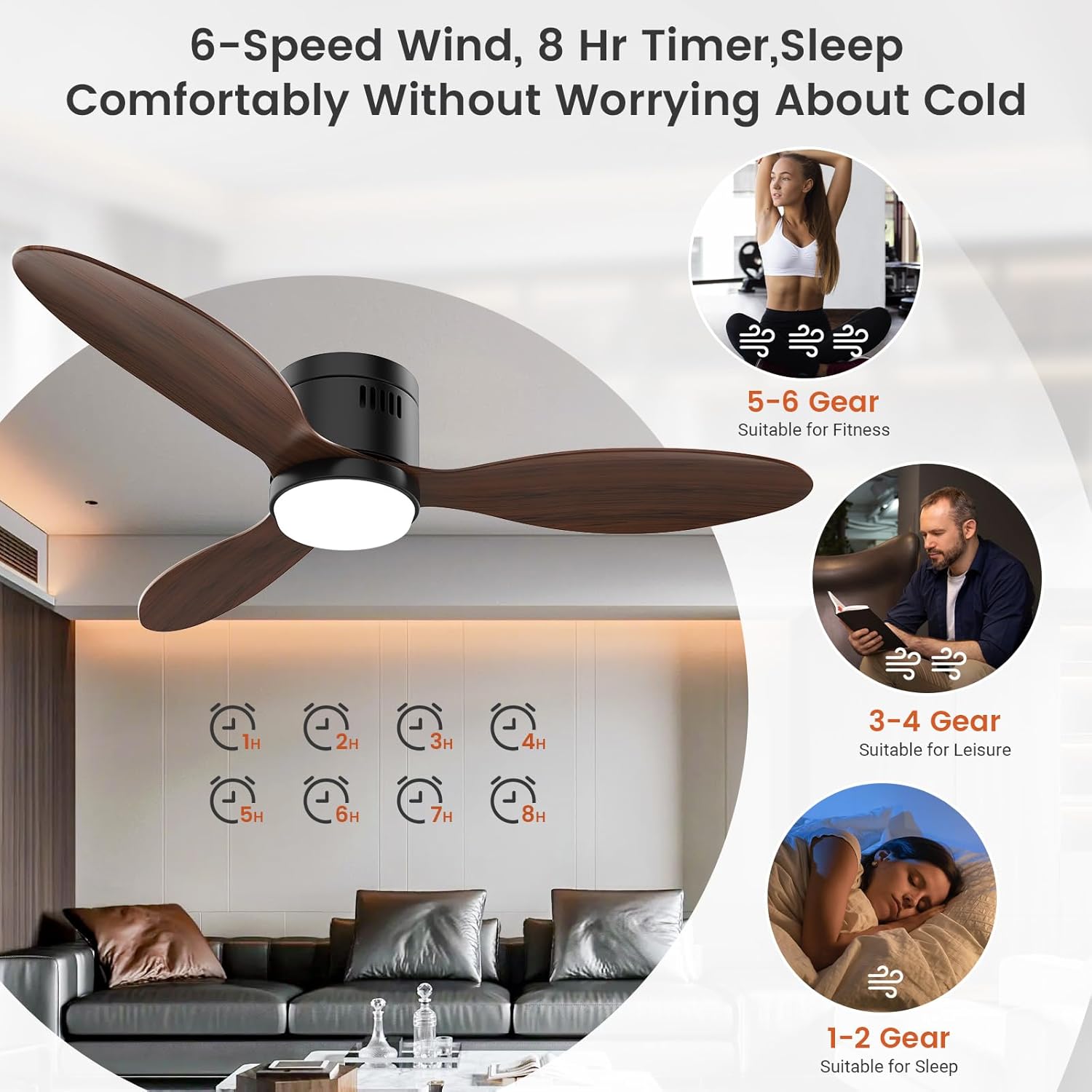
Image: Illustration of the 6-speed settings and 8-hour timer, suggesting optimal fan speeds for various activities such as sleeping, leisure, and fitness.
Light Settings
- Color Temperatures: Choose between 3000K (Cozy Romantic), 4000K (Soft Natural), and 6000K (Bright Comfortable) to match your ambiance.
- Stepless Dimming: Adjust brightness from 1% to 100% for perfect illumination.
- Memory Function: The fan remembers your last chosen light color temperature and brightness settings.
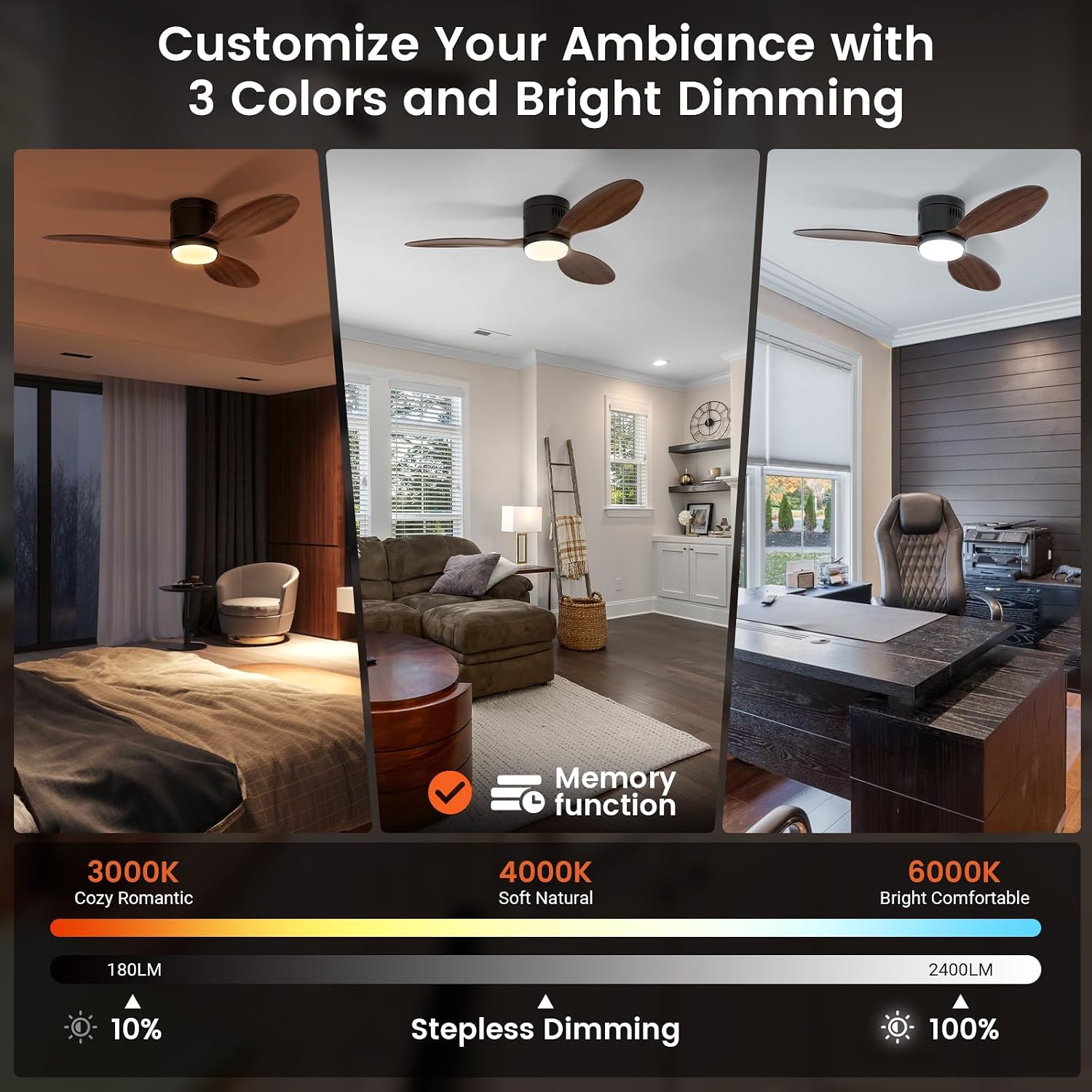
Image: Visual representation of the three adjustable color temperatures (3000K, 4000K, 6000K) and the stepless dimming capability of the integrated LED light.
Reversible Motor Function (Summer/Winter Mode)
- Summer Mode (Forward Rotation): Blades rotate counter-clockwise, pushing air downwards to create a cooling effect.
- Winter Mode (Reverse Rotation): Blades rotate clockwise, drawing air upwards to circulate warm air trapped near the ceiling, distributing it evenly throughout the room.

Image: Illustration demonstrating the fan's reversible function, with arrows indicating downward airflow for cooling in summer and upward airflow for circulating warm air in winter.
Maintenance
Regular maintenance ensures optimal performance and longevity of your ceiling fan.
- Cleaning: Dust the fan blades and motor housing regularly with a soft, damp cloth. Do not use abrasive cleaners or solvents.
- Blade Inspection: Periodically check that all blade screws are tight. Loose screws can cause wobbling and noise.
- Light Cover: Clean the light cover with a soft, dry cloth.
- No Lubrication Required: The motor is permanently lubricated and does not require oiling.
- Power Disconnection: Always disconnect power before performing any cleaning or maintenance.
Troubleshooting
| Problem | Possible Cause | Solution |
|---|---|---|
| Fan does not start | No power supply; Loose wiring; Remote control battery depleted. | Check circuit breaker; Verify all wire connections; Replace remote control batteries (AAA*2, 1.5V). |
| Fan wobbles | Loose blades or mounting bracket; Unbalanced blades. | Tighten all blade and mounting screws; Ensure blades are balanced (refer to full manual for balancing kit instructions if needed). |
| Light does not work | Loose light kit wiring; LED module failure. | Check light kit connections; Contact customer support for LED module replacement. |
| Remote control not working | Depleted batteries; Remote not paired; Obstruction. | Replace batteries; Re-pair remote control (refer to full manual); Ensure no obstructions between remote and receiver. |
| App control not working | No WiFi connection; Incorrect pairing; App issues. | Ensure fan is connected to 2.4 GHz WiFi; Re-pair device in app; Restart app or phone. |
Specifications
| Feature | Detail |
|---|---|
| Model Number | BW-FL-CL303-EU |
| Dimensions (L x W x H) | 132 x 132 x 22 cm |
| Weight | 5.24 kg |
| Brand | BLITZWILL |
| Color | Wood Color |
| Material | Acrylic, Wood (Blades) |
| Control Method | App, Remote Control |
| Connectivity Protocol | Wi-Fi (2.4 GHz) |
| Light Type | LED |
| Color Temperature | 3000K, 4000K, 6000K (Adjustable) |
| Brightness | Stepless Dimming (1%-100%) |
| Power Consumption | 25 Watts |
| Voltage | 230 Volts |
| Fan Speeds | 6 |
| Timer Range | 1-8 hours (App), 1-2 hours (Remote) |
| Noise Level | < 35 dB |
| Energy Label | F (EPREL Link) |
| Indoor/Outdoor Use | Indoor (Covered Outdoor) |

Image: EU Energy Label indicating the energy efficiency class F for the BLITZWILL BW-FL-CL303-EU ceiling fan.
Warranty and Support
BLITZWILL products are designed for reliability and performance. For warranty information, technical support, or any issues encountered during installation or use, please contact BLITZWILL customer service. Refer to your purchase documentation for specific warranty terms and contact details.
If you encounter problems, please send an email to customer support, and they will respond as soon as possible.


