
1. Product Overview
The SHARP KI-SS50-W is an advanced air purifier with humidification capabilities, featuring SHARP's unique Plasmacluster 25000 technology. This unit is designed to improve indoor air quality by suppressing airborne and adhered viruses, pollen, and other microscopic particles, while also maintaining optimal humidity levels.
Key Features:
- Plasmacluster 25000 Technology: Effectively removes positive and negative static electricity, preventing pollen and microscopic particles from adhering to surfaces.
- Efficient Air Purification: Recommended for rooms up to approximately 23 tatami mats, with a purification time of 12 minutes for an 8-tatami room.
- High Humidification Capacity: Features a two-layer humidifying filter, providing a maximum humidification capacity of 600mL/h.
- Quiet Operation: Achieves a low noise level of 43dB during 'strong' humidification, ensuring a comfortable environment.
- Slim and Space-Saving Design: With a depth of only 230mm, it can be placed neatly against walls without obstructing daily life.
- User-Friendly Mobility: Equipped with casters with stoppers for easy movement and secure placement, convenient for households with children.
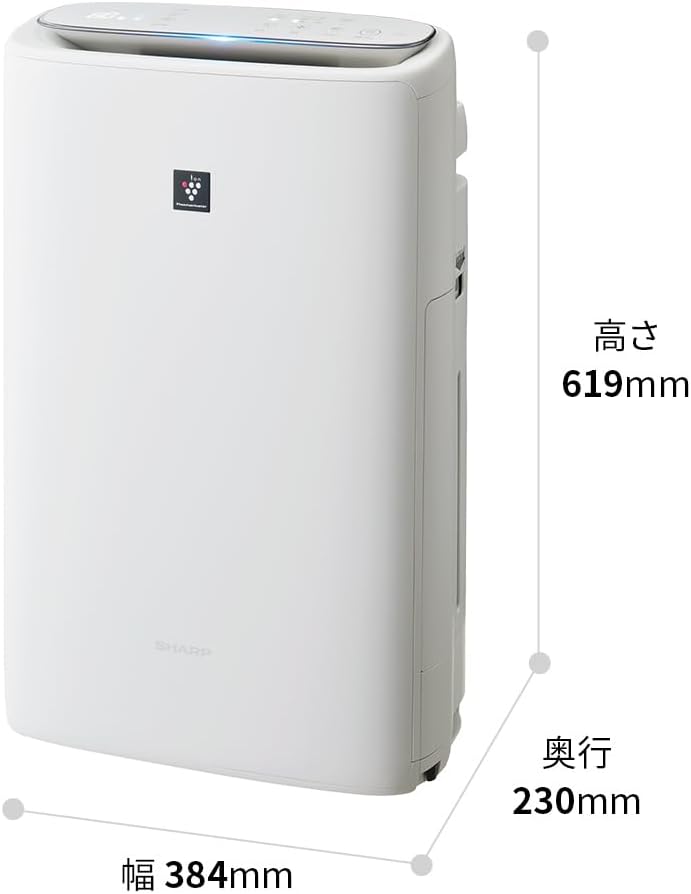
Image 1.1: Front view of the SHARP KI-SS50-W Plasmacluster Air Purifier with Humidifier.

Image 1.2: Product dimensions showing height (619mm), width (384mm), and depth (230mm).
2. Setup Guide
2.1 Unpacking
- Carefully remove the air purifier from its packaging.
- Remove all protective films, tapes, and packing materials from the unit.
- Check that all components are present: main unit, humidifying filter, water tank, and power cord.
2.2 Filter Installation
The filters are typically pre-installed but may require removal of protective plastic bags before first use.
- Open the rear panel of the unit.
- Remove the HEPA filter, deodorizing filter, and pre-filter. Ensure any plastic packaging is removed from these filters.
- Reinstall the filters in the correct order: pre-filter, deodorizing filter, and then the HEPA filter. Ensure they are securely in place.
- Close the rear panel.

Image 2.1: Exploded view showing the pre-filter, double deodorizing filter, and HEPA filter.
2.3 Water Tank Preparation (for Humidification)
- Remove the water tank from the side of the unit.
- Unscrew the cap at the bottom of the water tank.
- Fill the tank with clean tap water. Do not use hot water or water with additives.
- Securely screw the cap back on.
- Place the water tank back into the unit, ensuring it clicks into place.

Image 2.2: Demonstrates the easy-to-handle water tank and casters for mobility.
2.4 Placement
Place the unit on a flat, stable surface. Ensure there is adequate space around the unit for optimal airflow (at least 30 cm from walls or furniture). Avoid placing it near heat sources or in direct sunlight.
3. Operating Instructions
3.1 Power On/Off
- Connect the power cord to a wall outlet.
- Press the Power button on the control panel to turn the unit on or off.
3.2 Mode Selection
The unit offers various operating modes:
- Air Purification Mode: Activates the air purification function.
- Humidification Mode: Activates humidification along with air purification. Ensure the water tank is filled.
- Plasmacluster Spot Mode: Concentrates Plasmacluster ions for targeted deodorization or static electricity removal.
- Pollen Mode: Optimized for effective pollen removal.
Press the respective mode buttons on the control panel to select your desired operation.
3.3 Fan Speed Adjustment
You can adjust the fan speed to suit your needs:
- Auto: Automatically adjusts fan speed based on air quality.
- Silent: For quiet operation, ideal for nighttime.
- Medium: Standard operation.
- High: For rapid air purification or humidification.
Use the Fan Speed button to cycle through the options.
3.4 Timer Function
Set the unit to operate for a specific duration:
- Press the Timer button to select the desired operating time (e.g., 2 hours, 4 hours, 8 hours).
- The unit will automatically turn off after the set time.

Image 3.1: Control panel and illustration of low noise operation at 43dB.
3.5 Plasmacluster Technology Explained
The Plasmacluster technology generates positive (H+) and negative (O2-) ions, similar to those found in nature. These ions are released into the air and attach to the surface of airborne mold and bacteria. They transform into highly oxidative OH radicals, which extract hydrogen (H) from the protein on the surface of the mold/bacteria, breaking down the protein. The extracted hydrogen (H) and OH radicals then combine to form water (H2O), which returns to the air.
Video 3.2: This video illustrates the mechanism of Plasmacluster technology, showing how ions are released and interact with airborne particles to purify the air.
Video 3.3: This video compares different dust collection methods, demonstrating the effectiveness of the HEPA filter system in capturing microscopic particles.
4. Maintenance
Regular maintenance ensures optimal performance and extends the lifespan of your air purifier.
4.1 Pre-filter Cleaning
Clean the pre-filter approximately once a month, or more frequently depending on usage and air quality.
- Turn off the unit and unplug it from the power outlet.
- Open the rear panel and remove the pre-filter.
- Use a vacuum cleaner to remove dust and debris from the pre-filter. For stubborn dirt, wash it gently with water and a mild detergent.
- If washed, ensure the pre-filter is completely dry before reinstalling.

Image 4.1: Illustration of cleaning the pre-filter with a vacuum cleaner while it's still attached to the rear panel.
4.2 Humidifying Filter and Water Tank Cleaning
Clean the humidifying filter and water tank regularly to prevent mold and bacteria growth.
- Remove the water tank and humidifying filter from the unit.
- Wash the water tank with water and a soft brush.
- Clean the humidifying filter by soaking it in a solution of water and citric acid or a specialized humidifier cleaner to remove mineral deposits. Rinse thoroughly.
- Ensure all parts are dry before reassembling and placing them back into the unit.
4.3 Main Unit Cleaning
- Wipe the exterior of the unit with a soft, dry cloth.
- Do not use abrasive cleaners or solvents.
4.4 Filter Replacement
The HEPA filter and deodorizing filter have a lifespan and will need to be replaced periodically. Refer to the indicator lights on the unit or the product specifications for recommended replacement intervals (typically every 10 years for the HEPA filter under normal use).
5. Troubleshooting
If you encounter any issues, please refer to the following common problems and solutions before contacting customer support.
| Problem | Possible Cause | Solution |
|---|---|---|
| Unit does not turn on | Power cord not properly connected; Power outage | Ensure power cord is securely plugged in; Check household circuit breaker. |
| Weak airflow or poor purification | Filters are dirty or clogged; Unit placed too close to walls | Clean or replace filters as needed; Ensure adequate space around the unit. |
| Humidification not working | Water tank is empty; Humidifying filter is dirty or dry | Refill water tank; Clean humidifying filter; Ensure humidifying filter is wet. |
| Unusual noise | Foreign object in the fan; Unit not on a stable surface | Turn off and unplug the unit, check for obstructions; Place unit on a flat, stable surface. |
| Odor persists | Deodorizing filter is saturated; Strong odor source nearby | Replace deodorizing filter; Remove or ventilate the source of the odor. |
6. Specifications
| Feature | Detail |
|---|---|
| Manufacturer | SHARP |
| Model Number | KI-SS50-W |
| Product Dimensions (D x W x H) | 23 x 38.4 x 61.9 cm |
| Product Weight | 9.46 kg |
| Color | White |
| Power Source | Corded Electric |
| Plasmacluster Ion Density | 25000 ions/cm³ |
| Recommended Room Size (Air Purification) | ~23 tatami mats |
| Recommended Room Size (Plasmacluster) | ~13 tatami mats |
| Maximum Humidification Capacity | 600 mL/h |
| Purification Time (8 tatami mats) | 12 minutes |
| Noise Level (Humidification 'Silent' mode) | 43 dB |
| Other Functions | Humidification function |
| Batteries Required | No |
| Date First Available (Amazon.co.jp) | 2024/3/15 |
7. Warranty Information
This SHARP product is covered by a manufacturer's warranty. Please refer to the warranty card included with your purchase for specific terms, conditions, and duration. Keep your proof of purchase for warranty claims.
8. Customer Support
For further assistance, technical support, or inquiries regarding your SHARP KI-SS50-W air purifier, please contact SHARP customer service.
- Website: Visit the official SHARP website for support resources and FAQs.
- Phone: Refer to your product documentation for regional customer service contact numbers.
- Service Centers: Information on authorized service centers can be found on the SHARP website.


