
Simrad 9" MFD + 83/200 XDCR
Simrad GO Chartplotter and Fish Finder User Manual
Model: 9" MFD + 83/200 XDCR
1. Introduction
This manual provides essential information for the installation, operation, and maintenance of your Simrad GO9 XSE Chartplotter and Fish Finder. The Simrad GO9 XSE is a multifunctional display designed for marine environments, offering intuitive touchscreen controls, advanced navigation capabilities, and powerful sonar features. It integrates seamlessly with various marine electronics, enhancing your boating experience.

Figure 1.1: The Simrad GO9 XSE display showing the main home screen with various application icons.
2. Setup and Installation
2.1 Unpacking and Components
Carefully unpack your Simrad GO9 XSE. Verify that all components are present:
- Simrad GO9 XSE 9" Multifunctional Display (PN 000-16293-001)
- 83/200 kHz Transom Mount Transducer
- GO9 XSE Suncover
- Preloaded C-MAP Discover Card (US and Bahamas coastal, and inland coverage)
- Gimbal Bracket + Knobs
- Power Cable
2.2 Mounting the Display
The Simrad GO9 XSE is designed for dashboard mounting. Ensure a stable and accessible location, considering visibility and protection from direct impact. Use the provided gimbal bracket for flexible positioning.
2.3 Electrical Connections
Connect the power cable to a 12V DC power source. The unit features a 4-pin power connector with a yellow ignition input and alarm output. Ensure proper polarity and fuse protection.
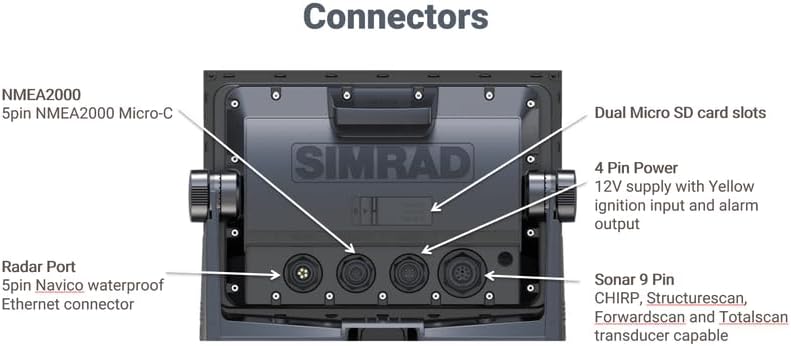
Figure 2.1: Rear view of the Simrad GO9 XSE, highlighting the various connection ports including NMEA2000, Radar Port, Sonar 9 Pin, 4 Pin Power, and Dual Micro SD card slots.
2.4 Transducer Installation
Install the 83/200 kHz transom mount transducer according to the separate transducer installation guide. Proper placement is crucial for optimal sonar performance. Connect the transducer cable to the 9-pin sonar port on the back of the display.

Figure 2.2: The included 83/200 kHz transom mount transducer with its cable and mounting hardware.
2.5 Network Connections (NMEA 2000 & Radar)
The GO9 XSE supports NMEA 2000 for integration with other marine electronics such as engines, fuel sensors, and autopilots. Connect NMEA 2000 devices to the 5-pin NMEA2000 Micro-C port. For radar functionality, connect a compatible Simrad Broadband 3G/4G or Halo Pulse Compression radar system to the 5-pin Navico waterproof Ethernet connector (Radar Port).
2.6 Chart Card Insertion
Insert the preloaded C-MAP Discover card into one of the dual Micro SD card slots. This card provides detailed cartography for navigation.
3. Operating the Simrad GO9 XSE
3.1 Power On/Off
Press and hold the power button located on the unit to turn the device on or off. A short press will typically bring up a power menu for quick actions.
3.2 Multi-Touch Display and Home Screen
The GO9 XSE features an intuitive multi-touch display. Use gestures familiar to smartphone and tablet users:
- Tap: Select items, activate buttons, or create waypoints.
- Pinch-to-Zoom: Adjust the zoom level on charts or sonar views.
- Tap and Drag: Pan across charts or move selected items.
The home screen provides access to all major functions via large, clearly-captioned icons.
3.3 Chartplotter Navigation
Access the Chart application from the home screen. The GO9 XSE supports various cartography options, including C-MAP MAX-N, Navionics, and Insight charts. You can create and manage waypoints by tapping on the chart, and assign meaningful names for easy retrieval.

Figure 3.1: The Simrad GO9 XSE displaying a detailed navigation chart with route information and current vessel data.
Automatic Routing
With compatible charts (Navionics+ or Navionics Platinum for Navionics Autorouting, or Jeppesen CMAP MAX-N+ for Jeppesen Easy Routing), the device can plot the shortest, safest route to a destination, considering your vessel's draught and dimensions. Note: Automatic Routing (EasyRouting / AutoRouting) is not available in the USA.
3.4 Fish Finder (Sonar) Functions
The built-in echosounder supports multiple sonar technologies:
- CHIRP Broadband Sonar: Provides clear detection of fish throughout the water column.
- StructureScan HD: Combines DownScan and SideScan sonar for picture-like views of structure beneath and around your boat (requires optional HDI or TotalScan transducer).
- ForwardScan: Offers a clear two-dimensional image of the bottom in front of your vessel, aiding navigation in shallow or poorly-charted waters (requires optional ForwardScan transducer).
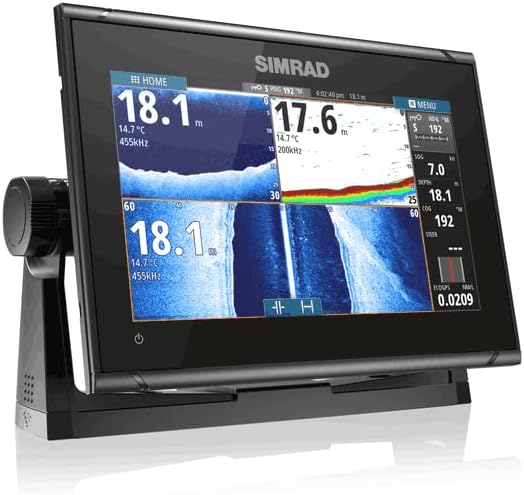
Figure 3.2: The Simrad GO9 XSE displaying a split-screen view of sonar data, showing both traditional sonar and DownScan imaging for detailed underwater views.
3.5 Radar Operation
When connected to a compatible Simrad radar system, the GO9 XSE functions as a full-featured radar display. Use radar for navigation in poor visibility, collision avoidance, and identifying weather patterns or bird activity. Automatic tuning assists in maintaining a clear radar picture.

Figure 3.3: A Simrad radar dome, which can be integrated with the GO9 XSE for radar functionality.
3.6 Customization and Interface
The GO9 XSE interface is fully customizable. You can personalize your home screen with shortcuts to frequently used features and choose your preferred wallpaper. Adjustable split-screen views and customizable panel layouts allow you to display all necessary information simultaneously.
3.7 TripIntel Technology
Designed for power boaters, TripIntel technology provides key information for trip planning. This includes fuel range overlaid on charts, access to current and future tide levels, and a detailed history of previous trips, including routes and boat performance data.
3.8 NMEA 2000 Engine Monitoring
Connect the GO9 XSE to any NMEA 2000-capable equipment on your vessel, such as outboard/inboard engines, fuel level/flow meters, and various sensors (speed, heading, water temperature). This allows you to create custom digital instrument displays, consolidating a wealth of information on a single screen.
3.9 Built-in GPS Receiver
The integrated 10 Hz GPS receiver updates your position ten times per second, ensuring smooth, accurate, real-time tracking of your boat's movement, particularly beneficial for fast-moving vessels.
4. Maintenance
4.1 Cleaning the Display
Clean the touchscreen with a soft, damp cloth. For stubborn marks, use a mild glass cleaner applied to the cloth, not directly to the screen. Avoid abrasive cleaners or solvents that can damage the screen coating.
4.2 General Care
Regularly inspect all cables and connections for signs of wear or corrosion. Ensure the suncover is used when the unit is not in use to protect it from UV exposure and environmental elements. Keep the Micro SD card slots free of dust and moisture.
5. Troubleshooting
5.1 No Power
- Check all power connections and ensure they are secure.
- Verify the vessel's battery is charged and the circuit breaker/fuse is not tripped or blown.
- Ensure the power button is pressed and held for the required duration to power on.
5.2 No Sonar Image
- Confirm the transducer is correctly connected to the 9-pin sonar port.
- Check for obstructions or marine growth on the transducer face.
- Ensure the correct transducer type is selected in the system settings.
- Verify the depth range is set appropriately for current water conditions.
5.3 GPS Not Acquiring Position
- Ensure the unit has a clear view of the sky, free from overhead obstructions.
- Allow sufficient time for the GPS receiver to acquire satellites, especially after initial power-up or moving to a new location.
5.4 Display Issues
- Adjust backlight settings if the screen is too dim or bright.
- If the touchscreen is unresponsive, try a soft reset (refer to the full product manual for specific instructions).
6. Specifications
| Feature | Specification |
|---|---|
| Model Name | 9" MFD + 83/200 XDCR |
| Part Number | 000-16293-001 |
| Screen Size | 9 Inches |
| Item Dimensions (LxWxH) | 10.35 x 3.54 x 7.24 inches |
| Item Weight | 3 Pounds |
| Connectivity Technology | Bluetooth, Ethernet, Wi-Fi |
| Special Features | Bluetooth, Radar Warning, Touchscreen, Waterproof |
| Map Type | North America (C-MAP Discover card included) |
| Mounting Type | Dashboard Mount |
| Included Components | 9" MFD, transducer, Suncover, C-MAP Discover card, gimbal bracket + knobs, and power cable |
| Vehicle Service Type | Boat |
7. Warranty and Support
7.1 Warranty Information
The Simrad GO9 XSE comes with a 2-year manufacturer's warranty. This warranty covers defects in materials and workmanship under normal use. Please retain your proof of purchase for warranty claims.
7.2 Technical Support
For further assistance, technical support, or detailed troubleshooting not covered in this manual, please refer to the official Simrad website or contact Simrad customer service. Contact information can typically be found on the manufacturer's website or in the full product documentation.
Related documents9" MFD + 83/200 XDCR


Ask a question about this manual
Ask about setup, troubleshooting, compatibility, parts, safety, or missing instructions. Manuals+ will review the question and use this page’s manual context to help answer it.