
Formuler Z11Pro
Formuler Z11Pro User Manual
4K Android 11 Streaming Media Player
1. Introduction
Welcome to the user manual for your Formuler Z11Pro 4K Android 11 Streaming Media Player. This guide provides essential information to help you set up, operate, maintain, and troubleshoot your device. The Formuler Z11Pro is designed to deliver a high-quality entertainment experience with its powerful hardware and user-friendly Android 11 operating system.
Please read this manual carefully before using your device to ensure optimal performance and longevity.
2. What's in the Box
Carefully unpack your Formuler Z11Pro and verify that all the following items are included:
- Formuler Z11 Pro With BT1 Edition Streaming Media Player
- Formuler BT1 Bluetooth Voice Remote Control
- Formuler Luminous Long Remote (IR Smart learning Remote)
- Power Adaptor
- Batteries (2AA for remote)
- Monster HDMI 2X Thicker Cable (6 feet long)
- Wireless Mini Keyboard
- Magnetic Car Air Vent Mount Cell Phone Holder
- Silicone Remote Cover

Figure 2.1: All included components of the Formuler Z11Pro package.
3. Product Overview
3.1 Formuler Z11Pro Main Unit
The Formuler Z11Pro is a compact and powerful streaming device. Its rear panel features various ports for connectivity.

Figure 3.1: Rear ports of the Formuler Z11Pro.
- LAN Port (Gigabit): For wired internet connection.
- HDMI Port: Connects to your TV or display for audio and video output.
- USB 2.0 Ports: For connecting external storage devices or peripherals.
- Micro SD Card Slot: For expandable storage.
- IR Rec: Infrared receiver port for external IR extender.
- 12V/1A DC Power Input: Connects to the included power adaptor.
3.2 Remote Controls
The package includes two remote controls for versatile navigation and control.

Figure 3.2: Formuler Z11Pro with BT1 Bluetooth Voice Remote Control.

Figure 3.3: Formuler Luminous Long Remote Control.
- BT1 Bluetooth Voice Remote: Offers Bluetooth connectivity for wider range and voice control capabilities.
- Luminous Long Remote: An IR-based remote with smart learning functions, providing traditional button navigation and TV control.
3.3 Wireless Mini Keyboard
A compact wireless keyboard with a touchpad for easy text input and navigation, especially useful for browsing and app usage.

Figure 3.4: Wireless Mini Keyboard (colors may vary).
3.4 Monster HDMI Cable
A high-quality 6-foot HDMI cable for connecting your Formuler Z11Pro to your display, supporting 4K HDR content.

Figure 3.5: Monster HDMI Cable (color of LED light may vary).
3.5 Magnetic Car Air Vent Mount
A convenient accessory for mounting your cell phone in a car, utilizing a magnetic attachment to the air vent.
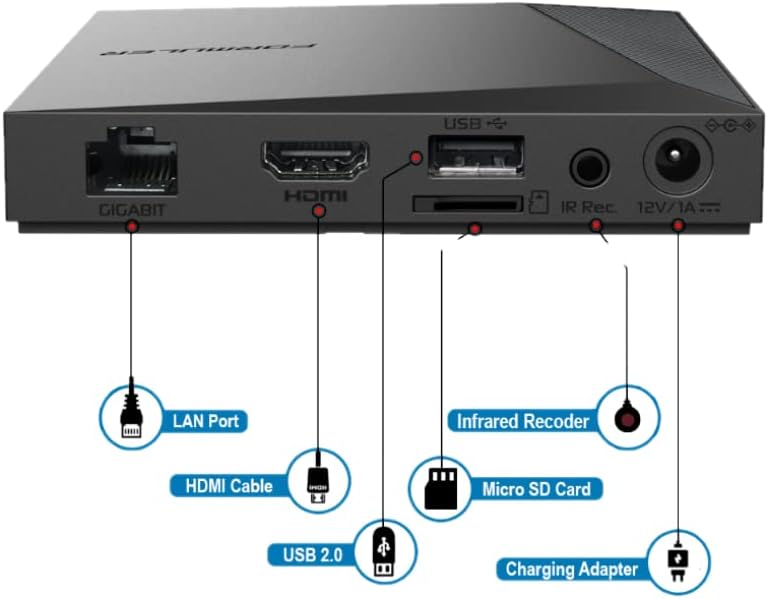
Figure 3.6: Magnetic Car Air Vent Mount.
4. Setup Guide
4.1 Connecting the Device
- Connect HDMI Cable: Insert one end of the Monster HDMI cable into the HDMI port on the back of the Formuler Z11Pro and the other end into an available HDMI input on your television or display.
- Connect Power Adaptor: Plug the power adaptor into the DC 12V/1A input port on the Formuler Z11Pro, then plug the adaptor into a wall outlet. The device will automatically power on.
- Network Connection (Optional):
- Wired: For a stable connection, connect an Ethernet cable from your router to the LAN port on the Formuler Z11Pro.
- Wireless: If using Wi-Fi, you will configure this during the initial setup process.
4.2 Initial Setup Wizard
Upon first boot-up, the device will guide you through an initial setup wizard:
- Language Selection: Choose your preferred language.
- Network Configuration: Select your Wi-Fi network and enter the password, or confirm your wired connection.
- Google Account Sign-in: Sign in with your Google account to access the Google Play Store and other Google services.
- Date and Time: Set the correct date and time zone.
- Remote Pairing: Follow on-screen instructions to pair your Bluetooth Voice Remote. Typically, this involves holding specific buttons on the remote near the device.
4.3 Connecting Wireless Mini Keyboard
The wireless mini keyboard connects via a USB dongle. Locate the small USB receiver usually stored in the battery compartment of the keyboard. Plug this receiver into one of the USB ports on the Formuler Z11Pro. The keyboard should automatically connect and be ready for use.
5. Operating Instructions
5.1 Basic Navigation
Use the directional pad (D-pad) and OK button on your remote control to navigate through the Android TV interface. The Back button returns to the previous screen, and the Home button takes you to the main home screen.
5.2 Using Voice Control (BT1 Remote)
Press the dedicated Voice button on your BT1 Bluetooth Voice Remote. Speak clearly into the remote to search for content, open apps, or control playback. For example, say "Open YouTube" or "Search for action movies."
5.3 App Management
- Installing Apps: Access the Google Play Store from the home screen to download and install new applications.
- Uninstalling Apps: Go to Settings > Apps, select the app you wish to uninstall, and choose "Uninstall."
- Accessing YouTube: The Formuler Z11Pro comes with YouTube pre-installed. You can find it on your home screen or by using voice control.
5.4 Network Settings
To change network settings after initial setup, go to Settings > Network & Internet. Here you can switch between Wi-Fi and Ethernet, connect to new Wi-Fi networks, or view network status.
5.5 Storage Management
The device has 16GB of internal storage. You can expand this using a Micro SD card or by connecting a USB storage device to the USB ports. To manage storage, go to Settings > Storage.
6. Maintenance
- Cleaning: Use a soft, dry cloth to clean the device. Do not use liquid cleaners or aerosols.
- Firmware Updates: Periodically check for system updates to ensure your device has the latest features and security patches. Go to Settings > Device Preferences > About > System update.
- Ventilation: Ensure the device is placed in a well-ventilated area to prevent overheating. Do not cover ventilation openings.
- Power Cycle: If the device becomes unresponsive, disconnect the power adaptor for a few seconds and then reconnect it to perform a power cycle.
7. Troubleshooting
| Problem | Possible Cause | Solution |
|---|---|---|
| No power | Power adaptor not connected or faulty outlet. | Ensure power adaptor is securely connected to the device and a working power outlet. |
| No signal on TV | Incorrect HDMI input selected on TV; loose HDMI cable. | Check that your TV is set to the correct HDMI input. Ensure the HDMI cable is securely connected at both ends. |
| Remote not responding | Low batteries; remote not paired (BT1); IR path blocked (Luminous). | Replace batteries. For BT1, re-pair the remote (refer to Setup Guide). For Luminous, ensure no obstructions between remote and device. |
| Wi-Fi connection issues | Incorrect password; router issues; device too far from router. | Verify Wi-Fi password. Restart your router. Move the device closer to the router or use a wired connection. |
| App crashes or freezes | App error; insufficient memory. | Close and reopen the app. Clear app cache (Settings > Apps > [App Name] > Clear cache). Restart the device. |
8. Specifications
| Feature | Detail |
|---|---|
| Model Name | Z11Pro |
| Operating System | Android 11 |
| RAM | 2GB |
| Storage | 16GB |
| Resolution | 4K |
| Connectivity | Bluetooth, HDMI, IR, Wi-Fi (Dual Band 2x2 Dual Antenna 6th Generation AX wireless), Gigabit LAN (1000M) |
| Special Features | Universal Bluetooth Voice Remote Control, Bonus 3 Colour keyboard, YouTube support |
| Product Dimensions | 6 x 4 x 8 inches |
| Item Weight | 2.34 pounds |
9. Warranty and Support
For warranty information and technical support, please refer to the documentation provided with your purchase or visit the official Formuler website. Keep your proof of purchase for warranty claims.
Online resources, FAQs, and contact information for customer support are typically available on the manufacturer's website.
Ask a question about this manual
Ask about setup, troubleshooting, compatibility, parts, safety, or missing instructions. Manuals+ will review the question and use this page’s manual context to help answer it.