
1. Product Overview
The Jebao Jecod ECP-50 DC Wave Maker Pump is designed to create natural water movement within your aquarium, promoting a healthy environment for aquatic life. This pump features a compact design, an external drive controller for enhanced longevity, and SINE wave technology for stable performance.
Key Features:
- External Drive Controller: No electronic components are located inside the pump, contributing to a longer operational life.
- Cross Wave Double Impeller Structure: Engineered to ensure comprehensive water flow without dead spots.
- SINE Wave Technology: Provides high stable performance and quiet operation.
- Master and Slave Control: Allows for synchronized operation of multiple pumps. One controller can be designated as the master to set modes for all connected wave makers.
- Energy Saving: Operates efficiently at DC 24V with a power consumption of 12 Watts.
- Magnetic Base: Facilitates secure and flexible placement within the aquarium.
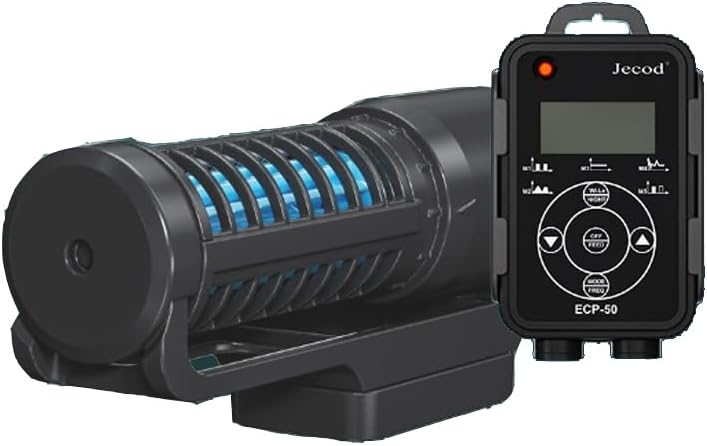
Figure 1: The Jebao Jecod ECP-50 Wave Maker Pump with its external controller. The pump unit is black with a blue impeller visible through the grates, and the controller features a digital display and control buttons.
2. Safety Instructions
Please read and understand all safety instructions before operating the Jebao Jecod ECP-50 Wave Maker Pump. Failure to follow these instructions may result in product damage, injury, or electrical shock.
- Electrical Safety: Always disconnect power to all aquarium equipment before performing any maintenance, installation, or handling of the pump. Ensure your hands are dry when plugging or unplugging the power adapter.
- Water Immersion: The pump unit is designed for submersible use only. The controller and power adapter are not waterproof and must be kept dry.
- Placement: Position the pump and controller in a location where they are not easily disturbed. Ensure the power cord forms a "drip loop" to prevent water from traveling along the cord and reaching the electrical outlet.
- Children and Pets: Keep the product and its components out of reach of children and pets to prevent accidental injury or damage.
- Damage Inspection: Before each use, inspect the pump, controller, and power cord for any signs of damage. Do not operate if any part is damaged.
- Intended Use: This pump is designed for aquarium use only. Do not use it for any other purpose.
3. Package Contents
Verify that all items are present in the package:
- Jebao Jecod ECP-50 Wave Maker Pump Unit
- External Controller
- Power Adapter
- Magnetic Mount
4. Installation and Setup
Follow these steps to properly install your ECP-50 Wave Maker Pump:
- Mounting the Pump:
- Ensure the aquarium glass thickness is less than 8mm (0.31 inches).
- Place the pump unit inside the aquarium, ensuring it is fully submerged.
- Align the external magnetic mount on the outside of the aquarium glass, directly opposite the pump unit. The strong magnets will secure the pump in place.
- Adjust the pump's position and angle to direct water flow as desired.
- Connecting the Controller:
- Connect the pump's cable to the designated port on the external controller.
- Connect the power adapter to the controller's power input port.
- Plug the power adapter into a suitable electrical outlet, ensuring a drip loop is formed with the power cord.
- Initial Power-Up:
- Once powered, the controller display will illuminate, and the pump will begin operation in its default mode.
- Refer to the "Operating Instructions" section to customize settings.
- Master and Slave Group Use (Optional):
- If using multiple ECP series pumps, you can link them for synchronized operation.
- Designate one controller as the "Master" and others as "Slave" units according to the controller's instructions (typically via a dedicated button or menu option).
- The Master controller will then dictate the mode and intensity for all connected Slave pumps.
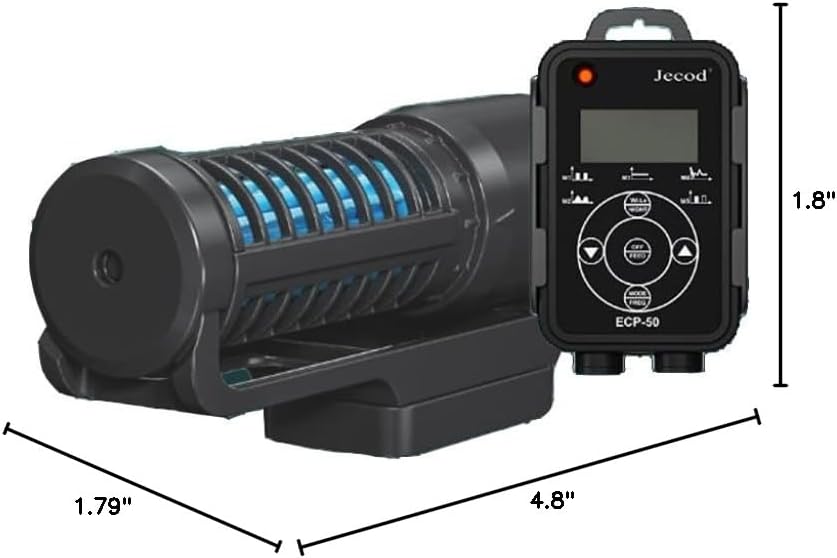
Figure 2: Dimensions of the Jebao Jecod ECP-50 Wave Maker Pump and its controller. The pump measures approximately 4.8 inches in length, 1.79 inches in width, and 1.8 inches in height.
5. Operating Instructions
The ECP-50 controller allows you to select various wave patterns and adjust pump intensity. Familiarize yourself with the controller buttons:
- ON/OFF Button: Powers the pump on or off.
- MODE Button: Cycles through different wave patterns (e.g., constant flow, pulse mode, random flow). The selected mode will be displayed on the LCD screen.
- FREQ Button: Adjusts the frequency or speed of the wave pattern in pulse or random modes.
- +/- Buttons (Up/Down Arrows): Adjusts the pump's output intensity or flow rate.
- FEED Button: Activates a temporary pause mode (typically 10 minutes) to allow for feeding without food being immediately drawn into the pump or filter. The pump will resume normal operation automatically after the set time.
Experiment with different modes and intensity settings to find the optimal water movement for your aquarium inhabitants and aquascape.
6. Maintenance
Regular maintenance ensures the longevity and efficient operation of your ECP-50 Wave Maker Pump.
- Disassembly:
- Always unplug the power adapter before attempting any maintenance.
- Carefully remove the pump unit from the aquarium.
- Disassemble the pump housing by twisting or unlatching the components as per the design to access the impeller.
- Cleaning:
- Rinse all pump components, including the impeller and housing, under clean running water.
- Use a soft brush or cotton swab to remove any algae, detritus, or mineral deposits from the impeller, impeller shaft, and inside the pump housing.
- For stubborn mineral deposits, a diluted vinegar solution can be used, followed by a thorough rinse with fresh water.
- Reassembly:
- Ensure all components are clean and free of debris before reassembly.
- Carefully reassemble the pump, ensuring all parts fit securely.
- Place the pump back into the aquarium and reconnect the power.
Perform cleaning at least once a month, or more frequently if you notice reduced flow or increased noise.
7. Troubleshooting
If you encounter issues with your ECP-50 Wave Maker Pump, refer to the following common problems and solutions:
| Problem | Possible Cause | Solution |
|---|---|---|
| Pump not turning on. | No power, loose connection, damaged power adapter/controller. | Check power outlet. Ensure all connections are secure. Inspect power adapter and controller for visible damage. |
| Reduced water flow. | Impeller clogged with debris/algae, mineral buildup, pump positioned incorrectly. | Disconnect power and clean the impeller and pump housing thoroughly. Adjust pump position for optimal flow. |
| Excessive noise or vibration. | Impeller obstructed, worn impeller, improper mounting, air trapped in pump. | Disconnect power and clean the impeller. Ensure the pump is securely mounted and fully submerged. Gently shake the pump to release trapped air. |
| Controller display not working. | No power, damaged controller. | Check power connection. If power is present and other components work, the controller may be faulty. |
8. Specifications
| Attribute | Detail |
|---|---|
| Model Number | ECP-50 |
| Brand | Jebao |
| Power Source | DC |
| Voltage | 24 Volts |
| Wattage | 12 Watts |
| Product Dimensions (Pump) | 4.8"L x 1.79"W x 1.8"H |
| Item Weight | 2 Pounds |
| Material | Stainless Steel (internal components), Plastic (housing) |
| Color | Black |
| Recommended Tank Length | Less than 60cm / 23 inches |
| Recommended Glass Thickness | Less than 8mm |
9. Warranty and Support
The Jebao Jecod ECP-50 Wave Maker Pump comes with a 1-year warranty through Amazon order for non-damage hardware issues. Please retain your proof of purchase for warranty claims.
For technical support or warranty inquiries, please contact the seller directly through your Amazon order history. Provide your order number and a detailed description of the issue to facilitate a quicker resolution.


