Introduction
This manual provides essential information for setting up, operating, and maintaining your Hisense 43E7NQ QLED Smart TV. Please read these instructions carefully before using your television and retain them for future reference.

Image: Front view of the Hisense 43E7NQ QLED Smart TV, showcasing its display and slim bezels.
Setup Guide
1. Unboxing and Package Contents
Carefully remove the TV from its packaging. Ensure all components are present:
- Hisense 43E7NQ QLED Smart TV
- Remote Control
- Batteries for Remote Control
- User Manual (this document)
- Quick Start Guide
- Power Cable
- TV Stand components (if applicable)
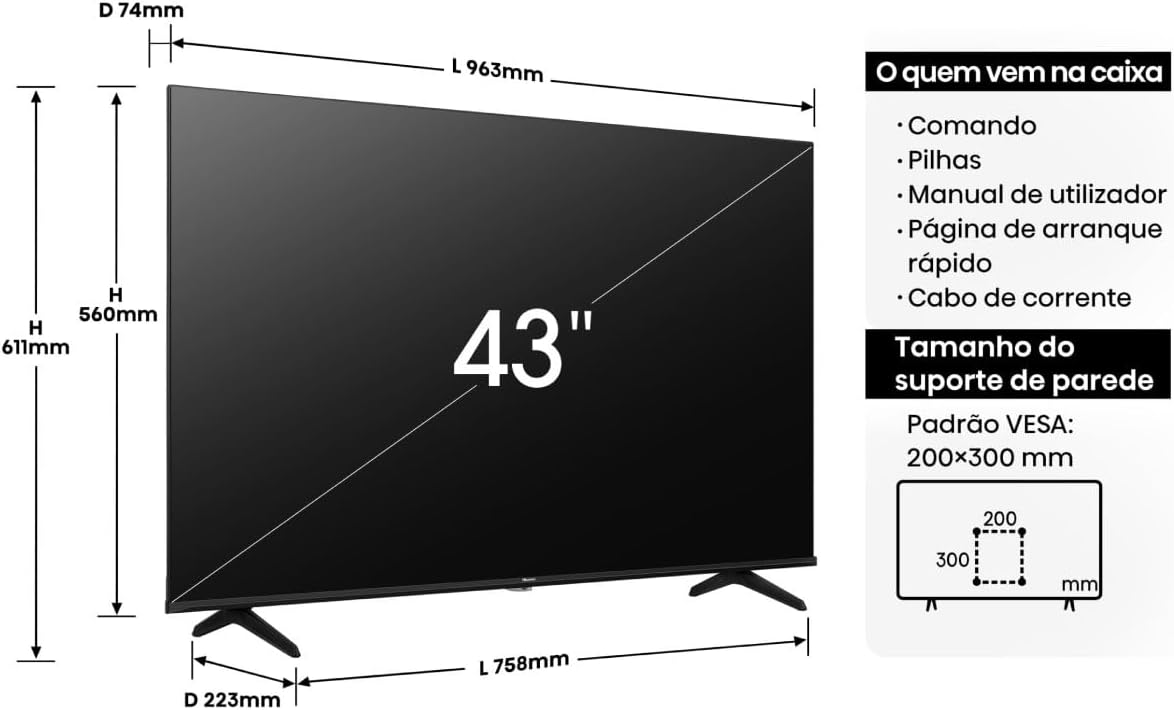
Image: A diagram illustrating the dimensions of the 43-inch TV and a list of items included in the box, such as the remote, batteries, user manual, quick start guide, and power cable. It also shows VESA wall mount compatibility (200x300 mm).
2. Physical Installation
You can install your TV on a stand or mount it on a wall. Refer to the separate wall mount instructions if applicable. For stand installation, attach the provided stands securely to the bottom of the TV.

Image: Multiple views of the Hisense 43E7NQ TV, showing the back panel with ports, a side profile demonstrating its slim design, a close-up of the bezel, and the design of the TV stand.
3. Connecting Peripherals
Connect your external devices (e.g., cable box, gaming console, Blu-ray player) to the appropriate ports on the back of the TV. The Hisense 43E7NQ features multiple HDMI and USB ports, as well as Ethernet for wired network connectivity.
4. Initial Power On and First-Time Setup
- Connect the power cable to the TV and a power outlet.
- Press the power button on the remote control or the TV.
- Follow the on-screen instructions to select your language, country, and connect to your Wi-Fi network.
- The TV will guide you through channel scanning and smart TV (VIDAA) setup.
Operating Instructions
1. Remote Control Functions
The included remote control allows you to navigate the TV's features. Insert the provided batteries, ensuring correct polarity.
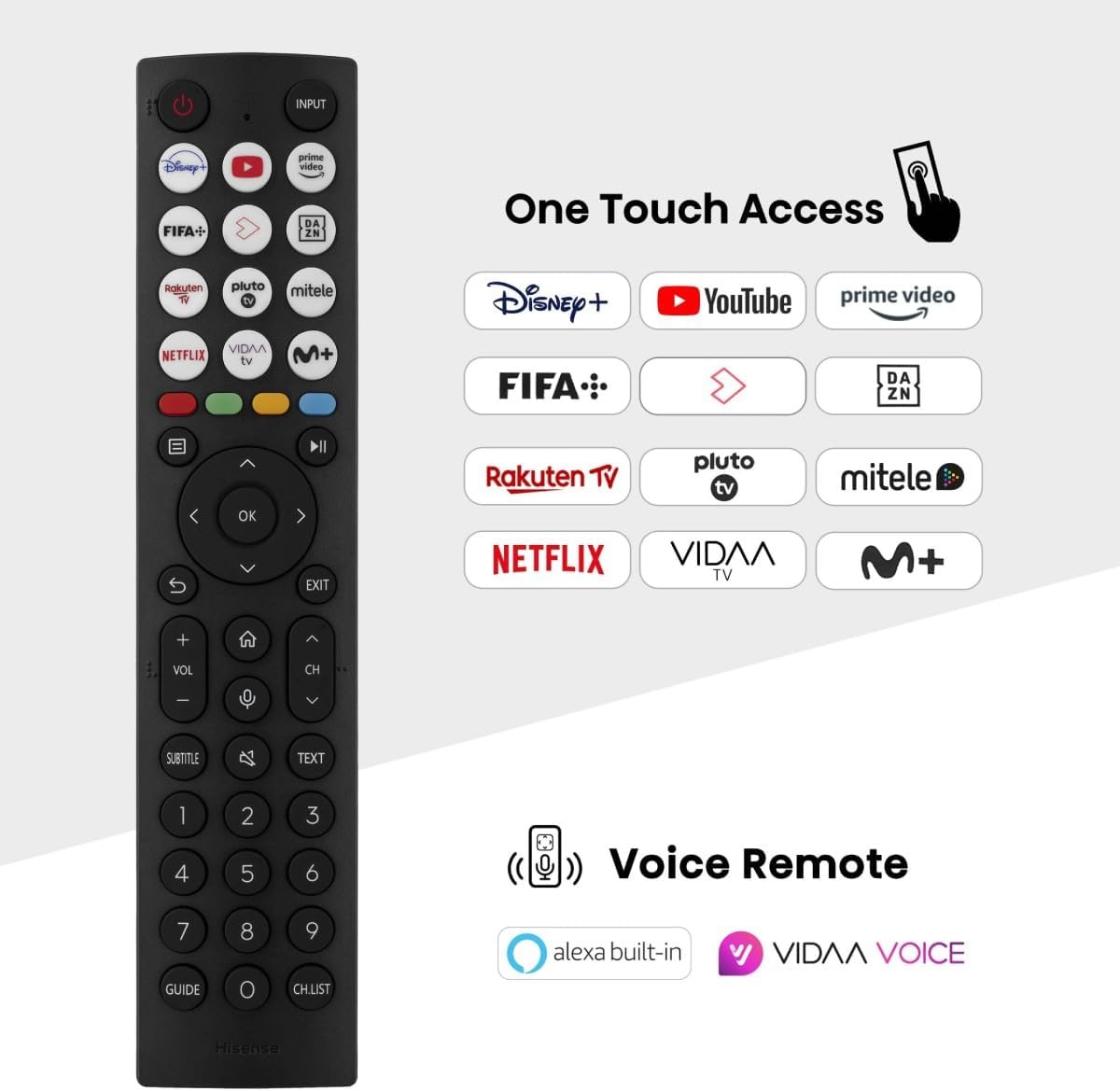
Image: The Hisense Smart TV remote control, highlighting dedicated buttons for popular streaming services like Disney+, YouTube, Prime Video, Netflix, and others. It also indicates voice control capabilities with Alexa built-in and VIDAA Voice.
- Power Button: Turns the TV on or off.
- Input Button: Selects input sources (HDMI, AV, etc.).
- Navigation Buttons (Up/Down/Left/Right/OK): Navigate menus and confirm selections.
- Volume Up/Down: Adjusts the volume level.
- Channel Up/Down: Changes TV channels.
- Home Button: Accesses the VIDAA Smart TV interface.
- Quick Access Buttons: Direct access to popular streaming apps.
- Voice Control Button: Activates voice commands (Alexa built-in, VIDAA Voice).
2. VIDAA Smart TV Features
The Hisense 43E7NQ runs on the VIDAA operating system, providing access to a wide range of applications and streaming services. Use the Home button on your remote to access the smart TV interface.

Image: A visual representation of the VIDAA Smart TV interface, displaying a variety of application icons for streaming services and other content, emphasizing its simple, fast, and secure global and local entertainment options.
3. Picture and Sound Settings
Your TV offers advanced picture and sound technologies for an enhanced viewing experience.
- Quantum Dot Colour: Provides a wider range of colors and improved color accuracy.
- Dolby Vision: Enhances contrast and detail in both bright and dark scenes.
- UHD Upscaling: Converts lower resolution content to near 4K quality.
- Direct Full Array: Delivers precise contrast and deep blacks across the screen.
- Filmmaker Mode: Preserves the original aspect ratio, colors, and frame rates to display movies as intended by the director.
- Dolby Atmos: Creates immersive, multi-dimensional audio.

Image: A scene depicting a flooded street with cars, viewed from a cinema audience perspective, illustrating the Filmmaker Mode feature which ensures content is displayed as originally intended by the creators.
4. Gaming Features
For gamers, the Hisense 43E7NQ includes features designed to optimize your experience.
- Game Mode Plus: Automatically reduces input lag for a more responsive gaming experience.
- ALLM (Auto Low Latency Mode): Automatically switches the TV to low-latency mode when a gaming console is detected.
- VRR (Variable Refresh Rate): Synchronizes the TV's refresh rate with the console's output for smoother gameplay.
- 60Hz VRR 120fps: Supports high frame rates at 60Hz VRR for fluid motion.

Image: A futuristic gaming scene with a spaceship, highlighting the 'Game Mode Plus' feature and its benefits like 120Hz High Refresh Rate, Game Bar, 60Hz VRR, Low Latency, MEMC, and ALLM for ultra-smooth gaming and incredible response.
5. Voice Control
Control your TV using voice commands with integrated Alexa or VIDAA Voice. Press the dedicated voice button on your remote and speak your command.

Image: A person holding a Hisense TV remote, demonstrating voice control functionality with Alexa built-in and VIDAA Voice, showing examples of voice commands like "show comedy movies" or "what's the weather forecast?".
6. Connectivity
- Bluetooth: Connect Bluetooth headphones or other audio devices wirelessly.
- Wi-Fi: Connect to your home network for internet access and smart features.
- Screen Mirroring (Apple AirPlay, Content Sharing): Share content from your mobile devices directly to the TV screen.
- Smart Home Ready: Integrate your TV with Google Home or Apple Home for centralized control.

Image: A person holding a smartphone, with its screen content mirrored onto a large Hisense TV, illustrating the screen mirroring and content sharing capabilities, including Apple AirPlay.
Maintenance
1. Cleaning Your TV
To clean the screen, gently wipe it with a soft, lint-free cloth. For stubborn marks, slightly dampen the cloth with water or a specialized screen cleaner. Avoid using harsh chemicals or abrasive materials. For the TV body, use a dry, soft cloth.
2. Software Updates
Your Hisense TV may receive software updates to improve performance and add new features. Ensure your TV is connected to the internet. You can check for updates manually through the TV's settings menu (usually under 'System' or 'About TV'). It is recommended to install updates when prompted.
Troubleshooting
If you encounter issues with your TV, refer to the following common problems and solutions:
| Problem | Possible Solution |
|---|---|
| No Power | Check if the power cable is securely connected to both the TV and the power outlet. Try a different outlet. Ensure the remote control batteries are not depleted. |
| No Picture / Black Screen | Verify the correct input source is selected. Check all cable connections (HDMI, AV). Try restarting the TV by unplugging it for a minute and plugging it back in. |
| No Sound | Check the volume level and ensure the TV is not muted. Verify external audio device connections if applicable. Check audio settings in the TV menu. |
| Remote Control Not Working | Replace the batteries. Ensure there are no obstructions between the remote and the TV's IR sensor. |
| Network Connection Issues | Restart your router and modem. Reconnect to the Wi-Fi network in the TV settings. For wired connections, ensure the Ethernet cable is properly connected. |
Technical Specifications
| Feature | Detail |
|---|---|
| Brand | Hisense |
| Model Number | 43E7NQ |
| Screen Size | 43 inches |
| Display Technology | QLED |
| Resolution | 4K (UHD) |
| Refresh Rate | 60 Hz (with 60Hz VRR 120fps support) |
| Operating System | VIDAA |
| Connectivity | Bluetooth, HDMI, USB, Wi-Fi, Ethernet |
| Special Features | Quantum Dot Colour, Dolby Vision, Dolby Atmos, Game Mode Plus, AI Sports Mode, Voice Control (Alexa built-in, VIDAA Voice), Filmmaker Mode, Screen Mirroring (Apple AirPlay) |
| Dimensions (with stand) | Approx. 96.3 cm (W) x 56 cm (H) x 7.4 cm (D) (TV only) / 61.1 cm (H) with stand |
| VESA Wall Mount | 200x300 mm |
Warranty and Support
Warranty Information
Your Hisense 43E7NQ QLED Smart TV comes with a limited manufacturer's warranty. Please refer to the warranty card included in your product packaging or visit the official Hisense website for detailed terms and conditions regarding warranty coverage and duration.
Customer Support
For technical assistance, troubleshooting beyond this manual, or service inquiries, please contact Hisense customer support. Contact information can typically be found on the Hisense official website or in your product documentation.
Online Support: Visit the official Hisense support website for FAQs, software downloads, and further assistance.
Telephone Support: Refer to your regional Hisense website for local contact numbers.


