
1. Introduction
This manual provides comprehensive instructions for the SUUNY W&O X9+ Ultra 2 Smartwatch. It covers device setup, operation, maintenance, and troubleshooting to ensure optimal performance and user experience. The X9+ Ultra 2 is a feature-rich smartwatch designed for daily use, offering advanced functionalities such as gesture control, Bluetooth calling, NFC, AI-generated watch faces, and integrated ChatGPT.
2. Package Contents
Upon opening your SUUNY W&O X9+ Ultra 2 Smartwatch package, please verify that all the following items are included:
- SUUNY W&O X9+ Ultra 2 Smartwatch
- Silicone Watch Strap (x2)
- Nylon Alpine Loop Strap
- Charging Cable
- User Manual (this document)
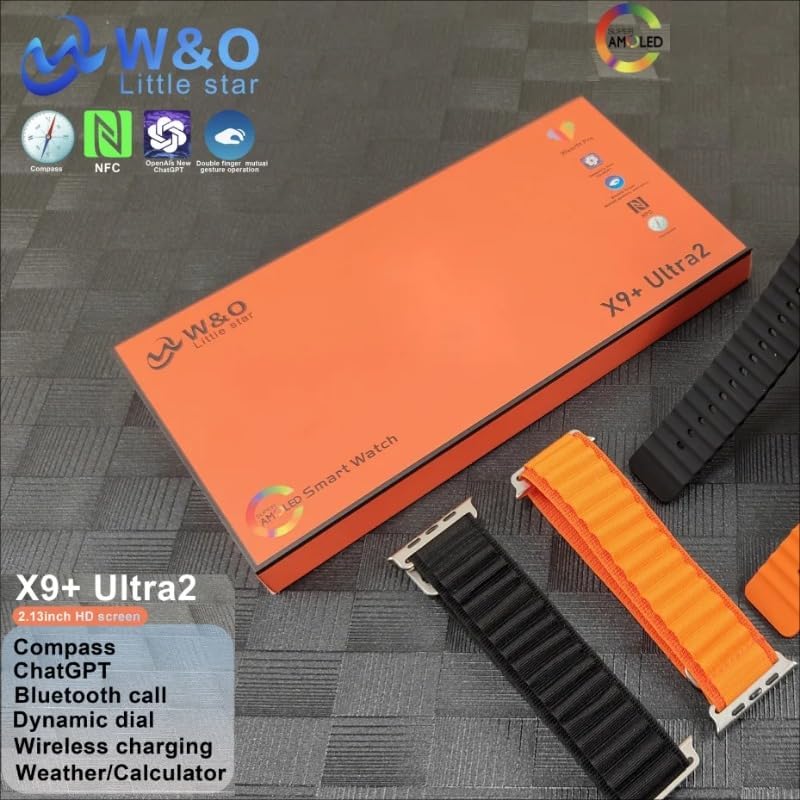
Image: The SUUNY W&O X9+ Ultra 2 Smartwatch packaging, displaying the watch body, two silicone straps, and an alpine nylon strap.

Image: The SUUNY W&O X9+ Ultra 2 Smartwatch box, featuring icons for NFC, ChatGPT, and Compass, along with the "W&O Little Star" logo.
3. Setup
3.1 Charging the Smartwatch
- Connect the charging cable to a USB power adapter (not included) or a computer's USB port.
- Attach the magnetic end of the charging cable to the charging contacts on the back of the smartwatch. Ensure it snaps into place securely.
- The watch display will indicate charging status. Allow approximately 2-3 hours for a full charge.
3.2 Pairing with Your Smartphone
To unlock the full potential of your smartwatch, pair it with your smartphone using the Wearfit Pro application.
- Download the Wearfit Pro app from your smartphone's app store (App Store for iOS, Google Play Store for Android).
- Ensure Bluetooth is enabled on your smartphone.
- Open the Wearfit Pro app, register or log in, and follow the on-screen instructions to add a new device.
- Select "X9+ Ultra 2" from the list of available devices.
- Confirm the pairing request on both your smartphone and the smartwatch.
4. Operating Instructions
This section details the various functions and features of your SUUNY W&O X9+ Ultra 2 Smartwatch.

Image: The SUUNY W&O X9+ Ultra 2 Smartwatch displaying a vibrant, abstract watch face with the current date and time.
4.1 Basic Navigation
- Touchscreen: Swipe left/right, up/down to navigate menus and access different functions. Tap to select.
- Side Button(s): Typically used for power on/off, returning to the home screen, or accessing the app menu. Refer to the watch's on-screen prompts for specific button functions.
4.2 Gesture Control
The smartwatch supports gesture control for convenient interaction. Specific gestures can be used to answer or hang up calls, and to dismiss alarms. Refer to the Wearfit Pro app settings for customization and detailed gesture instructions.
4.3 Bluetooth Calling
Once paired with your smartphone, the X9+ Ultra 2 allows you to make and receive calls directly from your wrist. Ensure the Bluetooth connection is stable for clear audio.
- Answering Calls: When a call comes in, tap the green answer icon on the watch screen or use the designated gesture.
- Making Calls: Access the dialer or contacts list on your watch to initiate a call.
4.4 NFC Functionality
The integrated NFC (Near Field Communication) allows for various convenient functions, such as access control or quick pairing with compatible devices. Configure NFC settings within the Wearfit Pro app.
4.5 AI-Generated Watch Faces
Personalize your smartwatch with unique AI-generated watch faces. Explore the options available in the Wearfit Pro app to customize your display.
4.6 ChatGPT Integration
Access ChatGPT directly from your smartwatch for quick information, queries, or conversational interactions. This feature requires an active internet connection via your paired smartphone.
4.7 Local Storage and Playback
With 1GB of internal memory, the smartwatch supports local audio playback and recording functions. Transfer audio files from your smartphone via the Wearfit Pro app to enjoy music directly from your watch.
4.8 Smart Island Feature
The Smart Island feature provides dynamic notifications and quick access to ongoing activities, such as calls, timers, or music playback, in an intuitive display area.
4.9 Mini-Games
The smartwatch includes a selection of mini-games for entertainment. Access them through the app menu on your watch.
4.10 Muslim Prayer Function
A dedicated Muslim prayer function is included, providing prayer times and other relevant features. Configure this feature within the watch settings or the Wearfit Pro app.
5. Maintenance
5.1 Cleaning Your Smartwatch
- Wipe the watch screen and body with a soft, lint-free cloth.
- For stubborn smudges, slightly dampen the cloth with water. Avoid using harsh chemicals or abrasive materials.
- Clean the charging contacts regularly to ensure efficient charging.
5.2 General Care
- Avoid exposing the smartwatch to extreme temperatures or direct sunlight for prolonged periods.
- While the watch may have some water resistance, avoid submerging it in water or exposing it to high-pressure water jets unless explicitly stated in the specifications.
- Handle the watch with care to prevent drops or impacts.
6. Troubleshooting
If you encounter issues with your smartwatch, refer to the following common solutions:
- Watch not turning on: Ensure the watch is fully charged. Connect it to the charger and wait a few minutes before attempting to power it on.
- Cannot pair with smartphone:
- Ensure Bluetooth is enabled on your phone and the watch.
- Make sure the Wearfit Pro app is installed and running.
- Restart both your phone and the smartwatch.
- Forget the device in your phone's Bluetooth settings and try pairing again.
- Notifications not appearing: Check notification settings in both the watch and the Wearfit Pro app. Ensure all necessary permissions are granted to the app on your smartphone.
- Inaccurate data (steps, heart rate): Ensure the watch is worn snugly on your wrist, not too loose or too tight.
- Short battery life: Reduce screen brightness, disable unnecessary features, and limit background app refresh.
7. Specifications
| Feature | Detail |
|---|---|
| Brand | SUUNY |
| Model | X9+ Ultra 2 |
| Display Size | 2.13 inches (AMOLED, 410 x 502 resolution) |
| Connectivity | Bluetooth, NFC |
| Special Features | Bluetooth Call, Gesture Control, ChatGPT, Smart Island, AI Watch Faces, Mini-Games, Muslim Prayer Function |
| Memory Storage Capacity | 1 GB |
| Compatible Devices | Smartphone |
| Target Audience | Men |
| Color | Black |
8. Warranty and Support
For warranty information and customer support, please refer to the documentation provided with your purchase or contact the retailer. Keep your proof of purchase for any warranty claims.
For further assistance, visit the official SUUNY W&O website or contact their customer service department.