
1. Safety Information
Please read and understand all safety instructions before operating the Topping A50 III. Keep this manual for future reference.
- Do not expose the device to rain, moisture, or extreme temperatures.
- Avoid placing the device near heat sources or in direct sunlight.
- Ensure proper ventilation to prevent overheating.
- Use only the provided power adapter.
- Do not attempt to disassemble or modify the device. Refer all servicing to qualified personnel.
- Avoid listening at high volume levels for extended periods to prevent hearing damage.
2. Package Contents
Verify that all items are present in the package:
- Topping A50 III Headphone Amplifier
- Power Adapter
- User Manual (this document)
3. Product Overview
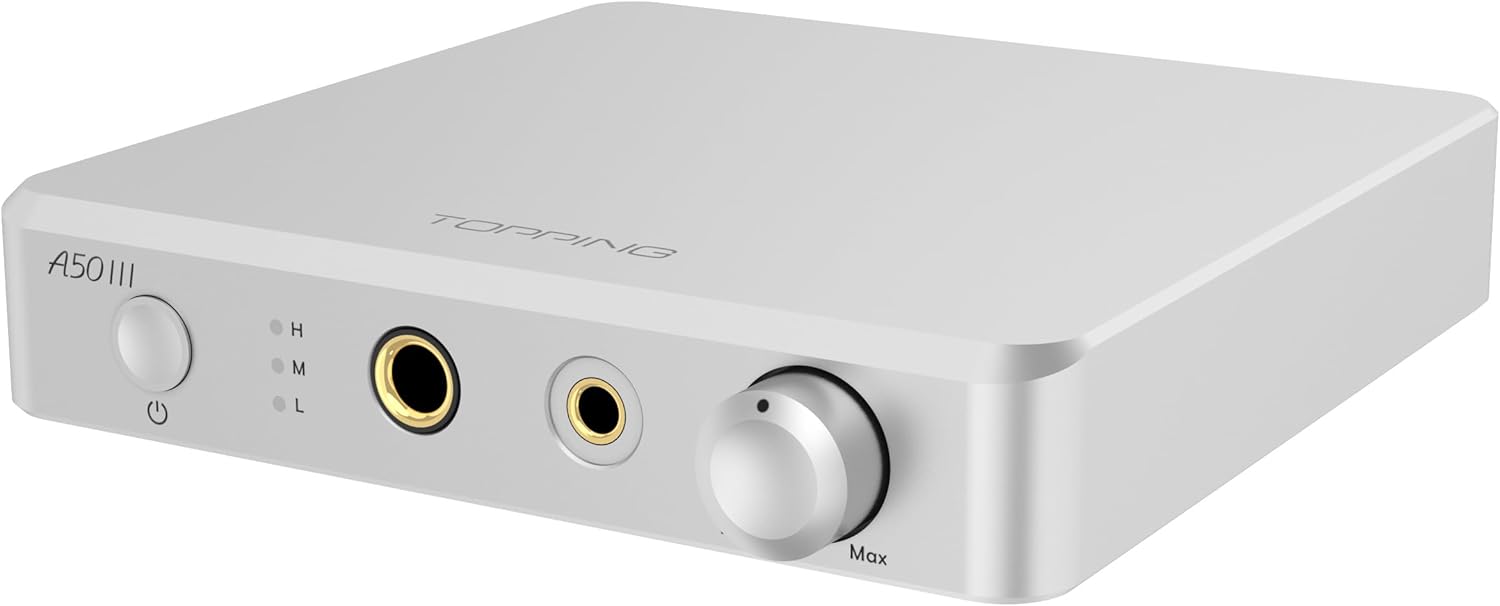
The Topping A50 III is a high-performance headphone amplifier designed for desktop audio setups. It features advanced NFCA (Nested Feedback Composite Amplifier) modules, offering exceptional audio fidelity and powerful output capabilities for a wide range of headphones.


4. Key Features
- Ultra-high Performance NFCA Modules: Utilizes NFCA (Nested Feedback Composite Amplifier) modules with Voltage Current hybrid feedback architecture and UHGF (UltraHigh Gain Feedback) technology for excellent DC and AC performance.
- High-Output Current Drive: Capable of driving low-impedance headphones with ease.
- Full Aluminum Case: Unique integrated design from solid aluminum bricks, providing excellent electromagnetic shielding, smooth appearance, and superior strength.
- Versatile Application: Features 6.35mm single-ended and 4.4mm balanced headphone jacks, as well as RCA single-ended and TRS balanced inputs for various combinations.
- Wide Headphone Adaptation: Three gain selections (Low, Medium, High) to suit all types of headphones, including sensitive IEMs with a low noise floor of 0.3uVrms.
- Powerful Output: Delivers up to 3500mW x 2, ensuring most headphones maximize their performance with a low distortion rate (<0.1%) even at high power.
- 12V Trigger Function: Can be switched on and off with a compatible device (e.g., Topping D50 III) via a 12V Trigger connection.
5. Setup
5.1 Connecting Power
- Ensure the A50 III is powered off.
- Connect the provided power adapter to the DC 15V input on the rear panel of the A50 III.
- Plug the power adapter into a suitable wall outlet.
5.2 Connecting Audio Sources
The A50 III supports both single-ended (RCA) and balanced (TRS) audio inputs.
- RCA Input: Connect your audio source (e.g., DAC, CD player) to the RCA L/R input jacks on the rear panel using RCA cables.
- TRS Balanced Input: Connect your audio source to the TRS L/R input jacks on the rear panel using 6.35mm TRS cables.
5.3 Connecting Headphones
The A50 III offers two headphone output options on the front panel:
- 6.35mm Single-Ended: Plug your headphones into the 6.35mm (1/4 inch) headphone jack.
- 4.4mm Balanced: For balanced headphones, use the 4.4mm balanced headphone jack.
5.4 12V Trigger Connection (Optional)
If you have a compatible device with a 12V Trigger output (e.g., Topping D50 III), you can connect it to the 12V Trigger input on the A50 III's rear panel. This allows the A50 III to power on/off synchronously with the connected device.
6. Operation
6.1 Power On/Off
Press the power button on the front panel to turn the A50 III on or off. The LED indicator will illuminate when the device is powered on.
6.2 Volume Control
Rotate the large knob on the front panel clockwise to increase volume and counter-clockwise to decrease volume. Start with a low volume setting before playing audio.
6.3 Gain Selection
The A50 III features three gain settings (L: Low, M: Medium, H: High) to match the sensitivity of your headphones. Use the gain switch on the front panel to select the appropriate setting. Higher gain provides more power for demanding headphones, while lower gain is suitable for sensitive IEMs to avoid noise and excessive volume.
6.4 Input Selection
The A50 III automatically detects the active input. If multiple inputs are connected, ensure only one source is playing at a time or switch between them using your source device.
7. Connectivity
The A50 III provides comprehensive connectivity options:
7.1 Front Panel Outputs
- 6.35mm Headphone Output: Standard single-ended headphone jack.
- 4.4mm Balanced Headphone Output: For balanced headphone connections.
7.2 Rear Panel Inputs
- RCA L/R Input: Single-ended analog audio input.
- TRS L/R Input: Balanced analog audio input.
- 12V Trigger Input: For synchronous power control with compatible devices.
8. Specifications
Detailed technical specifications for the Topping A50 III:
| Parameter | SE IN/SE OUT | BAL IN/SE OUT | SE IN/BAL OUT | BAL IN/BAL OUT |
|---|---|---|---|---|
| THD+N @1kHz A-wt | <0.00006% (500mW@32Ω) <0.00006% (80mW@300Ω) | <0.00007% (500mW@32Ω) <0.00006% (80mW@300Ω) | <0.00007% (2000mW@32Ω) <0.00006% (320mW@300Ω) | <0.00012% (2000mW@32Ω) <0.00008% (320mW@300Ω) |
| THD @20-20kHz 90kBW | <0.0002% (500mW@32Ω) <0.0001% (80mW@300Ω) | <0.0005% (500mW@32Ω) <0.0003% (80mW@300Ω) | <0.0002% (2000mW@32Ω) <0.0001% (320mW@300Ω) | <0.0002% (2000mW@32Ω) <0.0001% (320mW@300Ω) |
| SNR @MAX OUT 1kHz A-wt | 141dB | 136dB | 144dB | 137dB |
| Dynamic Range @1kHz A-wt | 141dB | 136dB | 144dB | 137dB |
| Frequency Response | 20Hz-40kHz (±0.05dB) 10Hz-100kHz (±0.1dB) | 20Hz-40kHz (±0.1dB) 10Hz-100kHz (±0.5dB) | 20Hz-40kHz (±0.05dB) 10Hz-100kHz (±0.1dB) | 20Hz-40kHz (±0.05dB) 10Hz-100kHz (±0.1dB) |
| Output Level | 21Vpp @G=L/M/H | 21Vpp @G=L/M/H | 18Vpp @G=L 42Vpp @G=M/H | 18Vpp @G=L 42Vpp @G=M/H |
| AP Measured Noise Level @A-wt | <0.7uVrms @G=L/M <1.2uVrms @G=H | <0.7uVrms @G=L/M <1.1uVrms @G=H | <0.9uVrms @G=L/M <2.1uVrms @G=H | <0.9uVrms @G=L/M <2.1uVrms @G=H |
| Actual Noise Level* @A-wt | <0.3uVrms @G=L/M <1.0uVrms @G=H | <0.3uVrms @G=L/M <1.0uVrms @G=H | <0.7uVrms @G=L/M <2.0uVrms @G=H | <0.7uVrms @G=L/M <2.0uVrms @G=H |
| Input Sensitivity | 13Vrms @G=L 8.0Vrms @G=M 1.9Vrms @G=H | 9.2Vrms @G=L 8.0Vrms @G=M 1.9Vrms @G=H | 13Vrms @G=L 7.8Vrms @G=M 1.9Vrms @G=H | 9.2Vrms @G=L 7.8Vrms @G=M 1.9Vrms @G=H |
| Gain | -12.0dB @G=L 0dB @G=M 11.9dB @G=H | -12.0dB @G=L 0dB @G=M 11.7dB @G=H | -6.0dB @G=L 6.0dB @G=M 17.9dB @G=H | -6.0dB @G=L 6.0dB @G=M 17.7dB @G=H |
| Output Impedance | <0.1Ω | <0.1Ω | <0.2Ω | <0.2Ω |
| Input Impedance | 10.0kΩ @G=L 2.5kΩ @G=M/H | 2.0kΩ @G=L/M/H | 10.0kΩ @G=L 2.5kΩ @G=M/H | 2.0kΩ @G=L/M/H |
| Output Power (THD+N<0.1%) | 2150mWx2 @16Ω 1400mW x 2@32Ω 190mW x 2@300Ω 100mW x 2@600Ω | 3500mW x 2 @32Ω 2700mW x 2 @64Ω 760mW x 2@300Ω 395mW x 2@600Ω | ||
| Load Impedance | >8Ω | |||
| Package Dimensions | 9.57 x 7.36 x 2.44 inches | |||
| Item Weight | 2.09 pounds (0.95 Kilograms) | |||
| Color | Silver | |||
| Connectivity Technology | RCA | |||
| Controller Type | Button | |||
| Compatible Devices | Speaker | |||
| Audio Output Mode | Stereo | |||
| Surround Sound Channel Configuration | 2.0 | |||
*Note: The actual noise level is obtained by boosting the noise of A50 III by 40dB using a low noise amplifier in front of the APx555B then dividing the measured noise by 100 times.
9. Troubleshooting
If you encounter issues with your Topping A50 III, refer to the following common troubleshooting steps:
- No Sound:
- Check all cable connections (power, input, headphones).
- Ensure the A50 III is powered on and the volume is not at minimum.
- Verify the audio source is playing and its volume is adequate.
- Confirm the correct input is selected on your source device.
- Distorted Sound:
- Reduce the volume on both the A50 III and your audio source.
- Check if the gain setting is too high for your headphones. Try a lower gain setting.
- Inspect audio cables for damage or loose connections.
- Device Not Powering On:
- Ensure the power adapter is securely connected to both the A50 III and the wall outlet.
- Test the wall outlet with another device to confirm it has power.
- If using the 12V Trigger, ensure the connected device is powered on and functioning correctly.
10. Maintenance
To ensure the longevity and optimal performance of your A50 III:
- Cleaning: Use a soft, dry cloth to clean the exterior of the device. Avoid using harsh chemicals or abrasive materials.
- Storage: When not in use for extended periods, store the device in a cool, dry place away from direct sunlight and dust.
- Handling: Handle the device with care. Avoid dropping it or subjecting it to strong impacts.
11. Warranty and Support
The Topping A50 III is covered by a manufacturer's warranty. For detailed warranty information, technical support, or service inquiries, please refer to the warranty card included with your product or visit the official Topping website. Please retain your proof of purchase for warranty claims.


