
TORRAS COOLiFY Air
TORRAS COOLiFY Air Upgraded Neck Fan Air Conditioner User Manual
Model: COOLiFY Air | Brand: TORRAS
1. Introduction
The TORRAS COOLiFY Air Upgraded Neck Fan Air Conditioner is designed to provide instant cooling relief and comfort. Utilizing advanced cooling technology, this portable device offers a personal climate control solution for various environments. It features a lightweight, ergonomic design for comfortable wear and multiple operating modes to suit your needs.

Figure 1: The TORRAS COOLiFY Air Neck Fan, showcasing its sleek, wearable design.
Key features include:
- Instant Cool Relief: Features the Ku 2.0 Peltier Radiator and 4397mm² Ceramic semiconductor radiator for rapid cooling.
- High-Speed Airflow: 3D Airflow Design with 36 air vents and a 5000 RPM High-Speed Motor for consistent cooling.
- Ergonomic Comfort: Bladeless design, metal honeycomb mesh for safety, soft silicone material, lightweight (285g), and quiet operation (31dB).
- Long-Lasting Battery: Up to 2-4 hours in cooling mode and 3.5-8 hours in fan mode, with Type-C fast charging.
2. Setup
2.1 Charging the Device
Before first use, fully charge your COOLiFY Air device. Use the provided USB-C braided fast-charging cable.
- Connect the USB-C end of the cable to the charging port on the COOLiFY Air device.
- Connect the other end of the cable to a compatible USB power adapter (not included) or a computer USB port.
- The device typically takes approximately 2 hours to fully charge.
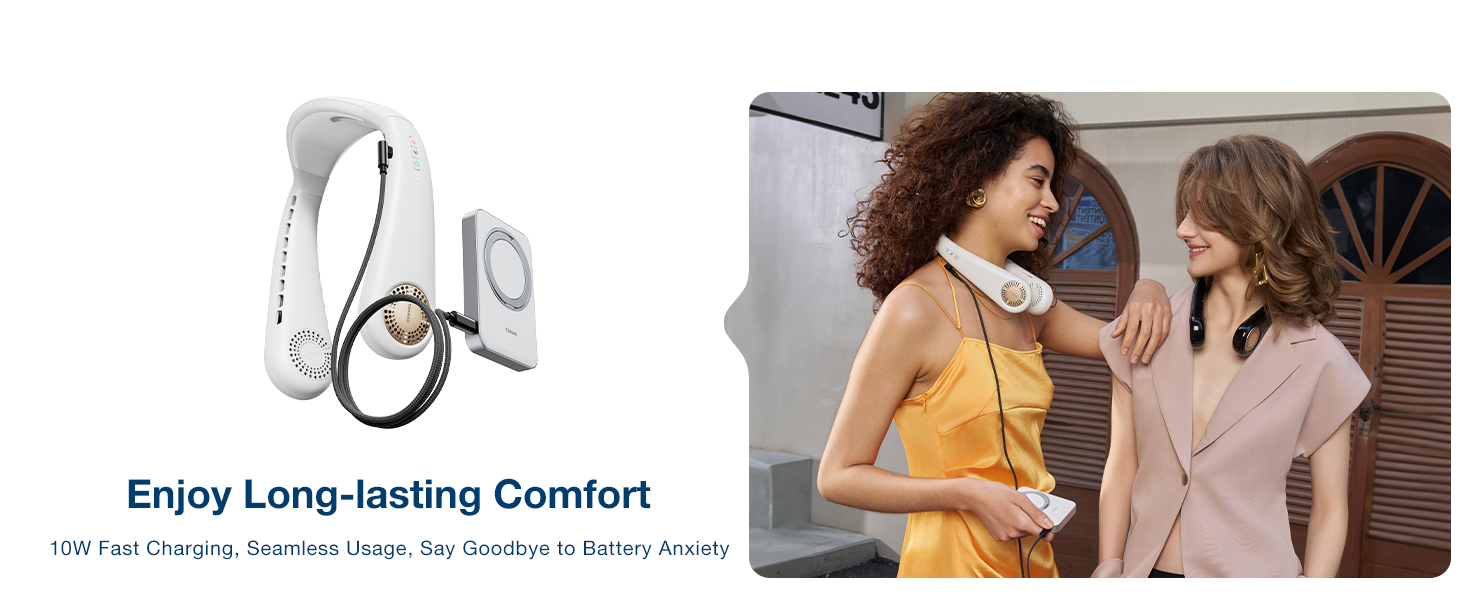
Figure 2: The COOLiFY Air device connected to its USB-C charging cable, illustrating the charging process.
2.2 Wearing the Device
The COOLiFY Air is designed for comfortable wear around the neck.
- Gently open the device and place it around your neck. The soft silicone material allows for adjustment to fit various neck sizes.
- Ensure the cooling plate at the back of the device makes contact with the nape of your neck for optimal cooling performance.

Figure 3: A person wearing the TORRAS COOLiFY Air, demonstrating its ergonomic fit and discreet appearance.
3. Operating Instructions
3.1 Power On/Off and Fan Modes
The device features a push-button control for power and fan speed adjustment.
- Power On: Press the power button once to turn on the device. It will start in the lowest fan mode.
- Adjust Fan Speed: Each subsequent press of the power button will cycle through fan speeds: Low, Medium, High.
- Power Off: After the highest fan speed, pressing the button again will turn off the device.
3.2 Cooling Mode
To activate the cooling function, which utilizes the Peltier Radiator:
- With the device powered on, press and hold the power button for approximately 2 seconds. The cooling indicator light will illuminate.
- The cooling plate at the back of the neck will activate, providing instant cool relief.
- To deactivate cooling mode, press and hold the power button again for 2 seconds.

Figure 4: An internal view of the COOLiFY Air's cooling technology, highlighting the Peltier Radiator and cooling particles.
3.3 Heat Therapy Mode (If Applicable)
The COOLiFY Air also offers a heat therapy function for warmth in cooler conditions.
- Refer to your specific model's instructions for activating heat therapy, as this feature may vary.

Figure 5: Visual representation of the COOLiFY Air operating in both cooling and heating modes, showing the targeted areas of effect.
3.4 Battery Life
Battery life varies depending on the selected mode:
- Cooling Mode: Approximately 2-4 hours.
- Fan Mode: Approximately 3.5-8 hours.

Figure 6: An infographic detailing the expected battery life for different operating modes of the COOLiFY Air.
4. Maintenance
To ensure the longevity and optimal performance of your COOLiFY Air device, follow these maintenance guidelines:
- Cleaning: Wipe the exterior of the device with a soft, damp cloth. Do not use harsh chemicals or abrasive cleaners.
- Air Vents: Periodically check the air vents for any dust or debris accumulation. Use a soft brush or compressed air to gently clear them.
- Storage: When not in use for extended periods, store the device in a cool, dry place, away from direct sunlight and extreme temperatures.
- Avoid Water Immersion: The device is not waterproof. Do not immerse it in water or expose it to heavy rain.
5. Troubleshooting
If you encounter issues with your COOLiFY Air, refer to the following common problems and solutions:
| Problem | Possible Cause | Solution |
|---|---|---|
| Device does not turn on. | Low battery or no charge. | Charge the device fully using the provided USB-C cable. |
| Cooling effect is weak. | Cooling mode not activated, or ambient temperature is too high. | Ensure cooling mode is activated (hold power button). For optimal performance, use in environments where the ambient temperature is not excessively high. Ensure the cooling plate is in direct contact with your neck. |
| Battery life is shorter than expected. | Frequent use of cooling mode, or high fan speed. | Cooling mode consumes more power. To extend battery life, use fan-only modes or lower fan speeds when possible. Ensure the device is fully charged before use. |
| Unusual noise during operation. | Obstruction in air vents or internal issue. | Check air vents for obstructions and clear them. If the noise persists, contact customer support. |
If the problem persists after trying these solutions, please contact TORRAS customer support for assistance.
6. Specifications
| Feature | Detail |
|---|---|
| Brand | TORRAS |
| Model Name | COOLiFY Air |
| Color | 2024 Black |
| Power Source | Battery Powered |
| Product Dimensions | 7.83"D x 10.24"W x 2.76"H |
| Item Weight | 400 Grams (14.1 ounces) |
| Noise Level | 31 dB |
| Speed | 5000 RPM |
| Voltage | 12 Volts (DC) |
| Control Method | Touch |
| Connector Type | USB Type C |
| Number of Power Levels | 3 |
| Batteries | 2 Lithium Polymer batteries (included) |
| Special Features | Fan/Cooler/Heat therapy, Ultra-light Portable Cooling, 4397mm² Cooling area, Wearable, 244 Cooling particles |
7. Warranty and Support
TORRAS is committed to providing excellent customer service and support for your COOLiFY Air device.
7.1 Warranty Information
Your COOLiFY Air wearable air conditioner comes with a 180-day limited warranty from the date of purchase.
7.2 Customer Support
For any shipping issues, product issues, usage problems, or technical support, TORRASCare is available 24/7.
- Register for extended quality service.
- Call us at: +1 888-881-8818 (Mon-Fri 9am-5pm PT)
- 24/7 Email support: support@torraslife.com
Video 1: An official product video from TORRASLife showcasing the 2024 Ultra-light Portable Neck Air Conditioner in use, highlighting its features and benefits.
Related documentsCOOLiFY Air


Ask a question about this manual
Ask about setup, troubleshooting, compatibility, parts, safety, or missing instructions. Manuals+ will review the question and use this page’s manual context to help answer it.