
1. Introduction and Overview
The TOPPING D50 III is a high-performance Digital-to-Analog Converter (DAC) designed to deliver exceptional audio fidelity for discerning audiophiles. Featuring dual ES9039Q2M DAC chips, it supports ultra-high-resolution audio formats up to DSD 512 and PCM 768kHz. Its advanced engineering, including a novel I/V conversion circuit, ensures minimal distortion and noise, providing a pristine listening experience. The D50 III also offers versatile connectivity options and advanced features like ten-band PEQ adjustment and a 12V trigger for integrated system control.

Figure 1.1: Front view of the TOPPING D50 III Digital-Analog Converter in Silver.
2. Package Contents
Please verify that all items listed below are included in your package. If any items are missing or damaged, please contact customer support.
- TOPPING D50 III Unit
- USB A-C Cable
- USB C-C Cable
- Bluetooth Antenna
- Product Information Card
- Guide for Bluetooth Remote

Figure 2.1: Contents included in the TOPPING D50 III package.
3. Product Features
The TOPPING D50 III incorporates several advanced features to enhance your audio experience:
- Dual ES9039Q2M DAC Chips: Equipped with two high-performance ES9039Q2M chips, one for each channel, ensuring superior signal-to-noise ratio, dynamic range, and ultra-low distortion.
- Advanced I/V Conversion Circuit: Features a newly designed current-to-voltage conversion circuit that significantly reduces distortion and noise, maximizing the DAC chip's performance.
- High-Resolution Audio Support: Supports audio playback up to DSD 512 (Native) and PCM 768kHz/32bit, catering to the highest fidelity audio formats.
- Bluetooth 5.1 with LDAC: Offers high-definition wireless audio streaming with support for LDAC and other advanced Bluetooth codecs, providing excellent sound quality without cables.
- Dual Type-C Interfaces: Provides flexible and stable connectivity for signal transmission and power. An auxiliary power supply is recommended for optimal performance, especially when fixed on a desktop or connected to a mobile phone.
- Versatile Outputs: Includes both RCA and TRS balanced outputs to connect to a wide range of audio systems.
- Preamp Functionality: Can function as a preamplifier, allowing direct volume control for simplified audio setups.
- Ten-Band PEQ Adjustment: Offers a customizable ten-band parametric equalizer (PEQ) for precise sound profile adjustments, allowing users to fine-tune frequency gain and bandwidth. This function supports PCM 192kHz/32bit and is supported only for USB input.
- 12V Trigger Output: Enables synchronized power control with other compatible audio components, such as the A50 III amplifier, for seamless system integration.

Figure 3.1: Overview of TOPPING D50 III's core features.

Figure 3.2: Detailed view of the dual ES9039Q2M DACs and I/V conversion.

Figure 3.3: LDAC wireless and dual Type-C interface benefits.

Figure 3.4: Visual representation of the ten-band PEQ adjustment.
4. Setup and Connections
Follow these steps to set up your TOPPING D50 III DAC:
- Placement: Place the D50 III on a stable, flat surface away from direct sunlight, heat sources, and excessive moisture. Ensure adequate ventilation.
- Connect Inputs:
- USB: Connect your computer or source device to the D50 III's USB-C input using the provided USB A-C or USB C-C cable. The USB hardware is based on XMOS XU316 and Thesycon driver.
- Optical/Coaxial: For digital audio sources, connect an optical or coaxial cable from your source to the corresponding input on the D50 III.
- Bluetooth: Attach the provided Bluetooth antenna to the 'BT' connector on the rear panel.
- Connect Outputs:
- RCA Output: Connect RCA cables from the D50 III's 'R out' and 'L out' RCA ports to your amplifier or active speakers.
- TRS Balanced Output: For balanced connections, use TRS cables from the D50 III's 'R out' and 'L out' TRS ports to your balanced amplifier or active speakers.
- Power Connection: Connect the power adapter to the 'POWER' USB-C port or DC15V input on the rear panel and plug it into a suitable power outlet.
- 12V Trigger (Optional): If you have compatible equipment (e.g., TOPPING A50 III amplifier), connect a 12V trigger cable from the D50 III's '12V TRIGGER OUT' to the '12V TRIG IN' on the other device for synchronized power control.

Figure 4.1: Rear panel connections of the TOPPING D50 III.

Figure 4.2: Example setup: D50 III connected to desktop speakers.

Figure 4.3: Example setup: D50 III connected to a laptop and speakers.
Video 4.1: An overview of the TOPPING D50 III, showcasing its design, various input/output ports, and connectivity options, including its compatibility with the A50 III amplifier.
5. Operation
Operating the TOPPING D50 III is straightforward:
- Power On/Off: Press the power button on the front panel to turn the unit on or off.
- Input Selection: Use the input selection button or remote control to cycle through available inputs (USB, Bluetooth, Optical, Coaxial). The selected input will be displayed on the screen.
- Volume Control: If using the D50 III as a preamp, adjust the volume using the dedicated volume knob or the remote control.
- Bluetooth Pairing: To pair a new Bluetooth device, select the Bluetooth input. The D50 III will enter pairing mode. Search for 'TOPPING D50 III' on your device and connect.
- PEQ Adjustment: For advanced users, the ten-band PEQ (Parametric Equalizer) can be accessed and adjusted via the device's menu or dedicated software (if available). Refer to the detailed PEQ guide for specific instructions on customizing frequency response.

Figure 5.1: Bluetooth pairing with the TOPPING D50 III.
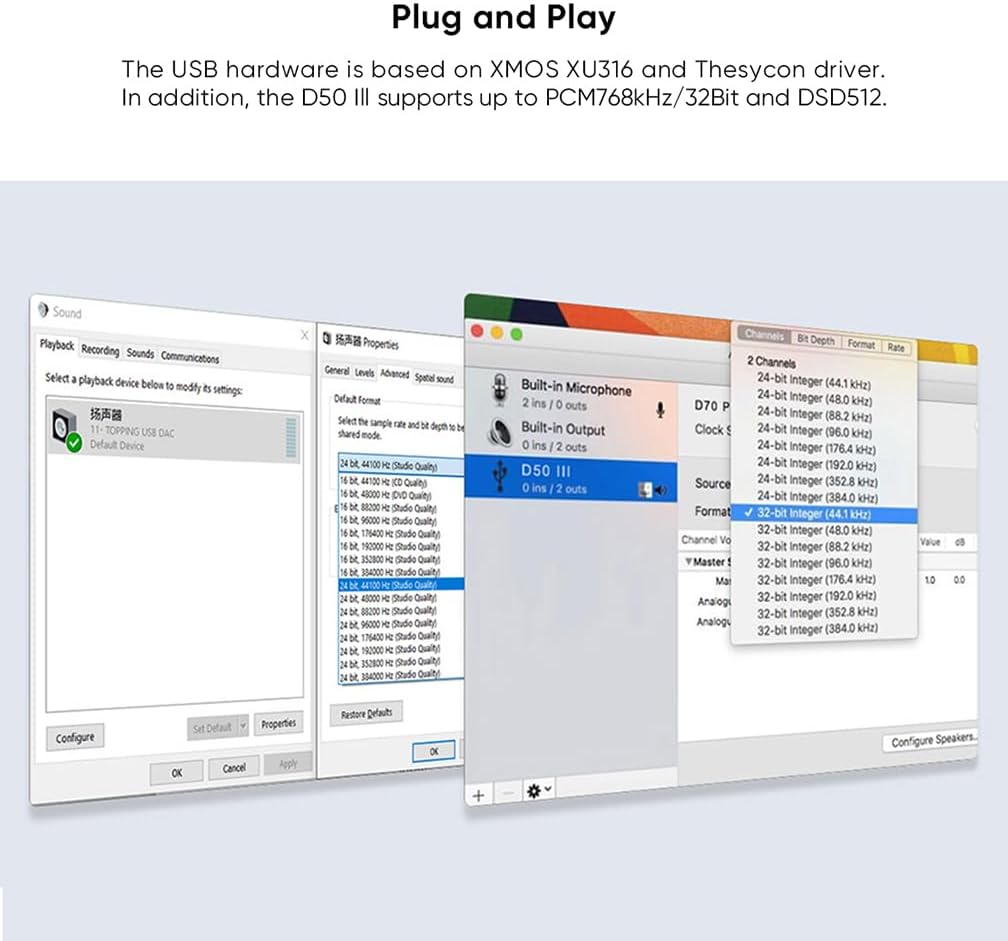
Figure 5.2: Plug and Play setup on computer operating systems.
6. Specifications
Detailed technical specifications for the TOPPING D50 III:
| Parameter | RCA (LineOut/USB In@96kHz) | TRS (LineOut/USB In@96kHz) |
|---|---|---|
| THD+N @1kHz (A-wt) | <0.00008% @1kHz | <0.00006% @1kHz |
| THD@No-wt (96kBW) | <0.0004% @20-20kHz | <0.0002% @20-20kHz |
| SNR (A-wt) | 127dB @1kHz | 132dB @1kHz |
| Dynamic Range @1kHz (A-wt) | 127dB @1kHz | 132dB @1kHz |
| Frequency Response | 20Hz-20kHz (±0.1dB) | 20Hz-20kHz (±0.1dB) |
| 20Hz-40kHz (±0.3dB) | 20Hz-40kHz (±0.3dB) | |
| Output Level | 2.0Vrms @0dBFS (4V Mode) | 4.0Vrms @0dBFS (4V Mode) |
| 2.5Vrms @0dBFS (5V Mode) | 5.0Vrms @0dBFS (5V Mode) | |
| Noise (A-wt) | <1.1uVrms | <1.3uVrms |
| Channel Crosstalk | -136dB @1kHz | -147dB @1kHz |
| Channel Balance | 0.3 dB | 0.3 dB |
| Output Impedance | 50Ω | 100Ω |
*Note: The above data is the result obtained from TOPPING lab test under AC220V 50Hz and D50 III set to 5V output mode.

Figure 6.1: TOPPING D50 III DAC parameters.
General Specifications:
- Product Dimensions: 5.91 x 0.79 x 2.76 inches
- Item Weight: 10.6 ounces
- Manufacturer: TOPPING
- Model Number: TOPPING D50III Silver
- ASIN: B0CXSDTTFD
- Date First Available: March 13, 2024
7. Troubleshooting
If you encounter issues with your TOPPING D50 III, please refer to the following common problems and solutions:
- No Sound Output:
- Ensure the D50 III is powered on and the correct input source is selected.
- Check all cable connections (input and output) are secure.
- Verify that your amplifier or active speakers are powered on and set to the correct input.
- If using USB, ensure the necessary drivers are installed on your computer and the D50 III is selected as the audio output device.
- Bluetooth Connection Issues:
- Ensure the Bluetooth antenna is securely attached.
- Make sure the D50 III is in Bluetooth input mode and pairing mode (if connecting for the first time).
- Try unpairing and re-pairing the device.
- Reduce the distance between the D50 III and your Bluetooth device, and remove any obstructions.
- Distorted or Poor Sound Quality:
- Check cable quality and connections. Use high-quality, shielded cables.
- Ensure the source audio file is not corrupted or of low quality.
- Verify that the volume level is not excessively high, causing clipping.
- If using USB, ensure your computer's audio settings match the D50 III's capabilities (e.g., sample rate, bit depth).
- Unit Not Responding:
- Disconnect the power cable, wait 10 seconds, and reconnect it to perform a hard reset.
- Ensure the power supply is stable and within the specified voltage range.
If the problem persists after trying these solutions, please contact customer support for further assistance.
8. Maintenance
To ensure the longevity and optimal performance of your TOPPING D50 III, follow these maintenance guidelines:
- Cleaning: Use a soft, dry cloth to wipe the exterior of the unit. Do not use liquid cleaners, aerosols, or abrasive materials, as they may damage the finish or internal components.
- Environment: Keep the unit in a clean, dust-free environment. Avoid exposing it to extreme temperatures, humidity, or direct sunlight.
- Ventilation: Ensure that the ventilation openings are not blocked to prevent overheating.
- Handling: Handle the unit with care. Avoid dropping it or subjecting it to strong impacts.
9. Warranty and Support
The TOPPING D50 III comes with a manufacturer's warranty. Please refer to the Product Information Card included in your package for specific warranty terms and conditions. For technical support, troubleshooting assistance beyond this manual, or warranty claims, please contact AOSHIDA customer service through the retailer where you purchased the product or visit the official AOSHIDA website for contact information.