
1. Introduction
The Sound Town SWM15-MAX is a versatile 16-channel wireless microphone karaoke mixer system designed to enhance your audio experience. It offers broad compatibility with various devices, including smart TVs, home receivers, and sound bars, through multiple input and output options. This manual provides detailed instructions for setting up, operating, and maintaining your SWM15-MAX system to ensure optimal performance.

Figure 1: Sound Town SWM15-MAX Wireless Microphone Karaoke Mixer System
2. Safety Information
- Read all instructions carefully before use.
- Keep the device away from water, moisture, and extreme temperatures.
- Do not attempt to disassemble or repair the unit yourself. Refer all servicing to qualified personnel.
- Use only the provided power adapter and cables.
- Ensure proper ventilation around the mixer unit to prevent overheating.
3. Package Contents
Verify that all items listed below are included in your package:
- 1 x SWM15-MAX Karaoke Mixer Unit
- 2 x Wireless Microphones (metal handheld)
- 1 x Power Adapter
- Cables (including 3.5mm/3.5mm Audio Cable, Toslink/Toslink Optical Cable, 3.5mm/RCA Audio Cable, USB Charging Cable)

Figure 2: Included in the Box
4. Setup
4.1 Initial Connections
The SWM15-MAX offers versatile connectivity options. Follow the diagrams and instructions below for common setup scenarios.
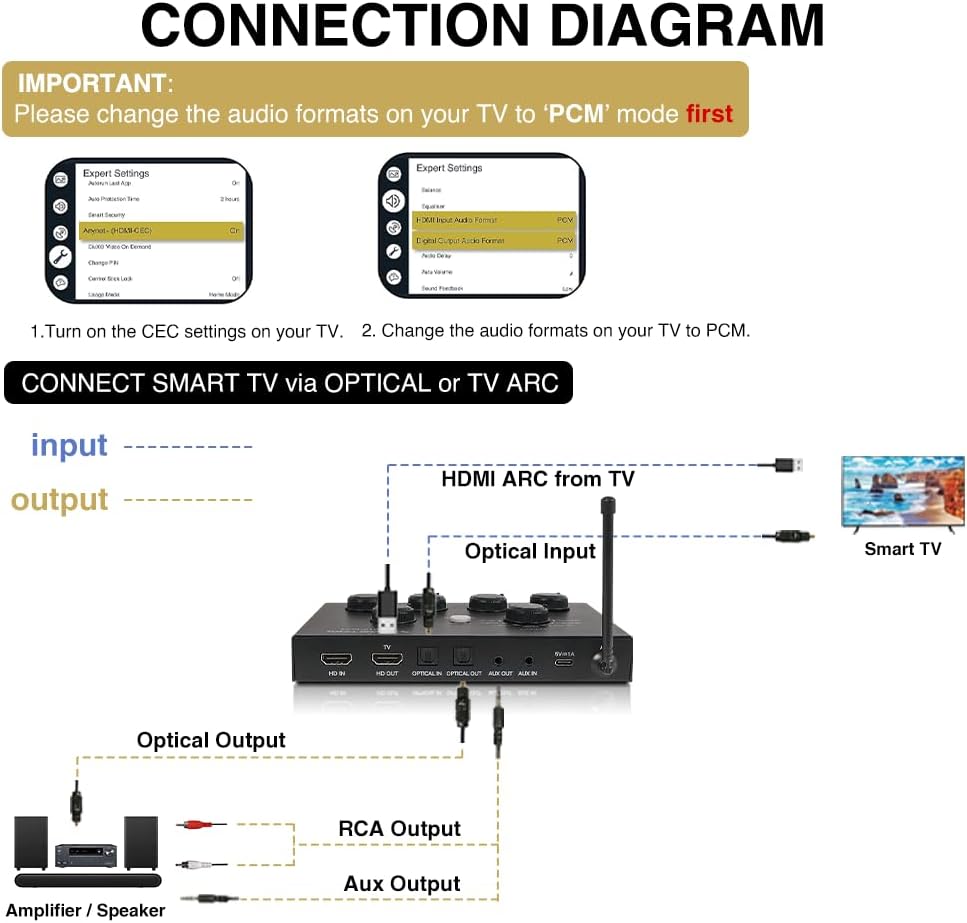
Figure 3: General Connection Diagram
Connecting to Smart TV via Optical or HDMI ARC:
- TV Settings: Before connecting, ensure your TV's CEC settings are activated and the audio format is set to PCM. This is crucial for HD Audio Return Channel functionality.
- HDMI ARC: Connect one end of an HDMI cable (not included) to your Smart TV's HDMI ARC port and the other end to the SWM15-MAX's HD ARC input.
- Optical: Alternatively, connect the included Optical (Toslink) cable from your Smart TV's Optical Audio Out to the SWM15-MAX's Optical In.
- Audio Output: Connect the SWM15-MAX's Optical Out or AUX Out to your soundbar, home receiver, or amplifier/speaker system.

Figure 4: Connect to TV: HDMI ARC/Optical
4.2 Microphone Pairing
The SWM15-MAX system supports two wireless microphones. They are typically pre-paired, but if re-pairing is needed:
- Ensure the mixer unit is powered on.
- Turn off the wireless microphone.
- Press and hold the power button and the frequency adjustment button on the microphone simultaneously until the display starts blinking.
- On the mixer unit, press the 'Set' button for the corresponding microphone channel (W/MIC A or W/MIC B). The microphone should then pair with the mixer.
4.3 Setup Tutorial Videos
For visual guidance on connecting your SWM15-MAX system, please refer to the official tutorial videos below:
Video 1: Connection Instructions for SWM15-PRO (relevant for SWM15-MAX)
This video demonstrates the connection process for the Sound Town SWM15-PRO, which shares similar connectivity features with the SWM15-MAX. It covers connecting the mixer to your audio sources and output devices.
Video 2: SWM15-PROS Connection Tutorial Video (relevant for SWM15-MAX)
Another helpful tutorial from Sound Town Inc. showing the connection steps for a similar model, providing clear visual instructions for setting up your karaoke mixer system.
5. Operating Instructions
5.1 Mixer Controls
The SWM15-MAX mixer unit features several knobs for precise audio control:
- POWER: On/Off button for the mixer unit.
- EFFECT MODE: Selects different audio effects (e.g., Reverb, Echo, Tune, Guitar).
- EFFECT LEVEL: Adjusts the intensity of the selected effect.
- W/MIC A / W/MIC B: Independent volume controls for wireless microphones A and B.
- MUSIC: Adjusts the volume of the background music.
- TONE: Adjusts the tonal characteristics of the audio (bass/treble).
- VOCAL CUT: Reduces or removes the vocal component from an audio source for karaoke.
5.2 Adjusting Audio Levels
To achieve optimal sound balance:
- Start with the MUSIC volume knob at 20%-30% of its maximum.
- Adjust the W/MIC A and W/MIC B knobs to fine-tune the microphone volumes relative to the music.
- Experiment with EFFECT MODE and EFFECT LEVEL to add desired vocal enhancements.
- Use the TONE knob to adjust the bass and treble for your preference.
6. Maintenance
- Clean the mixer unit and microphones with a soft, dry cloth. Do not use liquid cleaners or aerosols.
- Store the system in a cool, dry place away from direct sunlight when not in use.
- Remove batteries from microphones if storing for extended periods to prevent leakage.
7. Troubleshooting
Low Microphone Volume:
- Increase the volume on your TV, sound bar, or receiver.
- Adjust the mixer's "MUSIC" volume to 20%-30% and then fine-tune with the "W/MIC" knobs.
- Ensure microphones are properly paired and have fresh batteries.
No Sound Output:
- Verify all cables are securely connected.
- Check TV audio settings: Ensure HDMI ARC is enabled (if using HDMI) and digital audio output is set to PCM.
- Confirm the correct input source is selected on your soundbar/receiver.
8. Specifications
| Feature | Detail |
|---|---|
| Item Weight | 2.92 pounds |
| Product Dimensions | 12.8 x 11.2 x 2.6 inches |
| Item Model Number | SWM15-MAX |
| Compatible Devices | Digital Receiver, Home Theater, Laptop, Smartphone, Television |
| Connector Type | 6.35 mm Jack |
| Hardware Platform | Karaoke Machine, PC, Television |
| Power Source | Corded Electric |
| Special Feature | Noise Reduction, Volume Control |
| Included Components | Microphone, Power Adapter, cables, receiver |
9. Warranty and Support
For warranty information, technical support, or any inquiries regarding your Sound Town SWM15-MAX system, please refer to the official Sound Town website or contact their customer service directly. Keep your purchase receipt as proof of purchase for warranty claims.


