
Moondrop Golden Ages
Contents
Moondrop Golden Ages TWS Earphones User Manual
Model: Golden Ages
Introduction
This manual provides comprehensive instructions for the Moondrop Golden Ages TWS Earphones. It covers product features, setup, operation, maintenance, and troubleshooting to ensure optimal performance and user experience. Please read this manual carefully before using the product.
Product Overview
The Moondrop Golden Ages TWS Earphones feature a 13mm full-frequency planar magnetic driver, multi-protocol lossless transmission, and Active Noise Cancellation (ANC). Designed for high-fidelity audio, these earphones offer a blend of advanced technology and user-friendly features.

Image: Moondrop Golden Ages TWS Earphones and their charging case, showcasing the retro design.
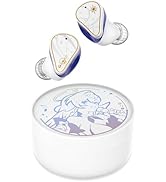
Image: An exploded view diagram illustrating the internal components of a Moondrop Golden Ages earbud.
Setup
1. Charging the Earphones and Case
Before first use, fully charge the earphones and charging case. Connect the charging case to a USB power source using a compatible cable. The charging port is USB.
- Earphone charging time: Approximately 1 hour.
- Charging case charging time: Approximately 1.5 hours.

Image: The Moondrop Golden Ages earphones placed inside their open charging case, indicating charging status.
2. Bluetooth Pairing
- Ensure the earphones are charged and placed in the charging case.
- Open the charging case. The earphones will automatically enter pairing mode.
- On your device (smartphone, tablet, etc.), enable Bluetooth and search for available devices.
- Select "Moondrop Golden Ages" from the list of detected devices to connect.
- Once connected, a confirmation sound or indicator will be present.
The earphones support Bluetooth version 5.3 and various profiles including A2DP, AVRCP, HFP, and HSP. Supported audio codecs are SBC, AAC, LDAC, and LC3.
3. Moondrop Link App
For advanced settings and firmware updates, download the Moondrop Link application from your device's app store. The app is compatible with both iOS and Android systems.
Operating Instructions
1. Touch Controls
The Moondrop Golden Ages earphones feature touch controls for various functions. Specific touch gestures for media control (play/pause, skip tracks, volume) and call management (answer/end calls) can be customized or found in the Moondrop Link app.
2. Sound Modes (ANC, Transparency, Standard)
The earphones offer multiple sound modes:
- Active Noise Cancellation (ANC): Reduces ambient noise for an immersive listening experience. Provides up to 44dB wide-band ANC.
- Ambient Sound Transparency Mode: Allows you to hear your surroundings while listening to audio.
- Standard Mode: Normal audio playback without noise cancellation or transparency.
Switch between these modes using the touch controls or through the Moondrop Link app.
3. Game Mode
Activate the 55ms low-latency game mode for synchronized audio during gaming. This mode can be switched by tapping the earphone faceplate four times. The signal transmission latency is as low as 55ms, providing a more responsive gaming experience.

Image: An illustration depicting the low-latency game mode feature, highlighting its benefit for gaming.
4. Automatic Reconnection and Monaural-Binaural Switching
The Golden Ages earphones support automatic reconnection and seamless switching between monaural (single earbud) and binaural (both earbuds) modes. They will reconnect to the paired device as long as one or both earpieces are removed from the charging case. The connection remains active even when one or both earpieces are returned to the charging case.
Image: A diagram illustrating the automatic reconnection and seamless switching between monaural and binaural modes.
5. Voice Prompts
The earphones utilize voice prompts to indicate mode changes:
- "Hey" indicates Transparency Mode.
- "Shh" indicates ANC is ON.
- "Umm" indicates Standard Mode.
An upgraded MitsukiYuki prompt voice is available through the Moondrop Link app.
Image: A visual guide explaining the MitsukiYuki voice prompts for different earphone modes.
Maintenance
- Regularly clean the earphones and charging case with a soft, dry cloth.
- Avoid exposing the earphones to extreme temperatures, humidity, or liquids. The product is not water resistant.
- Store the earphones in their charging case when not in use to protect them and maintain battery life.
- Do not attempt to disassemble or repair the earphones yourself, as this will void the warranty.
Troubleshooting
Common Issues and Solutions:
- No Sound: Ensure earphones are charged, properly paired, and volume is adjusted on both the earphones and the connected device.
- Pairing Issues: Turn off Bluetooth on your device, then turn it back on. Reset the earphones by placing them in the case, closing it, and then reopening. Ensure no other devices are trying to connect simultaneously.
- Connectivity Instability: Ensure you are within the 10m working distance from your device in an unobstructed environment. Minimize interference from other Bluetooth devices.
- Earphones Not Charging: Check the charging cable and power source. Ensure the charging contacts on both the earphones and case are clean and free of debris.
- App Syncing Issues: Ensure the Moondrop Link app is updated to the latest version. Restart the app and your device.
- ANC Wind Noise: While ANC is effective, some wind noise may be noticeable in certain conditions. This is normal for some ANC systems.
If problems persist, refer to the official Moondrop support channels for further assistance.
Specifications
| Feature | Specification |
|---|---|
| Model | MOONDROP Golden Ages |
| Bluetooth Version | 5.3 |
| Bluetooth Profiles | A2DP/AVRCP/HFP/HSP |
| Audio Codecs | SBC/AAC/LDAC/LC3 |
| Charging Port | USB |
| Working Distance | 10m (unobstructed open environment) |
| Earphone Charging Time | Approx. 1 hour |
| Charging Case Charging Time | Approx. 1.5 hours |
| Earphone Battery Capacity | 3.7V/37mAh |
| Charging Case Battery Capacity | 3.7V/380mAh |
| Earphone Battery Life (AAC) | Approx. 6 hours |
| Charging Case Battery Life (AAC) | Approx. 18 hours |
| Noise Control | Active Noise Cancellation (44dB depth) |
| Audio Driver Type | 13mm Planar Magnetic Driver |
| Audio Latency (Game Mode) | 55ms |
| Frequency Range | 20Hz~40kHz |
| Impedance | 16 Ohm |
| Control Method | Touch Control |
| Material | Plastic (Charging Case) |
| Water Resistance Level | Not Water Resistant |
| Item Weight | 0.32 Kilograms (approx. 11.3 ounces) |
Warranty and Support
For warranty information and customer support, please refer to the official Moondrop website or contact your retailer. Keep your proof of purchase for warranty claims. Specific warranty terms and conditions may vary by region.
Ask a question about this manual
Ask about setup, troubleshooting, compatibility, parts, safety, or missing instructions. Manuals+ will review the question and use this page’s manual context to help answer it.