
1. Product Overview
The ALONEFIRE X63 is a compact and powerful mini LED flashlight designed for various lighting needs. It features a durable aluminum construction, multiple lighting modes, and convenient USB-C rechargeable functionality. Its portable design includes a detachable pocket clip and a strong magnetic base for hands-free use.
1.1 Components

Image 1.1: Disassembled view of the ALONEFIRE X63 flashlight, highlighting key components such as the pocket clip, power switch, battery compartment, 3 LED emitters, security attack lamp head, and Type-C USB port.
- Pocket Clip: For secure attachment to clothing or gear.
- Power Switch: Controls power and cycling through lighting modes.
- Battery Compartment: Houses the rechargeable battery.
- 3*LED: Multiple high-lumen LED emitters for bright illumination.
- Security Attack Lamp Head: Designed for durability and potential emergency use.
- Type-C USB Port: For convenient charging.
1.2 Package Contents
Verify that all items are present in the package:
- ALONEFIRE X63 Mini LED Flashlight
- USB-C Charging Cable
- Detachable Pocket Clip (pre-installed or separate)

Image 1.2: The ALONEFIRE X63 flashlight shown alongside its included USB-C charging cable.
2. Setup
Before first use, ensure the flashlight is fully charged.
- Initial Charge: Connect the provided USB-C cable to the flashlight's charging port and to a compatible USB power source (e.g., wall adapter, computer USB port). Refer to the "Charging" section for detailed instructions.
- Attach Pocket Clip (Optional): If the pocket clip is not pre-installed, align it with the groove on the flashlight body and slide it into place until secure.

Image 2.1: The ALONEFIRE X63 flashlight demonstrating its detachable clip, shown attached to a pocket and a backpack strap for convenient carrying.
3. Operating Instructions
The ALONEFIRE X63 flashlight features a single power switch for all functions.
- Power On/Off: Press the power switch once to turn the flashlight on. Press it again to turn it off.
- Change Lighting Modes: While the flashlight is on, press the power switch repeatedly to cycle through the available lighting modes (e.g., Low, Medium, High, Strobe, SOS). The order of modes may vary.
- Magnetic Base: The flashlight features a strong magnet in its tail cap, allowing it to be securely attached to metallic surfaces for hands-free illumination.

Image 3.1: The ALONEFIRE X63 flashlight emitting a bright beam, held in a user's hand against a night sky backdrop.

Image 3.2: Diagram illustrating the strong magnetic tail cap of the ALONEFIRE X63 flashlight, capable of adhering to iron surfaces.
3.1 Applications
The ALONEFIRE X63 is suitable for a variety of uses:
- Camping and Outdoor Activities
- Night Illumination
- Security Patrol
- Wild Exploration
- Signal Transmission
- Emergency Situations

Image 3.3: A collage of images depicting the ALONEFIRE X63 flashlight being used in various scenarios, including camping, night illumination, security patrol, wild exploration, signal transmission, and emergency situations.
4. Charging
The ALONEFIRE X63 flashlight features a built-in USB-C charging port for convenient recharging.
- Connect the Cable: Insert the USB-C end of the charging cable into the flashlight's charging port.
- Connect to Power: Plug the USB-A end of the charging cable into a standard USB power adapter (5V/1A recommended), a computer's USB port, or a power bank.
- Charging Indicator:
- A red indicator light signifies that the flashlight is currently charging.
- A green indicator light signifies that the flashlight is fully charged.
- Charging Time: Charging time may vary depending on the power source and the battery's depletion level.
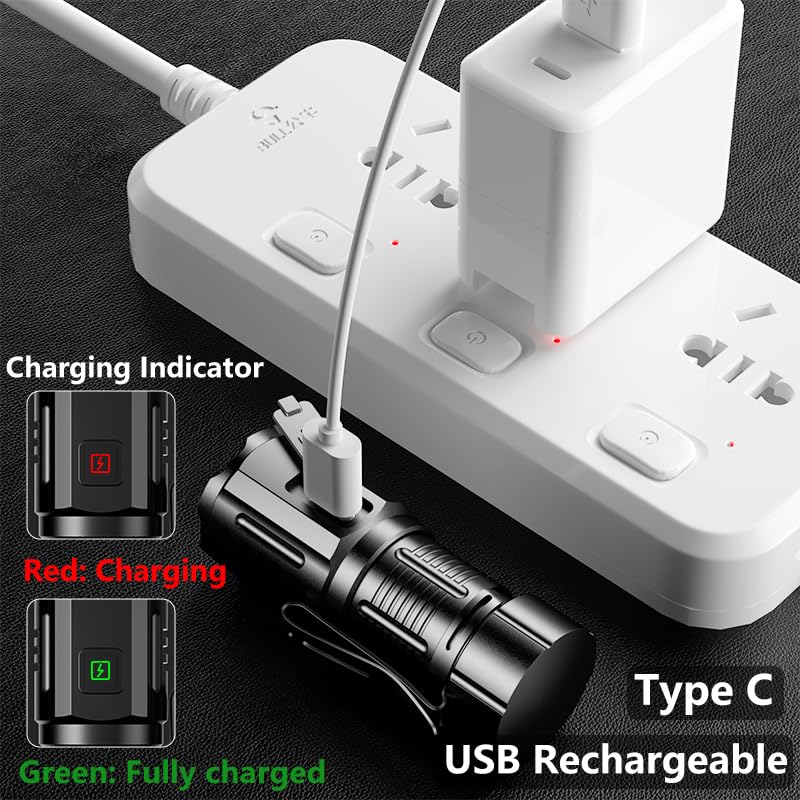
Image 4.1: The ALONEFIRE X63 flashlight connected to a power adapter via its USB-C charging cable, showing the charging indicator lights (red for charging, green for fully charged).
5. Maintenance
Proper maintenance ensures the longevity and optimal performance of your flashlight.
- Cleaning: Wipe the flashlight body with a soft, damp cloth. Do not use abrasive cleaners or solvents.
- Storage: Store the flashlight in a cool, dry place away from direct sunlight and extreme temperatures. If storing for extended periods, charge the battery periodically to maintain its health.
- Battery Care: Avoid fully depleting the battery frequently. Recharge the flashlight when the light output noticeably diminishes.
- Water Resistance: While the flashlight may be resistant to splashes, avoid submerging it in water unless explicitly stated in the specifications.
6. Troubleshooting
If you encounter issues with your ALONEFIRE X63 flashlight, refer to the following common problems and solutions:
| Problem | Possible Cause | Solution |
|---|---|---|
| Flashlight does not turn on. | Battery is depleted. | Charge the flashlight using the provided USB-C cable. |
| Light output is dim. | Low battery level. | Recharge the flashlight. |
| Flashlight does not charge. | Faulty cable or power source. | Try a different USB-C cable or a different USB power adapter. Ensure connections are secure. |
| Cannot change lighting modes. | Switch malfunction or temporary glitch. | Turn the flashlight off and then on again. If the issue persists, contact customer support. |
7. Specifications
| Feature | Detail |
|---|---|
| Brand | Alonefire |
| Model | X63 |
| Light Source Type | LED |
| Power Source | Battery Powered (Rechargeable) |
| Material | Aluminium |
| Special Features | Rechargeable, Strong Magnetic Base, Detachable Pocket Clip |
| Item Weight | 82 g |
| Charging Port | USB Type-C |
8. Safety Information
Please read and follow these safety precautions to prevent injury or damage to the product:
- Do not look directly into the LED light when it is on, as it can cause temporary vision impairment.
- Keep out of reach of children.
- Do not disassemble the flashlight beyond what is necessary for maintenance, as this may void the warranty and cause damage.
- Use only the provided or a compatible USB-C cable for charging.
- Avoid exposing the flashlight to extreme temperatures, open flames, or corrosive liquids.
- Dispose of the product and its battery responsibly according to local regulations.
9. Warranty and Support
For warranty information or technical support, please refer to the retailer where the product was purchased or visit the official Alonefire website. Keep your purchase receipt as proof of purchase for warranty claims.


