
Introduction to the ANCEL BM300 Pro
The ANCEL BM300 Pro is an advanced battery monitoring device designed to provide real-time insights into your vehicle's battery health. This upgraded model offers enhanced features and broader compatibility compared to its predecessor, the BM300. It is engineered for durability and accuracy, ensuring reliable performance across various automotive and power storage applications.
Key Features
- Expanded Compatibility: Supports 6V, 12V, and 24V lead-acid batteries, including conventional flooded, AGM flat plate, AGM spiral, gel, and EFB types.
- Upgraded Bluetooth 5.3: Provides faster and more stable wireless connection for real-time data monitoring via the mobile application.
- Extended Data Storage: Stores up to 72 days of historical data, allowing for comprehensive analysis of battery performance trends.
- IP67 Waterproof Rating: Ensures robust protection against dust and water ingress, suitable for harsh environments.
- Multi-Battery Monitoring: Capable of monitoring up to 4 batteries simultaneously through the app.
- Comprehensive Testing: Includes voltage monitoring, cranking system tests, and charging system tests.
- Customizable Battery Settings: Allows users to configure settings for various battery types.
- Reliable Safety Features: Built-in Reverse Connection and Short-circuit Protection for user safety.
- Alarm Functionality: Notifies users via the app for abnormal battery conditions, low voltage, or system malfunctions.

Setup and Installation
1. Download the App
Before physical installation, download the 'ANCEL BM300 Pro' application from your device's app store. The app is available on both the App Store (for iOS) and Google Play (for Android). Ensure all requested permissions are granted for full functionality.
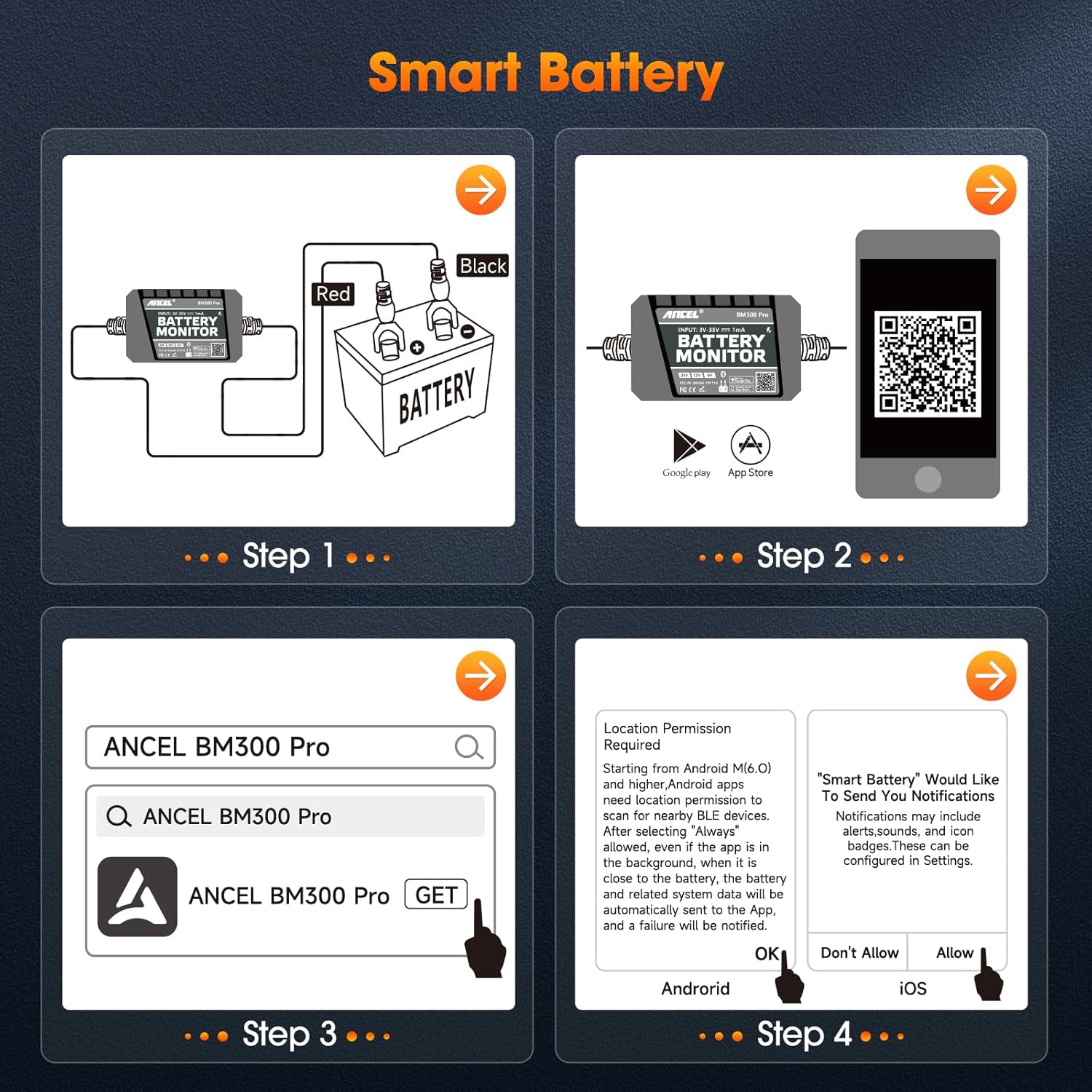
2. Physical Installation
The ANCEL BM300 Pro is designed for permanent installation on your vehicle's battery. Connect the red terminal of the device to the positive (+) terminal of the battery and the black terminal to the negative (-) terminal. Ensure a snug fit for accurate readings. The compact size of the device allows it to be placed discreetly near the battery.
Operating Instructions
Real-time Monitoring
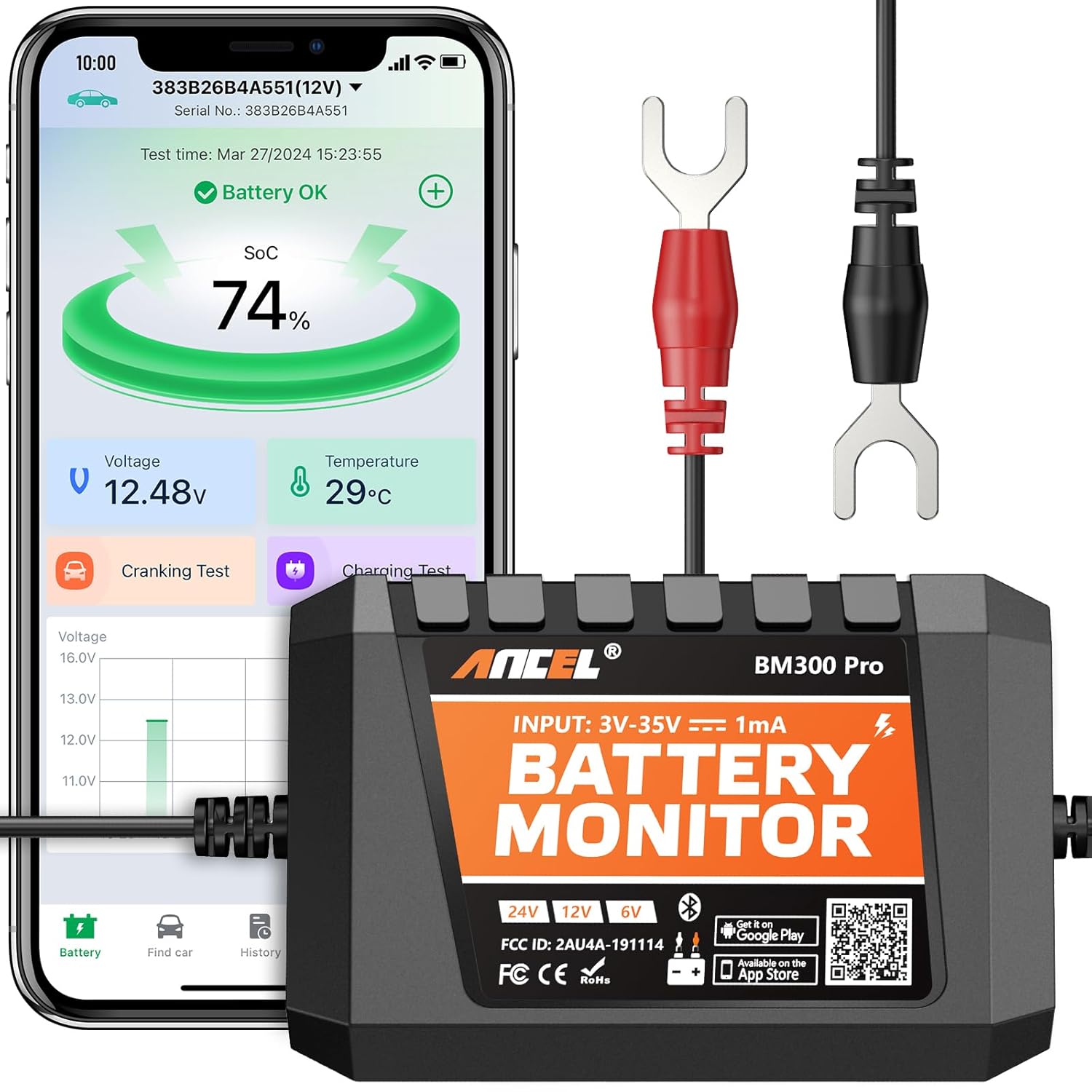
Once installed and connected via Bluetooth, open the ANCEL BM300 Pro app on your smartphone. The app will instantly display real-time battery data, including voltage, state of charge (SoC), and temperature. This allows for continuous monitoring without needing to access the battery directly.

Testing Functions
The app provides dedicated tests for different aspects of battery performance:
- Cranking Test: Measures the battery's ability to start the engine, providing insights into its cold-cranking amps (CCA) performance.
- Charging Test: Evaluates the vehicle's charging system (alternator) to ensure it is properly recharging the battery. This includes idle charging voltage, high-speed charging voltage, and diode ripple voltage.
Data Logging and Export
The device automatically saves historical data for up to 72 days. This data can be viewed within the app as graphs for voltage, SoC, and temperature. Users can also export this data to Excel files for more detailed analysis, which is useful for tracking long-term battery health and identifying potential issues.
GPS Tracking (Find Car Function)
The app includes a 'Find Car' function that utilizes GPS to record the parking position of your vehicle. This feature can help you locate your vehicle via navigation, adding an extra layer of convenience.

Maintenance and Safety
Accurate Readings and Durability
The BM300 Pro is equipped with an intelligent chip for precise data readings, boasting over 99.6% accuracy. Its fire-resistant ABS shell and IP67 waterproof rating enhance its durability, allowing it to withstand various environmental conditions.

Safety Features and Alarms
The device incorporates essential safety measures, including built-in Reverse Connection and Short-circuit Protection. It also features an exceptional alarm functionality that notifies you via the app when the battery encounters malfunctions, abnormal voltage, or low power, helping to prevent unexpected issues.

Specifications
| Specification | Value |
|---|---|
| Product Dimensions | 4.33 x 0.98 x 5.12 inches; 2.12 ounces |
| Item Model Number | BM300PRO |
| Date First Available | March 11, 2024 |
| Manufacturer | ANCEL |
| Power Source | Battery Powered |
| Style | Battery Monitor |
| Color | Orange |
Troubleshooting
If you encounter issues with your ANCEL BM300 Pro, consider the following:
- No Connection/Inaccurate Readings: Ensure the device is securely connected to the correct battery terminals (red to positive, black to negative). Verify that the input voltage is within the specified range of 3V~35V.
- App Issues: Confirm that all necessary app permissions have been granted. For optimal Bluetooth performance, use the device in a clear, open area with suitable temperatures, as extreme cold or obstacles may affect connectivity.
- Temperature Accuracy: For precise battery temperature readings, ensure the device is properly affixed to the battery case.
- Multiple Devices: The app supports monitoring up to 4 devices, but each device monitors only one battery.
Warranty and Support
For any product-related inquiries, technical support, or warranty claims, please refer to the official ANCEL support channels. The manufacturer is committed to providing professional and efficient service.
Legal Disclaimer
1. The input voltage range of the device is 3V~35V, which is suitable for 24V /12V/6V vehicle (boat) batteries. Too high input voltage will cause equipment damage. 2. In order to obtain accurate battery temperature, please stick the device on the battery case. 3. When installing the app, all permissions to be obtained must be accessed. If the permission fails to be obtained, some functions cannot be realized. 4. Some functions need to allow the app to self-start and run in the background. 5. The app has been optimized for this and will not consume more power. The app supports monitoring 4 devices, but each monitors only one battery.
