
1. Introduction
Welcome to the user manual for your HOT TOOLS Pro Artist SmoothWave Vibrating Flat Iron. This professional styling tool is designed to provide ultra-sleek hairstyles with advanced vibration technology, ensuring smooth results and reduced friction. Its Black Gold styling surface offers superior heat transfer and durability, suitable for all hair types. Please read this manual thoroughly before use to ensure safe and effective operation.

Image: The HOT TOOLS Pro Artist SmoothWave Vibrating Flat Iron, showcasing its sleek black design and digital display.
2. Safety Information
WARNING: To reduce the risk of electric shock, burns, fire, or injury to persons:
- This product is corded electric. Always unplug the appliance immediately after using it.
- Do not use while bathing or in a shower.
- Do not place or store appliance where it can fall or be pulled into a tub or sink.
- Do not place in or drop into water or other liquid.
- If an appliance falls into water, unplug it immediately. Do not reach into the water.
- Close supervision is necessary when this appliance is used by, on, or near children or individuals with certain disabilities.
- Use this appliance only for its intended use as described in this manual. Do not use attachments not recommended by the manufacturer.
- Never operate this appliance if it has a damaged cord or plug, if it is not working properly, or if it has been dropped, damaged, or dropped into water.
- Keep the cord away from heated surfaces. Do not wrap the cord around the appliance.
- Never use while sleeping.
- Never drop or insert any object into any opening.
- Do not use outdoors or operate where aerosol (spray) products are being used or where oxygen is being administered.
- Do not use an extension cord with this appliance.
- This appliance is hot when in use. Do not let eyes or bare skin touch heated surfaces.
- Do not place the heated appliance directly on any surface while it is hot or plugged in.
- Always store the appliance in a location free from moisture.
3. Key Features
- Vibration Technology: Delivers gentle waves to ensure each pass counts, reducing friction and breakage for super smooth, shiny results.
- Black Gold Styling Surface: Provides superior heat transfer, durability, and corrosion resistance, allowing safe use with hair products.
- LED Digital Temperature Display: Clear display for precise heat control.
- 26 Heat Settings: Customizable temperature options up to 455°F (235°C) to suit all hair types, from fine to coarse.
- Multi-Direction Floating Plates: Ensures full hair contact for efficient straightening and curling.
- Rounded Barrel Design: Facilitates both sleek straight styles and effortless curls or waves.
- Automatic Dual Voltage: Ideal for travel, automatically adjusts to the correct voltage.
- 2-Hour Auto Shut-Off: Enhances safety by automatically turning off the device after two hours of inactivity.
- 9 ft. Professional Swivel Cord: Provides flexibility and ease of use without tangling.
Feature Highlights:

Image: Close-up of the flat iron highlighting the vibration technology icon, indicating less breakage and smoother styles.

Image: Detail of the LED digital display showing a temperature of 455°F, emphasizing the 26 heat settings.

Image: The flat iron plates gripping a section of hair, illustrating the perfect tension for no-pull styling with vibrating technology.
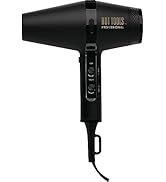
Image: The flat iron positioned next to a handbag, indicating its travel-friendly design with automatic dual voltage.
4. Setup
- Unpacking: Carefully remove the flat iron from its packaging. Ensure all components are present and undamaged.
- Placement: Place the flat iron on a heat-resistant, flat surface away from water or flammable materials.
- Power Connection: Plug the appliance into a standard electrical outlet. The dual voltage feature automatically adjusts for international use (120V/240V).
- Initial Power On: Press and hold the power button until the LED display illuminates.
5. Operating Instructions
5.1. General Operation
- Power On/Off: Press and hold the power button to turn the flat iron on or off.
- Temperature Adjustment: Use the temperature control dial to select your desired heat setting. The LED display will show the current temperature. The iron heats up quickly.
- Vibration Technology: The vibration function can be activated or deactivated by pressing the dedicated vibration button. When active, the vibration icon on the display will light up. This technology helps the plates glide smoothly through hair, reducing tugging and pulling.
- Auto Shut-Off: For safety, the flat iron will automatically turn off after 2 hours of inactivity.
5.2. Styling Techniques
Ensure hair is clean, dry, and detangled before styling. For best results and heat protection, apply a heat protectant spray.
For Straightening:
- Divide hair into small, manageable sections (approximately 1-2 inches wide).
- Select an appropriate temperature for your hair type. Lower temperatures for fine or damaged hair, higher for thick or coarse hair.
- Clamp a section of hair between the plates, close to the roots.
- Gently glide the flat iron down the hair section from root to tip in a single, smooth motion. The vibrating plates will assist in effortless gliding.
- Repeat on all sections until desired straightness is achieved.
For Curling/Waving:
The rounded barrel design allows for versatile styling.
- Divide hair into small sections.
- Select an appropriate temperature.
- Clamp a section of hair between the plates, about an inch or two from the roots.
- Rotate the flat iron 180 degrees away from your face, then slowly pull it down through the hair section to create a curl or wave. The multi-direction floating plates ensure full hair contact.
- For looser waves, pull faster. For tighter curls, pull slower.
- Repeat on all sections. Allow curls to cool before styling further.

Image: A woman showcasing long, sleek, straight brown hair, demonstrating the straightening capabilities of the tool.

Image: A woman showcasing long, wavy blonde hair, demonstrating the curling capabilities of the tool.
5.3. Official Product Videos
Below are official product videos demonstrating the features and usage of the HOT TOOLS Pro Artist SmoothWave Vibrating Flat Iron. These videos are provided by the seller to enhance your understanding of the product.
Video: A demonstration of the HOT TOOLS Pro Artist SmoothWave Vibrating Flat Iron in action, highlighting its vibration technology for smooth styling. This video illustrates how the plates glide through hair with minimal effort.
Video: A short preview showcasing the key features of the HOT TOOLS Pro Artist SmoothWave Vibrating Flat Iron, including its digital temperature display and versatile styling capabilities.
6. Maintenance
6.1. Cleaning
- Always ensure the flat iron is unplugged and completely cool before cleaning.
- Wipe the styling plates and exterior surfaces with a soft, damp cloth.
- Do not use abrasive cleaners, solvents, or harsh chemicals, as these can damage the Black Gold finish.
- Ensure no water enters the internal components.
6.2. Storage
- Allow the flat iron to cool completely before storing.
- Do not wrap the power cord around the appliance, as this can cause damage to the cord.
- Store in a dry, safe place, out of reach of children.
7. Troubleshooting
| Problem | Possible Cause | Solution |
|---|---|---|
| Flat iron does not turn on. | Not plugged in; power outlet issue; internal fault. | Ensure the appliance is securely plugged into a working outlet. Try a different outlet. If the issue persists, contact customer support. |
| Flat iron is not heating up. | Temperature setting too low; internal heating element issue. | Increase the temperature setting. Allow a few moments for the iron to reach the desired temperature. If no heat is detected, contact customer support. |
| Vibration function is not working. | Vibration feature is turned off. | Press the dedicated vibration button to activate the feature. Ensure the vibration icon on the display is lit. |
| Hair is snagging or pulling. | Hair is not fully detangled; plates are dirty; section of hair is too large. | Ensure hair is thoroughly detangled. Clean the plates as per maintenance instructions. Use smaller sections of hair. Activate the vibration function for smoother gliding. |
| Auto shut-off activates too soon. | Appliance has been inactive for 2 hours. | This is a safety feature. Turn the appliance back on if you wish to continue styling. |
8. Specifications
| Feature | Detail |
|---|---|
| Product Dimensions | 13.6 x 2.5 x 2.5 inches |
| Item Weight | 1.49 Pounds |
| Model Number | HTST4007BG |
| UPC | 078729640074 |
| Brand | HOT TOOLS |
| Material | Ceramic, Titanium (Black Gold Styling Surface) |
| Color | Black |
| Max Temperature | 455°F (235°C) |
| Heat Settings | 26 |
| Voltage | Automatic Dual Voltage (120V/240V) |
| Auto Shut-Off | 2 Hours |
9. Warranty & Support
9.1. Limited-Lifetime Warranty
The HOT TOOLS Pro Artist SmoothWave Vibrating Flat Iron comes with a Limited-Lifetime Warranty. Please refer to the warranty card included with your product for specific terms, conditions, and registration details. This warranty covers manufacturing defects and ensures your product performs as expected under normal use.
9.2. Customer Support
For any questions, troubleshooting assistance, or warranty claims, please contact HOT TOOLS customer support. Contact information can typically be found on the product packaging, the official HOT TOOLS website, or the warranty card.
- Online Support: Visit the official HOT TOOLS website for FAQs and support resources.
- Phone Support: Refer to your product documentation for the customer service phone number.


