
1. Introduction
This manual provides comprehensive instructions for the setup, operation, and maintenance of your FEITIAN K39 USB Security Key. The K39 is a compact, durable, and powerful solution designed to protect your digital accounts using advanced FIDO2 and U2F protocols, preventing phishing, account takeovers, and unauthorized access.
Please read this manual thoroughly before using the device to ensure proper functionality and security.
2. Safety Information
- Keep the device dry. Moisture can damage the internal components.
- Avoid extreme temperatures. Do not expose the device to very hot or cold environments.
- Do not attempt to disassemble or modify the device. This will void the warranty and may cause damage.
- Keep out of reach of small children to prevent accidental ingestion or damage.
- Handle with care. Although durable, excessive force or dropping may cause damage.
3. Product Overview
The FEITIAN K39 is a FIDO2 and FIDO U2F certified USB security key designed for robust multi-factor authentication. It features a USB-C connector for broad compatibility with modern devices.
Key Features:
- FIDO2 + FIDO U2F certified security.
- USB-C interface for universal compatibility.
- Plug-and-play functionality, no drivers required.
- Durable and water-resistant (IP67) design.
- Protects against phishing and cyber-attacks.
- Compatible with Android, Chrome OS, Windows, macOS, and Linux.
Product Components:
The FEITIAN K39 USB Security Key consists of the main unit with a USB-C connector and a touch sensor for authentication.
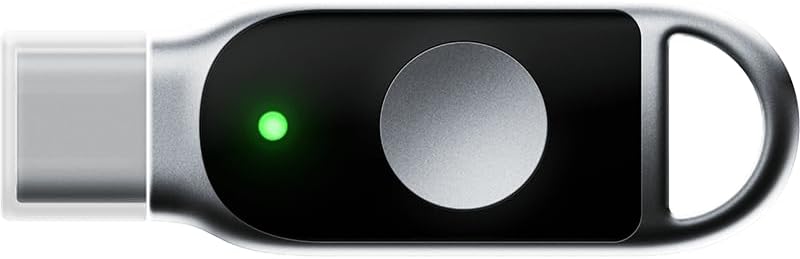
Figure 3.1: Front view of the FEITIAN K39 USB Security Key, showing the USB-C connector, the touch sensor, and a green indicator light, which signifies active status or successful authentication.

Figure 3.2: Rear view of the FEITIAN K39 USB Security Key, displaying the "FEITIAN" brand name and a unique serial number (e.g., 123456789) for identification.
4. Setup
The FEITIAN K39 is designed for plug-and-play operation and typically requires no driver installation.
Initial Setup:
- Identify a USB-C Port: Locate an available USB-C port on your computer, laptop, tablet, or mobile device.
- Insert the Key: Gently insert the FEITIAN K39 USB Security Key into the USB-C port. Ensure it is fully seated.
- Register the Key: Navigate to the security settings of the online service or application you wish to protect (e.g., Google, Microsoft, Dropbox, Twitter, etc.). Look for options related to "Security Key," "Two-Factor Authentication (2FA)," or "Multi-Factor Authentication (MFA)."
- Follow On-Screen Prompts: The service will guide you through the process of registering your new security key. This usually involves confirming your identity and then touching the sensor on the K39 when prompted.
- Name Your Key (Optional): Some services allow you to give your security key a descriptive name (e.g., "My K39 Home Key").
For specific instructions on registering your security key with various services, please refer to the support documentation of that particular service.
5. Operating Instructions
Once registered, using the FEITIAN K39 for authentication is straightforward.
Authentication Process:
- Initiate Login: Go to the website or application where you have registered your K39 security key. Enter your username and password as usual.
- Insert Key: When prompted for your security key, ensure the FEITIAN K39 is inserted into an available USB-C port on your device.
- Touch Sensor: The service will instruct you to touch the sensor on your security key. Gently place your finger on the metallic circular sensor on the K39. The green indicator light may flash or illuminate steadily during this process.
- Access Granted: Upon successful verification by the security key, you will be granted access to your account.
The K39 leverages FIDO2 and U2F standards to provide strong, phishing-resistant authentication, significantly enhancing your account security.
6. Maintenance
The FEITIAN K39 is designed to be durable and requires minimal maintenance.
- Cleaning: Use a soft, dry, lint-free cloth to wipe the surface of the key. Do not use liquid cleaners, aerosols, or solvents.
- Storage: Store the key in a clean, dry place when not in use. Avoid storing it with sharp objects that could scratch or damage the surface.
- Water Resistance: The K39 is water-resistant (IP67), meaning it can withstand immersion in up to 1 meter of water for 30 minutes. However, it is not waterproof. Avoid prolonged exposure to water or submersion. Ensure the key is dry before inserting it into a device.
7. Troubleshooting
If you encounter issues with your FEITIAN K39, refer to the following common problems and solutions:
| Problem | Possible Cause | Solution |
|---|---|---|
| Key not recognized by device. | Loose connection, dirty port, incompatible port, or device issue. |
|
| Authentication fails after touching the sensor. | Key not properly registered, incorrect prompt, or service issue. |
|
| Green indicator light does not illuminate. | No power, device not recognizing key, or key malfunction. |
|
If these solutions do not resolve your issue, please contact FEITIAN customer support.
8. Specifications
| Feature | Detail |
|---|---|
| Model Name | K39 |
| Item Model Number | ePass K39 |
| Brand | FeiTian |
| Connectivity Technology | USB Type C |
| Hardware Interface | USB |
| Supported Protocols | FIDO2, FIDO U2F |
| Supported OS | Android, Chrome OS, Windows, macOS, Linux |
| Special Features | Durable, Water-resistant (IP67) |
| Color | Black with Silver |
| Item Weight | 0.176 ounces (approx. 5 grams) |
| Product Dimensions (LxWxH) | 1.69 x 0.55 x 0.22 inches (approx. 43 x 14 x 5.6 mm) |
| Country of Origin | China |
9. Warranty and Support
Warranty Information:
FEITIAN Technologies Co., Ltd. provides a limited warranty for the K39 USB Security Key against defects in materials and workmanship under normal use. The specific terms and duration of the warranty may vary by region and retailer. Please retain your proof of purchase for warranty claims.
The warranty does not cover damage caused by accident, abuse, misuse, liquid contact, fire, earthquake, or other external causes. It also does not cover damage caused by operating the product outside the permitted or intended uses described by FEITIAN, or service (including upgrades and expansions) performed by anyone who is not a representative of FEITIAN or a FEITIAN Authorized Service Provider.
Customer Support:
For technical support, warranty claims, or further inquiries, please visit the official FEITIAN website or contact their customer service department. You can often find support contact information on the product packaging or on the manufacturer's website.
FEITIAN Technologies Co., Ltd.
Official Website: www.ftsafe.com
When contacting support, please have your product model (ePass K39) and serial number (if applicable, found on the device as shown in Figure 3.2) ready.


