
HANTECH H-PRO
HANTECH H-PRO Split Air Conditioner User Manual
Model: H-PRO | Brand: HANTECH
1. Introduction
This user manual provides comprehensive instructions for the installation, operation, and maintenance of your HANTECH H-PRO Split Air Conditioner. Please read this manual thoroughly before using the appliance to ensure safe and efficient operation. Keep this manual for future reference.
The HANTECH H-PRO Split Air Conditioner is designed to provide optimal indoor climate control, offering both powerful cooling and efficient heating functions. It also includes air filtration, dehumidification, and fan modes for year-round comfort. Its quiet operation and energy-efficient design make it suitable for various home and office environments.
2. Safety Information
Always adhere to the following safety precautions to prevent injury or damage to the unit:
- Ensure the unit is installed by a qualified professional in accordance with local electrical and safety regulations.
- Do not operate the air conditioner with wet hands or when standing on a wet surface.
- Do not insert fingers or objects into the air inlet/outlet.
- Keep the area around the outdoor unit clear of obstructions.
- In case of unusual sounds, smells, or smoke, immediately turn off the unit and disconnect the power supply. Contact qualified service personnel.
- This appliance is not intended for use by persons (including children) with reduced physical, sensory or mental capabilities, or lack of experience and knowledge, unless they have been given supervision or instruction concerning use of the appliance by a person responsible for their safety.
- Children should be supervised to ensure that they do not play with the appliance.
- The unit contains R32 refrigerant. Servicing should only be performed by certified technicians.
3. Product Overview
The HANTECH H-PRO Split Air Conditioner system consists of an indoor unit, an outdoor unit, and a remote control. It also supports Wi-Fi connectivity for app control.
3.1 Components

Figure 3.1: Complete set of HANTECH H-PRO Split Air Conditioner, showing the black indoor unit, outdoor unit, remote control, and app interface on a smartphone.
- Indoor Unit: Mounted inside the room, responsible for air distribution and temperature sensing.
- Outdoor Unit: Mounted outside, contains the compressor and condenser.
- Remote Control: For convenient operation and temperature adjustment.
- Mounting Accessories: Included for installation.
3.2 Key Features
- 4-in-1 Functionality: Heating, Cooling, Dehumidification, and Fan modes.
- Air Filtration: Filters viruses, bacteria, and odors for improved air quality.
- Wi-Fi Connectivity: Control the unit remotely via a smartphone app.
- I-Feel Function: Temperature sensor on the remote control ensures the desired temperature is maintained throughout the room, not just near the unit.
- Eco and Turbo Modes: For energy saving or rapid temperature adjustment.
- Sleep Mode: Operates at whisper-quiet levels with undercooling protection.
- 3D Airflow: Ensures even distribution of air throughout the room.
- Self-Cleaning Function: Simplifies maintenance.
- Child Lock and Emergency Stop: Enhanced safety features.

Figure 3.2: Visual representation of the versatile functions of the HANTECH air conditioner, including cooling, heating, dehumidifying, Eco mode, sleep mode, and timer function.
4. Setup and Installation
The HANTECH H-PRO Split Air Conditioner comes as a complete set, including both indoor and outdoor units, pre-filled with R32 refrigerant, and all necessary mounting accessories. Professional installation is highly recommended.
4.1 Pre-installation Checks
- Verify that the power supply matches the unit's requirements (220V).
- Ensure the installation location for both indoor and outdoor units allows for proper airflow and drainage.
- Confirm that the wall or mounting surface is strong enough to support the unit's weight.
4.2 Installation Steps (Overview)
While professional installation is advised, here is a general overview of the process:
- Mount the indoor unit securely on the wall, ensuring it is level.
- Install the outdoor unit on a stable, level surface or wall bracket, ensuring adequate clearance for airflow.
- Connect the refrigerant lines and electrical wiring between the indoor and outdoor units. Since the unit is pre-filled, ensure connections are tight to prevent leaks.
- Connect the drainage pipe from the indoor unit to an appropriate drainage point.
- Perform a vacuum test and check for any refrigerant leaks.
- Connect the unit to the main power supply.
Refer to the detailed installation guide provided with your product for specific instructions and diagrams.
5. Operating Instructions
Your HANTECH H-PRO Air Conditioner can be operated using the included remote control or via the Smart Life app on your smartphone.
5.1 Remote Control Operation

Figure 5.1: The remote control for the HANTECH H-PRO air conditioner, highlighting the iFeel function which measures temperature from the remote's location.
The remote control allows you to adjust various settings:
- Power Button: Turns the unit on or off.
- Mode Button: Cycles through Cooling, Heating, Fan, and Dehumidification modes.
- Temperature Adjustment: Use the Up/Down arrows to set the desired temperature.
- Fan Speed: Adjusts the fan speed (e.g., Low, Medium, High, Auto, or 4 distinct levels).
- iFeel Button: Activates the iFeel function, which uses the temperature sensor in the remote control to optimize room temperature.
- Timer Button: Sets a timer for automatic on/off operation.
- Sleep Button: Activates sleep mode for quiet operation and energy saving during sleep.
- Eco/Turbo Button: Toggles between energy-saving Eco mode and rapid cooling/heating Turbo mode.
5.2 Smart Life App Control

Figure 5.2: The Smart Life app interface on a smartphone, demonstrating remote control capabilities for the HANTECH H-PRO air conditioner.
The Smart Life app allows you to control your air conditioner from anywhere with an internet connection. It is compatible with both Android and iOS devices.
- Download the "Smart Life" app from your device's app store.
- Register or log in to your Smart Life account.
- Ensure your air conditioner's Wi-Fi function is enabled. (Some users report needing to press the display 6 times to activate pairing mode if not automatically detected).
- Follow the in-app instructions to add your HANTECH H-PRO device.
- Once connected, you can control modes, temperature, fan speed, set timers, and monitor the unit's status.
The app also supports integration with smart home systems like Amazon Alexa and Google Assistant for voice control.

Figure 5.3: Illustration of smart control features including timer, 5 fan speeds, EcoMode, and Smart Life App integration, along with cooling and heating capacities.
6. Maintenance
Regular maintenance ensures optimal performance and longevity of your HANTECH H-PRO Air Conditioner. The unit features a self-cleaning function for convenience.
6.1 Filter Cleaning
The air filters should be cleaned regularly, typically every two weeks, or more frequently depending on usage and air quality.
- Turn off the unit and disconnect the power supply.
- Open the front panel of the indoor unit.
- Remove the air filters.
- Clean the filters with a vacuum cleaner or wash them with lukewarm water and a mild detergent.
- Rinse thoroughly and allow them to dry completely in a shaded area before reinserting.
- Close the front panel.
6.2 Self-Cleaning Function
Activate the self-cleaning function periodically to clean the indoor coil and prevent mold and odor buildup. Refer to your remote control or app for instructions on activating this feature.
6.3 Outdoor Unit Maintenance
Periodically check the outdoor unit for any obstructions (leaves, debris) and clear them. Ensure the area around the unit is free for proper airflow. Do not attempt to clean the internal components of the outdoor unit yourself; contact a professional for deep cleaning or servicing.
7. Troubleshooting
If you encounter issues with your HANTECH H-PRO Air Conditioner, refer to the following common problems and solutions:
| Problem | Possible Cause | Solution |
|---|---|---|
| Unit does not turn on. | No power, remote control batteries low, emergency stop activated. | Check power supply, replace remote batteries, check emergency stop switch on unit. |
| Insufficient cooling/heating. | Dirty air filters, blocked outdoor unit, wrong mode selected, room too large. | Clean air filters, clear obstructions from outdoor unit, select correct mode, ensure unit BTU matches room size. |
| Unusual noise. | Loose parts, foreign objects, unit not level. | Check for loose parts, remove foreign objects, ensure unit is level. If noise persists, contact service. |
| Water leakage from indoor unit. | Blocked drainage pipe, improper installation. | Check and clear drainage pipe. If issue persists, contact installer. |
| Wi-Fi connection issues. | Incorrect pairing, weak Wi-Fi signal, app issues. | Ensure correct pairing procedure (e.g., pressing display 6 times), check Wi-Fi signal strength, restart app/router. |
For problems not listed here or if solutions do not resolve the issue, please contact HANTECH customer support or a certified technician.
8. Specifications
Below are the technical specifications for the HANTECH H-PRO 9000 BTU Split Air Conditioner:
| Feature | Detail |
|---|---|
| Model Name | H-PRO |
| Cooling Capacity | 9000 BTU (2.6 kW) |
| Heating Capacity | 2.1 kW |
| Energy Efficiency Class | A++ |
| Annual Energy Consumption (Cooling) | 149 kWh |
| Sound Emission (Outdoor Unit) | 65 dB |
| Sound Emission (Indoor Unit, Sleep Mode) | Whisper volume |
| Power Supply | 220 Volt |
| Refrigerant Type | R-32 |
| Product Dimensions (Indoor Unit) | 19T x 79B x 27H cm (approx.) |
| Product Dimensions (Overall) | 19 x 71 x 46 cm; 30 Kilograms (approx.) |
| Installation Type | Split |
| Special Features | Sleep Mode, I-Feel, Eco/Turbo Mode, 3D Airflow, Self-Cleaning, Wi-Fi |
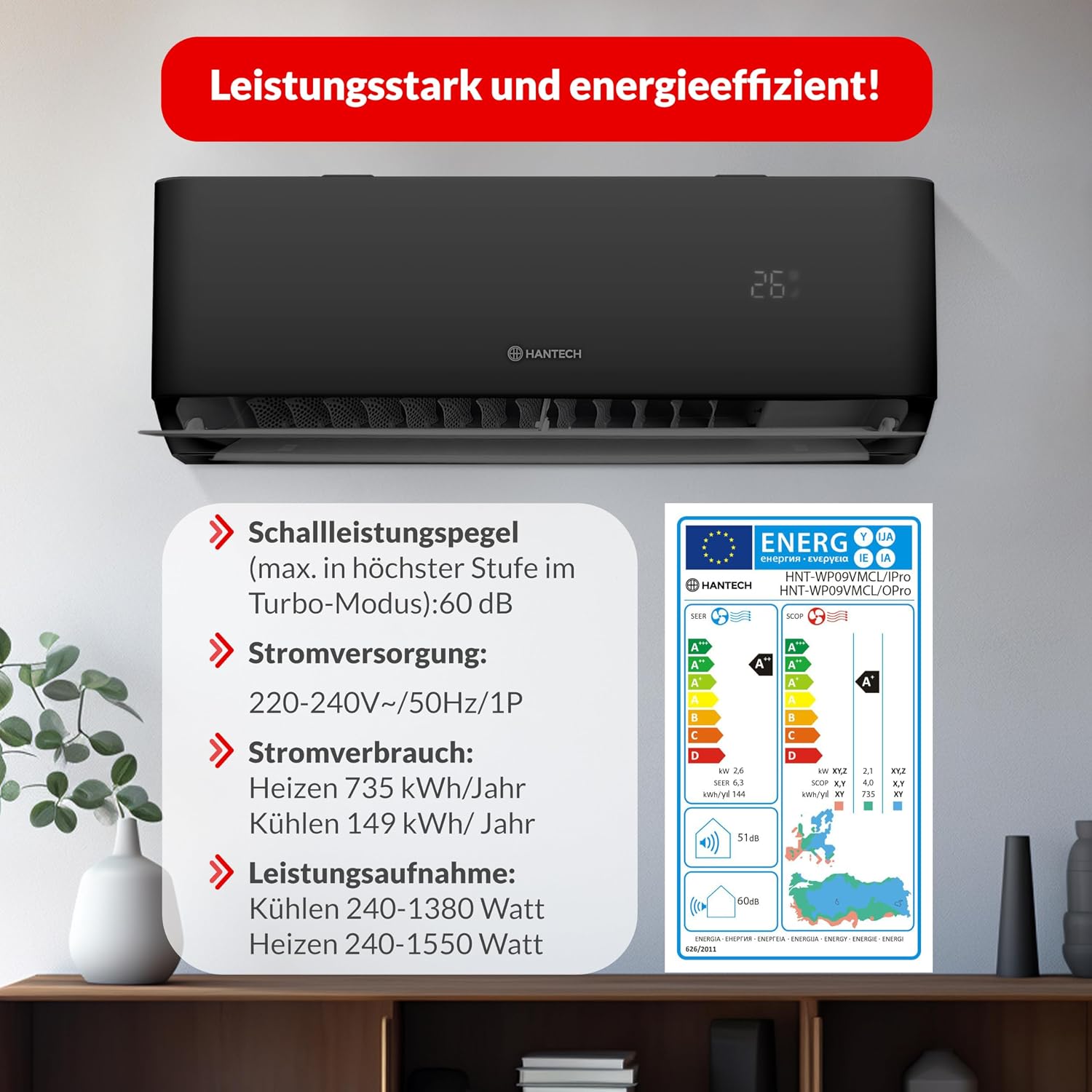
Figure 8.1: Energy label and detailed power specifications for the HANTECH H-PRO air conditioner, showing energy consumption and sound levels.
9. Warranty and Support
For warranty information, technical support, or service requests, please contact HANTECH customer service. Keep your purchase receipt as proof of purchase for warranty claims.
HANTECH Customer Support: Refer to the contact information provided in your product packaging or visit the official HANTECH website.
Online Resources: For additional support and FAQs, you may visit the HANTECH Store on Amazon.
Related documentsH-PRO


Ask a question about this manual
Ask about setup, troubleshooting, compatibility, parts, safety, or missing instructions. Manuals+ will review the question and use this page’s manual context to help answer it.