
Introduction
Thank you for choosing the Jebao ELW-20 DC Wave Maker Pump. This device is designed to create natural water movement in your aquarium, promoting a healthier environment for your aquatic inhabitants. The ELW-20 features a compact design, quiet operation, and an external controller for versatile flow management. Please read this manual thoroughly before installation and operation to ensure proper use and longevity of your product.
Safety Instructions
- Always disconnect the power supply before performing any maintenance or installation on the pump.
- This product is designed for indoor use in aquariums only. Do not use it for any other purpose.
- Ensure your hands are dry when handling the power adapter and controller.
- Do not operate the pump if the power cord or plug is damaged.
- Keep the controller and power adapter away from water to prevent electrical shock.
- Ensure the pump is fully submerged in water during operation. Running dry can cause damage.
- Keep out of reach of children.
Package Contents
Carefully unpack the box and ensure all items are present and in good condition. If any items are missing or damaged, please contact your retailer.
- Jebao ELW-20 Wave Maker Pump
- External Controller
- DC Power Adapter
- Magnetic Mounting Base
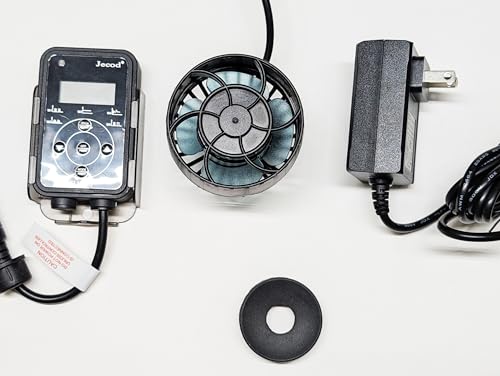
Image: All components included in the Jebao ELW-20 package, showing the wave maker pump, its external controller, the power adapter, and the magnetic mounting base.
Product Features
- ELW Series Wave Maker: Designed for efficient water circulation in aquariums.
- Adjustable Flow Direction: Features a 3D large rotation angle to direct water output as needed.
- Compact and Powerful: Mini size with strong power output, utilizing a four-pole super quiet motor.
- SINE Wave Technology: Ensures high stable performance and quiet operation.
- Master/Slave Control: Allows for single control of multiple pumps in a group. One controller can be set as master to manage all connected slave pumps.
- Energy Saving: Operates on DC 24V with a low power consumption of 20 Watts.
- Tank Compatibility: Recommended for tank lengths between 60-100 cm (23-39 inches) and glass thickness less than 12 mm.
- External Drive Controller: No electronic devices are located inside the pump, contributing to a longer lifespan.
- High Flow Rate: Provides up to 2641 GPH (10000 LPH) water flow.
Setup
- Mounting the Pump:
Position the wave maker pump inside your aquarium. Use the magnetic mounting base to secure it to the glass. Place one part of the magnetic base inside the tank and the other part on the outside, aligning them to hold the pump firmly. Ensure the pump is fully submerged and positioned to achieve desired water flow patterns. - Connecting the Controller:
Connect the pump's cable to the designated port on the external controller. - Connecting the Power Adapter:
Plug the DC power adapter into the controller, then plug the power adapter into a suitable electrical outlet. - Initial Placement:
Ensure the pump is positioned at least 5 cm (2 inches) below the water surface and away from sand or substrate to prevent debris intake. Adjust the pump's angle to direct the water flow as desired.

Image: The Jebao ELW-20 wave maker pump and its external controller, ready for installation.
Operating Instructions
The ELW-20 controller allows you to customize the wave maker's operation. Refer to the controller's display and buttons for specific mode selection and adjustments.
Controller Functions:
- Mode Selection: Use the 'MODE' button to cycle through various wave patterns and flow settings.
- Flow Adjustment: Use the '+' and '-' buttons to increase or decrease the water flow intensity.
- Feed Mode: A temporary pause function to allow for feeding without food being immediately swept away. Press the 'FEED' button to activate; the pump will resume normal operation after a set period (usually 10 minutes) or by pressing 'FEED' again.
- Master/Slave Setup: If using multiple ELW series pumps, designate one controller as 'Master' and others as 'Slave'. The Master controller will synchronize the modes and settings for all connected Slave pumps. Consult the controller's specific instructions for detailed pairing procedures.
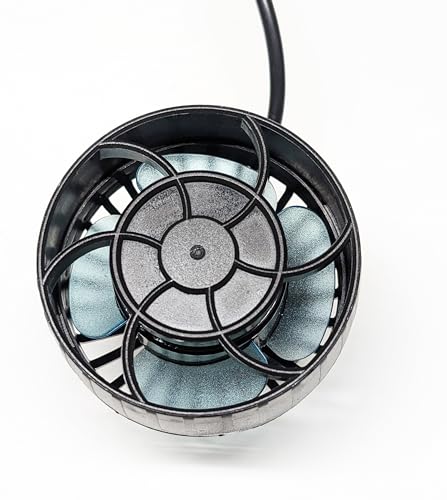
Image: Top view of the Jebao ELW-20 wave maker pump, illustrating its compact design and impeller.
Maintenance
Regular maintenance ensures optimal performance and extends the lifespan of your wave maker pump.
- Cleaning the Impeller:
At least once a month, or more frequently if needed, disconnect the pump from power. Carefully remove the front cover and impeller assembly. Clean any algae, debris, or calcium buildup from the impeller and its housing using a soft brush and warm water. Do not use harsh chemicals. - Cleaning the Pump Body:
Wipe down the exterior of the pump and the magnetic mount with a damp cloth. - Inspecting Cables:
Periodically check the power cord and controller cable for any signs of wear or damage. Replace immediately if damage is found. - Reassembly:
Ensure all parts are dry and correctly reassembled before reconnecting power.
Troubleshooting
| Problem | Possible Cause | Solution |
|---|---|---|
| Pump not operating / No water flow |
|
|
| Reduced water flow |
|
|
| Excessive noise |
|
|
| Controller screen not turning on (as per customer review) |
|
|
Specifications
| Feature | Specification |
|---|---|
| Model Number | ELW-20 |
| Brand | Jebao |
| Power Source | DC |
| Voltage | 24V DC |
| Power Consumption | 20 Watts |
| Maximum Flow Rate | 2641 GPH (10000 LPH) / 44.02 gpm |
| Recommended Tank Length | 60-100 cm (23-39 inches) |
| Recommended Glass Thickness | Less than 12 mm |
| Material | Plastic, Stainless Steel |
| Item Weight | 16 ounces |
| Specific Uses | Aquarium circulation |
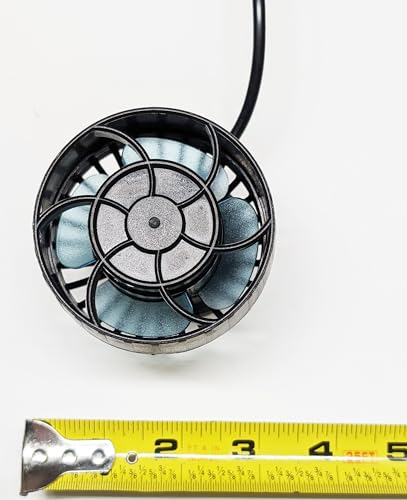
Image: Top-down view of the ELW-20 pump, showing its diameter alongside a measuring tape.
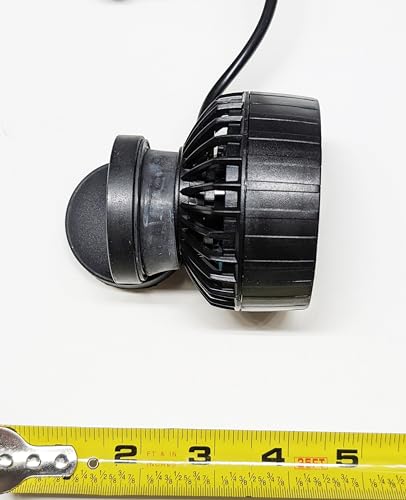
Image: Side view of the ELW-20 pump, illustrating its depth and profile next to a measuring tape.
Warranty and Support
Jebao products are manufactured to high-quality standards. For warranty information, please refer to the documentation provided with your purchase or contact your retailer. If you encounter any issues or require technical assistance, please reach out to the customer support provided by your point of purchase.


