
Nikotek NK01GT
Nikotek NK01GT Laser Level Instruction Manual
Model: NK01GT | Brand: Nikotek
Introduction
This instruction manual provides detailed guidance for the safe and effective use of your Nikotek NK01GT Laser Level with Tripod. This self-leveling green beam laser is designed for various home decoration and construction projects, offering both horizontal and vertical cross-line projection for precise alignment.
Safety Information
Always adhere to the following safety precautions to prevent injury and damage to the device:
- Laser Radiation: This product is a Class 2 laser product with a power output of <1mW and a wavelength of 635nm. Do not stare directly into the laser beam. Avoid direct eye exposure.
- Do not disassemble or modify the laser level. Repairs should only be performed by qualified personnel.
- Keep the device out of reach of children.
- Use the device only for its intended purpose as described in this manual.
- Ensure the work area is clear of obstructions and potential hazards.
- Remove batteries if the device will not be used for an extended period.
Package Contents
Verify that all items are present in the package:
- 1x Nikotek NK01GT Green Laser Level
- 1x Tripod (extendable up to 26 inches)
- 2x AA Batteries
- 1x Carrying Pouch
- 1x User Manual (this document)

Figure 1: Contents of the Nikotek NK01GT package, including the laser level, tripod, batteries, and carrying pouch.
Product Overview
Laser Level Features
- Bright Green Beam: Projects highly visible horizontal and vertical cross-lines with a wide 110° angle.
- Self-Leveling Function: Automatically levels within a 3.5° range when the pendulum is unlocked. Flashes continuously if tilted beyond 3.5°.
- Compact Design: Lightweight and palm-sized for easy portability.
- Durable Construction: IP54 rated for dustproof and waterproof performance, also shockproof.
- 1/4'' Screw Hole: Compatible with most tripods and mounting accessories.
Tripod Features
- Extendable Height: Can be extended up to 26 inches (66 cm) for optimal laser positioning.
- Rotary Rocker: Allows for fine adjustments of the laser level's angle.
- Neck Extension Locking: Secures the extended height of the tripod.
- Adjustment Buckle: For quick and secure height adjustments of the legs.
- Non-skid Rubber Feet: Provides stability on various surfaces.

Figure 2: Key features of the included tripod, highlighting its adjustable components and stable design.
Setup
1. Battery Installation
- Locate the battery compartment on the laser level.
- Open the compartment cover.
- Insert the two AA batteries, ensuring correct polarity (+/-).
- Close the battery compartment cover securely.
2. Tripod Assembly and Laser Level Mounting
- Extend the tripod legs to the desired height and secure them using the adjustment buckles.
- Extend the neck of the tripod if additional height is needed and lock it in place.
- Align the 1/4'' screw hole on the bottom of the laser level with the screw on the tripod's quick-release plate.
- Screw the laser level onto the tripod until it is firmly attached.

Figure 3: The 1/4"-20 mount thread allows for easy attachment to the included tripod or other compatible accessories.
Operating Instructions
Powering On/Off
To turn the laser level on or off, simply press the power button located on the device.


Figure 4: The power button (left) and the mode switch (right) for easy operation.
Operating Modes
The Nikotek NK01GT Laser Level features two primary operating modes:
1. Self-Leveling Mode (Unlocked Pendulum)
This mode is ideal for applications requiring precise horizontal and vertical alignment. When the pendulum is unlocked, the laser level will automatically self-level within a 3.5° range. If the device is placed on a surface that is tilted more than 3.5°, the laser lines will continuously flash, indicating that it is outside its self-leveling range and needs adjustment.
- To activate: Slide the side button to the UNLOCKED position.
- The laser will emit a steady beam once leveled.
- If the beam flashes, adjust the position of the laser level until it is within the 3.5° self-leveling range.
2. Manual Mode (Locked Pendulum)
Manual mode allows you to project laser lines at any angle, which is useful for tasks like installing handrails on stairs or creating angled designs. In this mode, the self-leveling function is disabled.
- To activate: Slide the side button to the LOCKED position.
- The laser lines will be projected at the angle you set the device.

Figure 5: Demonstrates the Self-Leveling Mode (top) for horizontal and vertical alignment and Manual Mode (bottom) for angled projections.
Typical Applications
The Nikotek NK01GT Laser Level is versatile and can be used for a variety of tasks:
- Picture hanging and gallery wall alignment.
- Installing shelves, cabinets, and other fixtures.
- Tile laying and flooring installation.
- Wallpaper application.
- Minor home construction and renovation projects.
- Door and window frame alignment.
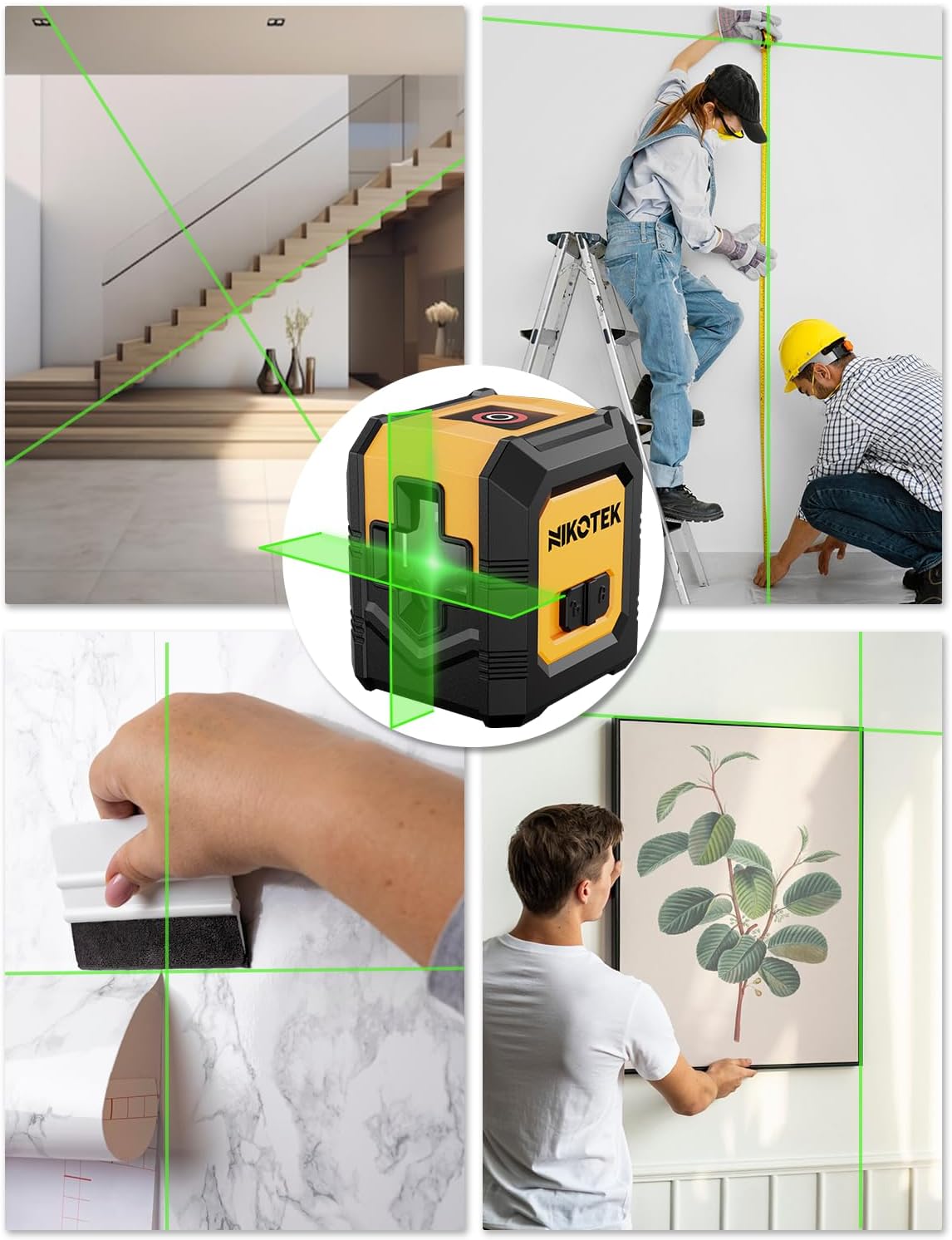
Figure 6: Examples of the laser level's utility in different home improvement and construction scenarios.
Maintenance
- Cleaning: Use a soft, damp cloth to clean the exterior of the laser level. Do not use abrasive cleaners or solvents. Keep the laser output window clean for optimal visibility.
- Storage: Store the device in its carrying pouch in a cool, dry place away from direct sunlight and extreme temperatures.
- Battery Care: Remove batteries if the device will not be used for an extended period to prevent leakage and damage.
- Calibration Check: Periodically check the accuracy of the laser level by comparing its lines against a known level surface or plumb line.

Figure 7: The laser level is designed with IP54 rating for dust and water resistance, aiding in its durability.
Troubleshooting
| Problem | Possible Cause | Solution |
|---|---|---|
| Laser does not turn on. | Low or dead batteries; incorrect battery installation. | Replace batteries with new AA batteries; ensure correct polarity. |
| Laser lines are flashing continuously. | Device is outside its self-leveling range (more than 3.5° tilt) in Self-Leveling Mode. | Adjust the position of the laser level or tripod until it is within the self-leveling range. |
| Laser lines are not straight or level. | Device is in Manual Mode; device is damaged or out of calibration. | Ensure the device is in Self-Leveling Mode. If the issue persists, contact customer support. |
| Laser beam is dim or unclear. | Low batteries; dirty laser output window; excessive ambient light. | Replace batteries; clean the laser output window; use in a less brightly lit environment if possible. |
Specifications
| Feature | Specification |
|---|---|
| Model | NK01GT |
| Laser Class | Class 2 |
| Laser Wavelength | 635nm |
| Power Output | <1mW |
| Self-Leveling Range | ±3.5° |
| Power Source | 2x AA Batteries (Included) |
| Operating Time | Up to 6 hours continuous work |
| IP Rating | IP54 (Dustproof & Waterproof) |
| Product Dimensions | 3.54"L x 3.54"W |
| Item Weight | 0.79 Pounds (approx. 12.6 ounces) |
| Tripod Max Height | 26 inches (66 cm) |
| Mount Thread | 1/4''-20 |
| Material | Acrylic, Plastic |
| Color | Green (Laser), Yellow/Black (Device) |
Warranty and Support
For information regarding warranty coverage, technical support, or service, please refer to the contact information provided by the seller or manufacturer at the time of purchase. Keep your purchase receipt as proof of purchase.
Manufacturer: Nikotek
Ask a question about this manual
Ask about setup, troubleshooting, compatibility, parts, safety, or missing instructions. Manuals+ will review the question and use this page’s manual context to help answer it.