
Product Overview
The Jackery Explorer 880 Portable Power Station is a high-capacity, versatile power solution designed for various applications, including home backup, emergency power, and outdoor activities. It features an 880Wh capacity with a 1000W continuous output (2000W peak) and supports multiple recharging methods, including solar.
Key Features:
- High Power Output: Provides 1000W continuous output (2000W peak) and an 880Wh capacity, suitable for most outdoor and emergency power needs.
- Versatile Device Compatibility: Capable of powering high-power devices such as electric hammers, small air compressors, circular saws, angle grinders, and drills, making it ideal for home DIY projects.
- Integrated MPPT Controller: Features a built-in MPPT module for up to 23% more efficient solar recharging by optimizing voltage and current from solar panels.
- Multiple Recharging Options: Supports three recharging methods: Solar Panel (approx. 6.5 hours with 2 panels, 10 hours with 1 panel), AC Outlet (approx. 6.5 hours), and Car Outlet (approx. 12.5 hours).
- Power Saving Function: Automatically turns off after 12 hours when drawing under 10W of power to conserve energy.
Setup
Before first use, ensure the Jackery Explorer 880 is fully charged. Unpack the unit and all accessories. Place the power station on a stable, flat surface in a well-ventilated area.
Initial Charging:
- Connect the provided AC charging cable to the AC input port on the back of the power station.
- Plug the other end of the AC charging cable into a standard wall outlet.
- The display will show the charging status. Charge until the battery indicator shows 100%.
- Alternatively, use a solar panel (sold separately) or car charger for initial charging.
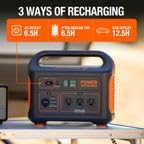
Image: The Jackery Explorer 880 can be recharged via AC input (approx. 6.5 hours), SolarSaga 100 solar panels (approx. 6.5 hours with 2 panels), or a car outlet (approx. 12.5 hours).
Operating Instructions
The Jackery Explorer 880 offers various output ports for different devices. Ensure the power station is adequately charged before use.
Turning On/Off:
- To turn on the main power, press the "POWER" button located on the front panel. The display will illuminate.
- To turn off, press and hold the "POWER" button until the display turns off.
Using AC Outputs:
- Press the "AC" button to activate the AC outlets. A green indicator light will appear.
- Plug your AC-powered devices into the three 1000W AC outlets.
- After use, press the "AC" button again to turn off the AC outputs and conserve power.
Using DC and USB Outputs:
- Press the "DC 12V" button to activate the 12V DC output and the car outlet.
- Press the "USB" button to activate the USB-A and USB-C ports.
- Connect your devices to the appropriate USB-A (18W Max) or USB-C (100W Max) ports.
- Turn off DC and USB outputs when not in use.
Using the Integrated Light:
- Press the "LIGHT" button to turn on the integrated LED light.
- Press again to cycle through different brightness levels or modes (e.g., SOS).
- Press a third time to turn off the light.

Image: The Jackery Explorer 880 is capable of powering a wide range of outdoor devices with its 1000W continuous output.

Image: The Explorer 880 can serve as a reliable backup power source for essential home electronics during outages.
Maintenance
Proper maintenance ensures the longevity and optimal performance of your Jackery Explorer 880.
- Storage: Store the power station in a cool, dry place away from direct sunlight and extreme temperatures. For long-term storage, charge the unit to 50-80% every 3-6 months to maintain battery health.
- Cleaning: Use a dry, soft cloth to clean the exterior of the unit. Do not use liquid cleaners or immerse the unit in water.
- Ventilation: Ensure the ventilation openings are clear of dust and debris to prevent overheating.
Troubleshooting
If you encounter issues with your Jackery Explorer 880, refer to the following common solutions:
- Unit Not Turning On: Ensure the battery is charged. If the battery is depleted, connect it to a power source for recharging.
- AC Output Not Working: Press the "AC" button to ensure the AC output is activated. Check if the device connected exceeds the 1000W continuous output limit.
- USB/DC Output Not Working: Press the respective "USB" or "DC 12V" button to activate the outputs. Ensure cables are securely connected.
- Slow Charging: Verify that the charging cable and power source are functioning correctly. For solar charging, ensure solar panels are in direct sunlight and free from obstructions. The built-in MPPT controller optimizes solar input.
- Automatic Shutdown: The unit will automatically turn off if the power draw is below 10W for 12 hours to save power. This is normal operation.
Specifications
| Brand | Jackery |
| Model Name | Explorer 880 |
| Capacity | 880Wh |
| Running Wattage | 1000 Watts |
| Starting Wattage (Peak) | 2000 Watts |
| AC Output | 3 x 110V AC Outlets (1000W Pure Sine Wave) |
| USB-A Output | 18W Max |
| USB-C Output | 100W Max |
| DC 12V Output | 10A |
| Power Source | AC/DC |
| Item Weight | 21.8 Pounds |
| Product Dimensions | 13.1"L x 9.2"W x 11.1"H |
| Included Components | Lithium ion battery (Power Station) |
Warranty and Support
This Jackery Explorer 880 Portable Power Station, being a refurbished product, comes with a 6-month warranty. This warranty covers full functional testing and ensures the product meets quality standards. For any support needs or warranty claims, please contact Jackery customer service or the Amazon Renewed support channel.
For further assistance, please refer to the official Jackery website or contact their customer support directly. Keep your purchase receipt for warranty validation.


