
1. Introduction
Welcome to the user manual for your new WISCENT WTB-797 Nostalgic Bluetooth Stereo System and WTB-795 Multi-functional Cassette Tape Player. This guide provides detailed instructions for setting up, operating, and maintaining your devices to ensure optimal performance and longevity. Please read this manual thoroughly before use.
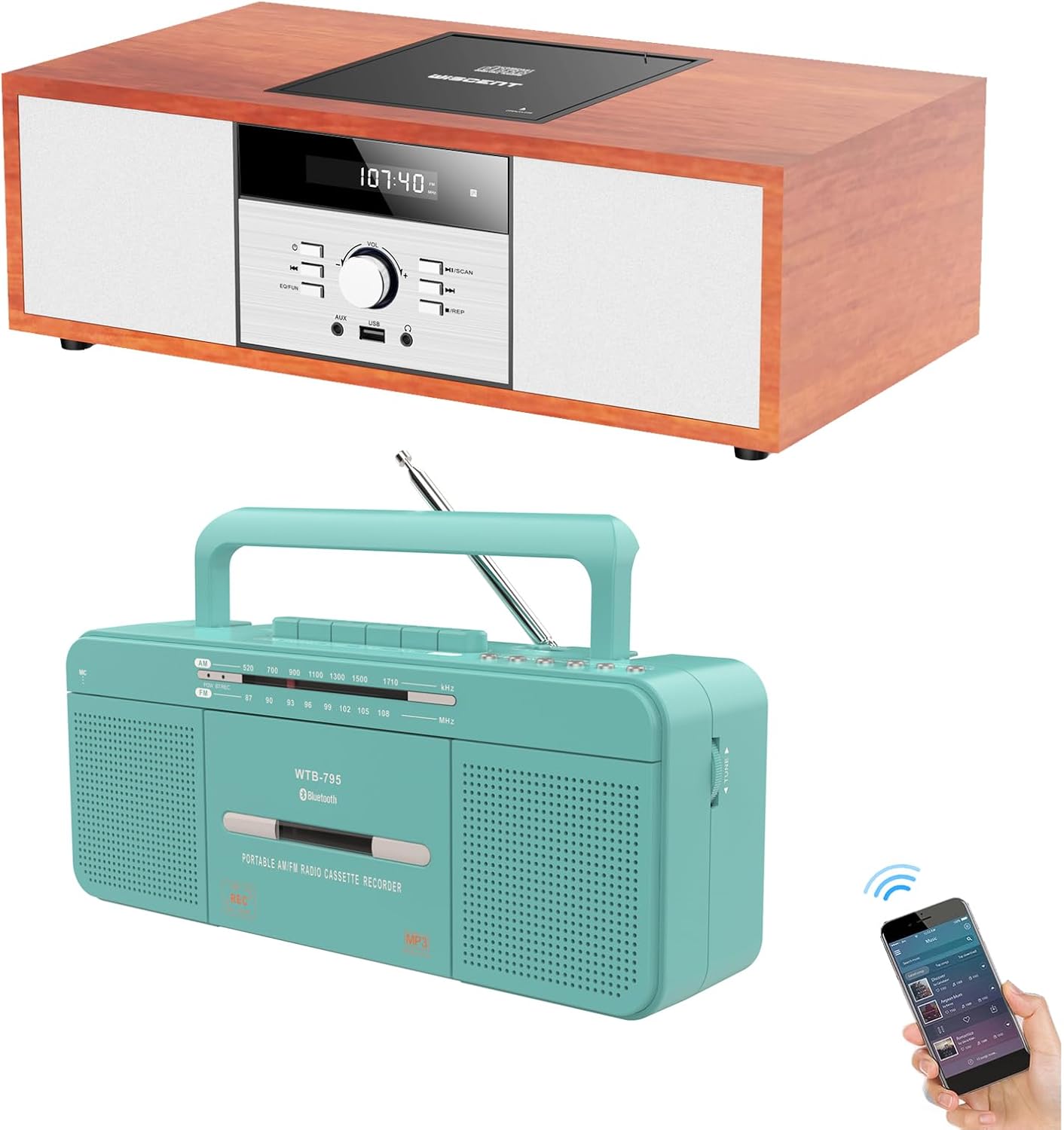
Image: The WISCENT WTB-797 Nostalgic Bluetooth Stereo System (top) and the WTB-795 Multi-functional Cassette Tape Player (bottom).
2. Safety Information
To prevent fire or shock hazards, do not expose this appliance to rain or moisture. Do not open the cabinet. Refer servicing to qualified personnel only.
- Ensure proper ventilation around the unit.
- Do not block ventilation openings with items such as newspapers, table-cloths, curtains, etc.
- Do not place naked flame sources, such as lighted candles, on the apparatus.
- Dispose of used batteries in an environmentally friendly manner.
- Do not expose the apparatus to dripping or splashing.
- Do not place objects filled with liquids, such as vases, on the apparatus.
3. Package Contents
Please check that all items are present:
- WISCENT WTB-797 Nostalgic Bluetooth Stereo System
- WISCENT WTB-795 Multi-functional Cassette Tape Player
- Power Cable(s)
- Remote Control (for WTB-797)
- User Manual (this document)
4. Product Overview
4.1 WTB-797 Nostalgic Bluetooth Stereo System
The WTB-797 is an all-in-one micro multimedia player featuring CD, Bluetooth, USB, Headphone, AUX-in, and FM Radio functionalities.

Image: Detailed diagram of the WTB-797 Stereo System, highlighting its front panel controls and rear connections.
Front Panel Controls:
- CD Tray: For inserting audio CDs.
- Remote Sensor: Receives signals from the remote control.
- Power On/Off: Turns the unit on or off.
- Play/Pause/Scan: Controls playback and scanning functions.
- Prev/Fast Rewind: Skips to the previous track or fast rewinds.
- Next/Fast Forward: Skips to the next track or fast forwards.
- Function/EQ: Switches between input modes (CD, Bluetooth, USB, AUX, FM) and adjusts equalizer settings.
- Stop/Repeat: Stops playback and controls repeat modes.
- AUX In: 3.5mm auxiliary input for external audio devices.
- USB Port: For playing MP3/WMA files from a USB flash drive.
- Headphone Jack: 3.5mm output for private listening.
Rear Panel Connections:
- Power: Main power switch.
- AC Port: Connects to the AC power supply.
- FM Antenna: For improved FM radio reception.
4.2 WTB-795 Multi-functional Cassette Tape Player
The WTB-795 is a versatile portable AM/FM radio cassette recorder with additional functions including USB playback, Bluetooth boombox, and microphone recording.
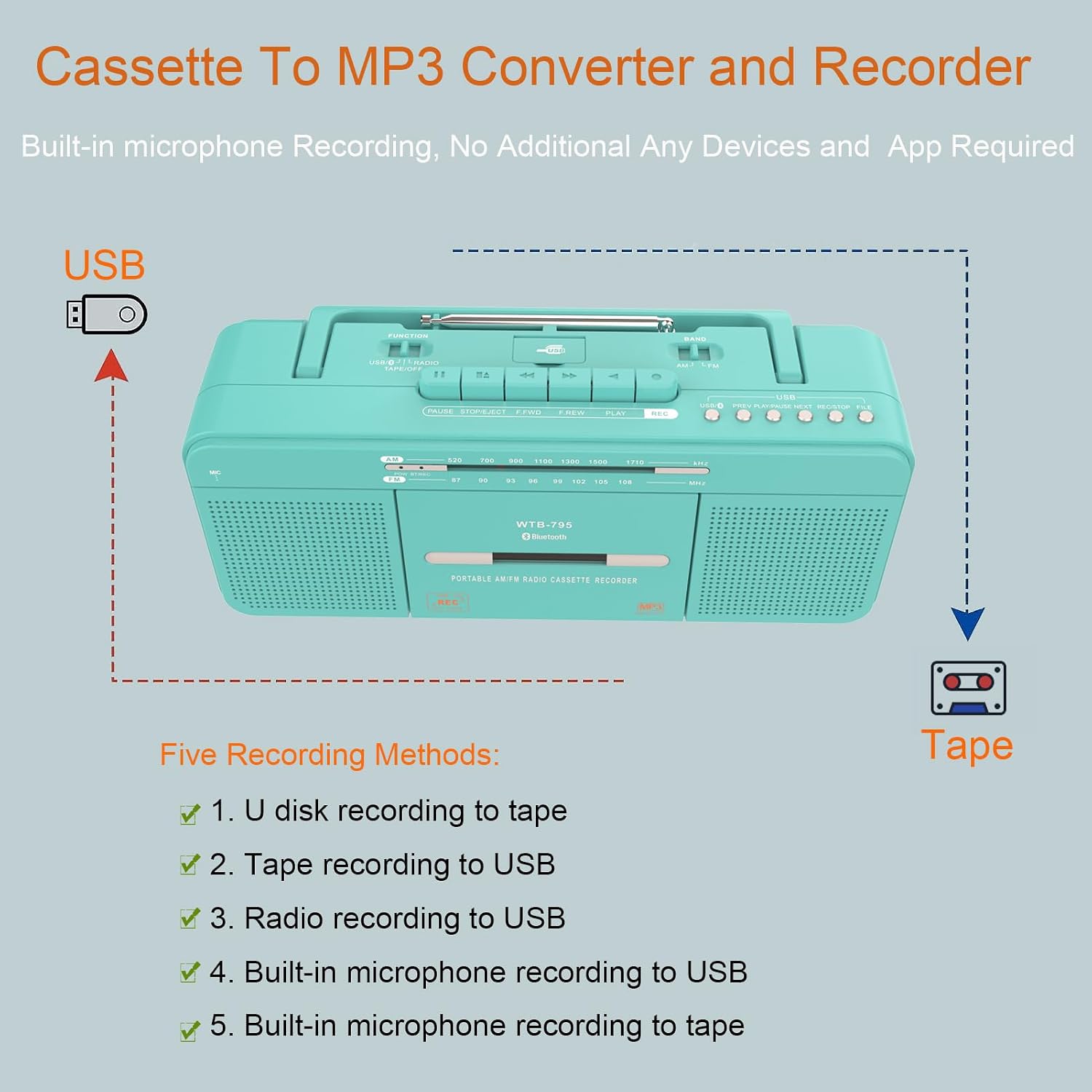
Image: Diagram illustrating the controls of the WTB-795 Cassette Tape Player and its various recording methods.
Top Panel Controls:
- Tape Controls: Play, Stop/Eject, Fast Forward, Rewind, Record.
- Function Switch: Selects between Tape, USB, Bluetooth, AM, FM, AUX.
- Volume Control: Adjusts audio output level.
- Tuning Dial: For selecting radio frequencies.
- USB Port: For USB flash drive playback and recording.
- Built-in Microphone: For voice recording.
- Headphone Jack: 3.5mm output for private listening.
- Telescopic Antenna: For FM/AM radio reception.
5. Setup
5.1 WTB-797 Stereo System Setup
- Placement: Place the unit on a stable, flat surface away from direct sunlight, heat sources, and excessive dust or moisture.
- Power Connection: Connect the AC power cable to the AC port on the rear of the unit, then plug it into a standard wall outlet. Ensure the main power switch on the rear is in the "ON" position.
- Antenna: Extend the FM antenna for optimal radio reception.
5.2 WTB-795 Cassette Player Setup
- Power: The WTB-795 can be powered by AC power (using a compatible adapter, not always included) or batteries (requires D-size batteries, not included). Insert batteries into the compartment if using portable power.
- Antenna: Extend the telescopic antenna for improved AM/FM radio reception.
6. Operating Instructions
6.1 WTB-797 Stereo System Operation
Power On/Off:
Press the Power On/Off button on the front panel or remote control to turn the unit on or off.
Mode Selection:
Press the Function/EQ button repeatedly to cycle through available modes: CD, Bluetooth, USB, AUX, FM Radio.
CD Playback:
- Select "CD" mode.
- Open the top-loading CD tray and place a CD (audio CD, CD-R, CD-RW, MP3/WMA CD) with the label side up.
- Close the CD tray. The unit will read the disc and begin playback automatically.
- Use Play/Pause, Prev/Fast Rewind, Next/Fast Forward, and Stop/Repeat buttons to control playback.

Image: The top-loading CD player mechanism of the WTB-797, showing a disc being inserted.
Bluetooth Pairing:
- Select "Bluetooth" mode. The display will show "BT" and flash, indicating it's ready for pairing.
- On your Bluetooth-enabled device (smartphone, tablet), enable Bluetooth and search for "WTB-797".
- Select "WTB-797" to pair. Once connected, a confirmation tone will sound, and "BT" will stop flashing.
- You can now stream audio from your device to the WTB-797.
USB Playback:
- Insert a USB flash drive into the USB port.
- Select "USB" mode. The unit will automatically detect and play compatible audio files (MP3/WMA).
- Use playback controls as with CD mode.
FM Radio:
- Select "FM" mode.
- Extend the FM antenna fully.
- Use the Scan button (often combined with Play/Pause) to auto-scan and save stations, or use Prev/Next buttons to manually tune.
6.2 WTB-795 Cassette Player Operation
Cassette Playback:
- Open the cassette door and insert a cassette tape.
- Set the Function switch to "Tape".
- Press the PLAY button to start playback.
- Use FAST FORWARD and REWIND for navigation.
- Press STOP/EJECT to stop playback and eject the tape.
Radio Operation (AM/FM):
- Set the Function switch to "AM" or "FM".
- Extend the telescopic antenna.
- Rotate the Tuning Dial to select your desired station.
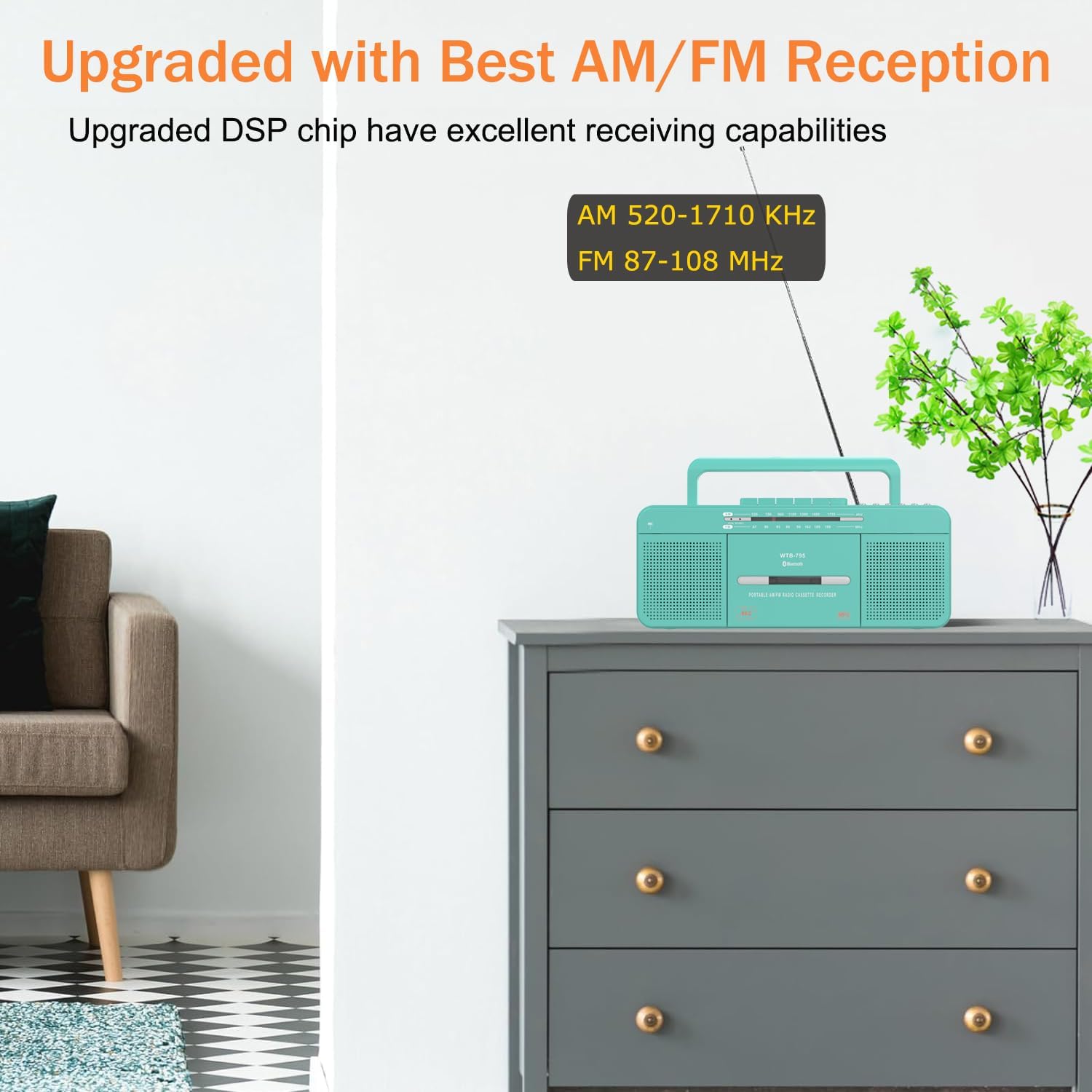
Image: The WTB-795 Cassette Player, highlighting its AM/FM reception capabilities and frequency ranges.
USB Playback:
- Insert a USB flash drive into the USB port.
- Set the Function switch to "USB". The unit will automatically play compatible audio files.
Bluetooth Boombox:
- Set the Function switch to "Bluetooth". The unit will enter pairing mode.
- On your Bluetooth device, search for "WTB-795" and connect.
Recording Functions (WTB-795):
The WTB-795 supports various recording methods:
- U disk recording to tape: Record audio from a USB drive onto a cassette tape.
- Tape recording to USB (MP3 conversion): Convert audio from a cassette tape to MP3 format on a USB drive.
- Radio recording to USB: Record live radio broadcasts to a USB drive.
- Built-in microphone recording to USB: Record voice or ambient sounds directly to a USB drive.
- Built-in microphone recording to tape: Record voice or ambient sounds directly onto a cassette tape.
To record, ensure a blank cassette tape or USB drive (depending on the recording destination) is inserted. Select the desired source (Tape, Radio, Mic, USB) and press the RECORD button. Press STOP to end recording.

Image: The WTB-795 Cassette Player demonstrating its capability to convert old mix tapes to MP3 format using a USB drive.
7. Maintenance
- Cleaning: Use a soft, dry cloth to clean the exterior of both units. Do not use abrasive cleaners or solvents.
- CD Lens Care (WTB-797): If CD playback issues occur, use a specialized CD lens cleaner disc. Do not touch the lens directly.
- Cassette Head Cleaning (WTB-795): Regularly clean the tape heads, pinch rollers, and capstan with a cotton swab lightly dampened with isopropyl alcohol to ensure optimal sound quality and prevent tape damage.
- Storage: When not in use for extended periods, unplug the units and store them in a cool, dry place.
8. Troubleshooting
| Problem | Possible Cause | Solution |
|---|---|---|
| No power | Power cable not connected; Main power switch off (WTB-797); Batteries depleted (WTB-795). | Check power connections; Ensure main power switch is ON; Replace batteries. |
| No sound | Volume too low; Incorrect mode selected; Headphones connected. | Increase volume; Select correct input mode; Disconnect headphones. |
| CD/Tape not playing | Disc/Tape inserted incorrectly; Disc/Tape dirty or damaged; Incorrect mode. | Reinsert correctly; Clean or replace disc/tape; Select CD/Tape mode. |
| Bluetooth not pairing | Device too far; Bluetooth not enabled on source; Unit not in pairing mode. | Move device closer; Enable Bluetooth; Ensure unit is in Bluetooth pairing mode. |
| Poor radio reception | Antenna not extended; Weak signal area. | Extend antenna fully; Reposition unit for better signal. |
9. Specifications
9.1 WTB-797 Nostalgic Bluetooth Stereo System
- Connectivity Technology: Bluetooth, Auxiliary, USB
- Speaker Type: Stereo
- Compatible Devices: Speaker, Headphone, Smartphone, Laptop, Tablet
- Media Playback: CD, CD-R, CD-RW, MP3/WMA CD, USB (MP3/WMA)
- Radio: FM
- Power Source: AC Power
9.2 WTB-795 Multi-functional Cassette Tape Player
- Functions: Tape Player, USB Flash Drive Player, Bluetooth Boombox, FM Radio, AM Radio, Microphone Recorder, 3.5mm Audio Player
- Recording Methods: U disk to tape, Tape to USB, Radio to USB, Mic to USB, Mic to tape
- Radio Frequencies: AM 520-1710 KHz, FM 87-108 MHz
- Speakers: Two 3-inch speakers
- Power Source: AC Power (adapter dependent), Batteries (D-size)
10. Warranty and Support
For warranty information and technical support, please refer to the documentation provided at the time of purchase or visit the official WISCENT website. Keep your purchase receipt as proof of purchase.
WISCENT Store: https://www.amazon.com/stores/WISCENT/page/DB59683F-F2FB-44D4-86B1-188D28A0837B


