
Introduction
Thank you for choosing the BICONIC True Wireless In-Ear Headphones. This manual provides essential information for setting up, operating, and maintaining your new headphones. Please read it carefully before use and retain it for future reference.
1. Setup
1.1 Package Contents
- BICONIC True Wireless In-Ear Headphones (White)
- Charging Case
- Charging Cable
- User Manual
1.2 Initial Charging
Before first use, fully charge your headphones and charging case. Connect the provided charging cable to the charging port on the case and a USB power source. The indicator lights on the case will show the charging status. Once fully charged, the indicator lights will change or turn off.
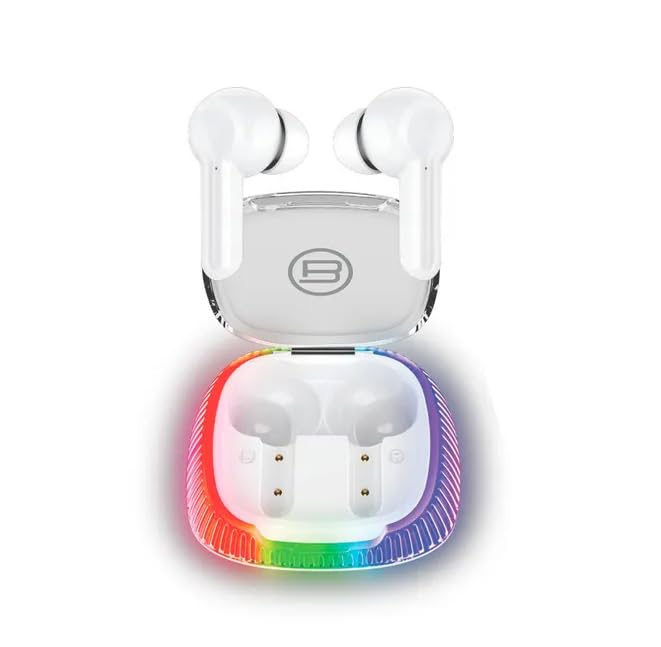
Image: The BICONIC True Wireless In-Ear Headphones, white in color, are shown resting in their charging case. The charging case features a clear lid and a base with a vibrant, multi-colored LED light strip, indicating its power status or aesthetic design.
1.3 Pairing with a Device
- Ensure the headphones are charged.
- Open the charging case. The headphones will automatically enter pairing mode, and an indicator light on the earbuds will flash (refer to product for specific light patterns).
- On your device (smartphone, tablet, etc.), enable Bluetooth.
- Search for available Bluetooth devices and select "BICONIC" (or similar name) from the list.
- Once connected, the indicator light on the headphones will stop flashing, and you will hear a confirmation tone.
If pairing fails, place the headphones back in the case, close the lid, wait a few seconds, and then repeat the steps.
2. Operating Instructions
2.1 Power On/Off
- Power On: Open the charging case, or long-press the touch area on both earbuds for a few seconds.
- Power Off: Place the earbuds back into the charging case and close the lid, or long-press the touch area on both earbuds for several seconds until they power off.
2.2 Music Playback
- Play/Pause: Tap the touch area on either earbud once.
- Next Track: Double-tap the touch area on the right earbud.
- Previous Track: Double-tap the touch area on the left earbud.
- Volume Up: Triple-tap the touch area on the right earbud.
- Volume Down: Triple-tap the touch area on the left earbud.
2.3 Call Management
- Answer/End Call: Tap the touch area on either earbud once.
- Reject Call: Long-press the touch area on either earbud for 2 seconds.
2.4 Voice Assistant
- Activate Voice Assistant: Long-press the touch area on either earbud for 2 seconds (when not on a call).
3. Maintenance
Proper maintenance ensures the longevity and optimal performance of your headphones.
3.1 Cleaning
- Use a soft, dry, lint-free cloth to clean the earbuds and charging case.
- Do not use abrasive cleaners, alcohol, or chemical solvents.
- Gently remove any earwax or debris from the earbud mesh using a small, soft brush or cotton swab.
3.2 Storage
- Always store the headphones in their charging case when not in use to protect them and keep them charged.
- Avoid storing in extreme temperatures, high humidity, or dusty environments.
3.3 Battery Care
- To preserve battery life, charge the headphones regularly, even if not used frequently.
- Avoid fully discharging the battery for extended periods.
4. Troubleshooting
If you encounter issues, try the following solutions:
4.1 Headphones Not Pairing
- Ensure both earbuds are charged.
- Turn off Bluetooth on your device and turn it back on.
- Delete "BICONIC" from your device's Bluetooth list and attempt to pair again.
- Place earbuds back in the case, close the lid, wait 10 seconds, then open and try pairing.
4.2 No Sound or Intermittent Sound
- Check the volume level on both your device and the headphones.
- Ensure the headphones are within the Bluetooth range of your device (typically 10 meters/33 feet).
- Try disconnecting and reconnecting the headphones to your device.
- Clean any debris from the earbud mesh that might be obstructing sound.
4.3 Charging Issues
- Ensure the charging cable is securely connected to both the case and the power source.
- Try a different USB port or power adapter.
- Clean the charging contacts on both the earbuds and the case with a dry cotton swab.
5. Specifications
| Brand | Genérico |
| Model | BC-AU-BE-133-WT |
| Connectivity Technology | Wireless (Bluetooth) |
| Color | White |
| Ear Placement | In-Ear (Intraurales) |
| Form Factor | True Wireless |
| Special Features | Rechargeable Battery |
| Components Included | Cable |
6. Warranty Information
This product is covered by a manufacturer's warranty. Please refer to the warranty card included in your package or contact the retailer for specific terms and conditions. The warranty typically covers defects in materials and workmanship under normal use.
7. Customer Support
If you require further assistance or have questions not covered in this manual, please contact your retailer or the manufacturer's customer support. Have your product model number (BC-AU-BE-133-WT) ready when contacting support.