
Introduction
Thank you for purchasing the BICONIC BC-AU-BS-233-BK Portable Bluetooth Luminous Speaker. This manual provides important information regarding the setup, operation, maintenance, and troubleshooting of your new device. Please read this manual thoroughly before using the product to ensure proper function and to prevent damage.
Safety Information
- Do not expose the speaker to extreme temperatures, humidity, or direct sunlight.
- Avoid dropping or subjecting the speaker to strong impacts.
- Do not disassemble, repair, or modify the speaker yourself. Contact qualified service personnel for assistance.
- Keep the speaker away from water and other liquids.
- Use only the provided charging cable for recharging the battery.
- Dispose of the product and its battery responsibly according to local regulations.
Package Contents
Please check the package contents upon unboxing:
- 1 x BICONIC BC-AU-BS-233-BK Portable Bluetooth Luminous Speaker
- 1 x Charging Cable
- 1 x User Manual (this document)
Product Overview
Familiarize yourself with the components and controls of your speaker.

Figure 1: Front View of the Speaker. This image displays the speaker from the front, highlighting its transparent design, the two visible speaker drivers, and the row of control buttons including Mode, Play/Pause, Power, Volume Down, and Volume Up, all illuminated with colorful lights.
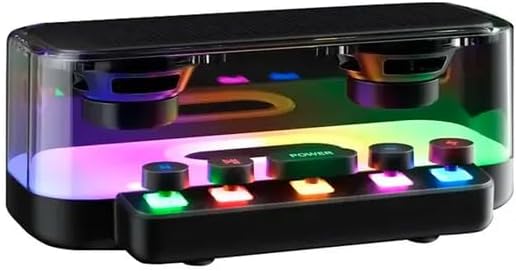
Figure 2: Angled View of the Speaker. This image provides an angled perspective of the speaker, showcasing its compact rectangular shape and the vibrant internal lighting effects that illuminate the transparent casing.

Figure 3: Internal Component Diagram. This diagram illustrates the internal structure of the speaker, including the two main speaker drivers and the visual representation of sound waves emanating from them, emphasizing the audio output capabilities.
Control Buttons:
- M (Mode Button): Press to switch between Bluetooth, AUX, and other available modes.
- Play/Pause Button: Press to play or pause audio.
- Power Button: Long press to turn the speaker ON/OFF. Short press for light mode changes (if applicable).
- - (Volume Down / Previous Track): Short press to decrease volume. Long press to go to the previous track.
- + (Volume Up / Next Track): Short press to increase volume. Long press to go to the next track.
Setup
Charging the Speaker:
- Connect the provided charging cable to the charging port on the speaker.
- Connect the other end of the cable to a USB power adapter (not included) or a computer's USB port.
- The charging indicator light will illuminate during charging and turn off when fully charged.
- A full charge typically takes approximately 2-3 hours.
Powering On/Off:
- To turn ON: Long press the Power button until the indicator lights turn on.
- To turn OFF: Long press the Power button again until the indicator lights turn off.
Operating Instructions
Bluetooth Pairing:
- Ensure the speaker is powered on and in Bluetooth pairing mode (indicated by a flashing blue light). If not, press the M (Mode) button to switch to Bluetooth mode.
- Enable Bluetooth on your device (smartphone, tablet, computer).
- Search for "BC-AU-BS-233-BK" in the list of available Bluetooth devices.
- Select "BC-AU-BS-233-BK" to connect. Once connected, the blue light will stop flashing and remain solid.
- You can now play audio from your device through the speaker.
Adjusting Volume:
- Press the + button to increase the volume.
- Press the - button to decrease the volume.
Controlling Playback:
- Press the Play/Pause button to play or pause the current track.
- Long press the + button to skip to the next track.
- Long press the - button to go back to the previous track.
Luminous Light Modes:
The speaker features unique luminous lights. Short press the Power button to cycle through different light modes or to turn the lights off.
Maintenance
- Clean the speaker with a soft, dry cloth. Do not use abrasive cleaners or solvents.
- Store the speaker in a cool, dry place when not in use for extended periods.
- Charge the battery at least once every three months to maintain battery health if not used regularly.
Troubleshooting
| Problem | Possible Cause | Solution |
|---|---|---|
| Speaker does not turn on. | Battery is low or depleted. | Charge the speaker using the provided cable. |
| Cannot pair with Bluetooth device. | Speaker is not in pairing mode or device Bluetooth is off. | Ensure speaker is in Bluetooth mode (flashing blue light). Turn on Bluetooth on your device and try searching again. Move devices closer. |
| No sound. | Volume is too low or muted. Device is not connected. | Increase volume on both speaker and connected device. Re-establish Bluetooth connection. |
| Sound distortion. | Volume too high or low battery. | Reduce volume. Charge the speaker. |
Specifications
| Feature | Detail |
|---|---|
| Model Name | BC-AU-BS-233-BK |
| Brand | Genérico |
| Connectivity Technology | Bluetooth |
| Special Features | Bluetooth, Portable, Luminous Lights |
| Power Source | Battery |
| Speaker Type | Multimedia |
| Subwoofer Diameter | 10 Centimeters |
| Product Dimensions | 8cm (D) x 10cm (W) x 10cm (H) |
| Included Components | Charging Cable |
Warranty and Support
This product is covered by a standard manufacturer's warranty. For specific warranty terms and conditions, please refer to the documentation included with your purchase or contact the retailer. For technical support or inquiries, please reach out to the point of purchase or the manufacturer's customer service channels.
Please retain your proof of purchase for warranty claims.