
1. Introduction
Thank you for choosing the CRISTALRECORD LED Ceiling Fan. This quiet Nordic-style ceiling fan features integrated LED lighting, dimmable in intensity and color temperature. Equipped with a quiet DC motor, it offers 6 different speed levels, a timer function (2h, 4h, 8h), and a convenient summer-winter mode. The fan also includes a power-on memory for the last lighting setting and comes with a remote control for comprehensive fan and lighting management. The fan has a white motor and light ABS plastic blades.

Figure 1: CRISTALRECORD LED Ceiling Fan overview.
This image shows the complete CRISTALRECORD LED Ceiling Fan with its white motor housing and light-colored, gently curved blades. The integrated LED light is visible at the bottom center of the motor unit.
2. Safety Instructions
Please read all instructions carefully before installation and use. Keep this manual for future reference.
- Ensure the main power supply is disconnected before installation, maintenance, or cleaning.
- Installation must be performed by a qualified electrician in accordance with local wiring regulations.
- The fan must be mounted at a height of at least 2.3 meters (7.5 feet) from the floor to the blades.
- Ensure the mounting structure can support the weight of the fan (refer to specifications for weight).
- Do not insert any objects into the path of the rotating blades.
- This appliance is not intended for use by persons (including children) with reduced physical, sensory or mental capabilities, or lack of experience and knowledge, unless they have been given supervision or instruction concerning use of the appliance by a person responsible for their safety.
- Children should be supervised to ensure that they do not play with the appliance.
- Use only the remote control provided with the fan.
3. Package Contents
Carefully unpack the box and ensure all items are present and undamaged. If any items are missing or damaged, contact your retailer immediately.
- Ceiling Fan Motor Unit with Integrated LED Light
- Fan Blades (x3)
- Downrod and Canopy
- Mounting Bracket
- Remote Control
- Remote Control Holder (optional)
- Hardware Pack (screws, washers, wire nuts)
- User Manual (this document)
4. Setup and Installation
Installation should be performed by a qualified electrician. Follow these general steps:
- Turn off Power: Before starting, ensure the power supply to the installation location is completely turned off at the circuit breaker.
- Mounting Bracket Installation: Secure the mounting bracket to a ceiling joist or a suitable electrical junction box capable of supporting the fan's weight.
- Assemble Downrod: Attach the downrod to the fan motor unit.
- Wiring: Connect the fan's electrical wires to the household wiring according to the wiring diagram provided in the separate installation guide (not included in this manual). Ensure all connections are secure and insulated.
- Hang Fan: Carefully lift the fan assembly and hang it onto the mounting bracket.
- Secure Canopy: Slide the canopy up to cover the mounting bracket and wiring, and secure it in place.
- Attach Blades: Securely attach the fan blades to the motor unit. Ensure all screws are tightened.
- Restore Power: Once installation is complete and all connections are checked, restore power at the circuit breaker.
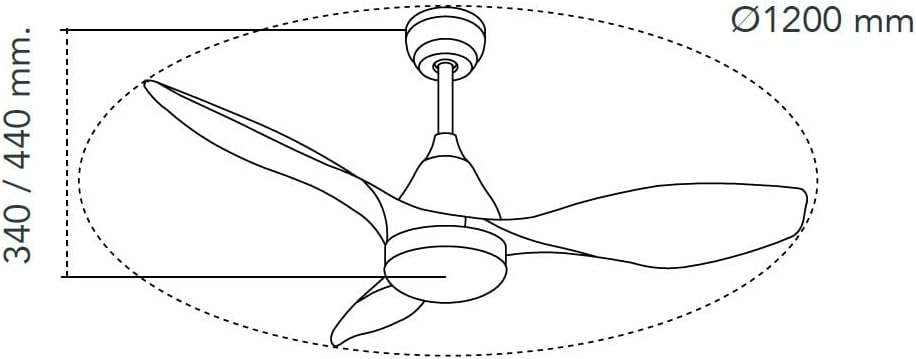
Figure 2: Ceiling Fan Dimensions.
This diagram illustrates the approximate dimensions of the ceiling fan, showing a diameter of 1200 mm and a height range of 340-440 mm, which is crucial for planning installation space.
5. Operating Instructions
Your CRISTALRECORD LED Ceiling Fan is controlled by the included remote control. Ensure batteries are installed correctly (2x AAA, not included).

Figure 3: Remote Control Layout.
This image displays the remote control for the fan, featuring buttons for power, fan speed, light control (on/off, dimming, color temperature), timer settings, and summer/winter mode.
Remote Control Functions:
- Power Button (⏻): Turns the fan and light on/off.
- Fan Speed (1-6): Selects one of 6 fan speeds. 'FAN/OFF' button in the center turns the fan off.
- Light On/Off (💡): Toggles the LED light on or off.
- Light Dimming (💡 slider): Adjusts the brightness of the LED light.
- Color Temperature (CCT) Adjustment (💡, 💡, 💡): Cycles through different color temperatures (e.g., warm white, neutral white, cool white).
- Timer (2H, 4H, 8H): Sets the fan to automatically turn off after 2, 4, or 8 hours.
- Summer/Winter Mode (F/R): Changes the direction of blade rotation.
- Summer Mode (Forward): Blades rotate counter-clockwise, pushing air downwards to create a cooling breeze.
- Winter Mode (Reverse): Blades rotate clockwise, drawing air upwards to circulate warm air trapped near the ceiling.
- Memory Function: The fan remembers the last lighting setting (brightness and color temperature) when turned off and on again.
6. Maintenance
Regular maintenance ensures optimal performance and extends the life of your fan.
- Cleaning: To clean the fan, wipe surfaces with a soft, damp cloth. Do not use abrasive cleaners or solvents. Ensure power is off before cleaning.
- Blade Cleaning: Dust the fan blades regularly to prevent dust buildup, which can affect balance and performance.
- Tighten Fasteners: Periodically check all screws and fasteners on the fan and mounting hardware to ensure they are secure.
- No Lubrication Required: The fan's motor is permanently lubricated and does not require additional oiling.
7. Troubleshooting
If you experience issues with your fan, consult the following table before contacting customer support.
| Problem | Possible Cause | Solution |
|---|---|---|
| Fan does not start | No power supply Loose wiring connection Remote control battery low/dead | Check circuit breaker Verify all wiring connections (power off first) Replace remote control batteries |
| Light does not work | No power to light Light setting off on remote | Check wiring to light Press light button on remote |
| Fan wobbles | Loose blades or mounting hardware Unbalanced blades | Tighten all screws on blades and mounting bracket Ensure blades are installed correctly and balanced (balancing kit may be required) |
| Noisy operation | Loose screws Motor issue Interference with ceiling/obstruction | Check and tighten all screws Ensure fan is not touching ceiling or other objects If noise persists, contact customer support |
8. Specifications
Technical specifications for the CRISTALRECORD LED Ceiling Fan, Model 85-950-20-106.
- Model: 85-950-20-106
- Brand: CristalRecord
- Power Consumption: 20 W
- Luminous Flux: 1900 lm
- Light Type: Integrated LED, CCT Dimmable
- Motor Type: DC Motor
- Speed Settings: 6
- Timer Functions: 2h, 4h, 8h
- Special Features: Dimmable, Summer/Winter Function, Power-on Memory
- Control Method: Remote Controlled
- Fan Design: Ceiling Fan
- Power Source: Corded Electric
- Room Type: Living Room (suitable for various rooms)
- First Available Date: April 11, 2024
9. Warranty and Support
For warranty information, please refer to the documentation included with your purchase or contact your retailer. For technical support or inquiries, please visit the official CristalRecord website or contact their customer service department.
Keep your purchase receipt as proof of purchase for warranty claims.