
1. Introduction
This manual provides detailed instructions for the setup, operation, and maintenance of your BOSGAME P2 Lite Mini PC. Please read this manual thoroughly before using the device to ensure proper functionality and longevity.
2. What's in the Box
Verify that all items listed below are included in your package:
- Mini PC 12450H (1 unit)
- BOSGAME User Manual (1 unit)
- HDMI Cable (1 unit)
- BOSGAME 20V 6A, 120W Power Adapter (1 unit)
- Mini PC VESA Mount & Screws (1 set)

Figure 2.1: Contents of the BOSGAME P2 Lite Mini PC package, including the mini PC, power adapter, HDMI cable, user manual, and VESA mount with screws.
3. Product Overview
3.1. Key Features
- Processor: Intel Core i5-12450H (8 Cores/12 Threads, up to 4.4GHz)
- Graphics: Intel UHD Graphics for 12th Gen Intel Processors
- RAM: 16GB DDR4 Dual Channel (expandable)
- Storage: 512GB NVMe M.2 2280 PCIe 4.0 SSD (2 slots, up to 8TB total)
- Display Output: Triple 4K 60Hz (1x HDMI 2.0, 1x DisplayPort, 1x USB-C)
- Wireless Connectivity: Wi-Fi 6 (2.4GHz, 5GHz), Bluetooth 5.2
- Wired Connectivity: Dual 1000M RJ45 LAN ports

Figure 3.1: Overview of the BOSGAME P2 Lite Mini PC's core components and connectivity options.
3.2. Ports and Interfaces
The BOSGAME P2 Lite Mini PC offers a variety of ports for versatile connectivity:
- Front Ports:
- Power Button
- Audio Jack (3.5mm)
- 2x USB 3.2 Gen2 (10Gbps)
- 1x USB-C (4K@60Hz video output, PD 3.0 power supply, 10Gbps data transmission)
- Rear Ports:
- DC Power Input
- 2x 1000M RJ45 LAN ports
- 1x HDMI 2.0 (4K@60Hz)
- 1x DisplayPort (4K@60Hz)
- 2x USB 3.2 Gen2 (10Gbps)

Figure 3.2: Front and rear interfaces for connecting peripherals and displays.
4. Setup
Follow these steps to set up your BOSGAME P2 Lite Mini PC:
- Connect to a Display: Use the provided HDMI cable to connect the Mini PC to your monitor or TV. Alternatively, use a DisplayPort or USB-C cable for compatible displays.
- Connect Peripherals: Plug in your keyboard and mouse to the available USB ports.
- Connect Power: Connect the power adapter to the DC input port on the rear of the Mini PC, then plug the adapter into a power outlet.
- Power On: Press the power button on the front of the Mini PC. The device will boot up, and you will see the BOSGAME logo on your display.
Video 4.1: This video demonstrates the simple and easy setup process of a Mini PC, including connecting power and display, and the initial boot sequence.
5. Operating Instructions
5.1. Initial Operating System Setup
Upon first boot, you will be guided through the Windows 11 Pro setup process. Follow the on-screen prompts to configure your language, keyboard layout, network settings, and user account. If installing a different operating system like Linux or Ubuntu, refer to the specific installation guide for that OS.
5.2. Connecting to Networks
- Wi-Fi: The Mini PC supports Wi-Fi 6. During OS setup or via network settings, select your Wi-Fi network and enter the password.
- Ethernet: For a wired connection, connect an Ethernet cable to one of the two RJ45 LAN ports on the rear of the device.

Figure 5.1: Dual 1000M RJ45 LAN ports for stable and fast wired network connections.
5.3. Multiple Display Setup
The BOSGAME P2 Lite supports up to three 4K 60Hz displays simultaneously using the HDMI, DisplayPort, and USB-C outputs. Connect your displays and configure them through your operating system's display settings.

Figure 5.2: Triple display setup for enhanced productivity and immersive experiences.
6. Storage and RAM Upgrade
The BOSGAME P2 Lite Mini PC is designed for easy upgrades of both RAM and storage.
6.1. RAM Upgrade
The device comes with 16GB DDR4 dual-channel RAM. It supports further expansion. To upgrade, carefully open the chassis (refer to the detailed instructions in the included BOSGAME User Manual for safe opening procedures), locate the SODIMM slots, and replace or add compatible RAM modules.
6.2. Storage Expansion
The Mini PC includes a 512GB NVMe M.2 2280 PCIe 4.0 SSD and features a second NVMe M.2 2280 SSD slot, supporting up to 8TB of total storage (2x4TB). To add or upgrade storage, open the chassis, insert the new M.2 SSD into the available slot, and secure it. Format the new drive through your operating system's disk management tools.
7. Mounting Options
The BOSGAME P2 Lite Mini PC can be conveniently mounted using the included VESA mount and screws.
- Attach Mount to Mini PC: Secure the VESA mount bracket to the Mini PC using the provided screws.
- Attach Mount to Display/Surface: Fix the bracket to the back of your display (if VESA compatible) or to a suitable surface using screws.

Figure 7.1: Instructions for VESA mounting the Mini PC to a monitor or wall.
8. Specifications
| Component | Detail |
|---|---|
| Model Number | P2 |
| Processor | Intel Core i5-12450H (8 Cores/12 Threads, 3.2 GHz base, up to 4.4 GHz) |
| RAM | 16GB DDR4 SODIMM (Dual Channel) |
| Hard Drive | 512GB M.2 2280 PCIe 4.0 SSD (2 slots, up to 8TB total) |
| Graphics Coprocessor | Intel UHD Graphics for 12th Gen Intel Processors |
| Max Screen Resolution | 3840x2160 Pixels (4K@60Hz) |
| Wireless Type | Wi-Fi 6 (802.11ax), Bluetooth 5.2 |
| Ethernet | Dual 1000M RJ45 LAN |
| Operating System | Supports Windows 11 Pro, Windows 10, various Linux systems (Ubuntu, Plex, etc.) |
| Item Weight | 2.68 pounds |
| Package Dimensions | 6.54 x 6.1 x 3.9 inches |
9. Troubleshooting
If you encounter issues with your Mini PC, refer to the following common solutions:
- No Display: Ensure all display cables (HDMI, DP, USB-C) are securely connected to both the Mini PC and the monitor. Verify the monitor is set to the correct input source.
- No Power: Check that the power adapter is firmly connected to the Mini PC and a working power outlet. Try a different outlet if necessary.
- Peripheral Not Detected: Ensure USB devices (keyboard, mouse) are properly plugged into the USB ports. Try different USB ports or restart the Mini PC.
- Network Connectivity Issues: For Wi-Fi, check your network settings and ensure the correct password is entered. For Ethernet, verify the cable is securely connected to both the Mini PC and your router/modem.
- Slow Performance: Close unnecessary applications. Check for background processes consuming resources. Consider upgrading RAM or ensuring sufficient free storage space.
10. Maintenance
To ensure optimal performance and longevity of your BOSGAME P2 Lite Mini PC, follow these maintenance guidelines:
- Cleaning: Regularly clean the exterior of the Mini PC with a soft, dry cloth. Use compressed air to gently clear dust from ventilation holes to prevent overheating. Do not use liquid cleaners directly on the device.
- Ventilation: Ensure the Mini PC is placed in a well-ventilated area, away from direct sunlight or heat sources. Do not block the ventilation openings.
- Software Updates: Keep your operating system and drivers updated to the latest versions for improved performance and security.
- Safe Shutdown: Always shut down the Mini PC properly through the operating system to prevent data corruption.
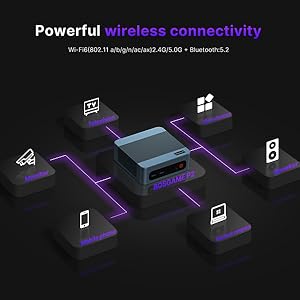
Figure 10.1: The BOSGAME P2 Mini PC is designed for quiet operation, contributing to a comfortable work environment.
11. Warranty and Support
For warranty information and technical support, please refer to the official BOSGAME website or contact BOSGAME Direct through your purchase platform. Keep your proof of purchase for warranty claims.
- Seller: BOSGAME Direct
- Return Policy: 2026 days (refund/replacement)


