Introduction
Thank you for purchasing the Irfora SK-502 Digital Voice Recorder. This device integrates a professional voice recorder with an MP3 music player, offering high-fidelity audio capture and playback. This manual provides detailed instructions for setup, operation, maintenance, and troubleshooting to ensure optimal performance and longevity of your device.
Package Contents
- 1 x SK-502 Voice Recorder
- 1 x Pair of Earphones
- 1 x Microphone
- 1 x Data Line (USB Cable)
- 1 x User's Manual (This document)
Product Overview
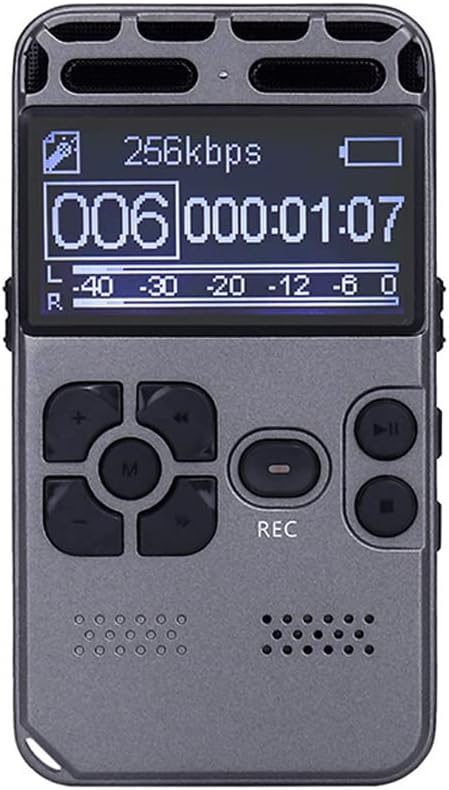
Figure 1: Front view of the SK-502 Digital Voice Recorder.

Figure 2: Labeled diagram of the SK-502 Digital Voice Recorder controls and ports.
The SK-502 features a clear LCD screen, intuitive button layout for easy navigation, and dedicated buttons for recording and playback. It includes dual audio input channels, a built-in loudspeaker, and various control buttons for volume, menu access, and track navigation.
Setup
1. Initial Charging
Before first use, fully charge the device. Connect the supplied USB data line to the recorder's USB port and the other end to a computer's USB port or a compatible USB wall adapter. The battery indicator on the screen will show charging status. A full charge typically takes a few hours.
2. Powering On/Off
- Power On: Press and hold the Power/Play button (refer to Figure 2) for a few seconds until the screen lights up.
- Power Off: Press and hold the Power/Play button again until the screen turns off.
3. Setting Date and Time (Optional but Recommended)
Access the system settings via the MENU button to set the correct date and time. This ensures accurate timestamps for your recordings.
Operating Instructions
1. Recording Audio
- Standard Recording: From the main screen, press the REC button (refer to Figure 2) to start recording. The recording indicator will appear on the screen.
- Saving Recording: Press the SAVE/STOP/ESC button to stop and save the current recording.
- Voice-Activated Recording (VOR): Navigate to the recording settings in the menu. Enable VOR mode. The recorder will automatically start recording when sound is detected and pause when silence occurs.
- Recording Monitoring: Connect earphones to the headphone jack to monitor audio during recording.
- LINE-IN/Phone-call Recording: Use the appropriate cables (not included) to connect external audio sources or a landline phone for direct recording.
2. Playing Back Audio
- Accessing Files: From the main screen, use the navigation buttons (Rewind/PREV, Fast forward/Next) to browse through recorded files or music tracks.
- Playing a File: Press the Play/Pause button to start playback of the selected file. Press again to pause.
- Volume Adjustment: Use the VOL+ and VOL- buttons to adjust the playback volume.
- A-B Segment Repeat: During playback, press the A-B repeat button (if available, typically a dedicated button or menu option) to mark the start (A) and end (B) points of a section you wish to repeat.
- Loop Function: The device supports loop playback for music files, configurable in the music playback settings.
3. Music Player Functionality
The SK-502 supports lossless music formats including MP3, WMA, FLAC, APE, and OGG. Transfer music files to the device's memory via USB connection. Use the navigation buttons to select music and the Play/Pause button for playback.
4. Password Protection
To protect your recordings and data, you can set a password for device boot-up. Access this feature through the system settings menu. Remember your password, as there may not be a simple reset option without data loss.
File Management
Connecting to a Computer
The device supports USB 2.0 connections for easy uploading and downloading of voice recordings or music files. Connect the recorder to your computer using the supplied USB data line. The device will appear as a removable disk drive. You can then drag and drop files to and from the recorder.
Maintenance
- Battery Care: The device has an intelligent battery detection system that automatically saves the current recording file before the battery is completely exhausted. To prolong battery life, avoid fully discharging the battery frequently and store the device with some charge if not used for extended periods.
- Cleaning: Use a soft, dry cloth to clean the device's exterior. Do not use liquid cleaners or solvents.
- Storage: Store the recorder in a cool, dry place away from direct sunlight, extreme temperatures, and high humidity.
- Data Backup: Regularly back up important recordings to your computer to prevent data loss.
Troubleshooting
| Problem | Possible Cause | Solution |
|---|---|---|
| Device does not power on. | Low battery; device frozen. | Charge the device fully. If unresponsive, try a soft reset (refer to manual or manufacturer support if available for specific reset instructions). |
| Cannot record. | Memory full; incorrect mode; low battery. | Delete old files to free up space. Ensure you are in recording mode. Charge the battery. |
| No sound during playback. | Volume too low; earphones not connected properly; corrupted file. | Increase volume. Check earphone connection. Try playing another file. |
| Computer does not recognize device. | Faulty USB cable; driver issue; incorrect connection mode. | Try a different USB port or cable. Ensure the device is powered on when connected. Some systems may require specific drivers (usually plug-and-play). |
Specifications

Figure 3: SK-502 Digital Voice Recorder size comparison with a ruler.

Figure 4: Detailed dimensions of the SK-502 Digital Voice Recorder.
| Model | SK-502 |
| Screen | 128 x 64 pixels |
| Internal Memory | 8GB (supports memory card expansion, type not specified) |
| Recording Format | WAV, MP3 |
| Recording Mode | MIC, LINE-IN, Phone-call Recording |
| Music Format | MP3, WMA, FLAC, APE, OGG |
| Battery | 3.7V, 850mAh Polymer Battery |
| Recorder Dimensions (L x W x H) | 92 x 50 x 10 mm (3.6 x 2.0 x 0.4 inches) |
| Recorder Weight | 98g (3.5 ounces) |
| Package Dimensions | 135 x 76 x 47 mm (5.3 x 3.0 x 1.9 inches) |
| Package Weight | 183g (6.5 ounces) |
| USB Connection | USB 2.0 |
Warranty and Support
Specific warranty information for the Irfora SK-502 Digital Voice Recorder is not provided in this manual. Please refer to the product packaging or the retailer's website for warranty details. For technical support or further assistance, please contact the seller or manufacturer directly through the contact information provided at the point of purchase.


