
AODK 55 Inch Computer Desk
AODK 55-Inch Computer Desk User Manual
Model: 55 Inch Computer Desk (Black)
Important Safety Information
Always assemble the desk according to the provided instructions. Ensure the desk is properly anchored to the wall or floor to prevent tip-overs, especially if using the monitor stand or placing heavy items on the desk. Always unplug the power strip when not in use and do not overload the outlets to prevent electrical hazards. Keep small parts away from children during assembly. Do not stand or sit on the desk during or after assembly.
Product Overview
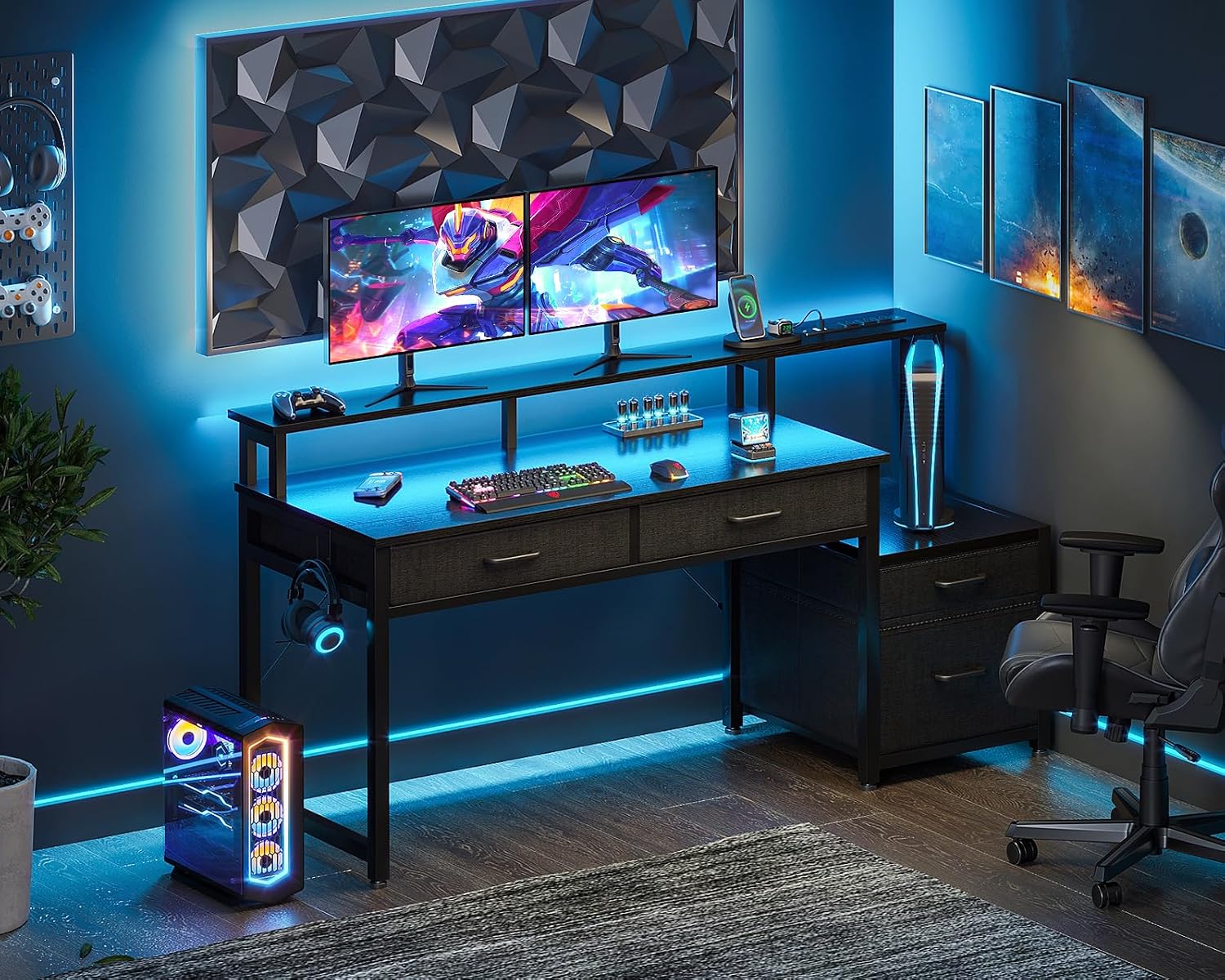
The AODK 55-Inch Computer Desk is designed for home office and gaming environments, offering a blend of functionality and modern aesthetics. It features integrated power outlets, USB ports, LED lighting, and ample storage solutions.
Key Features:
- Convenient Power Outlet: Includes 3 standard AC outlets and 2 USB ports for device charging.
- 4 Fabric Drawers: Provides organized storage, including a professional file drawer for letter and A4 legal documents.
- RGB LED Lights: Offers 10 static colors and 10 dynamic modes with adjustable brightness.
- Ergonomic Monitor Stand: Raises monitors to eye level to reduce neck strain.
- Reversible Design: The storage unit can be configured on either the left or right side.
- Durable Construction: Made with a premium metal frame and high-quality MDF board.

Package Contents
Before beginning assembly, please ensure all components listed in the included assembly manual are present and undamaged. The package typically includes:
- Desk frame components (metal legs, supports)
- Desk surface panels (MDF board)
- Fabric drawers and file cabinet frame
- Monitor stand components
- Power outlet strip with USB ports
- RGB LED light strip and controller
- Assembly hardware (screws, bolts, nuts)
- Assembly tools (wrench, screwdriver)
- Illustrated user manual
Assembly Instructions
This desk requires assembly. Please follow the detailed, step-by-step illustrated manual included in your package for precise instructions. All parts are labeled for easy identification. It is recommended to have two people for assembly to ensure stability and ease of handling larger components.
Reversible Design:
The storage unit (printer shelf and file cabinet) can be assembled on either the left or right side of the main desk. Refer to the assembly manual for specific steps on how to configure your preferred orientation.


Operating Instructions
Power Outlet and USB Ports:
The desk includes a built-in power strip for convenient access to charging. To use, plug the desk's main power cord into a standard wall outlet. The power strip provides:
- 3 AC Outlets (120V/12A)
- 2 USB Ports (5V/2A)
- Power Cord Length: 6.5 feet
Use these ports to power your computer, monitor, phone, and other electronic devices. Avoid overloading the outlets.

RGB LED Lights:
The integrated RGB LED light strip offers customizable lighting for your workspace. Use the inline controller to adjust settings:
- Static Color Button (C): Press once to cycle through 10 static color options.
- Dynamic Mode Button (M): Press once to cycle through 10 dynamic lighting effects. Press and hold for more than 3 seconds to enter demo mode, which cycles through various dynamic modes automatically.
- Speed & Brightness and Power Button (S/B):
- In static mode, press to adjust the brightness level.
- In dynamic mode, press to adjust the speed of the effect.
- Press and hold to turn the LED strip off when it is on. Press briefly to turn it on.
The LED strip features a power-off memory function, restoring the last color, brightness, and mode upon next power-on.


Fabric Drawers and File Cabinet:
The desk includes four fabric drawers for organized storage. One drawer is designed as a file cabinet, accommodating letter and A4 size documents. The other three drawers are suitable for general office supplies, gaming accessories, or personal items.
Ergonomic Monitor Stand:
The raised monitor stand helps position your screen at an ergonomic height, reducing neck and eye strain during prolonged use. Place your monitor(s) directly on the stand. Ensure the weight capacity of the stand is not exceeded.

Maintenance
To maintain the appearance and longevity of your AODK Computer Desk, follow these simple care instructions:
- Cleaning: Wipe the desk surfaces with a damp cloth. Avoid harsh chemicals or abrasive cleaners that may damage the finish.
- Spills: Clean up spills immediately to prevent staining or damage to the wood and fabric components.
- Fabric Drawers: For fabric drawers, spot clean with a mild detergent and damp cloth if necessary. Allow to air dry completely.
- Stability: Periodically check all screws and bolts to ensure they remain tight. Retighten as needed to maintain desk stability.
- Adjustable Foot Pads: The desk is equipped with adjustable non-slip foot pads to protect your floor and ensure stability on uneven surfaces. Adjust as necessary.

Troubleshooting
If you encounter any issues with your AODK Computer Desk, please refer to the following common troubleshooting tips:
- Assembly Difficulties: If you are having trouble assembling the desk, double-check the included instruction manual. Ensure all parts are correctly oriented and all screws and bolts are tightened securely. Do not force parts together.
- LED Lights Not Working: Verify that the LED light strip's power cable is securely plugged into a functional USB port or adapter. Check the inline controller to ensure it is turned on and not in a dimmed state.
- Power Outlets/USB Ports Not Working: Ensure the desk's main power cord is fully plugged into a live wall outlet. Check if the wall outlet itself is functioning by plugging in another device. Avoid overloading the power strip.
- Desk Wobbles: Ensure all assembly hardware is tightened. Adjust the non-slip foot pads on the bottom of the desk legs to compensate for uneven flooring.
- Missing Parts: If any parts are missing upon arrival, please contact AODK customer support immediately.
Specifications
| Feature | Detail |
|---|---|
| Brand | AODK |
| Model | 55 Inch Computer Desk |
| Product Dimensions | 18.89"D x 55.9"W x 35.39"H |
| Color | Black |
| Base Material | Metal |
| Top Material Type | Engineered Wood |
| Finish Type | Powder Coated |
| Special Features | Built-In USB Outlet, Ergonomic, Monitor Stand, Reversible, Scratch Resistant |
| Number of Drawers | 4 (Fabric Drawers) |
| Power Outlet | 3 AC Outlets (120V/12A), 2 USB Ports (5V/2A) |
| Power Cord Length | 6.5 Feet |
| LED Lights | RGB, 10 Static Colors, 10 Dynamic Modes |
| Recommended Assembly | 2 People |
| Product Care Instructions | Wipe with Damp Cloth |
| UPC | 850061908285 |
| ASIN | B0CXDQWFV9 |
Warranty and Support
AODK is committed to providing high-quality products and customer satisfaction. If you encounter any issues, receive damaged goods, or find missing parts, please do not hesitate to contact our professional customer support team. We aim to resolve any problems within 24 hours.
For further assistance or to explore other AODK products, please visit the official AODK store: AODK Store on Amazon.
Related documents55 Inch Computer Desk


Ask a question about this manual
Ask about setup, troubleshooting, compatibility, parts, safety, or missing instructions. Manuals+ will review the question and use this page’s manual context to help answer it.