
Sortfle AM25-1.2/30-MEL-PW
Smart Blinds Motor User Manual
Brand: Sortfle

Product Overview
This Sortfle Smart Blinds Motor (WIFI Only Motor) is a tubular motor designed for motorized roller shades, windows shades, and roller blinds. It features built-in Wi-Fi for direct connection to your router, enabling control via a mobile app, Alexa, Google Home voice commands, and a 433Mhz remote control (remote sold separately). It is compatible with 1-1/2" (38mm) diameter tubes and operates with a 110V power supply, capable of lifting blinds up to 120 inches and handling a maximum weight of 12 pounds.
Key Features
- Built-in Wi-Fi for direct router connection (no bridge needed).
- App control, Alexa/Google Home voice commands, and 433Mhz remote control compatibility.
- Suitable for roller blinds, sunshades, zebra blinds, and Roman blinds with 1-1/2" (38mm) diameter tubes.
- 110V wired power supply, 1.2N force, supports blinds up to 120 inches and 12 pounds.
- Supports limit adjustment and timed control.
Important Safety Instructions
- Read all instructions carefully before installation and operation.
- Ensure the power supply matches the motor's requirements (110V).
- Keep hands, hair, and loose clothing away from the motor and moving parts during operation.
- Do not allow children or pets to play with the motor or controls.
- Do not attempt to modify or repair the motor. Contact qualified personnel for service.
- Ensure the installation is secure and the motor is properly aligned within the tube.
What's Included
- Smart Blinds Motor (WIFI Only Motor)
- Power Cable
- Rubber fittings and Scan code instruction
- Mounting brackets (specific type may vary or be sold separately)

The main product image showing the tubular motor and a smartphone displaying its control interface.
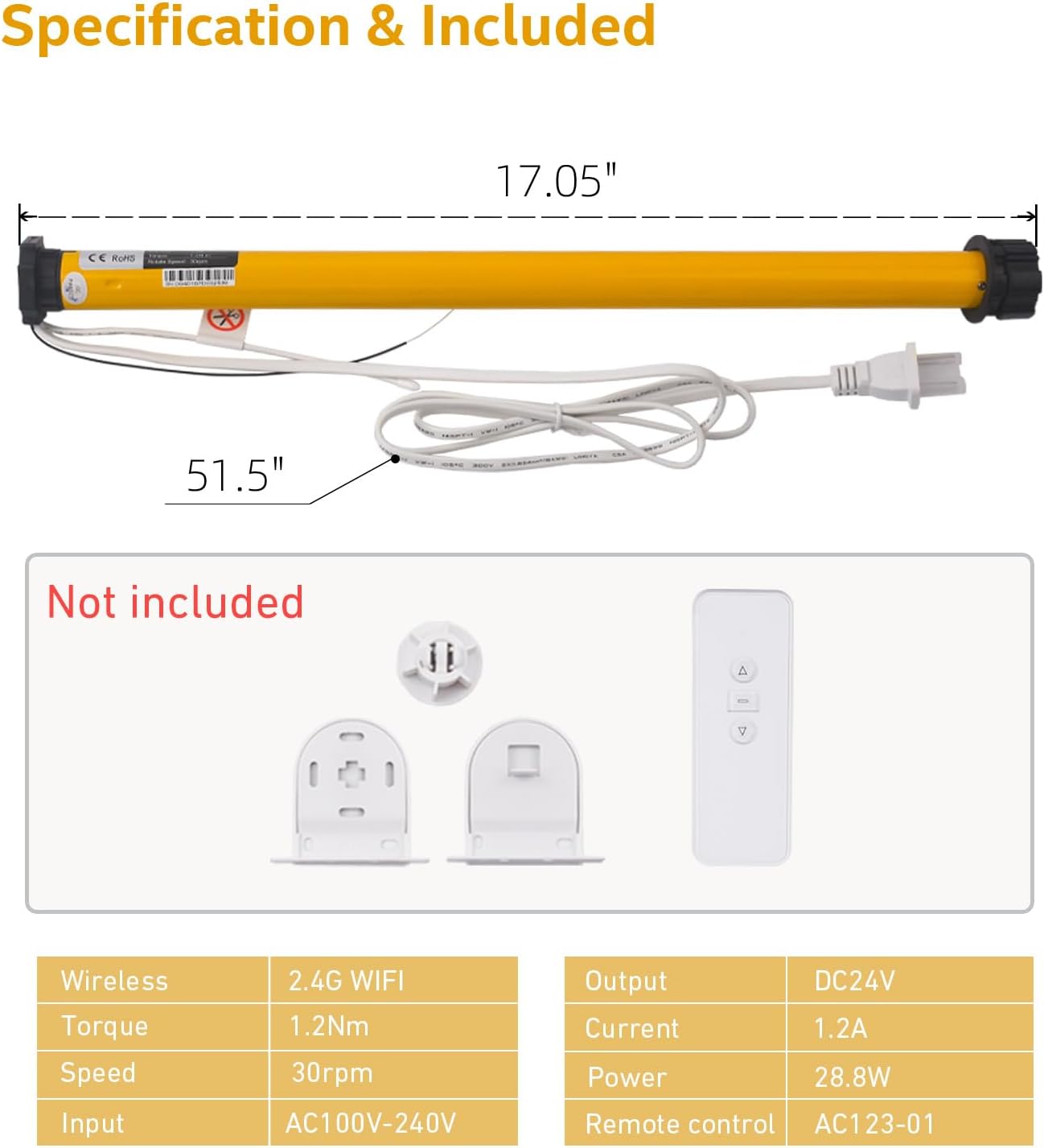
A diagram illustrating the motor's dimensions and a list of included components, highlighting that some parts like the remote and brackets are not included with this specific motor variant.
Technical Specifications
| Specification | Value |
|---|---|
| Product Dimensions | 17 x 1.5 x 1.5 inches |
| Item Weight | 1.18 pounds |
| Manufacturer | Sotrfle |
| Item model number | AM25-1.2/30-MEL-PW |
| Brand | Sortfle |
| Model Name | WiFi Blinds Motor |
| Voltage | 110 Volts |
| Material | Metal |
Setup and Installation
Preparing the Motor
Before inserting the motor into your blind's tube, attach the appropriate crown and drive wheel. Ensure they are securely fastened to the motor shaft.
Official Sortfle video demonstrating the initial preparation and installation process of the AM25 Tuya WiFi Blinds Motor.
Replacing Drive Crowns
If your motor's default drive wheel does not fit your blind's tube, you may need to replace it with a compatible size. Follow the instructions in the video to safely remove and replace the drive crown.
Official Sortfle video tutorial on how to replace drive crowns on AM25 motors for different tube sizes.
Installing Motor into Roller Shade
Carefully slide the prepared motor into the roller shade tube. Ensure the motor is fully inserted and aligned correctly with the mounting brackets.

Step-by-step visual guide showing how to insert the motor into a roller shade tube and secure it with brackets.
Official Sortfle video demonstrating how to install the AM25 motor into a roller shade.
Bracket Compatibility
If your existing blind bracket does not directly accommodate the motor, an adapter may be required. The video below illustrates how to use a bracket adapter to ensure proper fit and function.
Official Sortfle video explaining what to do if the blinds motor, bracket, and motor do not match, and how to use an adapter.
Operating Instructions
Wi-Fi Connection and App Control
Plug in the motor to a 110V power source. Press the program button on the motor head four times (1 second each press). On the fifth press, hold for 3 seconds until the motor briefly rotates, indicating it's in Wi-Fi pairing mode. Open the Smart Life app, click 'Add Device', and follow the prompts to connect to your 2.4GHz Wi-Fi network.
Official Sortfle video user manual for the AM25 WiFi Motor, covering setup and app control.
Voice Control (Alexa/Google Home)
Once connected to the Smart Life app, you can link your motor to Alexa or Google Home for convenient voice control. Use commands like "Alexa, open all blinds" or "Hey Google, close the living room shade."

An illustration showing the smart blinds motor integrated with Alexa and Google Home for voice commands.
Remote Control Pairing
To pair a 433Mhz remote control (sold separately), press and hold the program button on the motor head for 3 seconds. Then, press the UP button on your remote control. The motor will jog once to confirm successful pairing.
Official Sortfle video guide for AM25 Motor installation and setup, including remote pairing.
Setting Limits
Use the Smart Life app to set the upper and lower limits for your blinds. Navigate to the motor's settings within the app, raise the blind to the desired upper limit, and toggle 'Limit_Up'. Then, lower the blind to the desired lower limit and toggle 'Limit_Down'.
A preview video from Sortfle demonstrating how to set the motor's limits using the app.
Maintenance
Care and Cleaning
To ensure the longevity and optimal performance of your Sortfle Smart Blinds Motor, regularly inspect the motor and the blind for any obstructions or debris. Gently wipe the motor casing with a dry, soft cloth. Avoid using harsh chemicals or abrasive cleaners, as these can damage the motor's finish or internal components. Ensure the power cable is not pinched or damaged. Periodically check that the mounting brackets are secure and the blind operates smoothly within its limits.
Troubleshooting
Common Issues and Solutions
- Motor not responding: Check if the motor is properly plugged into a 110V power source. Verify your Wi-Fi connection is stable and the motor is connected in the Smart Life app. If using a remote, ensure its battery is not depleted.
- Limits not setting correctly: Re-attempt the limit setting procedure as described in the 'Setting Limits' section. Ensure the motor jogs to confirm each limit is saved.
- Motor making unusual noise: Inspect the blind and motor for any physical obstructions that might be impeding movement. Ensure the motor is correctly installed within the tube and the brackets are not causing friction.
- Motor not pairing with Wi-Fi: Confirm your Wi-Fi network is 2.4GHz. Ensure the motor is in pairing mode (brief jog after holding program button). Try restarting your router and the motor.
Warranty and Support
Warranty Information
For detailed warranty information regarding your Sortfle Smart Blinds Motor, please refer to the original purchase documentation or visit the official Sortfle website. Warranty terms typically cover manufacturing defects for a specified period from the date of purchase.
Customer Support
Should you require further assistance, have questions about installation, or encounter issues not covered in this manual, please visit the Sortfle Store on Amazon or contact Sortfle customer service directly through their official channels.
Ask a question about this manual
Ask about setup, troubleshooting, compatibility, parts, safety, or missing instructions. Manuals+ will review the question and use this page’s manual context to help answer it.