
Introduction
Thank you for choosing the AODK 55-Inch Computer Desk. This manual provides detailed instructions for assembly, operation, maintenance, and troubleshooting to ensure you get the most out of your new desk. Please read this manual thoroughly before assembly and use, and retain it for future reference.
Important Safety Information
- Always assemble the desk according to the provided instructions.
- Do not overload the desk with more weight than it can safely support. The main desktop supports up to 110 lbs, and the side cabinet supports up to 44 lbs.
- Be cautious when using the integrated power strip and ensure that all electrical components are properly grounded and in good working condition.
- Keep the desk and its components away from heat sources and liquids to prevent damage or injury.
- Ensure all connections are secure before use.
Package Contents
Please verify that all components are present before beginning assembly. If any parts are missing or damaged, please contact customer support.
- Desk panels and frame components
- 4 Fabric Drawers (including 1 file drawer)
- Monitor stand components
- Integrated power outlet with 3 AC outlets and 2 USB ports
- RGB LED light strip with controller
- Adjustable non-slip foot pads
- Versatile iron hook
- Assembly hardware (screws, bolts, etc.)
- Assembly tools (wrench, screwdriver)
- User manual (this document)
Setup and Assembly
The AODK Computer Desk is designed for straightforward assembly. All parts are labeled, and a step-by-step illustrated manual is included in the packaging. Assembly typically requires one person, and all necessary tools are provided.
Reversible Design
This desk features an innovative reversible design, allowing you to position the storage cabinet and printer shelf on either the left or right side to best suit your workspace and personal preference.

Follow the included assembly manual carefully for detailed instructions on each step. Ensure all screws are tightened securely, but do not overtighten.
Operating Instructions
RGB LED Lights
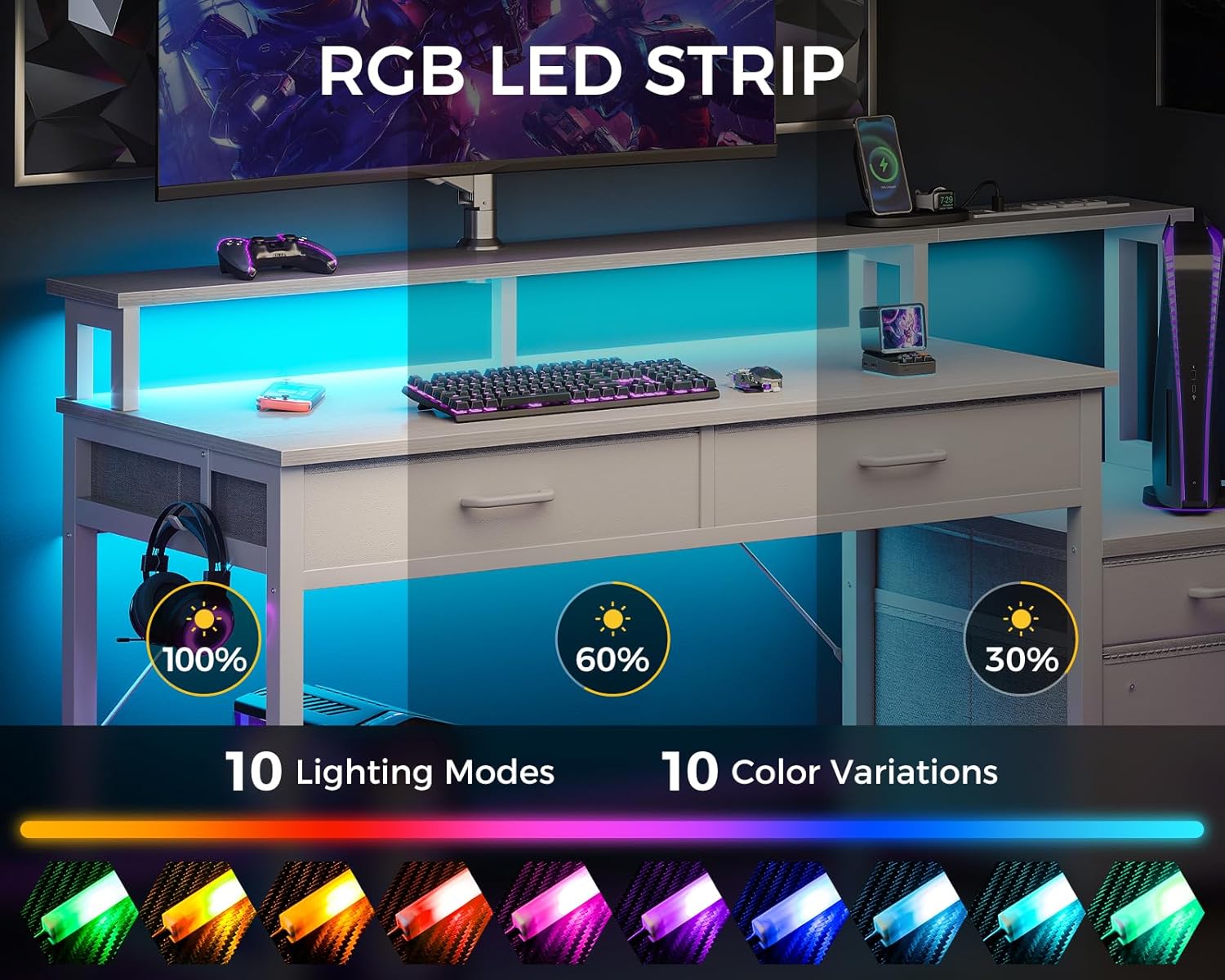
The desk is equipped with an RGB LED light strip offering 10 static colors and 10 dynamic modes. These lights can be customized to create various ambiances for work, gaming, or relaxation.

Controlling the LED Lights:
Use the inline controller to manage the LED strip. The controller typically includes buttons for static colors, dynamic modes, and brightness/speed adjustments.

- Static Color Button (C): Press once to switch to static color mode. Each subsequent press changes the color.
- Dynamic Mode Button (M): Press once to switch to a dynamic effect. Each subsequent press changes the dynamic mode. Press and hold for 3 seconds to enter demo mode, which cycles through various dynamic modes.
- Speed & Brightness and Power Button (⏻): In static mode, press to adjust brightness levels. In dynamic mode, press to adjust dynamic mode speed. Press and hold to turn the strip off; press again to turn it on.
The LED strip has a power-off memory function, restoring the last color, brightness, and mode upon next power-on.
Convenient Power Outlet
The desk includes a built-in power strip with 3 standard AC outlets (120V/12A) and 2 USB ports (5V/2A) for charging your devices directly from your workspace.
Simply plug your devices into the available outlets or USB ports. Ensure devices are compatible with the provided voltage and current specifications.
Storage Drawers
The desk features four fabric drawers for organized storage. This includes a professional file drawer designed to neatly store books, letter, and A4 legal documents, along with three additional drawers for office supplies and gaming gear.

Ergonomic Monitor Stand
The raised monitor stand helps elevate your screen to eye level, promoting better posture and reducing neck strain during extended use.

Adjustable Non-slip Foot Pads
The desk is equipped with adjustable non-slip foot pads. These can be adjusted to protect your floor from scratches and ensure the desk remains stable on uneven surfaces.

Versatile Iron Hook
A versatile iron hook is included, perfect for hanging headphones, bags, or other accessories, keeping your workspace tidy and items easily accessible.

Maintenance
- Cleaning: Wipe the desk surfaces with a damp cloth. Avoid harsh chemicals or abrasive cleaners that could damage the finish.
- Electrical Components: Periodically check the power cord and outlets for any signs of wear or damage. Ensure the LED light strip and its connections are secure.
- Hardware: Occasionally check and tighten any loose screws or bolts to maintain the desk's stability.
Troubleshooting
- Issue: LED lights are not turning on or functioning correctly.
- Solution: Check if the power cable for the LED strip is securely plugged into both the strip and a working power source. Ensure the power button on the controller is pressed. If issues persist, refer to the 'How to Control' section for proper operation.
- Issue: Devices are not charging when plugged into the power outlet.
- Solution: Verify that the desk's main power cord is securely plugged into a functional wall outlet. Check if the devices themselves are working and that their charging cables are not damaged. Ensure the power outlet on the desk is receiving power.
- Issue: Desk feels unstable or wobbly.
- Solution: Ensure all assembly screws and bolts are tightened. Adjust the non-slip foot pads on the bottom of the desk legs to compensate for uneven flooring.
- Issue: Missing parts or damaged components upon arrival.
- Solution: If your desk arrives damaged or with missing parts, please contact our professional customer support team immediately. We are committed to helping you solve the problem within 24 hours.
Specifications
| Feature | Detail |
|---|---|
| Brand | AODK |
| Model | B0CXDDRLXG |
| Product Dimensions (D x W x H) | 18.89"D x 55.9"W x 35.39"H |
| Color | White |
| Style | Modern |
| Top Material Type | Engineered Wood |
| Base Material | Metal |
| Finish Type | Powder Coated |
| Special Features | Built-In USB Outlet, Ergonomic, Monitor Stand, Reversible, Scratch Resistant, RGB LED Lights |
| Number of Drawers | 4 (3 fabric, 1 file cabinet) |
| Power Outlet | 3 AC Outlets (120V/12A), 2 USB Ports (5V/2A) |
| Required Assembly | Yes |
| Recommended Assembly People | 1 |
| Product Care Instructions | Wipe with Damp Cloth |
| UPC | 850061908308 |
Warranty and Customer Support
This AODK Computer Desk comes with a Limited Warranty. For specific details regarding warranty coverage, please refer to the documentation included with your purchase or contact AODK customer service.
For any questions during installation, issues with damaged or missing parts, or general inquiries, please do not hesitate to contact our professional customer support team. We are dedicated to providing assistance and resolving any concerns you may have.
You can typically find contact information for AODK customer support on the product packaging, our official website, or through your purchase platform.


