
Introduction
The BAOFENG UV-20R is a feature-packed handheld transceiver designed for reliable communication. It includes a 1.77" LCD screen, full keyboard, and various functions for both recreational and professional use.
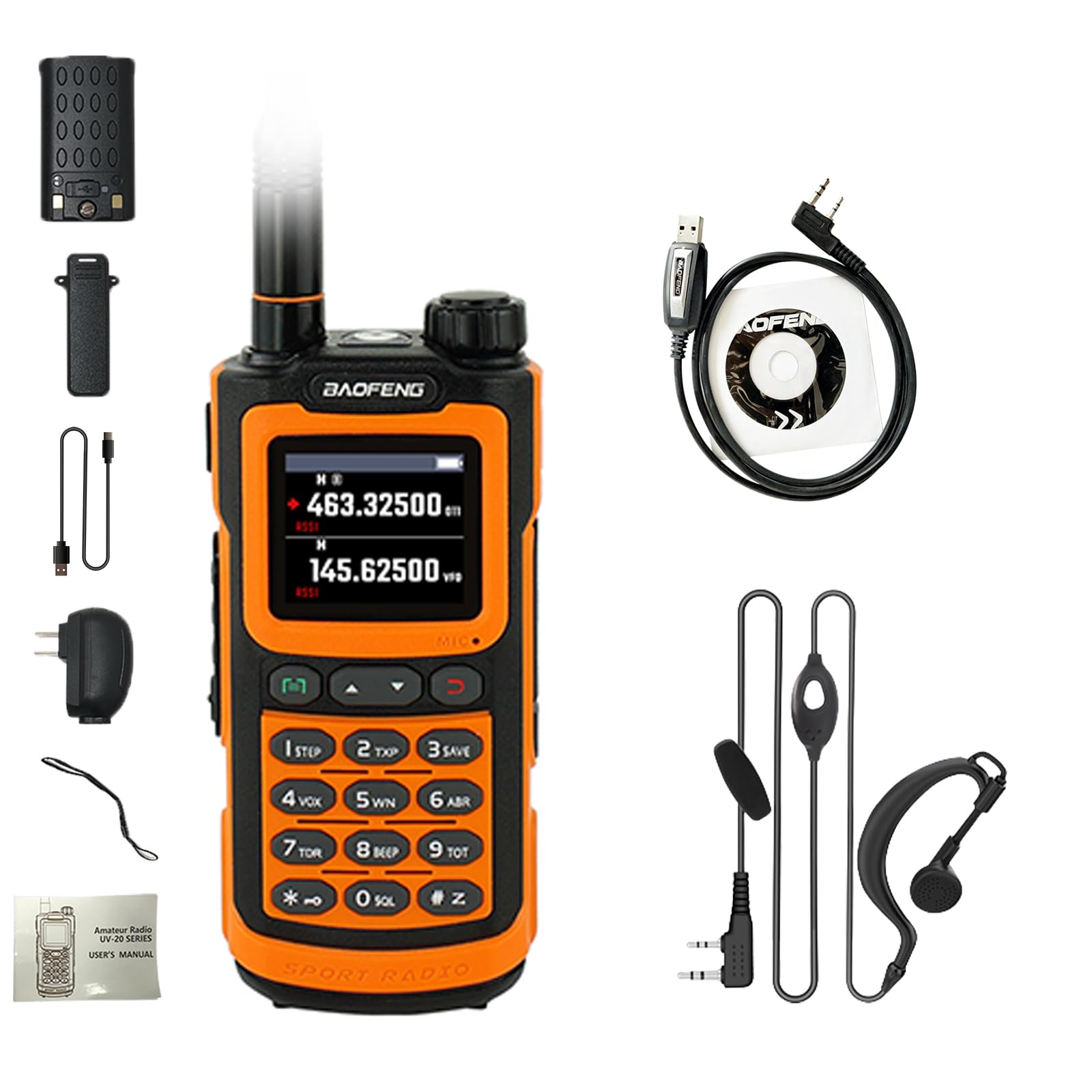
Figure 1: BAOFENG UV-20R Two-Way Radio.
Product Features
- Display: 1.77" LCD large screen with full keyboard for menu operation.
- Channels: Up to 999 named memory channels across 10 zones.
- Bands: 4-band operation (1.25M, 144-148MHz, 420-450MHz, FM).
- Charging: Type-C direct charging and charging stand for convenient power.
- Scanning: VFO scan range setting, three scan recovery methods, channel scan, CTC/DCS scan, and scan channel addition/removal.
- Frequency Copy: Wireless frequency copy function.
- NOAA Weather Radio: Built-in NOAA weather radio receiver.
- DTMF: DTMF encoder and manual dial.
- Battery: High capacity Lithium-Ion battery.
- Tones: 50 CTCSS tones and 105 DCS codes.
- Alerts: Alarm function.
- Power Output: High or low power selectable.
- Display Illumination: Programmable via keypad.
- Audio Feedback: Function beep on the keyboard.
- Repeater Offset: Programmable repeater offset.
- Flashlight: Built-in LED flashlight.
- PC Programmable: Supports PC programming for advanced customization.
- End of Transmission Tone: Also known as "Roger Beep".
- Security: Keypad lock.
- Water Resistance: IP54 Life Waterproof (Splash Waterproof Protection).

Figure 2: Overview of BAOFENG UV-20R key features.
What's in the Box
The BAOFENG UV-20R package includes the following items:
- BAOFENG UV-20R Radio
- Antenna
- Battery
- USB-C Cable
- US Adapter
- Strap
- User's Manual
- Programming Cable
- Earpiece
Setup
1. Attaching the Antenna
Carefully screw the antenna onto the connector at the top of the radio until it is finger-tight. Do not overtighten.
2. Installing the Battery
Align the battery with the back of the radio and slide it into place until it clicks securely. To remove, press the release latch and slide the battery off.
3. Initial Charging
Before first use, fully charge the battery. Connect the USB-C cable to the radio's Type-C port or use the charging stand with the US adapter. The charging indicator will show the charging status.

Figure 3: USB-C charging options for the BAOFENG UV-20R.
Operating Instructions
1. Power On/Off and Volume
Rotate the Power/Volume knob clockwise to turn the radio on and increase volume. Rotate counter-clockwise to decrease volume and turn off.
2. Basic Communication
- Selecting a Channel/Frequency: Use the keypad to enter frequencies directly or navigate through stored channels.
- Transmitting: Press and hold the PTT (Push-To-Talk) button on the side of the radio to transmit. Speak clearly into the microphone. Release the PTT button to listen.
- Receiving: The radio will automatically receive signals on the selected frequency/channel.
3. Menu Navigation
Press the MENU key to access the main menu. Use the Up/Down arrow keys to scroll through options. Press MENU again to select an option, and EXIT to go back or exit the menu.
4. Keypad Lock
To prevent accidental changes, activate the keypad lock function via the menu or a shortcut key (refer to the full user manual for specific key combinations).
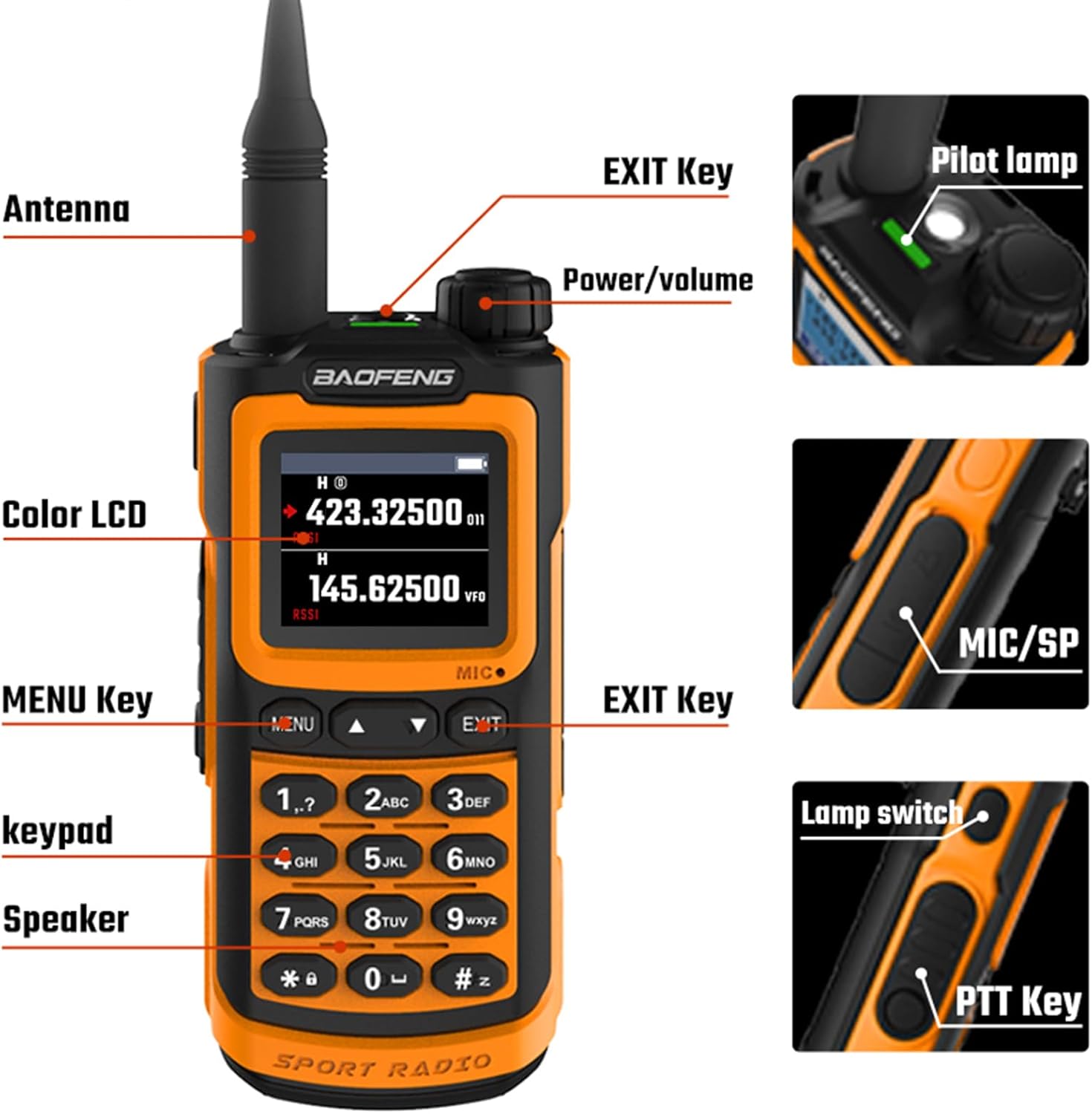
Figure 4: Key components and controls of the BAOFENG UV-20R.
Charging
The UV-20R offers flexible charging options:
- USB-C Direct Charging: Connect a standard USB-C cable to the port on the battery pack. This allows charging from power banks, PCs, car chargers, or any USB power source.
- Charging Stand: Place the radio in the provided charging stand. Connect the US adapter to the stand and a power outlet.
A red indicator light typically signifies charging, while a green light indicates a full charge.
Video 1: Demonstration of the USB-C charging feature on a similar Baofeng radio model. This video shows how to connect the USB-C cable to the battery for convenient charging.
Programming
The BAOFENG UV-20R can be programmed both manually via the keypad and through a PC using the provided programming cable.
- Manual Programming: Use the full keypad and LCD screen to enter frequencies, set tones (CTCSS/DCS), and configure other parameters directly on the radio. Refer to the detailed user manual for specific menu options and steps.
- PC Programming: Connect the radio to a computer using the programming cable. Utilize compatible software (e.g., CHIRP) to manage channels, frequencies, and other settings. This method allows for efficient customization and backup of radio configurations.
The wireless frequency copy function allows for quick duplication of settings between compatible radios.
Maintenance
- Cleaning: Wipe the radio with a soft, damp cloth. Do not use harsh chemicals or abrasive cleaners.
- Battery Care: Store the battery in a cool, dry place when not in use. Avoid fully discharging the battery for extended periods.
- Antenna: Ensure the antenna is securely attached. Avoid bending or stressing the antenna excessively.
- Water Resistance: The radio offers IP54 splash waterproof protection. While it can withstand splashes, avoid submerging the device in water. Ensure all port covers are properly sealed.
Troubleshooting
- No Power: Check if the battery is properly installed and charged. Ensure the Power/Volume knob is turned on.
- Cannot Transmit/Receive: Verify the antenna is attached. Check the selected frequency/channel and ensure it is within the radio's operating range. Confirm that CTCSS/DCS tones are correctly set if required for the channel.
- Poor Audio Quality: Adjust the volume. Check the squelch level in the menu. Ensure the microphone and speaker are clear of obstructions.
- Keypad Unresponsive: Check if the keypad lock is active. Deactivate it if necessary.
- Programming Issues: Ensure the programming cable is correctly connected and the correct software (e.g., CHIRP) and drivers are installed on your PC.
Specifications
| Feature | Specification |
|---|---|
| Model Number | UV-20R |
| Product Dimensions | 1.37"D x 2.24"W x 4.8"H |
| Battery Type | 1 Lithium Ion battery required |
| Number of Channels | 999 |
| Frequency Range | 1.25M, 144-148MHz, 420-450MHz, FM |
| Talking Range Maximum | 3.1 Miles |
| Voltage | 7.4 Volts (DC) |
| Water Resistance Level | Water Repellent (IP54) |
| Special Features | 1.77inch LCD Screen, 4 Band, NOAA, Type-C Charger, Wireless Frequency Copy |

Figure 5: Physical dimensions of the BAOFENG UV-20R.
Warranty and Support
The BAOFENG UV-20R comes with a 1-year warranty provided exclusively through "Shiqun Electronics Co., Ltd". For warranty claims or technical support, please contact the seller directly.


