
1. Introduction
Thank you for choosing the CristalRecord Moss Mini LED Ceiling Fan. This manual provides essential information for the safe installation, operation, and maintenance of your new ceiling fan. Please read these instructions carefully before installation and keep them for future reference.
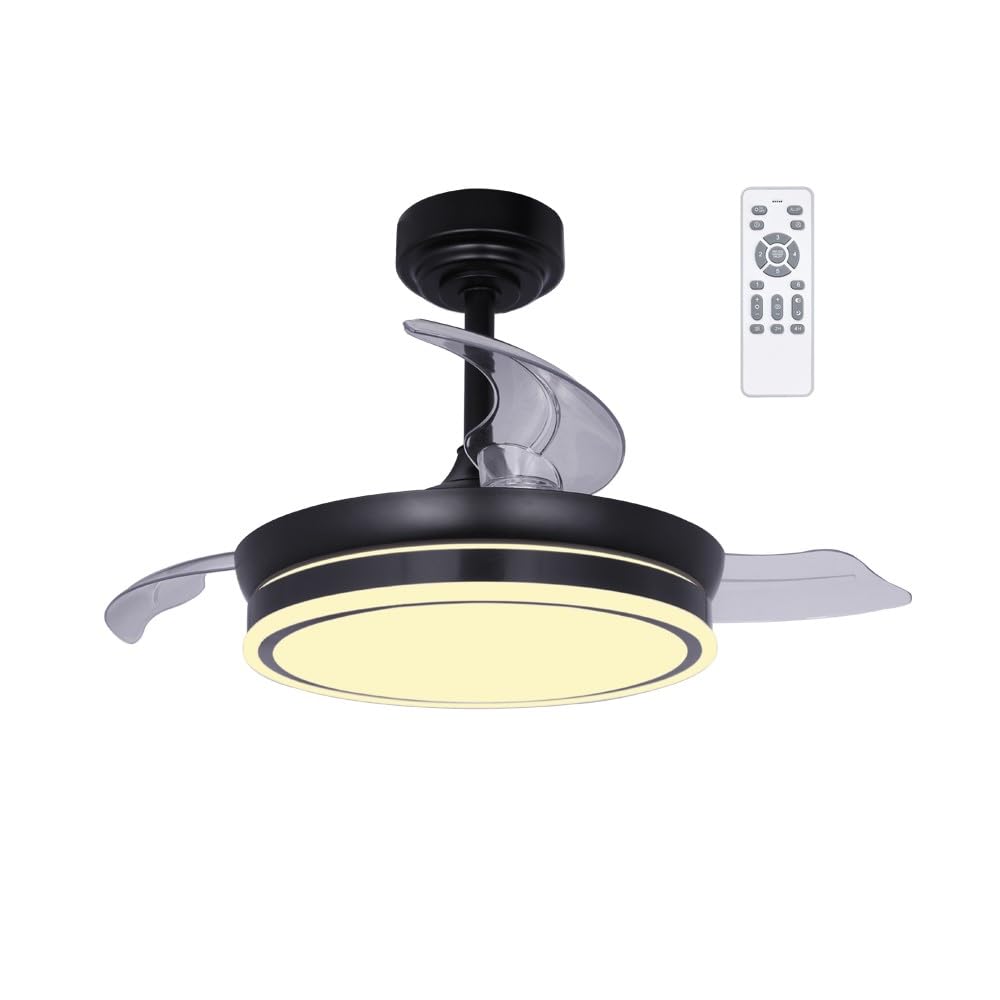
Image 1.1: The CristalRecord Moss Mini LED Ceiling Fan features a black body, transparent retractable blades, and an integrated LED light. This fan is designed for small rooms, offering both air circulation and adjustable illumination.
This ceiling fan is designed for small rooms, offering both efficient air circulation and adjustable LED lighting. It features an ultra-silent DC motor with 6 speeds, a winter-summer reverse function, a timer, and a breeze function. The integrated LED light allows for three color temperatures (warm, neutral, cool) and dimmable intensity.
2. Safety Information
- Electrical Safety: Installation must be performed by a qualified electrician in accordance with local electrical codes. Ensure the power supply is disconnected at the main circuit breaker before installation or maintenance.
- Mounting: The mounting structure must be capable of supporting the weight of the fan (refer to specifications for weight). Ensure all connections are secure to prevent the fan from falling.
- Blade Clearance: Maintain a minimum clearance of 2.3 meters (7.5 feet) from the floor to the bottom of the fan blades and at least 0.6 meters (2 feet) from the wall or any obstructions to the blade tips.
- Cleaning: Always disconnect power before cleaning. Use a soft, damp cloth. Do not use abrasive cleaners or solvents.
- Operation: Do not insert objects into the path of the rotating blades.
3. Package Contents
Please check that all components are present and undamaged before proceeding with installation:
- Ceiling Fan Unit (Motor housing, retractable blades, LED light)
- Mounting Bracket
- Downrod (if applicable)
- Canopy
- Remote Control
- Hardware Pack (screws, washers, wire nuts)
- User Manual
4. Setup and Installation
Important: Installation should only be carried out by a qualified electrician. Ensure the main power supply is switched off before beginning any electrical work.
- Prepare the Mounting Location: Securely attach the mounting bracket to a ceiling joist or a suitable electrical junction box rated for fan support.
- Assemble the Fan: Attach the downrod (if included) to the motor housing. Carefully feed the electrical wires through the downrod.
- Hang the Fan: Lift the fan assembly and hang it onto the mounting bracket.
- Electrical Connections: Connect the fan's electrical wires to the household wiring according to the wiring diagram provided in the separate installation guide (not included in this general manual). Ensure all connections are secure and insulated with wire nuts.
- Secure the Canopy: Slide the canopy up to cover the mounting bracket and wiring, then secure it with the provided screws.
- Install Blades: The blades are retractable and typically pre-installed or easily attached to the motor housing.

Image 4.1: Dimensional diagram of the fan. The fan has a diameter of 390mm when blades are retracted and 920mm when extended. The height is between 320mm and 420mm depending on the downrod configuration.
5. Operating Instructions
Your CristalRecord Moss Mini LED Ceiling Fan is operated using the included remote control.
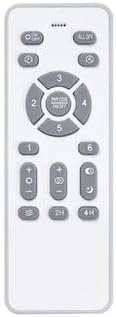
Image 5.1: The remote control allows full functionality of the fan and light, including power, speed, light color temperature, dimming, timer, and winter/summer mode.
Remote Control Functions:
- Power On/Off: Press the power button to turn the fan and light on or off.
- Fan Speed: Use the speed buttons (1-6) to adjust the fan's rotation speed. There are 6 available speeds.
- Light On/Off: Separate button for light control.
- Light Color Temperature (CCT): Cycle through warm white, neutral white, and cool white light settings.
- Light Dimming: Adjust the brightness of the LED light.
- Winter/Summer Mode (Reverse Function): Changes the direction of blade rotation. In summer, blades rotate counter-clockwise to create a downdraft. In winter, blades rotate clockwise to create an updraft, circulating warm air.
- Timer: Set the fan to turn off automatically after a specified period (e.g., 1H, 2H, 4H).
- Breeze Function: Simulates a natural breeze by varying fan speed intermittently.
6. Maintenance
Regular maintenance ensures optimal performance and longevity of your ceiling fan.
- Cleaning: Periodically clean the fan with a soft, lint-free cloth. For stubborn dirt, a slightly damp cloth can be used. Ensure the fan is completely dry before operating. Do not use harsh chemicals or abrasive materials.
- Blade Inspection: Check the retractable blades for any signs of damage or imbalance. Ensure they retract and extend smoothly.
- Tighten Fasteners: Annually, check all screws and fasteners on the mounting bracket, downrod, and motor housing to ensure they are secure.
- LED Light: The integrated LED light is designed for long life and is generally not user-replaceable. If the light fails, contact a qualified technician or the manufacturer.
Always ensure the power supply to the fan is disconnected at the circuit breaker before performing any cleaning or maintenance.
7. Troubleshooting
If you encounter issues with your fan, refer to the following common problems and solutions:
| Problem | Possible Cause | Solution |
|---|---|---|
| Fan does not start | No power supply Loose wiring connection Remote control battery low | Check circuit breaker and wall switch Verify all electrical connections (consult electrician) Replace remote control batteries |
| Light does not work | No power supply to light LED module failure | Check wiring connections for the light Contact manufacturer or qualified technician |
| Fan wobbles | Loose mounting screws Unbalanced blades | Ensure all mounting screws are tight Check if blades are securely attached and undamaged |
| Remote control not working | Low or dead batteries Obstruction between remote and receiver Remote not paired (if applicable) | Replace batteries Ensure clear line of sight Refer to specific pairing instructions (if provided with fan) |
If the problem persists after attempting these solutions, please contact a qualified electrician or the manufacturer's support.
8. Specifications
| Feature | Detail |
|---|---|
| Brand | CristalRecord |
| Model Number | 85-065-46-180 |
| ASIN | B0CX9BCRK2 |
| Manufacturer | CRISTALRECORD |
| Power (Fan) | 46W |
| Luminous Flux (Light) | 5520 Lumens |
| Light Color Temperature (CCT) | Dimmable (Warm, Neutral, Cool) |
| Fan Speeds | 6 speeds |
| Motor Type | Ultra-silent DC motor |
| Blade Type | Retractable, Transparent |
| Body Color | Black |
| Power Source | Electric Cable |
| Bulb Base | E27 (for integrated LED, not user-replaceable bulb) |
| Features | Winter-Summer Reverse Function, Timer, Breeze Function |
9. Warranty and Support
For warranty information, please refer to the documentation provided at the time of purchase or contact your retailer. CristalRecord products are designed for quality and durability. For technical support or service inquiries, please contact CristalRecord directly or your authorized dealer.
Manufacturer: CRISTALRECORD