
1. Introduction
This manual provides comprehensive instructions for the safe and efficient use of your Morec Level 2 EV Charger, Model SQP039-40A. This 40A, 240V charging station is designed for home use and offers a convenient solution for charging SAE J1772 compatible electric vehicles. Please read this manual thoroughly before installation and operation to ensure proper function and safety.

Figure 1.1: The Morec Level 2 EV Charger, including the main control unit, NEMA 14-50 plug, SAE J1772 charging connector, and a portable carrying bag.
2. Important Safety Information
Always adhere to the following safety precautions to prevent injury, electric shock, fire, or damage to the product or vehicle.
- Electrical Safety: Ensure the NEMA 14-50 outlet is properly installed by a qualified electrician and meets all local electrical codes. Do not use extension cords or adapters.
- Water and Moisture: Do not operate the charger if it or your hands are wet. Avoid submerging the charger in water. While the unit is IP66 rated for water and dust resistance, direct submersion is not recommended.
- Damage Inspection: Before each use, inspect the charger, cable, and connector for any signs of damage. Do not use if damaged.
- Ventilation: Ensure adequate ventilation around the charging unit during operation.
- Children and Pets: Keep the charger and cables out of reach of children and pets.
- Emergency Disconnect: In case of an emergency, immediately unplug the charger from the wall outlet and disconnect it from the vehicle.
- Vehicle Compatibility: This charger is designed for SAE J1772 compatible electric vehicles. For Tesla vehicles, a J1772 to Tesla adapter is required (not included).
This device features 8 protections including Over-voltage, Under-voltage, Overload, Short Circuit, Leakage, Ground Fault, Over-temperature, and Lightning protection.
3. Package Contents
Verify that all items are present in the package:
- Morec Level 2 EV Charger Unit (with integrated NEMA 14-50 plug and SAE J1772 connector)
- Storage Bag
- Mounting Bracket (for optional wall installation)
- User Manual (this document)
4. Product Overview
4.1 Components
The Morec Level 2 EV Charger consists of the main control unit, a 25-foot charging cable, a NEMA 14-50 power plug, and an SAE J1772 vehicle connector.

Figure 4.1: Overview of charger components and approximate dimensions. The total cable length is approximately 25 feet (7.6 meters).
4.2 LCD Display and Indicators
The integrated LCD display provides real-time information about the charging status and any potential faults. Familiarize yourself with the various display icons:

Figure 4.2: LCD display showing different charging statuses and fault indicators.
- Plug to be inserted: Indicates the charger is powered on and ready for connection to the vehicle.
- Charging standby: The charger is connected to the vehicle but not actively charging.
- Charging: Active charging is in progress. The display will show current, voltage, and charging time.
- Full-charging: The vehicle's battery is fully charged.
- Fault (e.g., Short Circuit): An error has occurred. Refer to the Troubleshooting section.
4.3 Durability and Protection
The charger unit is constructed from thick ABS material, providing resistance against impact and pressure. It is also rated IP66 for water and dust resistance, making it suitable for outdoor use.
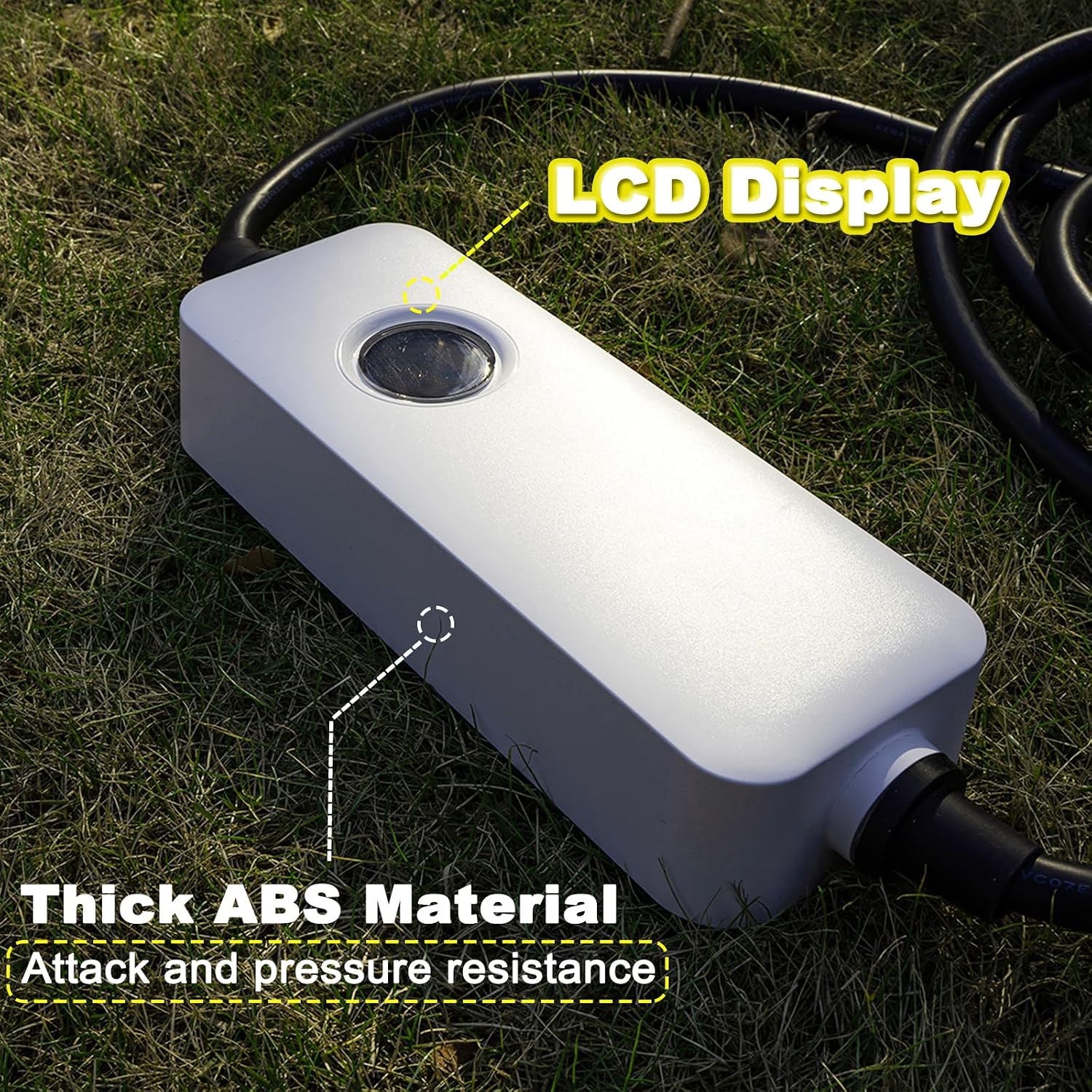
Figure 4.3: Charger unit constructed with thick ABS material for durability.

Figure 4.4: IP66 rating ensures water and dust resistance for outdoor use.
5. Setup and Installation
5.1 Power Requirements
The Morec Level 2 EV Charger requires a dedicated 240V NEMA 14-50 outlet. This type of outlet is commonly used for electric dryers or RVs. Ensure your electrical system can support a continuous 40A load.
5.2 Portable Use
- Locate a suitable 240V NEMA 14-50 outlet.
- Plug the charger's NEMA 14-50 plug firmly into the wall outlet. The LCD display on the control unit should illuminate, indicating power.
- Ensure the charging cable is uncoiled and free from kinks or obstructions.
5.3 Optional Wall Mounting
For permanent installation, the charger can be mounted to a wall using the included bracket. Choose a location that is:
- Within reach of your NEMA 14-50 outlet and your vehicle's charging port.
- Protected from direct impact or vehicle traffic.
- On a sturdy surface capable of supporting the charger's weight (approximately 11.33 lbs).
- Mark the desired mounting position for the bracket.
- Drill pilot holes and secure the mounting bracket to the wall using appropriate fasteners (not included).
- Slide the charger control unit onto the mounted bracket until it clicks securely into place.

Figure 5.1: Example of a wall-mounted charger setup, providing convenient access to the vehicle.
6. Operating Instructions
6.1 Starting a Charge
- Ensure the charger is plugged into the NEMA 14-50 wall outlet and the LCD display is active. The display should show "Plug to be inserted".
- Open your vehicle's charging port cover.
- Firmly insert the SAE J1772 connector into your vehicle's charging port. You should hear a click as it locks into place.
- The charger will perform a self-check, and the LCD display will transition to "Charging standby" and then to "Charging". Your vehicle's dashboard should also indicate that charging has begun.
- Monitor the LCD display for charging progress, including current, voltage, and elapsed time.
6.2 Stopping a Charge
- Once your vehicle is fully charged (indicated by "Full-charging" on the LCD display) or you wish to stop charging, first stop the charging process from your vehicle's interface if applicable.
- Press the release button on the SAE J1772 connector and gently pull it out of the vehicle's charging port.
- Replace your vehicle's charging port cover.
- Unplug the NEMA 14-50 plug from the wall outlet if you are finished charging for an extended period or storing the unit.
Note: Always disconnect the vehicle connector first, then unplug from the wall outlet.
7. Maintenance
- Cleaning: Disconnect the charger from both the power outlet and the vehicle before cleaning. Use a soft, dry cloth to wipe the control unit and cables. Do not use abrasive cleaners, solvents, or immerse any part of the charger in water.
- Cable Care: Avoid kinking, twisting, or driving over the charging cable. Store the cable neatly when not in use to prevent damage.
- Storage: When not in use, store the charger in a dry, clean place, preferably in the provided storage bag.
- Inspection: Regularly inspect the charger, cables, and connectors for any signs of wear, damage, or corrosion. If any damage is found, discontinue use and contact customer support.
8. Troubleshooting
If you encounter issues with your Morec EV Charger, refer to the following table for common problems and solutions.
| Problem | Possible Cause | Solution |
|---|---|---|
| Charger not powering on / LCD display is blank. | No power from the NEMA 14-50 outlet; outlet fault; internal charger fault. |
|
| Charging does not start after connecting to the vehicle. | Connector not fully inserted; vehicle not ready to charge; charger fault. |
|
| LCD display shows a "Fault" message (e.g., Short Circuit). | Internal fault; vehicle fault; external electrical issue. |
|
| Charging is slower than expected. | Vehicle charging limits; power supply issues; charger operating at reduced capacity. |
|
9. Specifications
| Feature | Detail |
|---|---|
| Model | SQP039-40A |
| Input Voltage | 240V AC |
| Output Amperage | 40 Amps |
| Maximum Power Output | 9600 Watts (9.6 kW) |
| Connector Type | SAE J1772 |
| Power Plug Type | NEMA 14-50 |
| Cable Length | 25 feet (approx. 7.6 meters) |
| Item Weight | 11.33 pounds (approx. 5.14 kg) |
| Product Dimensions (Control Unit) | 15.94 x 19.69 x 3.54 inches (approx. 40.5 x 50 x 9 cm) |
| Ingress Protection (IP) Rating | IP66 (Water and Dust Resistant) |
| Certifications | ETL, FCC, ROHS, CE |
| Safety Protections | Over-voltage, Under-voltage, Overload, Short Circuit, Leakage, Ground Fault, Over-temperature, Lightning |
| Compatible Vehicles | All SAE-J1772 Electric Vehicles and Plug-in Hybrid Vehicles |
10. Warranty and Customer Support
Morec products are designed for reliability and performance. For warranty information, technical support, or any questions regarding your EV charger, please contact Morec customer service. Refer to the product packaging or the official Morec website for the most current contact details.
Manufacturer: Nanjing SHENQI Electronic Technology Co., Ltd.
Brand: Morec