
Introduction
Thank you for choosing the miisso Z97 Ultra Slim 10000mAh Power Bank. This device is designed for convenient and efficient charging of your mobile devices, featuring built-in cables and a foldable AC wall plug for versatile use. Please read this manual carefully to ensure proper operation and maintenance of your power bank.
Product Overview
The miisso Z97 power bank combines a portable charger with a built-in AC wall plug and integrated charging cables (USB-C and Lightning). Its compact design makes it ideal for travel and daily use.

Image: The miisso Z97 power bank in purple, showcasing its built-in USB-C and Lightning cables.

Image: The miisso Z97 power bank with its foldable AC wall plug extended, alongside the built-in charging cables.
Setup
Charging the Power Bank
Before first use, fully charge your miisso Z97 power bank. There are two primary methods to recharge the power bank:
- Using the Foldable AC Wall Plug:
Extend the foldable AC wall plug located on the side of the power bank. Plug the power bank directly into a standard wall outlet (100V-240V). The LED indicators on the power bank will illuminate to show charging progress. - Using a USB-C Cable:
Connect a USB-C charging cable to the USB-C input port on the power bank and plug the other end into a compatible USB wall adapter or computer USB port. The LED indicators will show charging status.

Image: The miisso Z97 power bank plugged directly into a wall outlet using its foldable AC plug for self-charging.
Checking Battery Level
Press the power button once to check the current battery level indicated by the LED lights. Each light typically represents a percentage of the total charge.
Operating Instructions
Charging Devices
The miisso Z97 power bank features built-in USB-C and Lightning cables, as well as an additional USB-C output port, allowing you to charge up to three devices simultaneously.
- Using Built-in Cables:
Pull out the integrated USB-C or Lightning cable and connect it directly to your compatible device. The power bank will automatically begin charging. - Using the USB-C Output Port:
Connect your device's charging cable to the USB-C output port on the power bank, then connect the other end to your device.
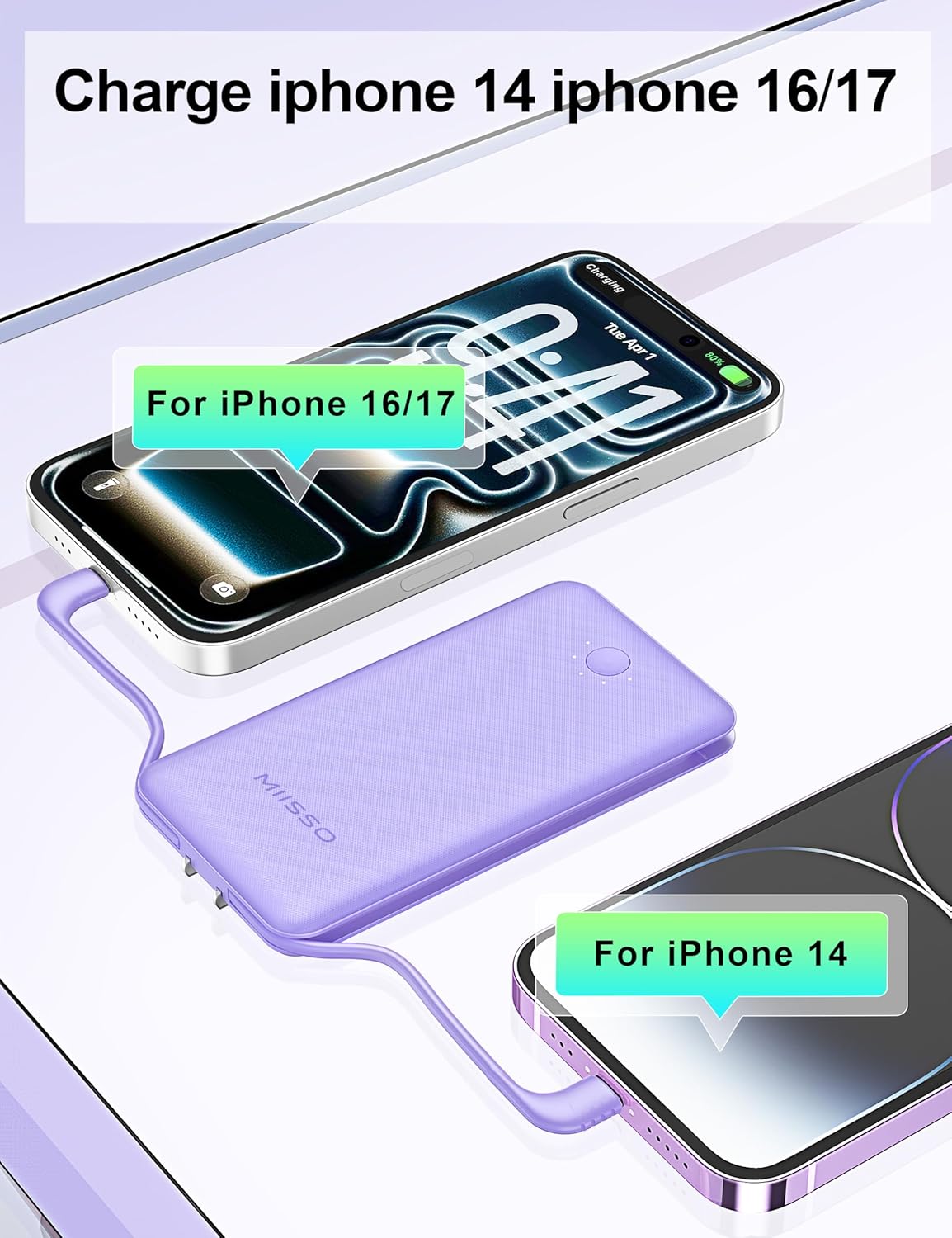
Image: The miisso Z97 power bank simultaneously charging an iPhone 14 via its built-in Lightning cable and another iPhone (16/17) via its built-in USB-C cable.
Pass-Through Charging
The power bank supports pass-through charging, meaning you can charge your devices while the power bank itself is being recharged from a wall outlet. Simply plug the power bank into a wall outlet and connect your devices to the power bank's output ports or built-in cables.

Image: The miisso Z97 power bank plugged into a wall outlet, simultaneously charging a smartphone via a connected cable, demonstrating pass-through charging.
Automatic On/Off
The power bank features an auto-wake function when a device is connected for charging and an auto-sleep function when unplugged or when charging is complete, conserving battery life.
Maintenance
Cleaning
Wipe the power bank with a soft, dry cloth. Do not use harsh chemicals or abrasive materials. Keep ports free of dust and debris.
Storage
Store the power bank in a cool, dry place away from direct sunlight, extreme temperatures, and humidity. For long-term storage, it is recommended to charge the power bank to about 50-75% every three months to prolong battery life.
Battery Life
The Lithium Polymer battery is designed to provide approximately 300 full charging cycles while maintaining optimal performance.
Troubleshooting
- Device not charging:
Ensure the power bank is sufficiently charged. Press the power button to activate charging if it doesn't start automatically. Check that the cables are securely connected to both the power bank and your device. Try a different cable or port if available. - Power bank not charging:
Verify that the AC wall plug is fully extended and securely plugged into a live outlet, or that the USB-C charging cable is properly connected to a working power source. Check for any damage to the cables or ports. - Slow charging:
Ensure you are using appropriate cables and adapters. Charging multiple devices simultaneously may reduce the charging speed for each individual device. - LED indicators not working:
If the power bank is not responding, try fully discharging and then recharging it. If the issue persists, contact customer support.
Specifications
| Model Name | Z97 |
| Brand | miisso |
| Battery Capacity | 10000 Milliamp Hours |
| Battery Cell Type | Lithium Polymer |
| Connector Type | USB Type C (Built-in), Lightning (Built-in) |
| Number of Ports | 3 (1x USB-C output, 1x Built-in USB-C, 1x Built-in Lightning) |
| Voltage | 5 Volts |
| Power Source | Battery, AC Wall Plug |
| Item Dimensions (L x W x T) | 4.9" x 2.67" x 0.7" (12.45 cm x 6.78 cm x 1.78 cm) |
| Battery Weight | 0.3 Pounds (136 grams) |
| Special Features | Built-in Cables, Built-in Foldable AC Wall Plug, Lightweight, Pocket Size, Slim Design |
| Compatible Devices | iPhone 16 Pro/Max, iPhone 16/Plus, iPhone 15/Plus/Pro/Max, iPhone 14/Pro/Max/Plus, iPhone 13/Pro/Max/Mini, iPhone SE, iPhone 12/Pro/Max/Mini, iPhone 11/Pro, iPhone XS/Max, iPhone 8/Plus, iPhone 7, iPhone 6, iPhone 5; Samsung Galaxy Z Fold 6/5/4, Samsung Galaxy Z Flip 6/5/4, Samsung Galaxy S24/Ultra/Plus, Samsung Galaxy S23/Ultra/Plus, Samsung Galaxy S22/Ultra/Plus, Samsung Galaxy S21/Ultra/Plus, Samsung Galaxy C55, Samsung Galaxy A55/A54/A53/A52, Samsung Galaxy S10/S9/S8, Samsung Galaxy Note 10; Motorola P50/Z4/G7 Plus/G7/One; LG G8/G7/X4/Q60/K40/Q7; Google Pixel/XL/2/2 XL/3/3 XL/4/4 XL. |
Warranty Information
The miisso Z97 Ultra Slim 10000mAh Power Bank comes with a one-year warranty from the date of purchase. This warranty covers manufacturing defects and issues arising from normal use. It does not cover damage caused by misuse, accidents, unauthorized modifications, or natural disasters. Please retain your proof of purchase for warranty claims.
Customer Support
If you encounter any issues or have questions regarding your miisso Z97 Power Bank, please contact our customer support team:
- Email: support@miisso.com
- Website: www.miisso.com/support
- Phone: 1-800-XXX-XXXX (Available Monday-Friday, 9 AM - 5 PM EST)
When contacting support, please provide your product model (Z97) and a detailed description of the issue.