
Fanttik E1 NEX Workstation & E1 Max Precision Electric Screwdriver Kit User Manual
Model: E1 NEX Workstation & E1 Max
1. Introduction and Overview
The Fanttik E1 NEX Workstation Precision Electric Screwdriver Kit and E1 Max Mini Electric Screwdriver are designed for precise repair and maintenance of electronic devices. This comprehensive kit provides the tools necessary for delicate tasks, offering both electric and manual torque options for versatility.

Image: The Fanttik E1 NEX Workstation and E1 Max Electric Screwdriver Kit, showing the workstation case, the E1 Max screwdriver, and the E1 NEX screwdriver.
2. What's in the Box
The Fanttik E1 NEX Workstation Precision Electric Screwdriver Kit includes the following components:
- E1 NEX Workstation (integrated with electric precision screwdriver)
- E1 Max Mini Electric Screwdriver
- Magnetic Storage Box for bits
- 50x Screwdriver Bits (S2 Steel, various types)
- USB-C Charging Cable
- User Manual
- Pry Bar
- Tweezers
- Additional Fix Tools (e.g., opening picks, opening tools, jimmy, spudgers, anti-static wrist strap, flex extension)

Image: All components of the Fanttik E1 NEX Workstation Kit laid out, including the workstation, E1 Max screwdriver, bit sets, charging cable, and user manual.
3. Features
3.1 E1 NEX Workstation
The E1 NEX Workstation is an all-in-one precision repair kit designed for efficiency and organization. It features a pop-up mechanism for the integrated electric precision screwdriver and a magnetic design for bit storage.
- Integrated Electric Precision Screwdriver: Dual torque settings of 0.05 N.m (low) and 0.2 N.m (high), with a manual gear up to 3 N.m.
- Magnetic Storage Compartment: Prevents bits from falling out and aids in organization with shaped batch markings.
- Integrated Magnetic Pad: Provides a convenient surface for holding small screws and parts during repair.
- Pop-up Mechanism: Allows for quick and secure access to the electric screwdriver.
- Comprehensive Tool Set: Includes various tools for precision repairs, such as opening picks, spudgers, and tweezers.

Image: The Fanttik E1 NEX Workstation opened, displaying the organized array of screwdriver bits and various repair tools.

Image: The Fanttik E1 NEX Workstation demonstrating its built-in screwdriver design with a pop-up mechanism for easy access.
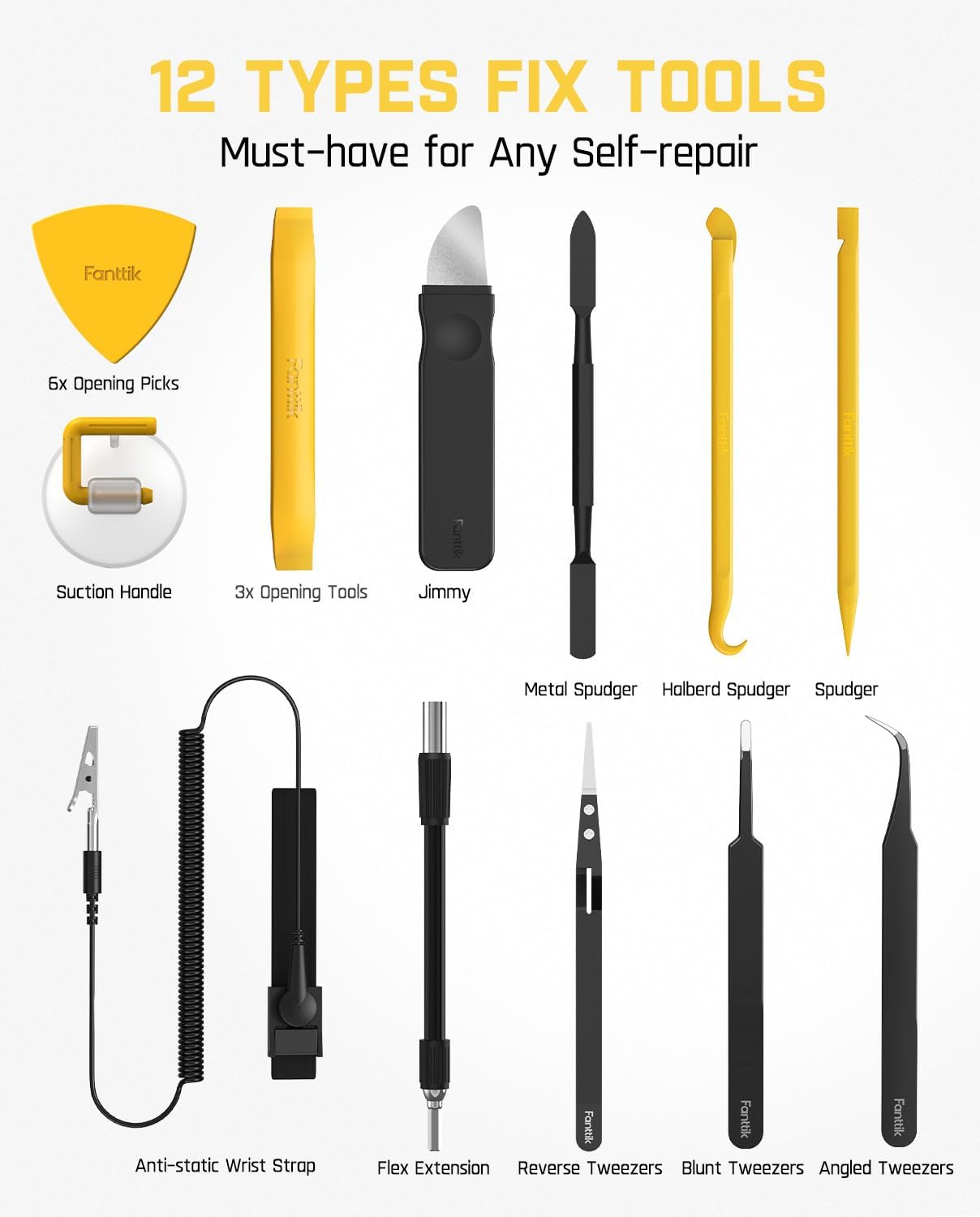
Image: A visual representation of the 12 types of fix tools included with the Fanttik E1 NEX Workstation, essential for self-repair tasks.
3.2 E1 Max Mini Electric Screwdriver
The E1 Max is a compact and portable electric screwdriver designed for precision tasks, offering accurate torque forces for various electronic devices.
- Precision Torque: Equipped with a high-torque of 0.2 N.m and a low-torque of 0.05 N.m, plus a manual torque of 3 N.m.
- Magnetic Case: Keeps the electric screwdriver and 50 metal bits organized.
- Pop-up Mechanism: Provides a satisfying sensation and secure storage for the screwdriver and bits.
- Magnetic Chuck and Bits: Ensures easy attachment and secure hold of bits.
- Long-lasting Battery: 350 mAh rechargeable battery, capable of driving approximately 450 screws (2.5*5mm) on a full charge.
- Planetary Gearbox: Ensures reliable and smooth rotation.

Image: A hand demonstrating the pop-up mechanism of the Fanttik E1 Max electric screwdriver from its aluminum alloy case, revealing the stored bits.

Image: An internal view of the Fanttik E1 Max screwdriver highlighting its 350 mAh rechargeable battery, capable of driving 450 screws on a single charge.

Image: A cutaway view of the Fanttik E1 Max screwdriver showcasing its planetary gearbox, which contributes to its reliability and rotation speed suitable for electronics.
4. Setup
4.1 Initial Charging
Before first use, fully charge both the E1 NEX Workstation's integrated screwdriver and the E1 Max Mini Electric Screwdriver using the provided USB-C cable. Connect the cable to a standard USB power adapter (not included).
4.2 Preparing the Workstation (E1 NEX)
- Open the E1 NEX Workstation case.
- The integrated magnetic pad will be revealed. This surface can be used to hold small metal components and screws during your repair.
- Familiarize yourself with the layout of the screwdriver bits and other fix tools within their designated slots.
4.3 Preparing the E1 Max Screwdriver
- Open the E1 Max magnetic case. The screwdriver and bits will be revealed.
- Select the appropriate bit for your task.
- Insert the chosen bit into the magnetic chuck of the screwdriver. Ensure it is fully seated.
5. Operating Instructions
5.1 Selecting Torque and Direction
Both the E1 NEX integrated screwdriver and the E1 Max screwdriver offer multiple torque settings and rotation directions:
- Low Torque (0.05 N.m): Suitable for very delicate components and small screws where minimal force is required.
- High Torque (0.2 N.m): For general precision tasks requiring more power.
- Manual Mode (up to 3 N.m): For initial loosening of tight screws or final tightening, apply manual force while the screwdriver is off or in electric mode.
- Rotation Direction: Use the directional buttons (usually arrows or 'L'/'R' indicators) on the screwdriver to select clockwise (tighten) or counter-clockwise (loosen) rotation.

Image: A detailed view of the Fanttik precision electric screwdriver, illustrating its rotation speed, battery capacity, rated voltage, and torque settings (low, high, and manual mode).
5.2 Using the Screwdriver
- Select the correct screwdriver bit for the screw you are working with.
- Insert the bit firmly into the screwdriver's magnetic chuck.
- Choose the desired torque setting (Low or High) and rotation direction.
- Place the bit onto the screw head, ensuring a secure fit to prevent stripping.
- Press and hold the activation button to operate the screwdriver. Release the button to stop.
- For very tight screws, you may need to apply manual force in addition to the electric motor.
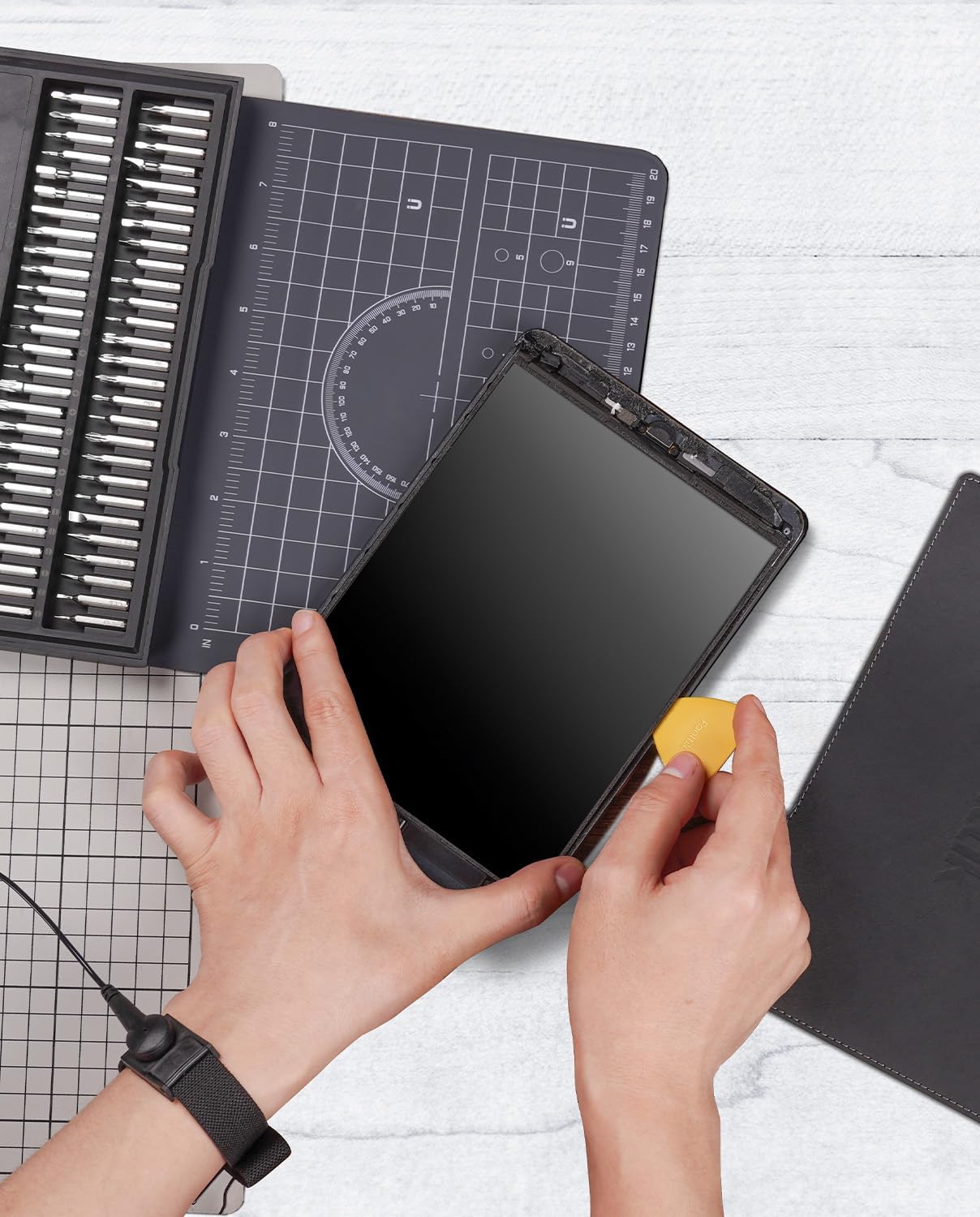
Image: A person utilizing the Fanttik E1 NEX Workstation to repair a tablet, demonstrating the use of the included tools and the organized workspace.
5.3 Using Additional Fix Tools
The kit includes various tools for opening, prying, and handling small components:
- Opening Picks and Tools: Use these to carefully pry open device casings without causing damage.
- Spudgers: Non-conductive tools for prying, poking, and manipulating delicate electronic components.
- Tweezers: For handling small screws, wires, and components with precision.
- Anti-static Wrist Strap: Wear this strap and connect it to a grounded point to prevent electrostatic discharge (ESD) damage to sensitive electronics.
6. Maintenance
- Cleaning: Wipe the screwdrivers and workstation with a soft, dry cloth. Do not use abrasive cleaners or solvents.
- Bit Storage: Always return screwdriver bits to their designated slots in the magnetic storage box to prevent loss and maintain organization.
- Charging: Recharge the screwdrivers when the battery indicator shows low power to ensure they are ready for use. Avoid over-discharging for prolonged battery life.
- Storage: Store the kit in a cool, dry place away from direct sunlight and extreme temperatures.
7. Troubleshooting
| Problem | Possible Cause | Solution |
|---|---|---|
| Screwdriver not turning on. | Low battery. | Charge the screwdriver using the USB-C cable. |
| Bit slipping or stripping screw head. | Incorrect bit size/type; insufficient pressure; worn bit. | Ensure the correct bit is used and fully seated. Apply firm, consistent pressure. Replace worn bits. |
| Screwdriver feels weak or slow. | Low battery; incorrect torque setting. | Recharge the battery. Switch to a higher torque setting if available and appropriate for the task. |
| Missing parts upon arrival. | Packaging error or transit damage. | Immediately contact customer support with your order details. |
8. Specifications
| Feature | Specification |
|---|---|
| Brand | Fanttik |
| Model | E1 NEX Workstation & E1 Max |
| Power Source | Battery Powered |
| Voltage | 3.7 Volts |
| Item Torque (Electric) | 0.05 N.m (Low), 0.2 N.m (High) |
| Item Torque (Manual) | Up to 3 N.m |
| Battery Capacity | 350 mAh (Rechargeable) |
| Battery Cell Composition | Lithium Ion |
| Material | Metal |
| Recommended Uses | Precision Repair and Maintenance (e.g., tablet computers, mobile phones, watches, electronic bracelets, cameras, precision instruments) |
9. Warranty and Support
For warranty information, product support, or to report any issues, please contact Fanttik customer service. Keep your purchase receipt or order number handy for faster service.
You can typically find contact information on the official Fanttik website or through the retailer where you purchased the product.