
Introduction
This manual provides essential instructions for the safe and effective use, installation, and maintenance of your DCH BF14405 Lithium-ion replacement battery. This battery is designed for compatibility with specific Gardena ComfortCut models. Please read this manual thoroughly before use to ensure optimal performance and safety.
Safety Information
WARNING: Failure to follow these safety instructions may result in fire, electric shock, injury, or damage to the battery and device.
- Warranty Void: The warranty is void if the label is removed from the battery pack.
- No Disassembly: Do not attempt to disassemble, open, or service the battery pack.
- Proper Replacement: Replace only with the battery pack designated for this product. Using an incompatible battery may cause damage or injury.
- Avoid Damage: Do not crush, puncture, short external contacts, or dispose of the battery in fire or water.
- Temperature Limits: Do not store the battery above 60°C (140°F). High temperatures can degrade battery performance and pose a safety risk.
- Disposal: Dispose of used batteries according to local regulations. Do not dispose of with household waste.
Compatibility
This DCH BF14405 battery is a replacement for the following models and part numbers:
- Compatible Device Models:
- Gardena ComfortCut 8895
- Gardena ComfortCut 8893
- D-89079 ULM ComfortCut 8893
- Compatible Battery Part Numbers:
- BF14405
- 08894-00
- 08894-00.640.00
- 08894-00.641.00
Setup and Installation
Before installing the new battery, ensure your device is turned off and disconnected from any power source. Refer to your Gardena ComfortCut device's original manual for specific battery compartment access instructions.
- Locate Battery Compartment: Identify the battery compartment on your Gardena ComfortCut device. This is typically secured with screws or a latch.
- Remove Old Battery: Carefully open the compartment and disconnect the old battery from its connector. Remove the old battery.
- Insert New Battery: Place the DCH BF14405 replacement battery into the compartment, ensuring proper orientation.
- Connect Battery: Connect the battery's plug to the device's battery connector. Ensure a secure connection.
- Secure Compartment: Close and secure the battery compartment.
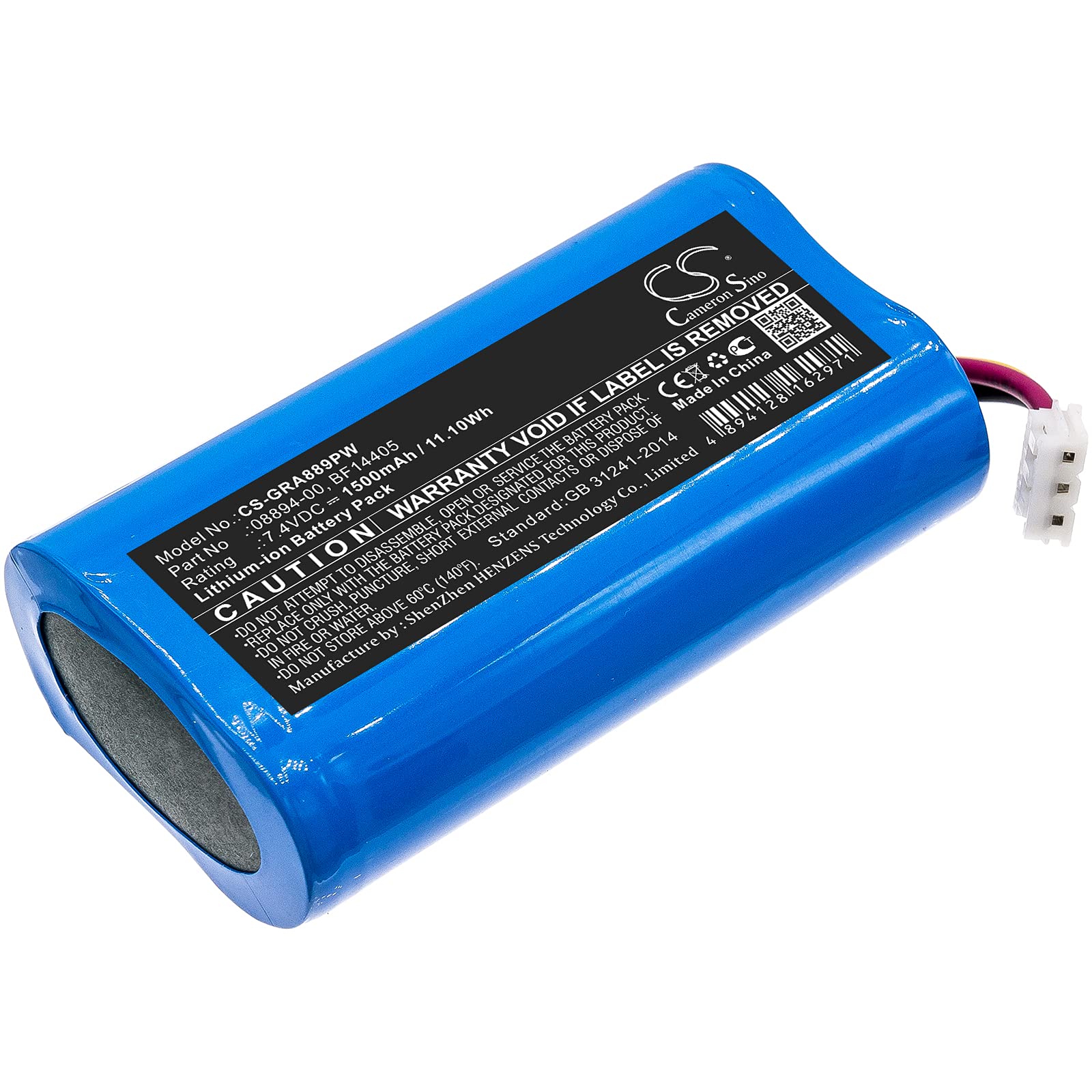
Image: The DCH BF14405 Lithium-ion battery shown alongside two Gardena ComfortCut tools, one with a grass shear attachment and the other with a hedge trimmer attachment. This illustrates the battery's intended use with compatible gardening equipment.
Operating (Charging and Usage)
This battery is a rechargeable Lithium-ion type. For optimal performance and longevity, follow these guidelines:
- Initial Charge: It is recommended to fully charge the battery before its first use.
- Charging: Use only the charger specifically designed for your Gardena ComfortCut device. Do not use third-party chargers unless explicitly stated as compatible by the device manufacturer.
- Charging Environment: Charge the battery in a well-ventilated area, away from flammable materials, and at room temperature.
- Usage: Operate your Gardena ComfortCut device as per its original instruction manual. The battery provides consistent power until depleted.
- Avoid Over-Discharge: Do not completely drain the battery repeatedly, as this can shorten its lifespan. Recharge when the device indicates low power.
Maintenance and Storage
Proper care and storage will extend the life of your DCH BF14405 battery.
- Cleaning: Keep the battery terminals clean and dry. Use a soft, dry cloth to wipe away any dust or debris.
- Storage Temperature: Store the battery in a cool, dry place, ideally between 0°C and 20°C (32°F and 68°F). Avoid extreme temperatures.
- Long-Term Storage: If storing the battery for an extended period (more than one month), charge it to approximately 50-60% capacity. Recharge every 3-6 months to prevent deep discharge.
- Avoid Moisture: Do not expose the battery to water or high humidity.
Troubleshooting
If you encounter issues with your DCH BF14405 battery, consider the following common solutions:
- Battery Not Charging:
- Ensure the charger is properly connected to both the power outlet and the device.
- Verify that the charger is functioning correctly.
- Check for any visible damage to the battery or charger terminals.
- Confirm the battery is correctly seated in the device.
- Short Run Time:
- Ensure the battery is fully charged before use.
- Battery capacity naturally degrades over time with repeated charge cycles. If the battery is old, it may be nearing the end of its lifespan.
- Operating the device in very cold conditions can temporarily reduce battery performance.
- Device Not Powering On:
- Confirm the battery is fully charged and correctly installed.
- Check if the device itself has any issues (refer to the device's original manual).
If problems persist after attempting these steps, please contact customer support.
Specifications
| Feature | Specification |
|---|---|
| Model Number | CS-GRA889PW |
| Part Numbers | BF14405, 08894-00, 08894-00.640.00, 08894-00.641.00 |
| Battery Type | Lithium-ion (Li-ion) |
| Capacity | 1500mAh |
| Watt-Hours (Wh) | 11.1Wh |
| Voltage | 7.4V |
| Dimensions (L x W x H) | 66.4 x 36.4 x 20.4mm (2.61 x 1.43 x 0.8 inches) |
| Weight | 113.6g |
| Reusability | Rechargeable |
| Manufacturer | DCH (Shenzhen HENZENS Technology Co., Limited) |
| Standard | GB 31241-2014 |
Warranty and Support
This DCH battery comes with a standard warranty. Please refer to the product packaging or your purchase documentation for specific warranty terms and duration. For technical support, troubleshooting assistance, or warranty claims, please contact your retailer or the manufacturer directly.
Contact Information: Please refer to your purchase receipt or the seller's information for direct contact details.
