
YDC TECH MR-50M
YDC TECH® MR-50M Handheld Waterproof VHF Marine Radio User Manual
Model: MR-50M
Introduction
The YDC TECH® MR-50M is a state-of-the-art handheld VHF marine radio designed for reliable and clear communication in marine environments. Engineered for durability and ease of use, this radio features IPX7 waterproofing, allowing it to float and flash if dropped in water. It includes essential functions such as NOAA Weather Alert, USB charging, and comprehensive channel access for USA, International, and Canadian waters. This manual provides detailed instructions for the proper setup, operation, and maintenance of your MR-50M marine radio.
Safety Information
Please read all safety instructions carefully before operating the device. Failure to follow these instructions may result in injury or damage to the radio.
- Do not attempt to disassemble or modify the radio. Unauthorized modifications can void your warranty and may cause damage.
- Ensure the USB charging port cover is securely closed when not charging to maintain waterproof integrity.
- Use only the provided or approved charging accessories.
- Keep the radio away from extreme temperatures, direct sunlight, and corrosive materials.
- Always ensure the antenna is properly attached before operation.
- This device is designed for marine use. While it is waterproof, avoid prolonged submersion beyond specified limits (1 meter for 30 minutes).

Image: Icon representing safety and reliability.
Package Contents
Verify that all items listed below are included in your package:
- YDC TECH® MR-50M Handheld VHF Marine Radio
- Antenna
- Belt Clip
- AC Adaptor (USB Charger)
- Hand Strap
- User Manual (this document)

Image: Contents of the MR-50M package, including the radio, antenna, belt clip, and charger.
Product Overview
Familiarize yourself with the various parts and controls of your MR-50M marine radio.

Image: Front view of the MR-50M radio, highlighting the display and control buttons.

Image: Angled view of the MR-50M radio, showing the side PTT button and antenna connection.
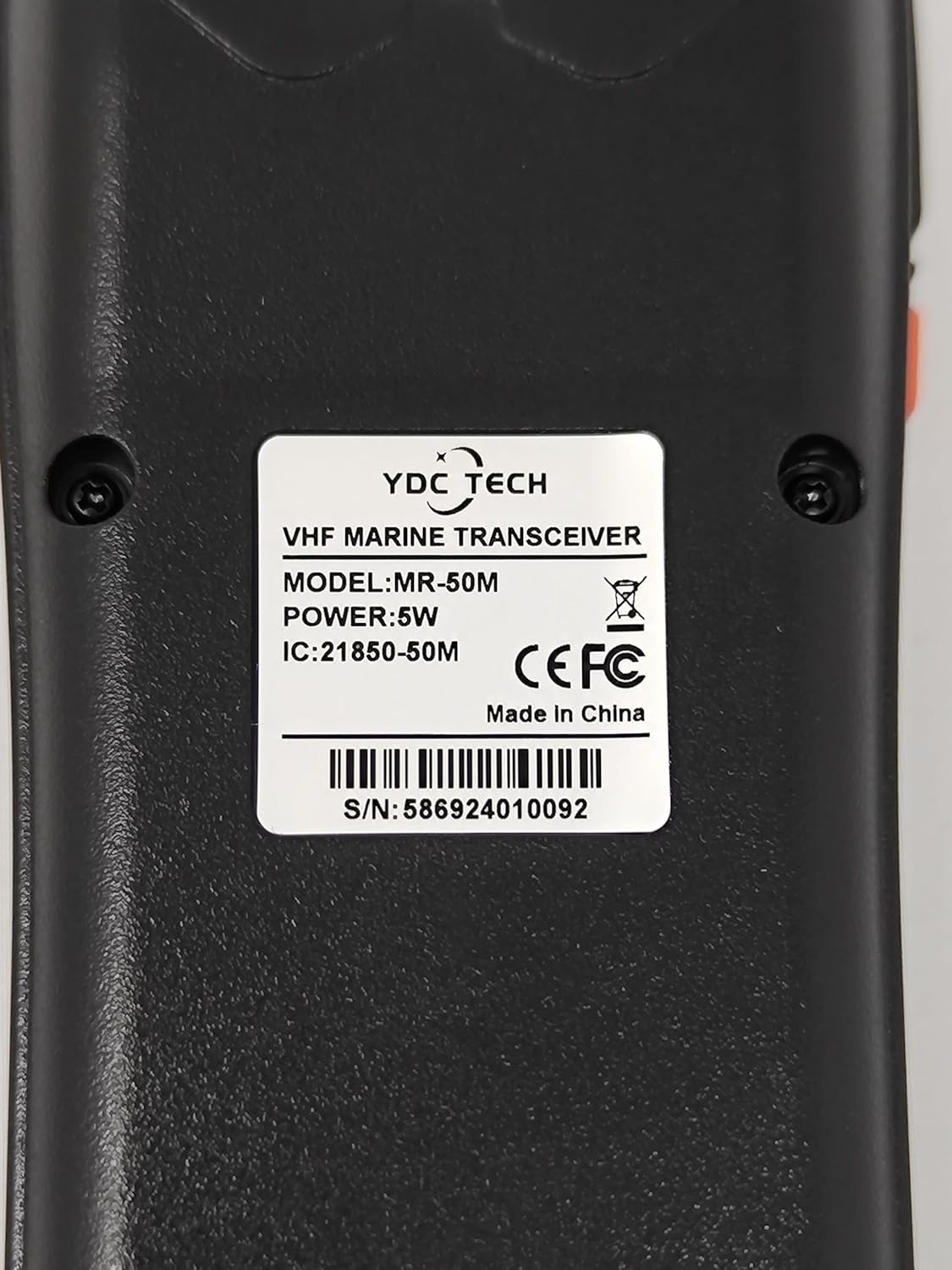
Image: Rear view of the MR-50M radio, displaying the product label with model and serial information. The serial number is 586924010092.
Key Components:
- Antenna: For transmitting and receiving signals.
- LCD Display: Shows channel number, battery status, volume, and other indicators.
- Speaker/Microphone: For audio output and input.
- Power Button: Turns the radio on/off.
- PTT (Push-to-Talk) Button: Activates transmission.
- Channel Up/Down Buttons: Navigates through channels and menu options.
- 16/C Button: Quick access to Channel 16 (Distress/Calling) and Call Channel.
- SCAN/DUAL Button: Initiates channel scan or Dual Watch function.
- VOL/SQL/MONI Button: Adjusts volume, squelch, or activates monitor function.
- FAV/TAG Button: Manages favorite channels.
- CH/WX/U/I/C Button: Switches between Channel Group (USA/International/Canada) and Weather Channel.
- H/L/LOCK Button: Adjusts transmit power (High/Low) and locks keypad.
- Micro-USB Charging Port: For battery charging.
Setup
1. Charging the Battery
The MR-50M features a built-in 1750mAh Lithium-ion battery and supports USB fast charging.
- Locate the Micro-USB charging port on the side or bottom of the radio.
- Connect the provided AC Adaptor (USB Charger) to the radio's USB port.
- Plug the AC Adaptor into a standard wall outlet.
- The battery indicator on the LCD display will show charging status. A full charge typically takes several hours.
- Once fully charged, disconnect the charger and ensure the USB port cover is securely closed to maintain waterproofing.
2. Attaching the Antenna
Screw the antenna clockwise onto the antenna connector at the top of the radio until it is finger-tight. Do not overtighten.
3. Attaching the Belt Clip
Attach the belt clip to the back of the radio using the two small screws provided. Ensure the screws are tightened securely.
Operating Instructions
Powering On/Off
- To power on: Press and hold the Power button until the display illuminates.
- To power off: Press and hold the Power button until the display turns off.
Channel Selection (USA, International, Canada)
The MR-50M supports all USA, International, and Canada marine channels.
- Press the CH/WX/U/I/C button to cycle through the channel groups: USA (U), International (I), and Canada (C). The selected group will be indicated on the display.
- Use the Up/Down arrow buttons to select the desired channel within the chosen group.

Image: Visual representation of USA, Canada, and International channel compatibility.
Volume and Squelch Adjustment
- Volume: Press the VOL/SQL/MONI button once. Use the Up/Down arrow buttons to adjust the listening volume. Press VOL/SQL/MONI again or wait a few seconds to exit volume adjustment mode.
- Squelch: Press the VOL/SQL/MONI button twice. Use the Up/Down arrow buttons to adjust the squelch level. Squelch eliminates background noise when no signal is received. Adjust it until the background noise disappears. Press VOL/SQL/MONI again or wait a few seconds to exit squelch adjustment mode.
- Monitor: Press and hold the VOL/SQL/MONI button to temporarily open the squelch and listen to weak signals. Release to close.
Dual/Tri-watch Function
This feature allows you to monitor Channel 16 and/or a call channel while operating on another channel.
- From a working channel, press the SCAN/DUAL button once for Dual Watch (monitors current channel and Channel 16).
- Press the SCAN/DUAL button again for Tri-watch (monitors current channel, Channel 16, and a user-defined call channel).
- Press SCAN/DUAL a third time to exit watch mode.
NOAA Weather Alert
The MR-50M includes a built-in NOAA Weather Channel for receiving important weather alerts.
- Press the CH/WX/U/I/C button repeatedly until "WX" appears on the display, indicating Weather Channel mode.
- Use the Up/Down arrow buttons to select from the available weather channels.
- The radio can be set to automatically alert you to severe weather warnings. Refer to the full manual for detailed setup of weather alert functions.

Image: Official NOAA Weather Radio logo, indicating weather alert capability.
Floating and Flashing Feature (IPX7 Waterproof)
The MR-50M is designed to float if dropped in water and will flash to indicate its location, making retrieval easier.
- The radio is IPX7 waterproof, meaning it can withstand submersion in 1 meter of water for up to 30 minutes.
- If the radio falls into water, it will float to the surface.
- The display and/or a dedicated LED will begin flashing to help you locate it, especially in low light conditions.
- Ensure the USB charging port cover is always sealed when near water.

Image: The MR-50M radio floating in water, showcasing its waterproof design.

Image: The MR-50M radio being submerged in water, illustrating its robust waterproof construction.
Vibration Draining
After being submerged, the radio may activate a vibration draining function to clear water from the speaker grille, ensuring clear audio.
- This function typically activates automatically after the radio is removed from water.
- Allow the radio to complete the draining cycle before attempting to transmit or receive.
Scanning Channels
- Press and hold the SCAN/DUAL button to initiate a scan of all active channels within the selected channel group.
- The scan will pause on any active channel. To resume scanning, press the Up/Down arrow buttons or wait for the signal to clear.
- To stop scanning, press the SCAN/DUAL button again.
Emergency Channel 16 Access
- For immediate access to Channel 16 (the international distress and calling channel), simply press the dedicated 16/C button.
- Pressing it again will typically return to the previously selected working channel or switch to the call channel.

Image: The MR-50M radio in use on a boat, demonstrating its practical application.
Maintenance
Cleaning
- Wipe the radio with a soft, damp cloth. Do not use harsh chemicals or abrasive cleaners.
- If exposed to saltwater, rinse the radio thoroughly with fresh water and dry completely before charging or storing.
Storage
- Store the radio in a cool, dry place away from direct sunlight and extreme temperatures.
- For long-term storage, ensure the battery is partially charged (around 50%) to prolong its lifespan. Avoid storing with a completely depleted or fully charged battery for extended periods.
Battery Care
- Recharge the battery when the low battery indicator appears.
- Avoid overcharging or deep discharging the battery frequently.
Troubleshooting
| Problem | Possible Cause | Solution |
|---|---|---|
| Radio does not power on. | Battery is depleted. | Charge the battery using the provided AC adaptor. |
| No audio or weak audio. | Volume too low; Squelch too high; Speaker blocked. | Increase volume; Adjust squelch; Check for water in speaker grille (use vibration draining). |
| Cannot transmit or receive. | Incorrect channel selected; Antenna not connected; Out of range. | Verify channel group (USA/INT/CAN); Ensure antenna is securely attached; Move closer to other stations. |
| Radio floats but does not flash. | Flashing feature disabled in settings. | Refer to the full manual to enable the flashing feature in settings. |
Specifications
| Feature | Detail |
|---|---|
| Model | MR-50M |
| IC Certification | IC# 21850-50M |
| Frequency Range | 156.025 - 157.425 MHz |
| Number of Channels | 72 (All USA, International, and Canada Marine Channels) |
| Water Resistance | IPX7 (1 meter depth for 30 minutes) |
| Battery | 1750mAh Lithium-ion (Built-in) |
| Charging | Micro-USB Fast Charging |
| Special Features | Float and Flash, NOAA Weather Alert, Dual/Tri-watch, Vibration Draining, Monitor Function |
| Weight | 0.5 Kilograms (approx.) |
| Dimensions (Parcel) | 22.1 x 19.8 x 7.2 cm (approx.) |
Warranty and Support
For warranty information and technical support, please contact YDC TECH customer service. Details can typically be found on the product packaging or the official YDC TECH website.
Manufacturer: YDC TECH
Place of Business: 10156965 Canada Ltd (YD Canada) Ydcanada@Ydcanada.ca
For further assistance, please visit the YDC TECH Store on Amazon.
Related Documents - MR-50M
 |
Cobra MR HH500 FLT BT VHF Marine Radio Owner's Manual Comprehensive owner's manual for the Cobra MR HH500 FLT BT handheld floating VHF marine radio, covering features, operation, installation, safety, troubleshooting, and marine radio protocols. |
 |
Cobra MR HH600W FLT GPS BT VHF Marine Radio Owner's Manual Owner's manual for the Cobra MR HH600W FLT GPS BT VHF Marine Radio. Learn about its features, GPS, Bluetooth, DSC, NOAA weather, and safe operation for marine communication. |
 |
Cobra HH600 FLT GPS BT VHF Marine Radio: Owner's Manual and Operation Guide Comprehensive owner's manual for the Cobra HH600 FLT GPS BT VHF Marine Radio. Details features like GPS, Bluetooth, DSC, NOAA weather alerts, submersible design, and operation instructions for marine communication and safety. |
 |
Cobra MR HH600W FLT GPS BT VHF Marine Radio Owner's Manual User manual for the Cobra MR HH600W FLT GPS BT VHF Marine Radio. This guide provides detailed instructions on operation, features like GPS, Bluetooth, DSC, and NOAA weather alerts, along with safety guidelines and troubleshooting for marine use. |
 |
Cobra Marine MR HH600 FLT GPS BT VHF Radio Owner's Manual This owner's manual for the Cobra Marine MR HH600 FLT GPS BT VHF radio covers its features for marine communication, safety, and navigation. It details GPS, DSC, Bluetooth, NOAA weather alerts, and its submersible, floating design. |
 |
Cobra Marine MR HH125 VHF Marine Radio Owner's Manual This owner's manual provides comprehensive instructions for the Cobra Marine MR HH125 VHF radio, covering its features, operation, safety guidelines, and troubleshooting for reliable marine communication and weather alerts. |