
Introduction
Thank you for choosing the Sharper Image X-Treme Roll High Performance Remote Control Vehicle. This manual provides essential information for the safe operation, setup, and maintenance of your new RC vehicle. Please read it thoroughly before use and retain it for future reference.
Safety Information
- Not suitable for children under 6 years of age. Recommended for ages 8 and up.
- Adult supervision is recommended during operation.
- Do not operate near people, pets, or fragile objects.
- Avoid operating in wet conditions or near water.
- Do not touch moving parts during operation.
- Always turn off the vehicle and remote control when not in use.
- Dispose of batteries responsibly according to local regulations.
Package Contents
Ensure all items are present in the package:
- 1 x X-Treme Roll RC Vehicle
- 1 x 2.4 GHz Remote Control
- 1 x USB-C Charging Cable
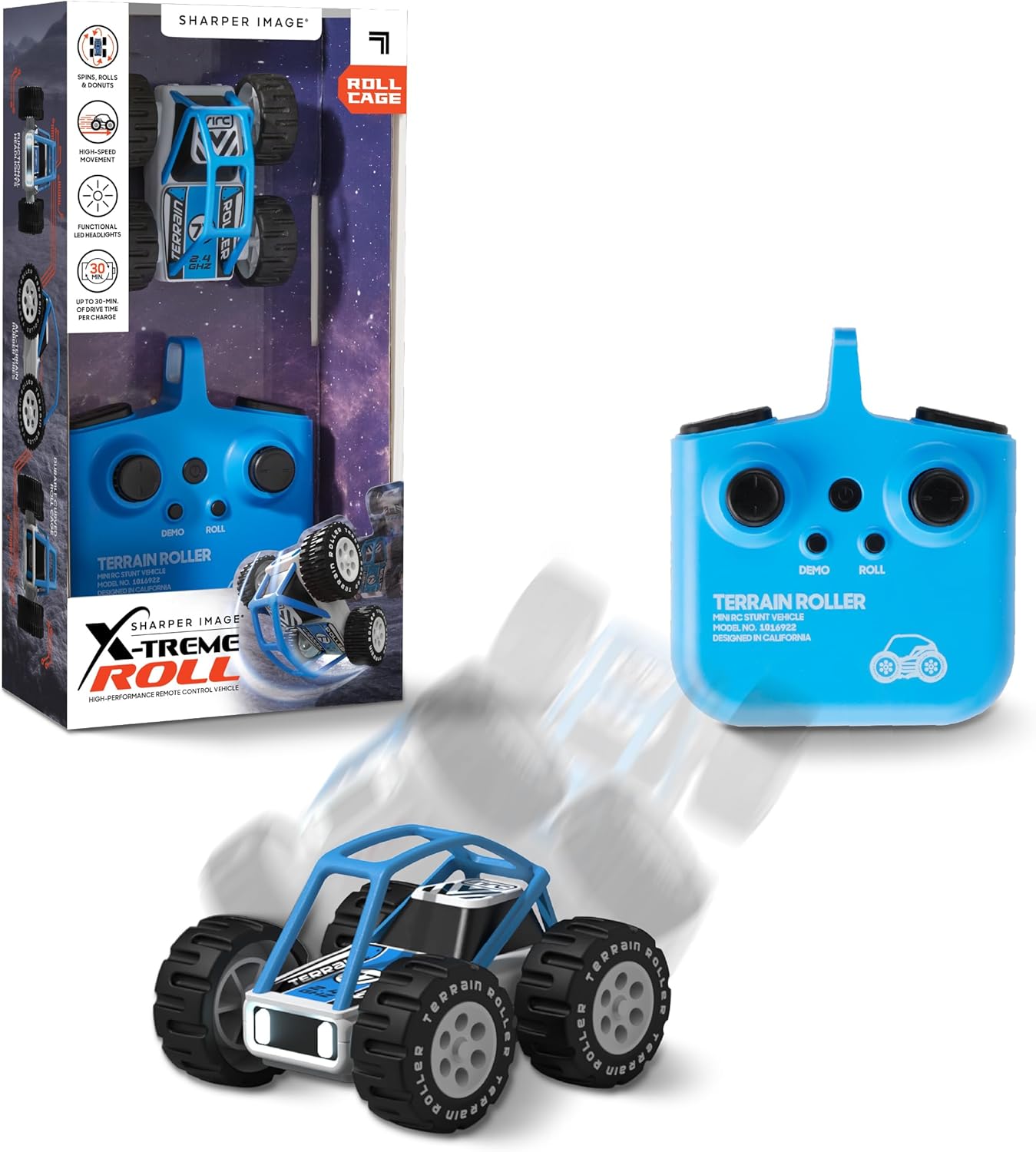
Image: The X-Treme Roll RC vehicle and its accompanying remote control, as found in the product packaging.
Setup
1. Charging the Vehicle Battery
- Locate the USB-C charging port on the X-Treme Roll vehicle.
- Connect the included USB-C charging cable to the vehicle's port.
- Plug the other end of the USB-C cable into a standard USB power adapter (not included) or a computer's USB port.
- The charging indicator light on the vehicle will illuminate during charging and turn off when fully charged.
- A full charge provides up to 30 minutes of playtime.
2. Installing Remote Control Batteries
- Open the battery compartment on the back of the 2.4 GHz Remote Control.
- Insert 3 x AAA 1.5V batteries (not included), ensuring correct polarity (+/-).
- Close the battery compartment securely.

Image: A diagram illustrating the X-Treme Roll vehicle's functional headlights, all-terrain rubber tires, durable curved roll cage, and the contents of the package, including the USB-C charging cable and the remote control's AAA battery requirement.
3. Pairing the Vehicle and Remote
The X-Treme Roll and its remote control are designed to pair automatically using 2.4 GHz technology. Follow these steps:
- Ensure both the vehicle and the remote control are powered off.
- Turn on the X-Treme Roll vehicle.
- Turn on the remote control.
- The remote control's indicator light will flash and then become solid, indicating a successful connection.
Operating Instructions
Basic Controls
- Forward/Backward: Push the left joystick forward or backward.
- Turn Left/Right: Push the right joystick left or right.
Stunt Functions
The X-Treme Roll is designed for dynamic stunts thanks to its durable curved roll cage and responsive controls.
- 360-Degree Spins: While moving forward or backward, quickly push one joystick fully in one direction (e.g., left joystick forward, right joystick left) to initiate a spin.
- Flips and Donuts: Utilize the vehicle's high-speed movement and the curved roll cage to perform flips and continuous rolling stunts. Experiment with quick turns and changes in direction.
- One-Button Stunts: The remote control may feature dedicated buttons for pre-programmed stunts. Refer to the remote's labeling (e.g., 'DEMO' or 'ROLL' buttons) for specific functions.

Image: The X-Treme Roll RC vehicle in motion, demonstrating its ability to tumble over rough terrain, with the remote control in the foreground.
LED Headlights
The X-Treme Roll is equipped with bright LED headlights for enhanced visibility during both day and night play. These lights activate automatically when the vehicle is powered on.

Image: The X-Treme Roll RC vehicle mid-stunt, with icons indicating its features: spins, rolls & donuts, high-speed movement, functional LED headlights, and up to 30 minutes of drive time per charge.
Maintenance
Cleaning
- Wipe the vehicle with a soft, dry cloth to remove dust and dirt.
- Do not use harsh chemicals or water directly on the electronic components.
Battery Care and Storage
- Always turn off the vehicle and remote control before storing.
- Remove AAA batteries from the remote control if it will not be used for an extended period.
- Store the vehicle and remote in a cool, dry place away from direct sunlight.
Troubleshooting
- Vehicle not responding:
- Ensure both the vehicle and remote control are powered on.
- Check if the vehicle's battery is charged.
- Replace the AAA batteries in the remote control.
- Ensure the vehicle and remote are within range (approximately 2.4 GHz operating range).
- Short playtime:
- Ensure the vehicle battery is fully charged before use.
- Battery performance may decrease over time with repeated charging cycles.
- Vehicle performs poorly:
- Check for any obstructions in the wheels or chassis.
- Ensure the vehicle is operated on suitable terrain.
Specifications
| Feature | Detail |
|---|---|
| Model Number | 1016847 |
| Product Dimensions | 8.51 x 7.49 x 5.49 cm |
| Weight | 340 g |
| Material Type | Plastic |
| Vehicle Battery | Built-in 3.7V 150mAh Li-Po rechargeable battery (not replaceable) |
| Remote Control Batteries | 3 x AAA 1.5V (not included) |
| Playtime | Up to 30 minutes per charge |
| Recommended Age | 8 years and up |
| Special Features | Rechargeable, LED Headlights, 360 Stunts, All-Terrain |

Image: A visual representation of the X-Treme Roll RC vehicle with its key dimensions: 85mm length, 75mm width, and 55mm height.
Warranty Information
For detailed warranty information, please refer to the documentation included with your purchase or visit the official Sharper Image website. Warranty terms and conditions may vary by region.
Support
If you encounter any issues or have questions not covered in this manual, please visit the Sharper Image official website for customer support and contact information.
