
Introduction
Thank you for choosing the EASYmaxx Window Mosquito Net with Magic Click. This manual provides essential information for the safe and effective installation, operation, and maintenance of your new insect screen. Please read these instructions carefully before use and retain them for future reference.
Safety Information
- Keep all packaging materials away from children to prevent choking hazards.
- Ensure the window frame is clean and dry before applying adhesive components.
- Use caution when cutting the mosquito net to size. Keep sharp objects away from children.
- This product is designed for insect protection and is not a safety barrier for children or pets.
- Do not expose the product to open flames or excessive heat.
Package Contents
Verify that all items are present in your package:
- 4 x Mosquito Nets (130 x 150 cm each)
- 48 x Magnet Sets (for 4 nets)

Image: Example of packaged mosquito nets.
Specifications
| Feature | Detail |
|---|---|
| Brand | EASYmaxx |
| Model Number | 14899 |
| Net Dimensions (each) | 130 x 150 cm (can be cut to size) |
| Color | Black |
| Fixing Style | Magnetic |
| Material (Magnets/Clips) | ABS |
| Special Features | Removable, Air-permeable, Semi-transparent |
| Total Weight | 300 Grams |
| Compatible Window Frames | Plastic (PVC), Wood, Aluminum (frame width ≥ 9 mm) |
Setup and Installation
Follow these steps for easy and quick installation of your EASYmaxx Window Mosquito Net:
- Prepare the Window Frame: Ensure the window frame is clean, dry, and free of dust or grease. This is crucial for the adhesive magnets to bond properly.
- Measure and Cut the Net: Measure the exact dimensions of your window opening. The mosquito net can be individually cut to fit windows up to a maximum of 150 x 130 cm. Use scissors to carefully trim the net to the required size.
- Attach Magnets to the Frame: Peel the protective film from the adhesive side of the magnetic strips. Apply these strips directly to your clean window frame, ensuring they are evenly spaced around the perimeter where the net will be attached.
- Attach Counterparts to the Net: Place the corresponding magnetic clips onto the edges of the cut mosquito net. These clips will align with the magnetic strips on the window frame.
- Install the Net: Once the magnets are in place on both the frame and the net, simply align the net with the window frame and let the magnets click together. The net should be taut and securely fixed.

Image: Window dimensions and cutting instructions.

Image: Attaching magnetic clips to the net.
The magnetic fixing allows for easy installation without drilling or screwing, and the net can be removed without leaving adhesive residue.

Image: Key features of the magnetic mosquito net.
Operating Instructions
The EASYmaxx Window Mosquito Net is designed for simple and practical use:
- Opening and Closing Windows: The magnetic attachment allows you to fully open and close your windows even with the mosquito net installed. Simply detach the net from the magnets on one side if you need to access the window exterior, then re-attach it.
- Airflow and Visibility: The black, semi-transparent material ensures reliable airflow while maintaining a clear view outside.
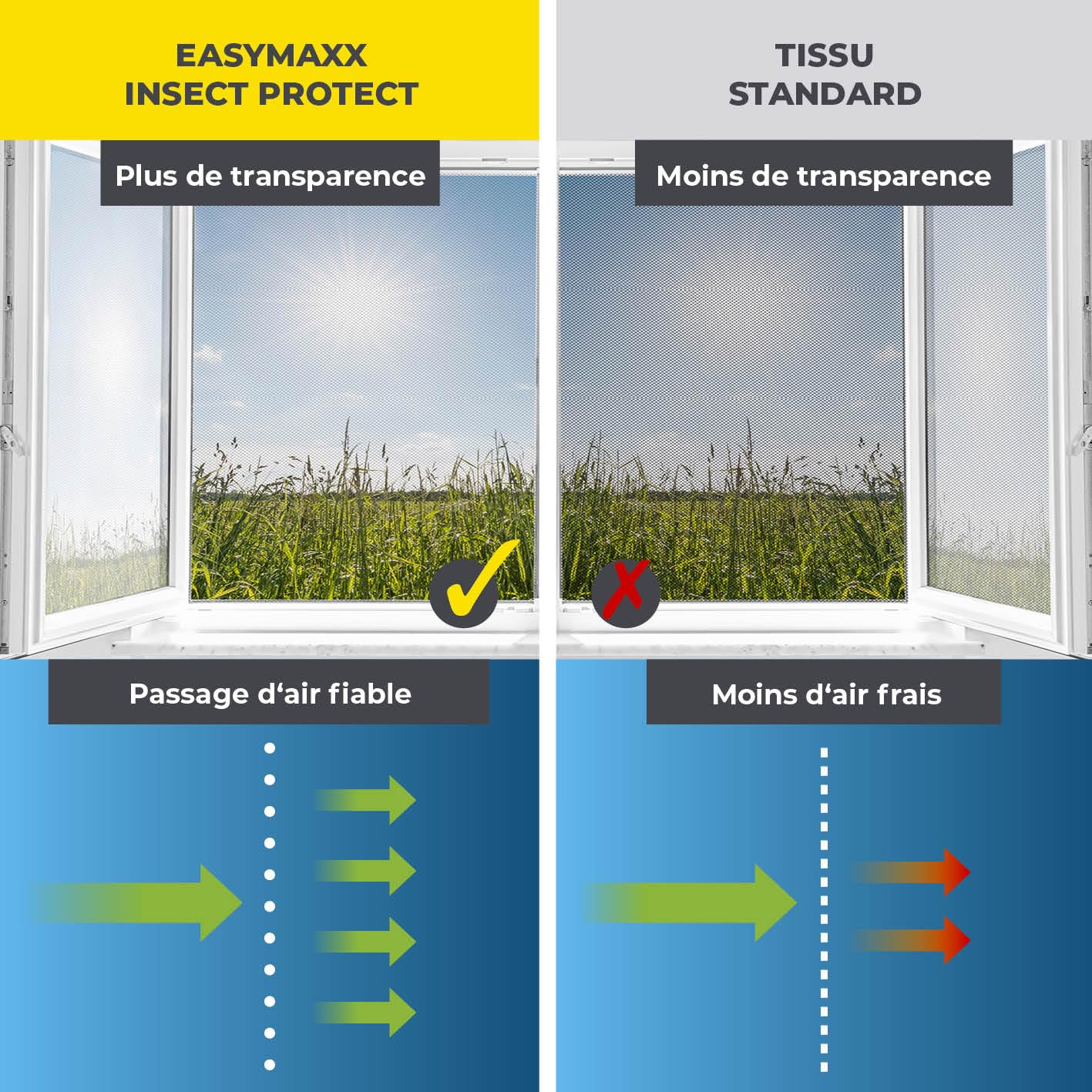
Image: Comparison of transparency and airflow.
Maintenance
To ensure the longevity and effectiveness of your mosquito net:
- Cleaning the Net: The net can be gently wiped with a damp cloth to remove dust and dirt. Avoid harsh chemicals or abrasive cleaners.
- Seasonal Removal: At the end of the season, the mosquito net can be easily detached from the magnets. The magnetic strips on the frame can also be removed without leaving residue.
- Storage: Store the cleaned and dried nets in a cool, dry place away from direct sunlight when not in use.
Troubleshooting
If you encounter any issues, refer to the following common solutions:
- Net not sticking to frame: Ensure the window frame surface is clean and dry before applying the adhesive magnetic strips. The adhesive may lose effectiveness if the surface is dirty or greasy.
- Gaps around the net: Re-check your measurements and ensure the net was cut to the correct size. Adjust the placement of the magnetic strips and clips to ensure a tight seal around the entire window opening.
- Insects still entering: Verify that there are no gaps or tears in the net. Ensure the net is securely attached to all magnetic points around the window frame.
- Magnets losing strength: Over time, adhesive may weaken. Ensure the magnets are clean. If necessary, replace the adhesive strips or contact support for replacement parts.
Warranty Information
This product comes with a standard manufacturer's warranty. Please refer to the packaging or the retailer's website for specific warranty terms and conditions. Retain your proof of purchase for any warranty claims.
Support
For further assistance, technical support, or to inquire about replacement parts, please contact the manufacturer or your retailer. You can typically find contact information on the product packaging or the brand's official website.