
1. Introduction
Thank you for choosing the BESTEK 200W Power Inverter. This device converts 12V DC power from your vehicle's battery into 240V AC household power, along with multiple USB charging ports. It is designed for charging electronic devices, camping, and mobile office use. Please read this manual thoroughly before use to ensure safe and optimal operation.
2. Safety Instructions
Adhering to these safety guidelines is crucial to prevent injury and damage to the inverter or connected devices.
- Power Limit: Ensure that the total power consumption of all connected devices does not exceed 200W. Overloading the inverter can cause damage and trigger protection mechanisms.
- Ventilation: Always ensure adequate ventilation around the inverter. Do not block the cooling fan or air vents. Overheating can lead to automatic shutdown.
- Environment: Use the inverter in a dry, well-ventilated area, away from direct sunlight, heat sources, flammable materials, and moisture.
- Connection: Connect the inverter only to a 12V DC power source (e.g., a car cigarette lighter socket). Do not connect to 24V DC systems.
- Children: Keep the inverter out of reach of children.
- Disassembly: Do not attempt to disassemble, modify, or repair the inverter. Refer all servicing to qualified personnel.
- Protection Features: The inverter includes built-in protections against overvoltage, undervoltage, overload, short circuit, and overheating. If a protection is triggered, the inverter may shut down automatically.

3. Product Overview
The BESTEK 200W Power Inverter is equipped with various ports and features for versatile power delivery.
Components:
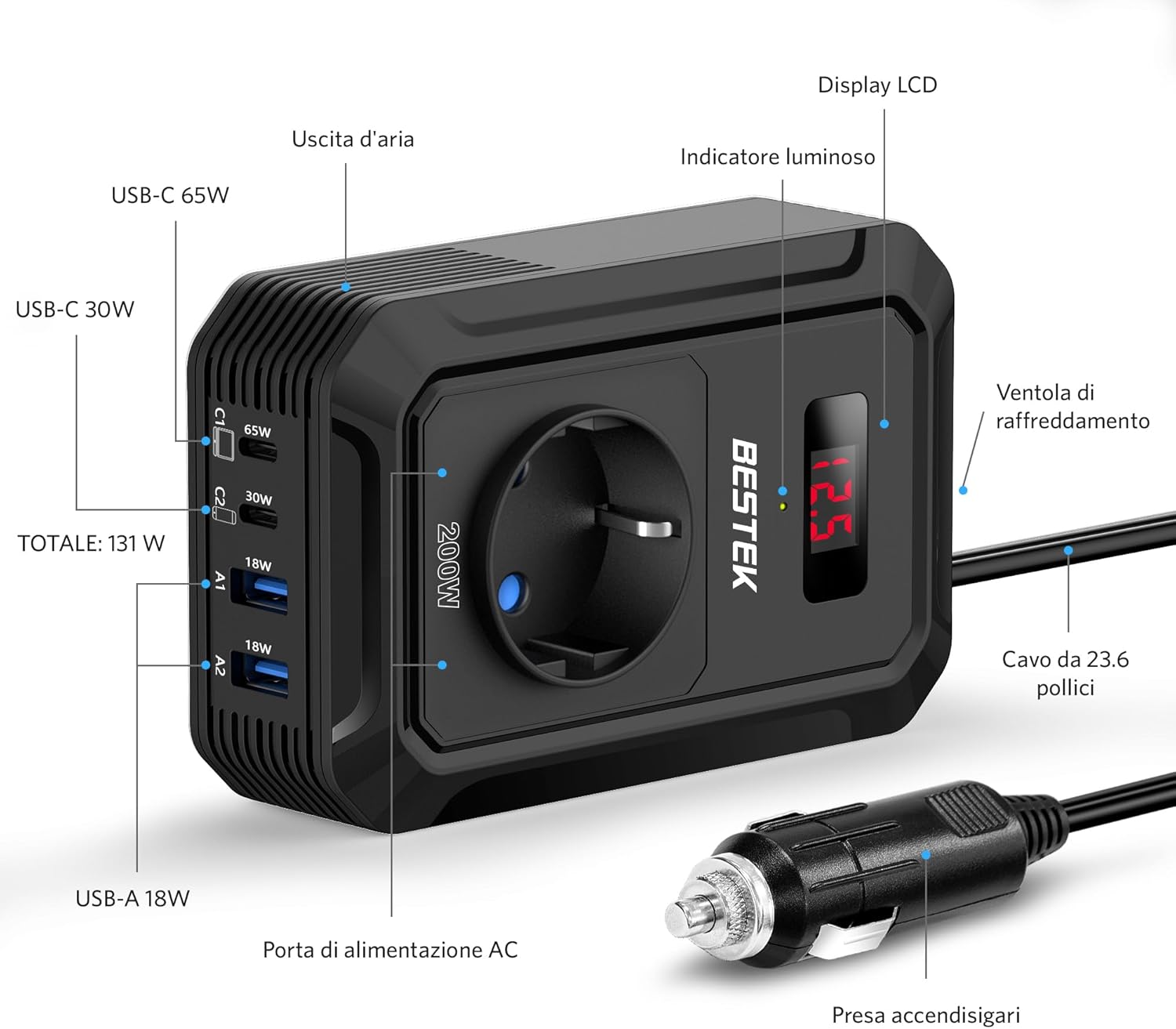
- AC Outlet: Universal EU socket for 240V AC devices.
- USB-C Ports: One 65W PD (Power Delivery) and one 30W QC3.0 (Quick Charge) port for fast charging compatible devices.
- USB-A Ports: Two 18W QC3.0 ports for quick charging.
- LCD Display: Shows input voltage from the vehicle battery.
- Cooling Fan: Automatically activates to dissipate heat.
- Cigarette Lighter Plug: For connecting to the vehicle's 12V DC power socket.
Key Features:
- 200W Continuous Power: Provides stable power for various electronics.
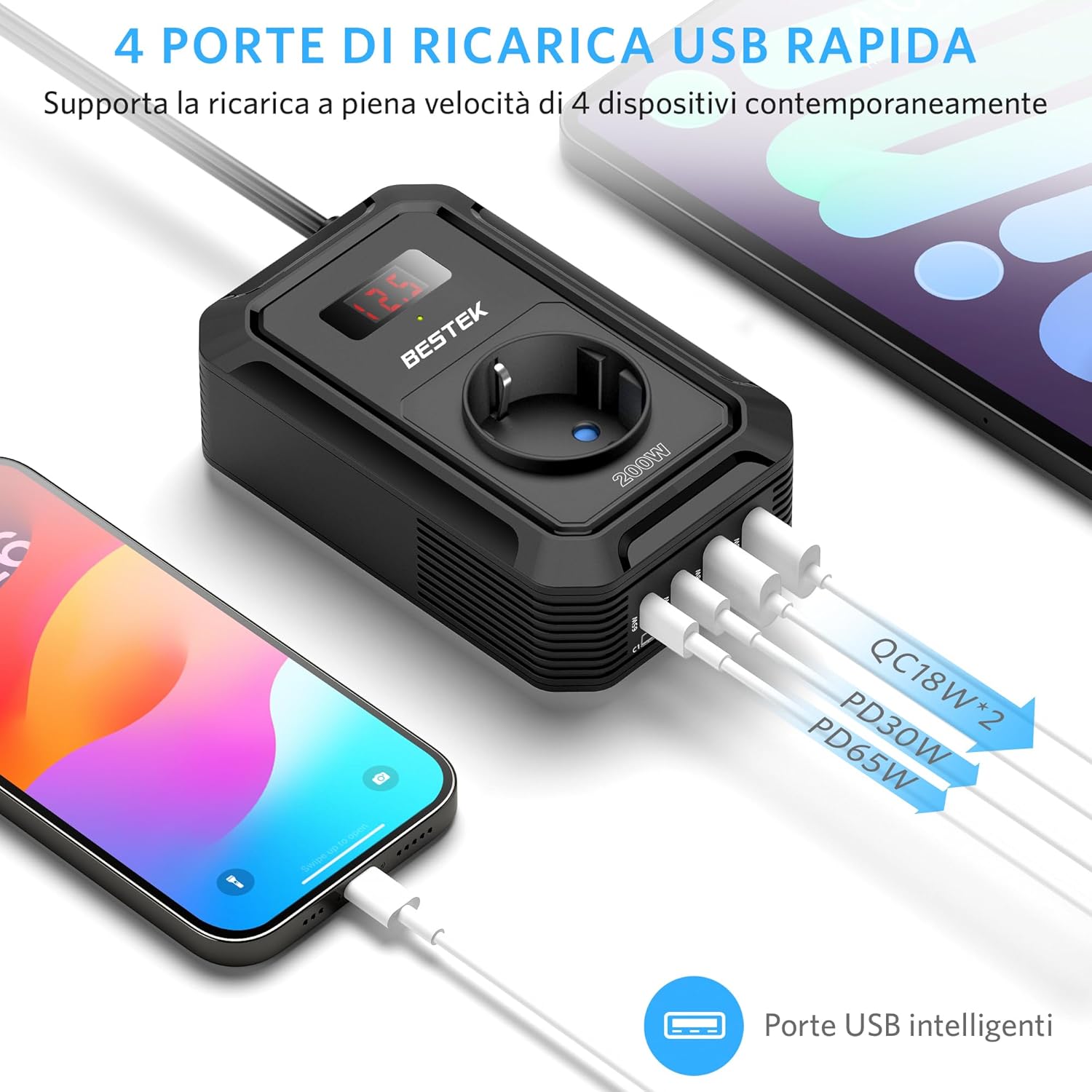
- High-Speed USB Charging: Total USB output of 131W, including PD 65W and QC 18W ports for rapid charging of smartphones, tablets, and laptops.
- Digital LCD Screen: Displays real-time input voltage for monitoring.
- Compact and Portable Design: Measures approximately 8L x 3.3W x 12.5H cm, making it easy to store and transport.
- Smart Cooling System: The fan adjusts speed based on load and temperature, reducing noise and preventing overheating.
4. Setup
Follow these steps to set up your BESTEK Power Inverter:
- Vehicle Preparation: Ensure your vehicle's engine is running to provide a stable 12V power supply and prevent draining the car battery, especially when using high-power devices.
- Connect to Cigarette Lighter: Insert the inverter's cigarette lighter plug firmly into your vehicle's 12V cigarette lighter socket. The LCD display should illuminate, showing the current input voltage.
- Placement: Place the inverter on a stable surface, ensuring that the air vents are not obstructed. Maintain sufficient space around the unit for proper airflow.
5. Operating Instructions
Once the inverter is properly set up, you can begin powering and charging your devices.
- Check Device Compatibility: Before connecting, verify that your device's power requirement (in Watts) is within the inverter's 200W limit.
- Connect Devices:
- For AC-powered devices, plug them into the universal AC outlet.
- For USB-powered devices, connect them to the appropriate USB-C (65W PD, 30W QC3.0) or USB-A (18W QC3.0) ports.
- Monitor Display: The LCD screen will show the input voltage. If the voltage drops too low (e.g., below 10.5V), the inverter may shut down to protect your car battery.
- Disconnect After Use: When you are finished, disconnect all devices and then unplug the inverter from the cigarette lighter socket.

Universal Compatibility:
The inverter supports a wide range of devices, including:
- Laptops (e.g., MacBook Pro)
- Smartphones and Tablets
- Gaming Devices (e.g., Nintendo Switch, PS5)
- Small Medical Machines (e.g., CPAP machine, Nebulizer)
- Car Accessories (e.g., Air Compressor, Small Fan, Bluetooth Speaker, Wireless Earbuds)

6. Maintenance
Proper maintenance ensures the longevity and reliable performance of your inverter.
- Cleaning: Periodically clean the exterior of the inverter with a soft, dry cloth. Do not use liquid cleaners or solvents.
- Ventilation: Regularly check that the cooling fan and air vents are free from dust and debris. Blocked vents can lead to overheating.
- Storage: Store the inverter in a cool, dry place when not in use, away from extreme temperatures and direct sunlight.
- Cable Inspection: Inspect the power cable and plug for any signs of damage before each use. Do not use if damaged.

7. Troubleshooting
If you encounter issues with your inverter, refer to the following common problems and solutions:
| Problem | Possible Cause | Solution |
|---|---|---|
| Inverter not powering on / No output |
|
|
| Inverter shuts down automatically (Protection mode) |
|
|
| Connected device not charging or working |
|
|
If the problem persists after attempting these solutions, please contact BESTEK customer support.
8. Specifications
| Feature | Specification |
|---|---|
| Brand | BESTEK |
| Model Name | MRI2013EU |
| Power in Watts | 200 Watts |
| Peak Power | 200 Watts |
| Input Voltage | 12 Volts (DC) |
| Output Voltage | 240 Volts (AC) |
| Output Waveform | Modified Sine Wave |
| Frequency | 50 Hz |
| AC Outlets | 1 (Universal EU) |
| USB-C Ports | 2 (65W PD, 30W QC3.0) |
| USB-A Ports | 2 (18W QC3.0) |
| Total USB Power | 131W |
| Power Source | Cigarette Lighter Socket |
| Display Type | LCD |
| Dimensions (L x W x H) | 8L x 3.3W x 12.5H cm |
| Weight | 300 Grams |
| Safety Certifications | CE, ETL Listed |
| Recommended Uses | Charging electronic devices, camping, mobile office use |
9. Warranty and Support
BESTEK stands behind the quality of its products.
- Warranty: This product comes with an 18-month product replacement warranty.
- Return Policy: BESTEK offers a 60-day refund policy for your purchase.
- Customer Support: Friendly technical support and customer service are available 24/7. For assistance, please visit the official BESTEK store or contact their support channels.
For more information or to contact support, please visit the BESTEK Official Store.


