
1. Introduction
Welcome to the miisso Ultra Slim 10000mAh Power Bank. This device is designed for convenient and efficient charging of your mobile devices on the go. Its compact design, built-in cables, and foldable AC wall plug make it a versatile power solution for various scenarios, from daily use to travel.
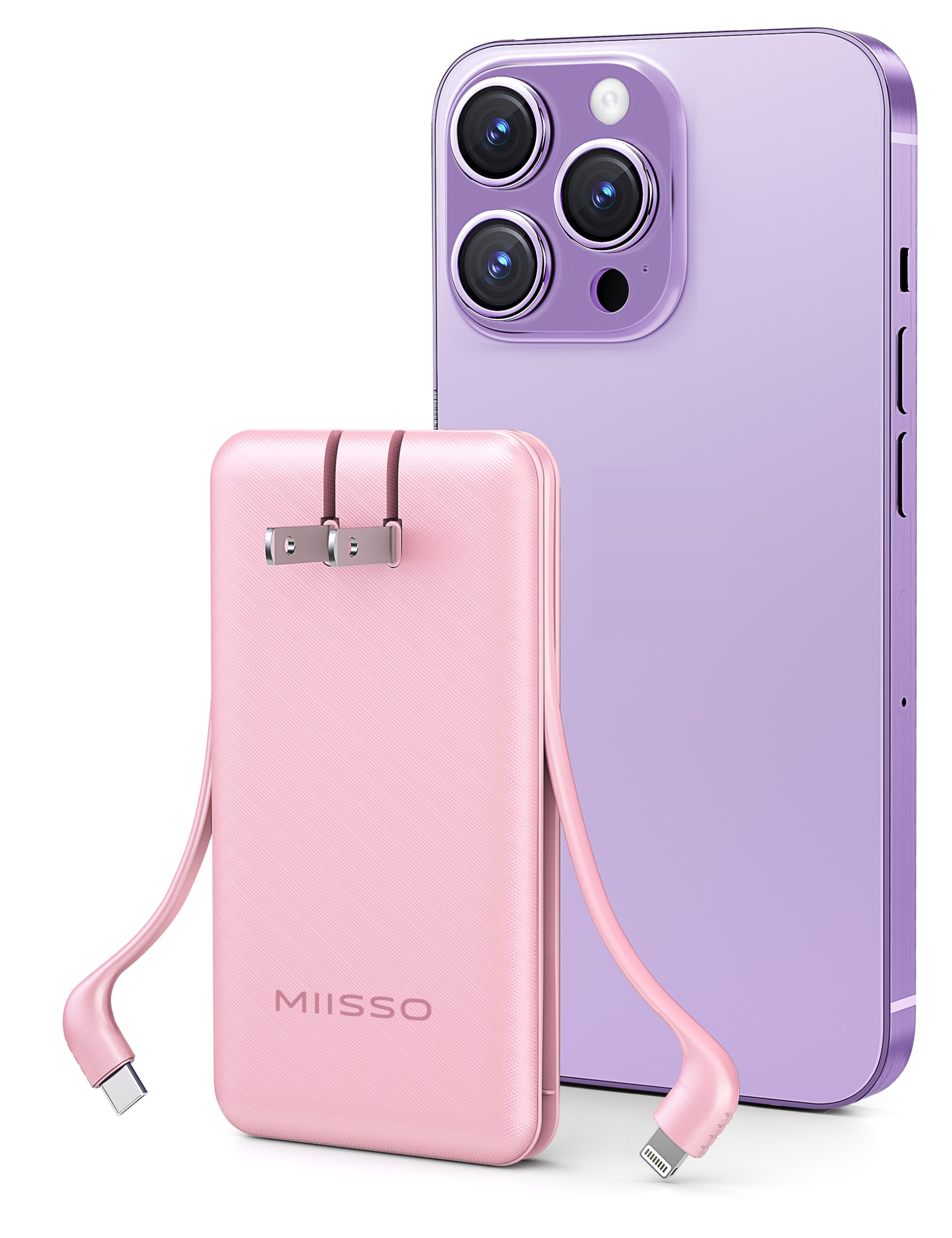
Figure 1: miisso Ultra Slim 10000mAh Power Bank
2. Product Overview
Key Features
- 10000mAh High Capacity: Provides multiple charges for most smartphones.
- Built-in USB-C and IP (Lightning) Cables: Eliminates the need to carry extra charging cables.
- Foldable AC Wall Plug: Allows direct charging from any standard wall outlet (100V-240V).
- Ultra-slim and Pocket-sized Design: Dimensions of 4.9"L x 2.67"W x 0.7"Th for easy portability.
- Pass-Through Charging Support: Charge the power bank and your devices simultaneously.
- 15-Layer Smart Protection System: Ensures safe charging against overcharge, over-discharge, short-circuit, and more.
- 3A High-Speed Charging: Delivers efficient power to compatible devices.

Figure 2: Built-in USB-C and IP (Lightning) Cables

Figure 3: Foldable AC Wall Plug
Package Contents
- miisso 10000mAh Power Bank (Model Z97) x 1
- USB Charging Cable (for external charging of power bank if AC plug is not used) x 1
- User Guide x 1
3. Setup
Initial Charge
Before first use, fully charge your miisso Power Bank to ensure optimal performance.
Method 1: Using the Foldable AC Wall Plug
- Locate the foldable AC prongs on the back of the power bank.
- Flip out the prongs and plug the power bank directly into a standard wall outlet (100V-240V).
- The LED indicator lights will illuminate to show charging progress. All four lights will be solid when fully charged.
Method 2: Using the USB Charging Cable
- Connect the provided USB charging cable to the USB-C input port on the power bank.
- Connect the other end of the USB cable to a compatible USB wall adapter or computer USB port.
- The LED indicator lights will show charging progress.
4. Operating Instructions
Checking Battery Level
Press the power button once to view the current battery level indicated by the LED lights:
- 1 LED: 0-25% charge remaining
- 2 LEDs: 25-50% charge remaining
- 3 LEDs: 50-75% charge remaining
- 4 LEDs: 75-100% charge remaining
Charging Your Devices
The miisso Power Bank features built-in USB-C and IP (Lightning) cables for direct connection to your devices.
Using Built-in Cables:
- Gently pull out the appropriate built-in cable (USB-C or IP) from its storage slot.
- Connect the cable to your device's charging port.
- The power bank will automatically begin charging your device. If not, press the power button once.
- You can charge two devices simultaneously using both built-in cables.
Using External USB-C Port (Output):
- For devices requiring a different cable or for additional charging, use your device's own USB-C cable.
- Plug one end of your cable into the USB-C output port on the power bank and the other end into your device.

Figure 4: Charging Multiple Devices
Pass-Through Charging
The power bank supports pass-through charging, meaning you can charge the power bank itself while it simultaneously charges your connected devices.
- Plug the power bank into a wall outlet using its foldable AC plug.
- Connect your devices to the power bank using the built-in cables or the USB-C output port.
- The power bank and your devices will charge concurrently.

Figure 5: Pass-Through Charging in action
5. Maintenance
- Keep the power bank away from extreme temperatures, direct sunlight, and liquids.
- Avoid dropping or subjecting the device to strong impacts.
- Clean the exterior with a soft, dry cloth. Do not use harsh chemicals.
- Store in a cool, dry place when not in use for extended periods.
- Fully charge the power bank at least once every three months to maintain battery health.
6. Troubleshooting
Power Bank not charging:
- Ensure the AC plug is fully inserted into a working wall outlet.
- If using the USB cable, ensure both ends are securely connected and the power source is active.
- Check if the power bank's LED indicators are active.
Device not charging from Power Bank:
- Ensure the power bank has sufficient charge (check LED indicators).
- Verify that the built-in cables or external USB-C cable are securely connected to both the power bank and your device.
- Press the power button on the power bank to initiate charging if it doesn't start automatically.
- Try a different cable or device to isolate the issue.
Slow charging:
- Ensure your device and cable are compatible with the power bank's output specifications.
- Avoid using your device heavily while charging.
- Check for any debris in the charging ports.
7. Specifications
Technical Specifications
| Feature | Specification |
|---|---|
| Brand | miisso |
| Model Name | Z97 |
| Model Number | Z97 |
| Battery Capacity | 10000mAh |
| Battery Cell Type | Lithium Polymer |
| Connector Type | USB Type C (input/output), Built-in IP (Lightning) cable, Built-in USB-C cable |
| Power Source | Battery, AC Wall Plug |
| Voltage | 5 Volts |
| Dimensions (L x W x Th) | 4.9" x 2.67" x 0.7" |
| Weight | 0.36 Pounds |
| UPC | 768399168366 |
| Manufacturer | Shenzhen Weilaishenniao Technology Co., Ltd. |
Compatibility
Compatible with a wide range of devices including:
- Apple Devices: iPhone 16, iPhone 15, iPhone 14, iPhone 13, iPhone 12, iPhone 11, iPhone XS, iPhone 8, iPhone 7, iPhone 6, iPhone 5, iPhone SE, iPad, iPad mini, AirPods Pro 3, Apple Watch.
- Android Devices: Samsung Galaxy S24, S23, S22, S21, S10, S9, S8, Note 10, Z Fold/Flip series, A55, A54, A53, A52; Motorola P50, Z4, G7 Plus, G7, One; LG G8, G7, X4, Q60, K40, Q7; Google Pixel, Pixel XL, Pixel 2, Pixel 3, Pixel 4.
- Other Devices: Bluetooth Headsets, Headphones, Bluetooth speakers, small USB-powered fans.

Figure 6: Compact and Portable Design
8. Warranty and Support
For specific warranty details and customer support, please refer to the documentation included in your product packaging or visit the official miisso website. Keep your purchase receipt for warranty claims.
9. Safety Information
- Do not disassemble, crush, puncture, or short-circuit the power bank.
- Do not expose to fire or water.
- Keep out of reach of children.
- Dispose of the product responsibly according to local regulations.
- Avoid using the power bank in extremely hot or cold environments.