
1. Introduction
This manual provides detailed instructions for the installation, operation, and maintenance of your PUZU PZ-D8 Digital Signal Processor and Amplifier. Please read this manual thoroughly before installation and use to ensure proper functionality and safety. Keep this manual for future reference.
2. Product Overview
Key Features
- Integrated 4-channel amplifier within a 4-channel to 8-channel D-class car digital signal processor.
- All 8 output channels feature a fully adjustable 31-band equalizer with high-precision floating-point tuning control.
- Peak Power: 4 x 180W, RMS: 4 x 80W, Impedance: 4 ohm, 8 channels, RCA output.
- Signal-to-Noise Ratio > 108 dB / Frequency Response: 20 Hz - 20 kHz. T.H.D < 0.01% / Operating Voltage: DC 12V.
- Supports wireless connection for Android application and PC software audio tuning / wireless music playback.
- Plug-and-play cable (38-pin) compatible with 2018-2025 Toyota Corolla, Camry, Sienna, RAV4 models that do not have a factory amplifier.
Package Contents
The PUZU PZ-D8 package includes the following items:
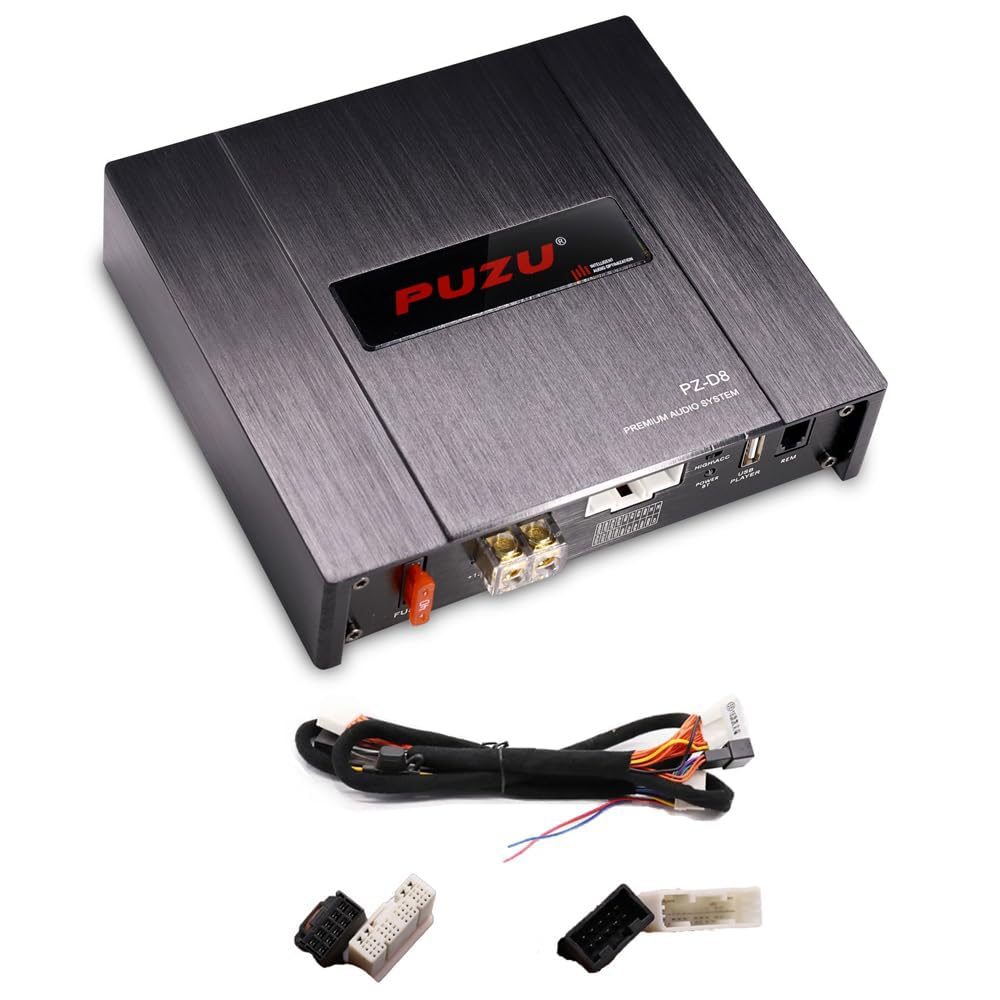
Image: The PUZU PZ-D8 unit, main harness cable, and various connectors.
- PUZU PZ-D8 Digital Signal Processor & Amplifier Unit
- #58 Harness Cable (for plug-and-play connection)
- USB PC Tuning Data Cable
3. Setup
Installation Guidelines
Before beginning installation, please observe the following:
- Verify if your vehicle has a built-in original amplifier system. If your car has a factory amplifier system, this unit is not plug-and-play. If you wish to use this DSP with a factory amplifier, the factory amplifier must be removed.
- Proper installation skills and cable connections are required. If you are unsure, consult a professional installer.
- Ensure the vehicle's ignition is off and the battery is disconnected before starting installation.
Wiring Diagram

Image: Wiring diagram showing connections for the PZ-D8 unit, car radio/DVD, vehicle-side audio harness, battery, and fuse.
The male plug of the harness connects to the car radio/DVD, and the female plug connects to the vehicle-side audio harness. The positive (+12V) and negative (GND) terminals connecting to the car battery supply power to the PZ-D8. Ensure the 40A fuse is correctly installed in the power line.
Physical Installation

Image: The PUZU PZ-D8 unit with dimensions: 155mm (width) x 170mm (depth) x 43mm (height).
- Choose a secure, dry, and well-ventilated location for mounting the PZ-D8 unit.
- Ensure there is adequate space around the unit for heat dissipation.
- Avoid mounting the unit in direct sunlight or areas prone to excessive vibration or moisture.
4. Operating
Software and Tuning
The PUZU PZ-D8 offers comprehensive audio tuning capabilities via PC software and a mobile application.

Image: Screenshot of the PC tuning software and the mobile application interface.
PC Software Tuning
- Connect the PZ-D8 unit to your computer using the provided USB PC tuning data cable.
- Install the dedicated PC software (available for Windows).
- The software provides a graphical interface for precise adjustment of the 31-band equalizer, crossover settings, time alignment, and gain control for each of the 8 output channels.
Mobile App Tuning (Android/iOS)
- Download the official PUZU tuning application from the respective app store (Android/iOS).
- Connect to the PZ-D8 wirelessly via Bluetooth 5.0.
- The mobile app allows for convenient adjustments of key audio parameters directly from your smartphone.
Sound Modes and Playback
- The unit supports 8 storage modes, allowing you to save and quickly recall different audio profiles for various music genres or listening preferences.
- The PZ-D8 supports subwoofer output, providing enhanced bass performance.
- Enjoy high-resolution audio playback through wireless connection or USB input.
5. Maintenance
To ensure the longevity and optimal performance of your PUZU PZ-D8, follow these maintenance guidelines:
- Keep the unit clean and free from dust and debris. Use a soft, dry cloth for cleaning.
- Avoid exposing the unit to extreme temperatures, direct sunlight, or high humidity.
- Regularly check all cable connections to ensure they are secure and free from corrosion.
- Do not attempt to open the unit or perform unauthorized repairs, as this will void the warranty.
6. Troubleshooting
If you encounter any issues with your PZ-D8, refer to the following common problems and their solutions:
| Problem | Possible Cause | Solution |
|---|---|---|
| No Power | Blown fuse, incorrect power wiring, loose connections. | Check the 40A fuse. Verify +12V and GND connections are secure and correct. |
| No Sound Output | Incorrect input/output connections, software settings (mute/low gain), wrong source selected. | Ensure all audio cables are correctly connected. Check the DSP software/app for mute settings, gain levels, and input source selection. |
| Distorted Sound | Gain levels too high, speaker impedance mismatch, faulty wiring. | Adjust gain levels in the DSP software. Ensure speakers are compatible with 4 ohm impedance. Inspect speaker wiring for shorts or damage. |
| Bluetooth Connection Issues | Device out of range, interference, incorrect pairing. | Ensure your device is within range. Restart both the PZ-D8 and your device. Re-pair the Bluetooth connection. |
If the problem persists after attempting these solutions, please contact customer support for further assistance.
7. Specifications
| Feature | Specification |
|---|---|
| Brand | PUZU |
| Model Number | PZ-D8 |
| Part Number | PUZU-D8-2 |
| Channels | 4 (input) to 8 (output) |
| Peak Power | 4 x 180 W |
| RMS Power | 4 x 80 W |
| Impedance | 4 ohm |
| Signal-to-Noise Ratio | >108 dB |
| Frequency Response | 20 Hz - 20 KHz |
| Total Harmonic Distortion (T.H.D) | <0.01% |
| Operating Voltage | DC 12 V |
| DSP Processor | 31-band equalizer |
| DSP Chip | 6-core 32-bit audio chip |
| Bluetooth Version | 5.0 (Dual Mode) |
| Input Impedance | High-level 240 ohm, RCA 20K ohm |
| Output Impedance | 51 ohm |
| Operating Temperature | -40 ~ +85°C |
| Unit Dimensions (L x W x H) | 171mm x 128mm x 43mm |
8. Warranty and Customer Support
Your satisfaction is important to us. If you encounter any problems with your PUZU PZ-D8 before or during use, please do not hesitate to contact our customer support team. We are committed to providing prompt assistance and aim to reply to all inquiries within 24 hours.
For support, please refer to the contact information provided with your purchase or visit the official PUZU website.


