
1. Introduction
The blurams A31S 2K Pet Camera is designed to provide comprehensive indoor surveillance for your home, offering peace of mind by allowing you to monitor your pets, children, or property from anywhere. This camera features crisp 2K resolution, 360° pan-tilt-zoom (PTZ) capabilities, two-way audio communication, advanced motion detection with tracking, and both color and infrared night vision. It supports dual-band Wi-Fi (2.4GHz/5GHz) for flexible connectivity and offers multiple storage options.

Image: The blurams A31S 2K Pet Camera, highlighting its dual-band Wi-Fi capabilities.
2. What's in the Box
Please verify that all components are present in your package:
- Indoor Pet Camera (A31S)
- USB Cable
- Power Adapter
- Screw Accessory Pack
- Plotting Sheet (for mounting)
- User Manual (this document)
3. Setup Guide
Follow these steps to set up your blurams A31S camera:
- Download the blurams App: Search for "blurams" in your mobile device's app store (Google Play Store for Android or Apple App Store for iOS) and download the official application.
- Connect to Wi-Fi: Ensure your smartphone is connected to a 2.4GHz or 5GHz Wi-Fi network. The blurams A31S camera supports both dual-band frequencies.
- Power On Camera: Plug in your blurams camera using the provided USB cable and power adapter. Wait for the camera to power on and indicate readiness (usually a blinking LED).
- Add Device in App: Open the blurams app, select "Add Device," and choose the A31S model.
- Scan QR Code: The app will display a QR code. Position your camera to scan this QR code. Once scanned successfully, the camera will connect to your Wi-Fi network.

Image: Visual guide for the easy setup process of the blurams camera.
4. Operating Instructions
4.1 Key Features
- 2K Resolution & 360° Coverage: The camera captures sharp 2K video. Use the blurams app to remotely rotate the camera for a full 360° panoramic view of your space.
- Motion Detection & Real-Time Alert: Receive instant notifications on your phone when motion or sound is detected. The camera can also track detected motion automatically.
- Color/IR Night Vision: Monitor in low-light conditions or complete darkness using 6 infrared LEDs for clear black-and-white vision, or a white LED for full-color night vision.
- Two-Way Talk: Communicate with individuals or pets near the camera using the built-in microphone and speaker via the blurams app.
- Flexible Storage: Supports local storage via a microSD card (up to 128GB, not included) and optional cloud storage for event recordings.
- Multi-Device Viewing & Sharing: The blurams app allows simultaneous viewing of up to 4 cameras. You can also share camera access with family members.

Image: Overview of the blurams camera's main features.
4.2 Advanced Features
- Customized Activity Zones: Define specific areas within the camera's view to focus on, reducing false alarms from irrelevant movements.
- AI Detection (Cloud Subscription Required): Utilize advanced AI for specific detection of pets or humans, providing more precise alerts.

Image: Setting customized activity zones to reduce false alarms.

Image: Protecting family together with device sharing.
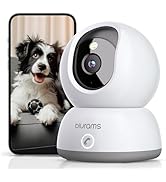
Image: Demonstrating 2K clarity and 360-degree coverage.

Image: Keeping recordings safe with flexible storage options.
5. Maintenance
To ensure optimal performance and longevity of your blurams A31S camera, follow these maintenance guidelines:
- Cleaning: Gently wipe the camera lens and body with a soft, dry, lint-free cloth. Avoid using liquid cleaners or abrasive materials, as they may damage the lens or surface.
- Placement: Place the camera in a stable location, away from direct sunlight, heat sources, and excessive moisture. Ensure proper ventilation around the device.
- Firmware Updates: Regularly check for and install firmware updates via the blurams app. Updates often include performance improvements, new features, and security enhancements.
- Power Supply: Always use the original power adapter and USB cable provided with the camera to prevent damage.
6. Troubleshooting (Q&A)
Here are answers to some frequently asked questions:
- Q: Does the camera support 5GHz Wi-Fi?
- A: Yes, the blurams A31S camera supports both 2.4GHz and 5GHz Wi-Fi networks, offering flexible connectivity options.
- Q: Is the camera wired or battery powered?
- A: The camera is wired and requires continuous power from a wall outlet using the provided USB cable and power adapter.
- Q: Can the camera record and store videos?
- A: Yes. blurams provides 1-day event cloud storage for each camera, recording events up to 12 seconds in the last 24 hours. For longer recordings or additional storage, you can insert a microSD card (up to 128GB, sold separately) or subscribe to a cloud service plan.
- Q: Do I have to subscribe to the cloud?
- A: No, cloud subscription is optional. However, certain advanced features like AI detection (e.g., pet or human detection) require a cloud subscription. You can still record videos to a microSD card without a subscription.

Image: Common questions and answers regarding the camera's functionality.
7. Specifications
| Feature | Detail |
|---|---|
| Model Name | A31S-2 Pack |
| Indoor/Outdoor Usage | Indoor |
| Video Capture Resolution | 2K |
| Connectivity Technology | Wi-Fi (2.4GHz/5GHz Dual-Band) |
| Power Source | Corded Electric |
| Controller Type | App Remote Control |
| Mounting Type | Wall Mount |
| Item Dimensions (L x W x H) | 6.61 x 3.43 x 6.38 inches |
| Item Weight | 1.46 pounds |
| Field Of View | 360 Degrees (Pan/Tilt) |
| Low Light Technology | Night Color (Color & IR Night Vision) |
| Special Features | 2-Way Audio, Motion & Sound Detection, Motion Tracking |
| Storage Options | Cloud, MicroSD Card (up to 128GB) |
8. Warranty and Support
For warranty information, technical support, or any inquiries regarding your blurams A31S camera, please contact blurams customer service directly. You can typically find support contact details on the official blurams website or within the blurams mobile application.
An official User Manual (PDF) is also available for download: Download User Manual (PDF)


